
Please REGISTER or RENEW your account on RAPiDGATOR.net and support us by doing through all RAPiDGATOR working download links on main posts...
June 3

Camtasia 2026.1.3

Camtasia for remarkable screencasts made easy. Create eye-catching training, presentation, and demo videos…the easy way. Camtasia screen-recording software is streamlined, intuitive, and makes you look like a pro.
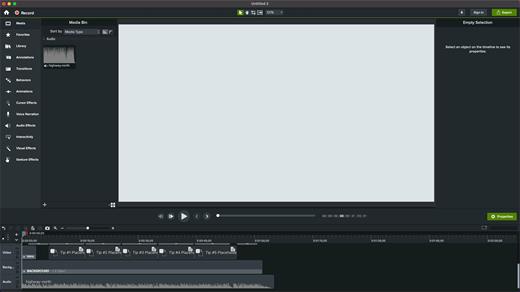
Easily record onscreen activity, Keynote slides, camera video, microphone, or system audio – all with sparkling clarity. Record in front of a live audience or at your desk. Edit to perfection. Turn it into a stunning, HD-quality video at the perfect size to share on popular video sites, Apple devices, your website, blog, or anywhere you like. Make them wonder how you did it.

What’s New

Version 2026.1.3:


  • Release notes were unavailable when this listing was updated.
Compatibility

macOS 13.0 or later
Apple Silicon or Intel Core processor


Release Name: Camtasia 2026.1.3
Size: 414.1 MB
Links: HOMEPAGE – NFO – Torrent Search

Download: RAPiDGATOR

5 Comments
June 3

WhatCable Pro 0.19.2

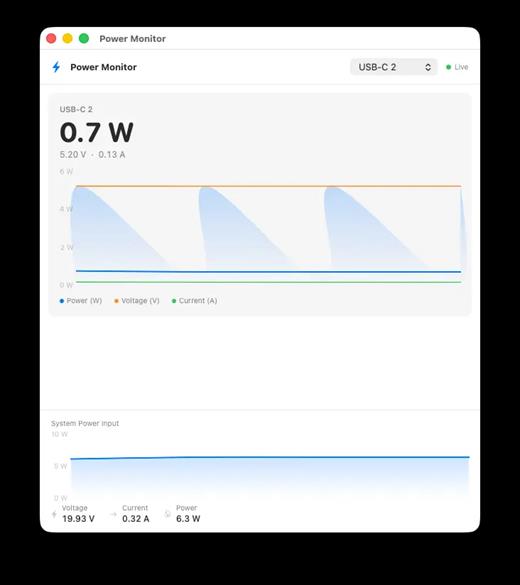
WhatCable Pro is a deep USB-C diagnostics tool designed specifically for Apple Silicon Macs running macOS 14+. While the free version identifies basic cable capabilities, the Pro tier offers advanced, real-time troubleshooting directly from IOKit data—requiring no extra software or root access.

Key Features


  • Negotiation Diagnostics: Easily spot bottlenecks by comparing what your Mac port, cable, and connected device support side-by-side.
  • Live Power Metering: Displays real-time wattage, voltage, and amperage per port, updating every 2 seconds.
  • Hardware & Port Health: Tracks lifetime port errors, resets, and monitors liquid detection (LDCM) sensors.
  • Advanced Insights: Offers Power Delivery (PD) contract inspection, cable resistance estimation, and DisplayPort Alt Mode lane mapping.
  • Developer Friendly: Includes a CLI monitor mode (whatcable –monitor) and desktop widgets for quick tracking.
What’s New

Version 0.19.2:


  • Release notes were unavailable when this listing was updated.
Compatibility

macOS 14.0 or later


Release Name: WhatCable Pro 0.19.2
Size: 8.7 MB
Links: HOMEPAGE – NFO – Torrent Search

Download: RAPiDGATOR
4 Comments
June 3

ChatGPT for macOS 1.2026.119

This is the official OpenAI ChatGPT app for macOS.

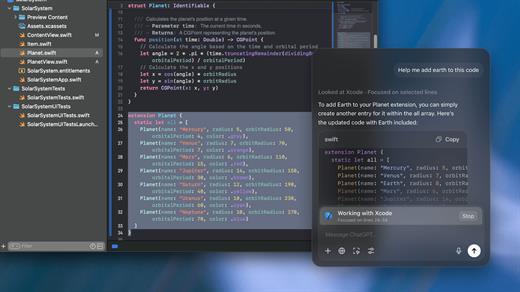
Whether you’re writing emails, exploring ideas, learning something new, or just curious about the world, ChatGPT is here to help. Designed with a clean, native experience for Mac users, the app makes it easier than ever to start a conversation with advanced AI.

Get answers. Find inspiration. Be more productive.

Free to use. Easy to try. Just ask and ChatGPT can assist with writing, learning, brainstorming, coding, and more. It’s like having an intelligent assistant, tutor, or creative partner always within reach—right from your menu bar.

Includes access to GPT-5 (for pro users), memory features, and voice input. Works seamlessly on macOS, optimized for speed and simplicity.

Key Features:

  • Instant AI-powered responses on your desktop
  • Natural language understanding and generation
  • Voice conversations with the built-in Whisper model
  • Synced across devices with your OpenAI account
  • Support for both GPT-5 (free) and GPT-5.4 (with Plus subscription)

Get started in seconds—no complex setup required. Just launch the app, l

What’s New

Version 1.2026.104:


  • Release notes were unavailable when this listing was updated.
Compatibility

macOS 14.0 and Apple Silicon (M1 or better)


Release Name: ChatGPT for macOS 1.2026.119
Size: 69.3 MB
Links: HOMEPAGE – NFO – Torrent Search

Download: RAPiDGATOR

5 Comments
June 3

Wipr 2.30.2

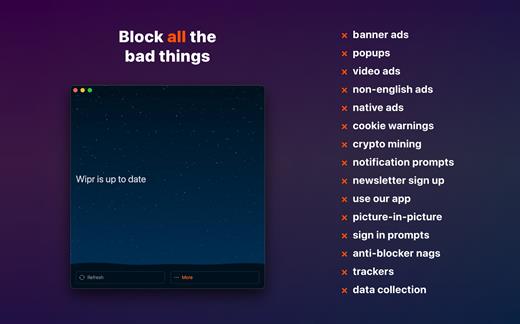
Wipr blocks ads, popups, trackers, cookie warnings, and other nasty things that make the web slow and ugly.

Websites in Safari will look clean, load fast, and stop invisibly tracking you. You’ll notice significant improvements to your battery life and data usage. Setup is a snap.

Wipr’s blocklist is updated twice a week automatically, and has enhanced versions for the following languages: Chinese, Czech, Danish, Dutch, Estonian, Finnish, French, German, Greek, Hebrew, Hindi, Hungarian, Icelandic, Italian, Japanese, Korean, Norwegian, Polish, Romanian, Russian, Slovak, Spanish, Thai, and Vietnamese.

Wipr 2 is a universal app: install it on all your devices (iPhone, iPad, Mac, Vision Pro) with a single purchase. It’s fully accessible with VoiceOver, Voice Control, and more. Dark and Tinted icon variants are included. Family Sharing is supported.

What’s New

Version 2.30.2:


  • Wipr Extra improvements on many websites
Compatibility

macOS 14.0 or later.


Release Name: Wipr 2.30.2
Size: 6.5 MB
Links: HOMEPAGE – NFO – Torrent Search

Download: RAPiDGATOR
4 Comments
June 3

ForkLift 4.6.3

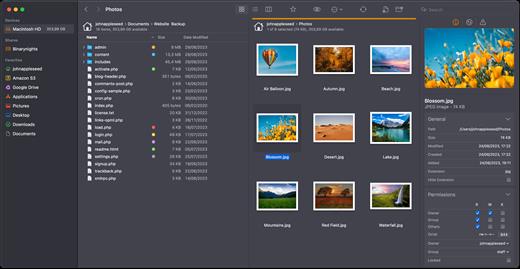
ForkLift is a powerful file manager and ferociously fast FTP client clothed in a clean and versatile UI that offers the combination of absolute simplicity and raw power expected from a well-executed Mac software.

ForkLift will connect to any remote server SFTP, FTP, WebDAV, Amazon S3, Backblaze B2, Google Drive, Rackspace CloudFiles, SMB, AFP and NFS shares on your local network,- pretty much anything you can plug into or hook up to a Mac. ForkLift also carries a complete toolbox for managing your files, including Folder Synchronization, Multi-Rename, Archive handling, Application deleter, editing files over remote connections and many more. All these power features are packaged into a Finder-like, dual-pane interface that delivers superior workflow while remaining absolutely familiar to use, along with Quick Look, Spotlight search and all.

Features

  • Completely rewritten entirely in Swift
  • ForkLift Mini
  • Two-way Sync
  • Preview
  • Quick Open
  • Multi Rename
  • Dark Mode
  • Dual Pane split vertically or horizontally
  • Favorite Sync via Dropbox
  • Dropbox Support
  • Transfer bandwidth throttling
  • Tags Support
  • Disklet
  • Sync Browsing
  • Tabs
  • Search by name, extention, kind, tags, or content
  • Quick Select
  • App Deleter
  • Remote Editing
  • Archive Management
  • Keyboard Control
  • Workspaces
  • FXP Copy
  • Tools
  • Git Support
  • Open in Terminal, iTerm, or Hyper
  • Hidden Files
  • Share
  • Possible to set as default file viewer
  • File Compare with FileMerge, Kaleidoscope, Beyond Compare, and Araxis Merge support
  • Multilingual: English, Chinese Simplified, Czech, French, German, Hungarian, Italian, Polish, Russian, Spanish and Ukrainian
What’s New

Version 4.6.3:


  • Release notes were unavailable when this listing was updated.
Compatibility

macOS 14.6 or later


Release Name: ForkLift 4.6.3
Size: 20.8 MB
Links: HOMEPAGE – NFO – Torrent Search

Download: RAPiDGATOR

5 Comments
June 3

URL Manager Pro 6.4.9

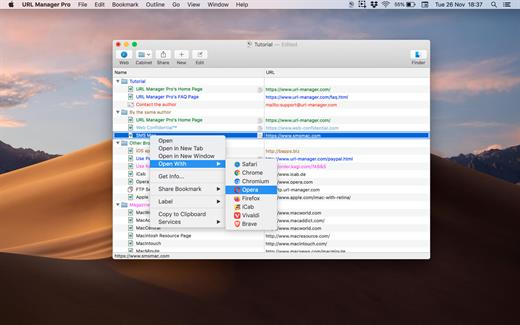
URL Manager Pro is the professional bookmark manager for Safari, Chrome, Chromium, Vivaldi, Opera, iCab, and Firefox browsers, making it easier to manage bookmarks.

This is a classic available since 1996, but now rewritten as a 64-bit application.

Features:

  • System-Wide Access: You can access your bookmarks in any application through a system menu.
  • Integration: You have access to your bookmarks from your browser’s menu bar and from the macOS Dock.
  • Document Storage: Your bookmarks are stored in URL Manager Pro bookmark documents, which you can store and manipulate in the normal Mac way. No need to hunt for your bookmarks in preferences folders of browsers. You can make automatic periodic saves and make copies of bookmark documents on backup devices on each save.
  • History: You can surf the Web using several different browsers while URL Manager Pro will keep recording the History of each.
  • Importing and exporting bookmarks: The File menu gives you a list of all of the browsers that URL Manager Pro can import from and export to. It lets you ‘harvest’ bookmarks by scanning HTML and text files for bookmarks and URLs.
  • It lets you edit and organize bookmarks fast: You can use inline editing, label and colour your bookmarks.
What’s New

Version 6.4.9:


  • Release notes were unavailable when this listing was updated.
Compatibility

macOS 10.13 or later, 64-bit processor


Release Name: URL Manager Pro 6.4.9
Size: 27.5 MB
Links: HOMEPAGE – NFO – Torrent Search

Download: RAPiDGATOR
4 Comments
June 3

iBarcoder 3.17.12

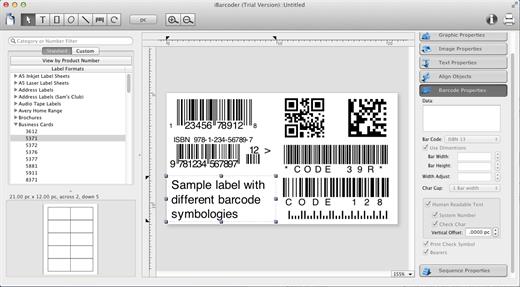
iBarcoder allows you to design and print your own barcoded labels, stickers, and tags. Create barcode graphics for retail packages, books, stickers, and more. Mac QR code and Datamatrix generator. Add text boxes, image boxes, rectangles, ovals and lines to your labels. Type in the necessary text, insert the desired images, to create the professional barcode labels for commercial use. Create sequential barcodes for catalogs and retail operations. Specify the sequence in which barcodes are printed or exported.

Smart, Intuitive Barcode Software


  • Create professional barcoded labels with a few mouse clicks
  • Live preview feature
  • Modify your Mac barcodes by changing types, sizes, and other attributes intrinsic to a certain barcode type. Advanced tools make customizing your barcode easy
  • Print barcodes directly to your printer using standard Avery formats provided
  • Create and save your own custom label formats
  • Export barcodes as a high-resolution image files, or vector graphics:

    • PDF (vector)
    • EPS (vector)
    • BMP
    • TIFF
    • JPEG
    • PNG
    • PNTG
    • Photoshop
    • …and more…!
  • Make the desired font and color settings
  • Copy, then paste finished graphics right to Adobe Illustrator, InDesign, Photoshop, or other software from Mac clipboard

Supports the following barcode types:


  • Postnet
  • Japanpost customer barcode
  • FIM Codes
  • Horizontal bars
  • UPC A
  • UPCE
  • EAN 13
  • EAN 8
  • ISBN
  • ISSN
  • Code 128
  • Codabar
  • ITF14
  • Code 39
  • Code 11
  • Code 93
  • MSI
  • Interleaved 2 of 5
  • Datamatrix
  • Intelligent Mail Barcode
  • Pharmacode
  • QR Code
What’s New

Version 3.17.12:


  • Release notes were unavailable when this listing was updated.
Compatibility

macOS 10.10 or later


Release Name: iBarcoder 3.17.12
Size: 16.6 MB
Links: HOMEPAGE – NFO – Torrent Search

Download: RAPiDGATOR

4 Comments
June 3

Rectangle Pro 3.80

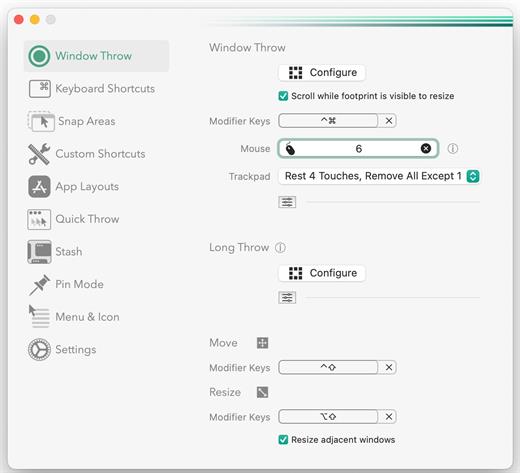
Snap windows faster in this featureful Rectangle superset. Toss windows in the right places with cursor movement, move multiple windows with one command, create custom shortcuts, and more.

One simple key combo
• 16 window sizes & positions
• No need to remember a ton of keyboard shortcuts, but those are all here, too

A Supercharged Rectangle Superset
• Keyboard shortcuts
• Drag windows to screen edges to snap

PRO
• Move and resize by holding a key and moving your cursor
• Snap windows under your cursor, even if not in focus
• Custom shortcuts for any size & position
• Sync your settings over iCloud

The Lightweight Gesture Champ
• Unlike touch gesture based window managers, Rectangle Pro only consumes CPU when configured modifier keys are pressed. Even then it’s minimal
• Rectangle Pro is a breeze to learn, and doesn’t conflict with any built-in macOS behavior
• Use it with any device that moves the cursor

Unmatched Customization and Actions
• Create keyboard shortcuts with any window size and location, and specify what happens on each repeated execution
• Fill left and right actions make it simple to maximize screen usage without overlap
• Match the keyboard shortcut window management of that other OS

Multiple Windows at Once
• Cascade windows
• Move all windows for an app to another display or screen half
• Tile top windows in a 2×2 or 2×3 grid

Additional Efficiency and Speed
• Each window action can be configured with a quick, simple cursor movement and modifier key combination
• Just press and release modifier keys while you move your cursor over the window you want to snap

What’s New

Version 3.80:


  • Release notes were unavailable when this listing was updated.
Compatibility

macOS 10.12 or later
Apple Silicon or Intel Core processor


Release Name: Rectangle Pro 3.80
Size: 8.9 MB
Links: HOMEPAGE – NFO – Torrent Search

Download: RAPiDGATOR
4 Comments
June 2

macOS Tahoe 26.5.1 (25F80)

macOS Tahoe 26 is the next major version of the macOS operating system, unveiled by Apple on June 9, 2025 at WWDC.

Named after Lake Tahoe, located on the California-Nevada border, it continues the tradition of naming macOS after iconic California locations.

The focus of macOS Tahoe is on a new design, improved integration with other Apple devices, and enhanced Apple Intelligence capabilities.

Key features of macOS Tahoe:

Liquid Glass design:


  • A completely redesigned interface using the new Liquid Glass visual language inspired by visionOS (Apple’s Vision Pro operating system). Interface elements such as menus, toolbars, and the dock have become translucent, creating the effect of glass reflecting and refracting light.
  • Fully transparent menu bar that visually expands the workspace.
  • Updated app icons unified with iOS and iPadOS, with support for light, dark, and color options, as well as a new transparent style.

Apple Intelligence:


  • Advanced artificial intelligence features, including Live Translation to automatically translate messages and subtitles in FaceTime.
  • Genmoji and Image Playground updates: Users can create new emoji by combining existing ones, and generate images in styles such as oil painting or vector graphics.
  • Improved reminders: Apple Intelligence analyzes emails, notes, and web pages, automatically categorizing tasks.

Improved Continuity integration:


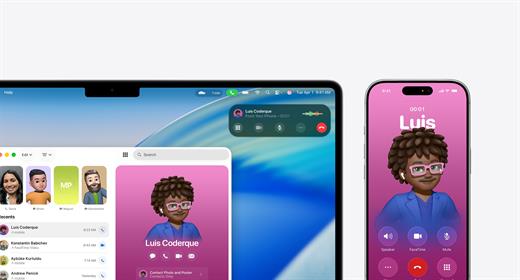
  • The Phone app is now available on Mac, allowing you to take calls, view contacts, view voicemail, and use features like Call Screening and Hold Assist.
  • Live Activities support with iPhone: notifications such as shipping or travel status are displayed in the Mac menu bar.
    iPhone Mirroring lets you launch iPhone apps directly on your Mac via Spotlight.

Updated Spotlight:


  • Significantly improved search engine that now not only searches for files and apps, but also performs actions such as creating events, starting podcasts, or sending messages.
  • Support for customizable quick commands (like “sm” to send a message or “ar” to add a reminder).
    Integration with cloud services and the ability to search PDFs and other documents.

New apps and features:


  • Games app with a catalog of installed games, support for chat, invitations, and an overlay for settings while playing.
  • The Journal app is now available on Mac.
  • Safari improvements: updated tab design and song lyrics translation in Apple Music.
  • Removal of Launchpad, replaced by an “Apps” feature integrated into Spotlight, similar to App Library in iOS.

Accessibility:


  • New features such as Magnifier (using the iPhone camera to zoom in), Braille support, and Vehicle Motion Cues to reduce motion sickness.
  • Accessibility Nutrition Labels in the App Store that display information about supported accessibility features.

New numbering:


  • Apple switched to a unified numbering system where all operating systems (iOS, iPadOS, macOS, etc.) got version 26, which corresponds to the year after the announcement (2025-2026). macOS still retains its unique name, Tahoe.
What’s New

Version 26.5.1:


  • Release notes were unavailable when this listing was updated.
Compatibility

macOS 14.0 or later


Release Name: macOS Tahoe 26.5.1 (25F80)
Size: 17.1 GB
Links: HOMEPAGE – NFO – Torrent Search

Download: RAPiDGATOR
2 Comments
June 2

RightFont 10.0.0

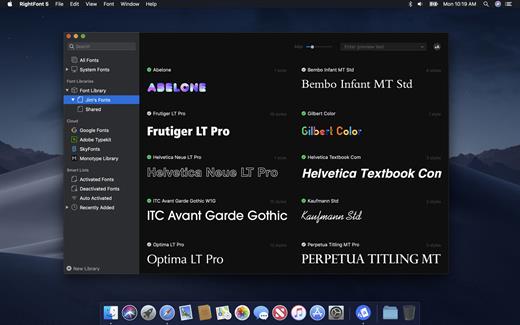
RightFont is a lightweight font manager with a clean, beautiful interface. It offers many features which help you manage all your local fonts with ease.


  • Font-management access anytime directly from your menubar
  • Mark any font as starred with a click
  • Create and manage font lists
  • Access fonts directly in Adobe Creative Cloud (Photoshop, Illustrator, InDesign, Flash, AfterEffect), Sketch, etc.
  • Instant search results as you type
  • Change font preview and font size in real-time
  • Find the right font faster
  • Easily filter fonts by classifications (sans serif, serif, script, etc.), font width and font weight. Even Google fonts and Adobe TypeKit fonts are listed separately for you.
  • Effortless integrations – You can use RightFont with design software. With a simple double-click, the font used in your text layer can be changed.
What’s New

Version 10.0.0:


  • Release notes were unavailable when this listing was updated.
Compatibility

macOS 10.13 or later
Apple Silicon or Intel Core processor


Release Name: RightFont 10.0.0
Size: 18.7 MB
Links: HOMEPAGE – NFO – Torrent Search

Download: RAPiDGATOR
6 Comments