Please REGISTER or RENEW your account on RAPiDGATOR.net and support us by doing through all RAPiDGATOR working download links on main posts...
June 29

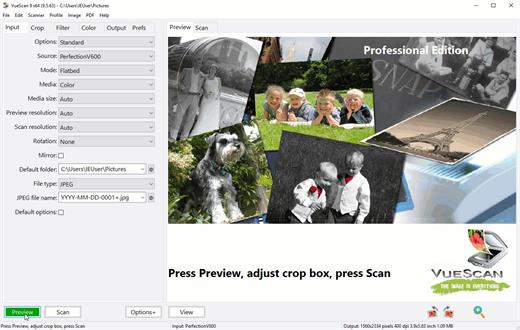
VueScan Pro 9.8.56

Description: Can't Find a Driver for Your Scanner? VueScan is here to help. We reverse engineered over 7400 scanners and included built in drivers in VueScan so you can keep using the scanner you already have.

VueScan supports over 7400 scanners from 42 manufacturers
The easiest way to see if VueScan works with your scanner is to download and try it. But you can also view the lists of all of the scanners VueScan supports.

The Tool For All Your Scanning Needs
VueScan has the features you need no matter what you need to scan

Scan Documents
Whether you need to scan a single page or a hundred page book, VueScan has the tools to help you.
Scan with Flatbed and Automatic Document Feeders (ADF)
Scan to PDF (Single and Multipage)
Optical Character Recognition (OCR)
Automatic Color Detection
Small document file sizes
Automatic document deskewing

Scan Photos
Do you have boxes full of photos in a drawer? Use VueScan to get them on your computer, and off your to-do list.
Scan with Flatbed and Automatic Document Feeders (ADF)
Scan to JPEG or TIFF
Preset photo sizes
Scan multiple photos on the flatbed
Automatic file naming

Scan Film and Slides
VueScan is the ultimate tool for all your film and slide scanning needs.
Works with almost all film/slide scanners
Scan to JPEG/TIFF/RAW
Infrared Dust Removal
Color correction
IT8 Calibration
Photoshop Integration

Operating Systems: Windows 11, 10 x64, 8 x64, 7 x64, Vista x64

Release Name: VueScan Pro 9.8.56
Size: 62.6 MB
Links: HOMEPAGE – NFO – Torrent Search

Download: RAPiDGATOR

4 Comments
June 29

Graphisoft MEP Designer 29.2.0 Build 5003

Description: MEP Designer 29 is a modern BIM solution from Graphisoft, aimed at MEP (Mechanical, Electrical, Plumbing) engineers. Modeling of utility routes. Ducts, pipes, cable trays, and other MEP elements are supported. You can place terminals, fittings, equipment, and accessories, and configure connections.

Automatic documentation and specifications. Generate plans, sections, legends, specifications, and lists for MEP elements. This data is updated dynamically when changes occur. Symbolic representations, labels, and dimensions can be customized to meet standards.

System calculations and optimization. Built-in tools enable duct calculations (based on air velocity) and hydraulic calculations for pipelines. A route sizing optimizer automatically selects element sizes based on design criteria.

Collision checking and model verification. Built-in collision checking between engineering systems and architectural structures helps identify potential conflicts early. Support for the BCF format allows for the exchange of comments and issues between project participants.

Extensive library and object customization. Parametric libraries of MEP components, the ability to create your own objects or extend existing ones. Import/export via IFC (including IFC 4.3) is supported for exchange with other programs in the AEC ecosystem.

Advantages:
Accelerated implementation of BIM processes in engineering systems
Simplified coordination between architecture and engineering
High automation of documentation and calculations
Reducing errors through collision checking
Flexibility and scalability to suit different standards and local requirements

Release Name: Graphisoft MEP Designer 29.2.0 Build 5003
Size: 3.2 GB
Links: HOMEPAGE – NFO – Torrent Search

Download: RAPiDGATOR

3 Comments
June 29

Boris FX Continuum Plug-ins 2026.5 v19.5.4

Description: Tools for content creators. Unleash your vision with Continuum plugins. Continuum gives you access to stunning visual effects and workflow solutions that fit any content creation need. The easy-to-use interface includes 300+ effects, 40 transitions, and 5000+ presets and is optimized to give you fast performance in many popular video editing and VFX applications.

Use AI-powered tools to reduce noise and upscale images, add pro film textures, apply broadcast-ready transitions, fix footage fast, instantly generate motion graphics elements with Particle Illusion’s 3D particle animations, or even build 2D/3D vector titles with Title Studio. This isn’t just a plugin package — it’s creative freedom.

Why Continuum?
AI powered image restoration and visual effects
Fix your footage from blurry shots to skin touch-ups
Distort and stylize your footage for the perfect look
Film looks and grains for that classic analog look
Mocha tracking built into every effect
Animate your effects to the beat of music
Drag and drop transitions
Easy greenscreen composites
Quick preset browsing with the custom FX Editor

Release Name: Boris FX Continuum Plug-ins 2026.5 v19.5.4
Size: 3.3 GB
Links: HOMEPAGE – NFO – Torrent Search

Download: RAPiDGATOR

3 Comments
June 29

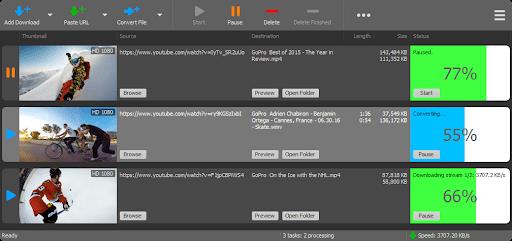
YT Downloader 10.6.5

Description: YT Downloader (ex YTD Youtube Downloader) is a simple and easy-to-use video download application. It helps you to download and convert videos from YouTube and hundreds of other video sites. YT Downloader increases your download speeds by up to 500%.

Features
YT Downloader is the easiest and the fastest way to download and convert videos from YouTube and other video sites.

Download videos from YouTube and hundreds of video sites
YT Downloader can download videos from YouTube, Facebook, Dailymotion, Vimeo, Metacafe, and hundreds of other video sites. After downloading your video files, you'll be able to watch them smoothly using any media player, even if you don't have internet access.

Accelerate your downloads
YT Downloader features an advanced download acceleration engine that lets you download videos 500% faster than normal speed.

Download 4K, 2K, HD 1080p and 720p videos from YouTube
You can also download 3D videos from YouTube if they are available.

YouTube to MP3
YT Downloader allows you to download only audio stream from YouTube, and save it as MP3. You don't need to download the entire video file. The audio stream is small, you can download it within seconds.

Download whole playlist from YouTube
Just enter a YouTube playlist ID, YT Downloader will download all or selected videos in the playlist from YouTube for you.

Support drag-and-drop
You can directly drag and drop video link from your browser to the drop box or program window to start a download. You don't even need to copy and paste video URL.

Download multiple videos at a time
YT Downloader supports simultaneous downloads. It allows you to download more than one video at same time and safe time.

Pause and resume downloads
You can pause, resume, or cancel your downloads if you need more connection to perform other important tasks.

Preview videos while downloading
While downloading, you can click the Preview button to play incomplete video and make sure the content you are downloading is really the content of your choice.

Video and audio converter
YT Downloader is also a powerful video/audio converter. It can convert local video/audio files to any format you wish so that they are playable everywhere.

Video to MP3
YT Downloader allows you to extract audio streams from videos and save them as mp3, wav, wma, ac3, ringtone, or other audio format.

Support all popular video and audio formats
YT Downloader allows you to save downloaded videos in any format for any device, so you can watch them smoothly on your PC, iPhone, iPad, Android phone, and other device.

Ready-made presets
YT Downloader provides ready-made presets for all video and audio formats. You can also custom output video/audio format settings.

iTunes compatible
Optionally, YT Downloader can add downloaded video/music to your iTunes library automatically, so you can easily synchronize your videos and music to your iPhone, iPad, iPod.

Media Player
YT Downloader includes a simple and easy-to-use media player. If your Windows Media Player cannot play your video/audio files, you may try our Media Player.

Release Name: YT Downloader 10.6.5
Size: 164.2 MB
Links: HOMEPAGE – NFO – Torrent Search

Download: RAPiDGATOR

4 Comments
June 29

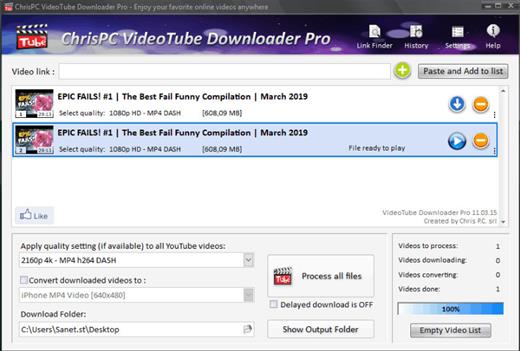
ChrisPC VideoTube Downloader Pro 15.26.0627

Description: A powerful software that allows you to download videos from BBC iPlayer, YouTube, Vimeo, Dailymotion, Metacafe, Viaplay & convert them to video formats compatible with iPad, iPhone, MPEG-4, MP3.

ChrisPC VideoTube Downloader is a powerful software with a friendly user interface that allows you to download videos and playlists from YouTube, videos from Dailymotion, BBC iPlayer, ITV Player, Viaplay, ABC, FOX, CBS.com, Vimeo, Prosieben, Metacafe, CBC.ca many more video websites. Once the videos are downloaded, you can convert them to formats compatible with iPad, iPhone, iPod, MPEG-4 H.264, MP3, AC3.

Version 14 comes with new features and improvements:
Added new advanced features Playlist Preview and Playlist History for YouTube videos, that lets you easily find the videos you want to download from a playlist.
The Playlist Preview loads all available videos from a playlist and lets you filter/search the list by name. You can also sort the list alphabetically, by duration or author.
Video selection can be made individually by clicking the checkboxes from 1st column or by batch using the SHIFT key and UP/DOWN arrow keys (or mouse) and pressing the SPACE key.
With Playlist History you can monitor new videos added to a playlist from previous versions or compare it with another list.
Added the option Set live recording end time (available for YouTube live streams and M3U8 streams, by pressing on the 3 dots menu of the video). It can be adjusted at any time during live recording.
Added the option Disable sleep mode while software is running, it will prevent your PC from entering in sleep mode (Settings->Advanced settings).
Link Finder Expert is a new powerful feature to be used when you can`t detect and download your video using copy/paste mode or with Link Finder engine.
Improved detection using Link Finder for videos from My5, Channel4, TVNow, TVNZ, threenow, UKTV Play, RTEPlayer, TG4, Atresplayer, NPOStart, 9Now, 7Plus, GlobalTV, CityTV, CTV, VirginPlayer, TF1, Prosieben, 6play, TVAPlus, VRai, MediasetPlay, Kijk, Zee5 and many more.
Added the Advanced Mode to Link Finder engine, which lets you choose the browser type from a list of 25+ browser configurations, like Safari on iPhone, Edge on iPad, Chrome on Android and many more. This way, you can find different video streams (like M3U8, MPD, MP4 or MP3) for the same video content depending on the platform it is played on.
Added advanced settings where you can choose how many parts to be downloaded at same time for M3U8 and MPD DASH streams. If your Internet connection is fast you can download up to 10 parts simultaneous.
Improved download speed by up to 15x times for M3U8, MPD and F4M streams.
Added segmented download option to improve YouTube video download by up to 12x times.
Improved Link Finder engine detection of HTML 5 videos, M3U8, F4M, MPD, MP4, M4A, M4V, MP3 video and audio streams.
Video Download History keeps a log of all your downloads, helps you find downloaded videos by title, author, day of download.
Added the option to automatically select subtitle language to download for YouTube, ITV, BBC, CBS, ABC, NBC, FOX and others.
You can download videos up to 3 GB with the free version from the popular video websites: YouTube, Vimeo, DailyMotion, Metacafe.
Record live streams from YouTube, Livestream, Ustream, M3U8 HLS and F4M HDS streams.

Release Name: ChrisPC VideoTube Downloader Pro 15.26.0627
Size: 51 MB
Links: HOMEPAGE – NFO – Torrent Search

Download: RAPiDGATOR

4 Comments
June 29

WindowTop Pro 5.32.3

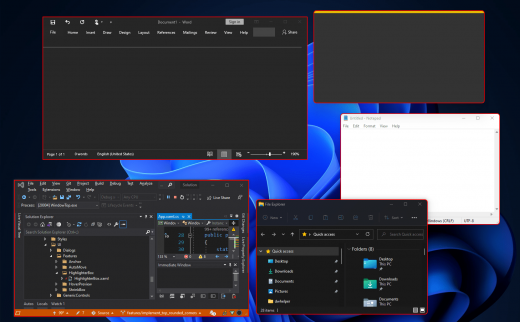
Description: Optimize your productivity by making windows Always-On-Top. By switching windows super fast using Anchors. By using & watching multiple windows at the same time using Picture-In-Picture (PiP) mode and enabling night mode (dark-mode) for any window.

WindowTop is far more than just a one-feature app. It is an advanced utility app with one goal - to make you much more productive during your work!

Always on Top
Easily set window on top and even highlight top-most window with a red frame! You can configure this behavior in settings (frame color, etc).

Anchors
The reason why you may put a window on top is to get back to it faster. If this is your case, then Anchors is for you! Instead of using Always-on-Top, just use Anchors! They will help you to access the window with a single click! Faster than ALT+TAB, great for touch screens! And don't worry, the anchors will not disturb you because they automatically move away from any text/image.

PiP & Crop any window!
Want to watch some videos while working? No problem! Enable Picture in Picture mode for it! It will enable PiP mode. In addition, you can even interact with the window while it is in PiP mode and even crop a region.

PiP Auto-Move!
PiP also come with auto-move option! It will stay away from text/images for you!

Opacity
Working on something like building a website and want to see your work behind? No problem! Use opacity.

Opacity + Click Through
Opacity also includes a feature that allows you to click through a transparent window. This can be useful for designers and graphic artists.

Dark Mode
Working at night? Tired of all the light coming out of the screen and unfortunately, the software does not support dark mode? No problem now! Note: Unstable in Windows 10 (Stable in Windows 11)

Glass Mode
Smart transparency mode enables you to take opacity to the next level! Unlike regular transparency, you can set different opacity levels for the background around the text/controls and the images. And you can even set the blur level. Note that this may work slowly on 4K and will work better for NVIDIA GPUs (make use of CUDA feature)

Release Name: WindowTop Pro 5.32.3
Size: 26.7 MB
Links: HOMEPAGE – NFO – Torrent Search

Download: RAPiDGATOR

4 Comments
June 29

iDownerGo Pro 11.1.1

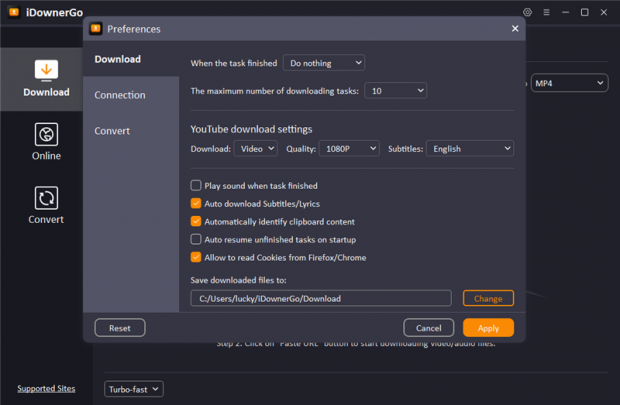
Description: All-in-one Video Downloader to Save Any Video and Music from 10,000+ Sites. Download Any Videos Up to 8K Resolutions. Download 1080p videos online from 10,000+ pupular streaming sites easily. Save any videos in various resolutions, like 720p HD, 1080p FHD, and even 4K/8K UHD. Download private videos from Facebook, Instagram, Vimeo, YouTube, etc.

Unlock Your Music Freedom with This Music Converter
Supports music downloading from multiple streaming music platforms, including Spotify, Apple Music, Tidal, Deezer, SoundCloud, etc.
Download songs, albums, playlists, podcasts, audiobooks, radio up to 320kbps.
Retain ID3 tags information, including title, artists, Track ID, and album artwork.

Enjoy More Visual and Audio Experience
Support downloading playlists from YouTube, Bilibili, Dailymotion, etc.
Download playlists, channels, albums, artists and more to your computer, save you lots of time.
Bulk download multiple videos at the same time with one click.

Enjoy Video and Music on Multiple Devices
Convert videos to any desired video format, like MP4, MOV, AVI, MKV, etc.
Save your favorite music in MP3, AAC, M4A and more, so you can play the songs on any devices.
Supports getting audio from Facebook, Dailymotion, YouTube, Vimeo, Bilibili, TikTok, or any other video website you like.

Download Live Stream Videos in Real Time
Download livestream videos from Twitch, Vimeo, YouTube, Facebook, TikTok, Stripchat and other well-known websites..
Save live streams in real time so you can play them offline at any time you want without lags or buffering issues.

Download Any Video From Any Website
iDownerGo Video Downloader is a cross-platform app that lets you save high-quality videos from Facebook, Instagram, Dailymotion, TikTok, Bandcamp, and other websites in seconds. It works faster than any free online video downloader — just a click, and you can enjoy content anytime, anywhere.

Release Name: iDownerGo Pro 11.1.1
Size: 394.9 MB
Links: HOMEPAGE – NFO – Torrent Search

Download: RAPiDGATOR

4 Comments
June 29

Directory Opus 13.24

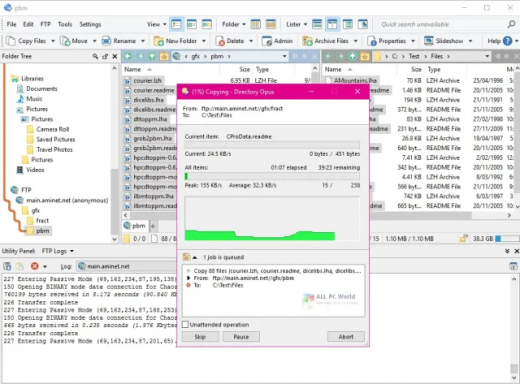
Description: Are you frustrated by the limitations of Windows Explorer? Directory Opus is a complete replacement for Explorer, with far more functionality than any other file manager available today.

You're in control.
Not just a simple file manager; Directory Opus lets you make your computer yours.
With a flexible user interface and unbelievable configurability, you can tailor Opus to streamline your workflow.
Dual panes, dual trees, multiple tabs.
Filter, sort, group your folders. Label and rate your files.
Queued file copies. Powerful batch renaming. Full archive support.
Find your files. Locate duplicates. Synchronize backups.
Assign tags and descriptions. Convert images. Edit metadata.
Fully multi-threaded, native 64 bit high performance code.
Whatever you want to do - Opus can probably do it. And if it's not built-in, you can take advantage of the unrivalled configurability to extend Opus using external tools.

What makes Opus unique?

Built for speed
Opus is written in native C++ multi-threaded code; compiled for the latest 64 bit CPUs, with high performance our number one design principle.

Fully configurable
Change the colors. Change the fonts. Change the toolbars and menus. Set up hotkeys. Opus adapts to how you want to use it.

Makes file management a breeze
Powerful searching, sorting, grouping, labelling and tagging features let you take control of your files like never before.

Endlessly extensible
Work with third-party tools as easily as with the built-in features. A full scripting interface, including scriptable dialogs, means your imagination is really the only limit.

Replace Windows Explorer and don't look back
Our unique Explorer Replacement mode provides a full replacement for Windows Explorer.
Single or dual pane file display and folder trees
Tabbed interface let you keep multiple folders open and switch quickly between them
Integrated viewer, metadata editor and utility panel
Built-in tools including synchronize and duplicate file finder
Leverage indexed search engines like Windows Search and Everything

High performance file management features
Copy, move, rename, duplicate, archive, view, backup and delete your files with ease
Queue multiple file copies for improved performance
Batch renaming including easy-to-use keyboard macros
Support for FTP and archive formats like Zip, 7Zip and RAR
Quickly filter, sort, group and search your folders
Color-code your files, assign status icons, star ratings, tags and descriptions
View images, documents and more. Image marking lets you sort your photos quickly and easily
Calculate folder sizes and print or export folder listings

Unrivalled configurability
Why let the programmers decide for you? You can tailor Opus to look how you want it to look, and to work how you want it to work.
Choose from light mode, dark mode, or design your own theme
Over 600 configurable colors and fonts
All toolbars and menus can be edited, plus you can add your own
Floating toolbars can act as program launchers
Configure your own hotkeys that work everywhere or just in Opus
Full scripting interface lets you design your own dialogs and add your own commands

Release Name: Directory Opus 13.24
Size: 28.4 MB
Links: HOMEPAGE – NFO – Torrent Search

Download: RAPiDGATOR

4 Comments
June 29

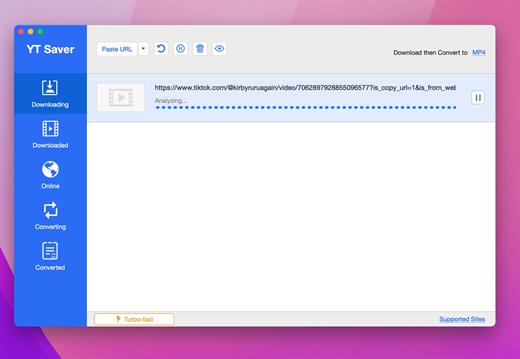
YT Saver Pro 11.1.1

Description: Download Video, Audio, Playlists from 10,000+ websites, Convert Video to MP4, MOV, AAC, WAV and more. Download Videos with Built-in Browser. YT Saver comes with a built-in web browser, which allows you to browse video/audio sharing sites easily and download videos direclty within the websites.

Unlimited Download with YT Saver Downloader
With YT Saver PRO you can download unlimited videos and playlists from streaming sites and access your videos when offline, and you can download multiple videos in bulk at the same time.

Download Videos at Ultra Fast Speed
YT Saver Video Downloader gives you 10X faster video download speed, which allows you to downlaod videos at ultra fast speed and get the fastest conversion speed.

Protect Your Downloaded Videos Privacy
To protect your video and audio from prying eyes and miswatching by children, YT Saver provides a Private Mode to keep your downloaded contents in a password-protected folder.

Supported Input Formats
Video: MP4, M4V, 3GP, MPEG, DAT, AVI, ASF, WMV, VOB, MKV, FLV, 3GS, 3G2, F4V, WEBM, TS, RMVB, MOV
Audio: AAC, AC3, FLAC, M4A, WAV, WMA, AMR, MKA, MP2, AIF, AU, AIFF, CAF, OGG, RAM, RA, M4B, M4R, APE, OPUS, WEBM

Supported Output Formats
Video: MP4, MOV, WMV, AVI, FLV, MKV, HEVC MP4, HEVC MKV, 3GP, iPhone/iPod, iPad, Android Phone, Android Tablets
Audio: M4A, MKA, WAV, AAC, FLAC, AIFF, OGG

Release Name: YT Saver Pro 11.1.1
Size: 381.9 MB
Links: HOMEPAGE – NFO – Torrent Search

Download: RAPiDGATOR

5 Comments
June 29

All Video Downloader Pro 10.4.7

Description: All Video Downloader Pro is a professional Windows app for downloading and converting your favorite videos from video sharing sites. It accelerates your downloads by up to 5 times!
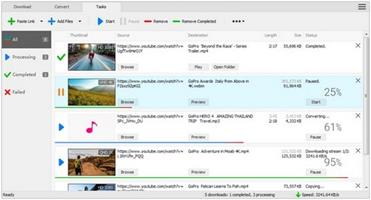
Features:

Download videos from hundreds of video sharing sites.
All Video Downloader Pro can download videos from YouTube, Facebook, Dailymotion, and hundreds of other video sharing sites. After downloaded, you'll be able to play them smoothly on your PC or mobile devices, even if you don't have internet access.

Accelerate downloads by up to 5 times.
All Video Downloader Pro features a multithreading download acceleration engine that can boost and increase your download speeds by up to 500% faster.

Download 4K, 2K, HD 1080p, HD 720p, and 3D videos.
All Video Downloader Pro allows you to download videos in different resolutions, including 4K/2160p, 2K/1440p, HD 1080p, HD 720p, 480p, 360p, and 240p. You can download 1080p HD videos to enjoy quality graphics on your TV, you can also download 240p videos in order to save space on your mobile devices.

YouTube to MP3 downloader.
All Video Downloader Pro allows you to download only audio stream directly from YouTube and save it as MP3, without downloading the entire video file.

Download entire playlist from YouTube at one time.
All Video Downloader Pro enables you to download an entire YouTube playlist with just a few clicks. All videos in the playlist can be downloaded automatically at one time.

Download multiple videos at a time.
All Video Downloader Pro supports simultaneous downloads that allows you to download more than one video at the same time.

Download subtitles in selected language and format.

Pause and resume downloads.
You may pause your downloads at any time. All Video Downloader Pro can resume broken download from where it was interrupted. You don't need to start from the beginning again.

Preview incomplete video while downloading.
While downloading, you can click the Preview button to play incomplete video and make sure that the content you are downloading is really the video of your choice.

Convert downloaded videos to any format.
All Video Downloader Pro can automatically convert downloaded videos to the format you choose. It supports MP4, FLV, WMV, MOV, ASF, AVI, DV, M4V, MKV, MPG, OGV, SWF, TS, VOB, WEBM, DVD, VCD, SVCD, and many others.

Optimize downloaded videos for any device.
All Video Downloader Pro can automatically optimize downloaded videos for your mobile devices, so you can watch them on your iPhone, iPad, Android phone, Android tablet, Xbox, Windows phone, PSP/PS4/PS3, Samsung Galaxy, etc.

Video to MP3 converter.
All Video Downloader Pro is capable of extracting audio streams from videos and save them as MP3, WAV, WMA, AC3, AAC, OGG, M4A, FLAC, MP2, or any other audio format.

Video and audio converter.
All Video Downloader Pro is a powerful video and audio converter too. It allows you to convert any video/audio files on your disk to the format you wish so that they are playable on your media player or mobile devices.

Ready-made video/audio format presets.
All Video Downloader Pro provides ready-made presets for all popular video and audio formats. You can also custom output video/audio format settings.

Schedule downloads.
All Video Downloader Pro can automatically start downloads at a set time, and shut down your computer when all done. You will no longer have to wait for your long list of videos to finish downloading.

Support drag-and-drop.
You may simply drag and drop a video link/URL from your web browser to All Video Downloader Pro's Drop Box to start a download. You don't even need to copy and paste video link/URL manually.

All Video Player.
All Video Downloader Pro includes a simple and easy-to-use media player - All Video Player, for playing MP4, WebM, FLV, MP3, AAC, and any other format video/audio files that Windows Media Player cannot play.

Release Name: All Video Downloader Pro 10.4.7
Size: 164.4 MB
Links: HOMEPAGE – NFO – Torrent Search

Download: RAPiDGATOR

4 Comments