Please REGISTER or RENEW your account on RAPiDGATOR.net and support us by doing through all RAPiDGATOR working download links on main posts...
June 28

MouseBoost Pro 5.2.0

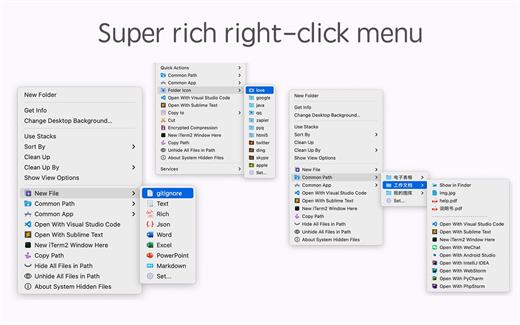
MouseBoost Pro integrates more than 30 kinds of small tools, and the operation way is very simple, as long as you click the right mouse button, you can activate all kinds of functions you want, so that your work efficiency is greatly improved.

You can create any file type you want, open any APP you want, self-sorting, fully customized!

*** Main Features ***
– All menus support custom sorting.
– Quickly create all kinds of commonly used files, and supports custom creation of various file types you want.
– Quickly open your terminal, iTerm2, and go to the directory you want.
– Quickly open VSCode, Sublime Text and Emacs, and customize the various apps you want to open.
– Quickly copy the current path power.
– Complete files deletion is supported.
– Supports files moving, copying and cutting.
– Supports files encrypted compression.
– Quickly open your favorite directory.
– Quickly get file MD5,SHA1,SHA256 and other information.
– Supports hiding and displaying of specified files.
– Supports modify folder icon.

What’s New

Version 5.2.0:


  • Release notes were unavailable when this listing was updated.
Compatibility

macOS 10.11 or later


Release Name: MouseBoost Pro 5.2.0
Size: 20.5 MB
Links: HOMEPAGE – NFO – Torrent Search

Download: RAPiDGATOR

5 Comments
June 28

Easy New File 6.2

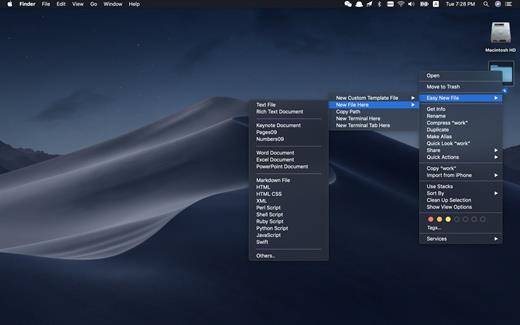
Easy New File is a Finder extension which adds some functions to the right-click menu in the Finder.

Features


  • Quick new file
  • Copy file path
  • Support all common file extension, such as text file, Word document, Excel, Keynote, Rich Text document, shell, Python script, Swift…
  • New Terminal here
What’s New

Version 6.2:


  • Release notes were unavailable when this listing was updated.
Compatibility

macOS 10.10 or later.


Release Name: Easy New File 6.2
Size: 7 MB
Links: HOMEPAGE – NFO – Torrent Search

Download: RAPiDGATOR

5 Comments
June 28

SponsorBlock 6.1.6

SponsorBlock lets you skip over sponsors, intros, outros, subscription reminders, and other annoying parts of YouTube videos. SponsorBlock is a crowdsourced browser extension that let’s anyone submit the start and end time’s of sponsored segments and other segments of YouTube videos.

Once one person submits this information, everyone else with this extension will skip right over the sponsored segment.

What’s New

Version 6.1.6:


  • Release notes were unavailable when this listing was updated.
Compatibility

macOS 10.14 or later


Release Name: SponsorBlock 6.1.6
Size: 6.3 MB
Links: HOMEPAGE – NFO – Torrent Search

Download: RAPiDGATOR

5 Comments
June 28

Multi-List Timer 11.5

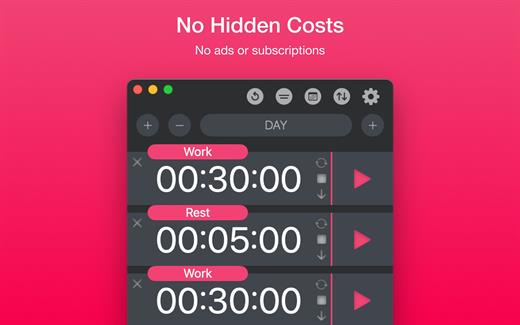
Study, Focus & Workout Timer. Create multiple timer lists for study, work, and workouts.


  • No Hidden Costs: No ads or subscriptions.
  • Private: No sign-ups or data collection.
  • Works Offline: No internet connection needed.
What’s New

Version 11.5:


  • Release notes were unavailable when this listing was updated.
Compatibility

macOS 11.0 or later


Release Name: Multi-List Timer 11.5
Size: 5.9 MB
Links: HOMEPAGE – NFO – Torrent Search

Download: RAPiDGATOR

5 Comments
June 28

Boris FX Silhouette 2026.0.2

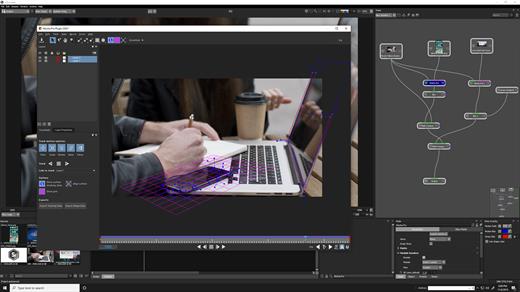
Description: Visual Effects & Compositing. The industry’s leading rotoscoping and paint tool is packed with major compositing features. Silhouette delivers 400+ VFX nodes, including Boris FX Sapphire, Mocha Pro, and Particle Illusion. Top artists have relied on Silhouette on Hollywood’s biggest titles for over fifteen years. The Academy and Emmy Award-winning toolkit created by visual effect artists recently made its mark on Deadpool & Wolverine, Rebel Moon, Barbie, Dune, and 3 Body Problem.

Why Silhouette?
Industry leading rotoscoping and paint tools
Auto paint for speed and reliability
Powerful tracking options
Node based compositing and image processing
Easy keying for green screens
Includes Sapphire, Mocha, Particle Illusion and Continuum effect tools
Warping and morphing tools
Work as a plugin in your favorite host or as a standalone application

New For 2025

3D Scene
Import Alembic or FBX files, place cards, track in 3D, and stabilize, paint, or composite directly in a 3D-aware environment.

Matte Refine ML
Transforms hard edge mattes into smooth, natural, semi-transparent transitions, preserving intricate details like hair, fur, and other fine textures.

Depth Map ML
Easily control blur, color correction, and create mattes according to depth levels using instant AI-driven depth map creation.

PowerMesh Morph
Use Mocha’s sub-planar mesh tracking to create realistic morphs between painted keyframes or individual frames.

Unproject/Reproject
Paint or composite on a locked-down 3D sequence, then restore the original motion.

Compound Nodes
Combine selected nodes into a single node with parameters grouped for easy access, and then share with other users.

Frame Fixer ML
Repair flash frames and corrupted footage using AI to generate clean replacements.

Updated 2025 Sapphire, Mocha Pro & Particle Illusion Nodes
Includes 2025 versions packed with new creative effects and presets.

Release Name: Boris FX Silhouette 2026.0.2
Size: 5.1 GB
Links: HOMEPAGE – NFO – Torrent Search

Download: RAPiDGATOR

2 Comments
June 28

Nob OmniScope 1.11.49

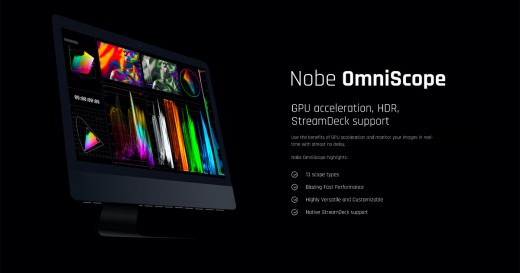
Description: Nobe OmniScope is loaded with powerful features that make color grading easy. GPU acceleration, HDR, StreamDeck support. Use the benefits of GPU acceleration and monitor your images in real-time with almost no delay.

Nobe OmniScope highlights
- 18 scope types
- Multiple input support
- Support for Dolby Vision Workflows
- Blazing Fast Performance
- 12 bit signal support
- Highly Versatile and Customizable
- Advanced Quality Control and New QC Timeline
- Colour Managed with OpenColorIO
- Native StreamDeck support
- NDI® 5 support
- Apple Silicon ready (M1 chip)

Loaded with video scopes
- Waveforms, Parade, Vectorscope, False Color, CIE Plot, Histogram and more!

Highly Customizable
- Each scope can be adjusted and fine-tuned to fit perfectly

Flexible layout
- Docking options allow you to create the perfect layout for your needs

Multiplatform
- OmniScope works on Windows and macOS

Blazing Fast Performance
- Efficient use of GPU resources - even on modest hardware!

Frequent updates
- Automated in-app updates bring all the new features and improvements regularly

Operating Systems: Windows 10 & later

Release Name: Nob OmniScope 1.11.49
Size: 121.6 MB
Links: HOMEPAGE – NFO – Torrent Search

Download: RAPiDGATOR

5 Comments
June 27

Waves Ultimate 17 2026.06.23

Description: Waves is the world’s leading developer of audio plugins and signal processors for the professional and consumer electronics audio markets. All 230+ Waves plugins. Create with Total Freedom: Everything Always at Your Fingertips

Let nothing stand between the sound you hear in your head—and what comes out of the speakers. With Waves Ultimate—the biggest option in our Waves Creative Access subscription—you get all the plugins you need, when you need them. Anything you want to create—you’re covered.

All of Waves’ popular vocal production plugins. All analog models, from Abbey Road to SSL. All Waves mastering plugins. All the compressors, all the EQs, all the effects, instruments, saturation plugins, artist signature plugins, channel strips, AI-powered noise reduction. Waves Ultimate offers the most complete set of pro-quality audio plugins, anywhere.

Over 230 plugins
7-day free trial: no commitment
All future updates included
New plugins added regularly
The industry’s largest, most diverse catalog of pro plugins
Includes StudioVerse: Thousands of mixing chains with AI search
2 licenses for activation on 2 machines at a time
Cancel anytime (your subscription will stop at the end of your current period)
Personal technical support by phone and email
From Waves Audio, winner of the Technical Grammy® Award

Release Name: Waves Ultimate 17 2026.06.23
Size: 10 GB
Links: HOMEPAGE – NFO – Torrent Search

Download: RAPiDGATOR

0 Comments
June 27

Macro Commander Pro+ 2.8.7

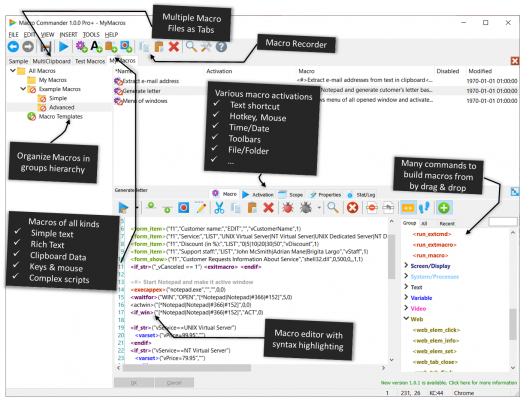
Description: Macro Commander is all-in-one data entry and desktop automation software. It is designed to empower users to effortlessly create, manage, and activate macros and scripts in order to make manual repetitive tasks automated, fast, and error free. Its clean user interface allows to create and organize macros quickly and easily either manually or using a built-in macro recorder.

While Macro Commander provides strong data entry features to make filling data to other applications fast and easy, it also offers a comprehensive set of 300+ built-in commands that enable you to perform variety of other tasks including: manipulate files, folders, images, text, clipboard, network resources, web pages, natively automate applications such as Word or Excel, and send keystrokes and mouse clicks to any application or web page. In addition, the macros can be integrated with other scripting options such as Power Shell in order to extend its general usability.

Automate Manual Tasks

Help Desk Support
Create macros with frequently used answers, phrases, screenshots, tips, etc. Increase helpdesk responsiveness, productivity, and efficiency by composing quick answers.

Data Extraction
Automatically extract required information from text files, Word documents, Excel tables, CSV files, web, computer screen, and other data sources.

Automated Testing
Create macros to mimic a real user in different test scenarios. Use built-in screencast features for the system under test behavior analyses.

Image Manipulation
Resize images, convert image formats, add watermark, reduce quality, and more bulk automated operations.

Data Entry
Enter customized frequently used phrases into any application or form fast and error free. Generate documents automatically.

Files Manipulation
Copy/move/rename/delete files and folders. Validate and manipulate text files content, send files for sharing, and more.

Release Name: Macro Commander Pro+ 2.8.7
Size: 40.3 MB
Links: HOMEPAGE – NFO – Torrent Search

Download: RAPiDGATOR

5 Comments
June 27

Sejda PDF Desktop Pro 7.9.6

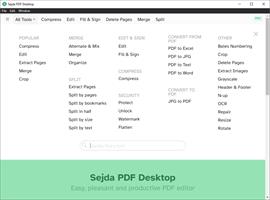
Description: Sejda PDF Desktop - pleasant and productive PDF software that you'll love to use. Full-featured to help you with your PDF tasks. Sejda PDF Desktop is free to use within daily limits. Upgrade for premium features and unlimited use.

Merge files into one PDF.
Visually combine and reorder pages, merge multiple PDF files. Alternate and mix odd and even page files.

Split PDF files.
Split documents by pages. Extract separate documents. Split by size, bookmarks or text occurrences. Divide two page layout scans.

Convert PDF files to Office and image formats.
Convert PDF files to Word, Excel and to image. Convert images to PDF file.

Compress PDF.
Reduce the size of PDF files. Optimize images and resources.

Edit PDF files.
Add, edit or move text in your PDF. Change the font type, size and style. Insert, reorder, move or delete pages.

Apply PDF passwords and permissions.
Add copy and edit protection to a PDF. Include a password to protect your PDF from unapproved access.

Watermark PDF.
Add image or text watermark to PDF documents.

Grayscale PDF.
Convert PDF text and images to grayscale.

Crop PDF.
Trim PDF margins, adjust visible page area, change PDF page size.

System Requirements
Windows 8.1, 10, 11 (64-bit)

Release Name: Sejda PDF Desktop Pro 7.9.6
Size: 340.1 MB
Links: HOMEPAGE – NFO – Torrent Search

Download: RAPiDGATOR

6 Comments
June 27

Hasleo Backup Suite 5.8.2.2 + WinPE

Description: Hasleo Backup Suite is a pro backup and restore software for Windows, which embeds backup, restore, and cloning features. The software is designed for Windows users and is compatible with both Windows PCs and Servers. Hasleo Backup Suite natively supports Windows X86/X64 and ARM64, enhancing performance while reducing power consumption.
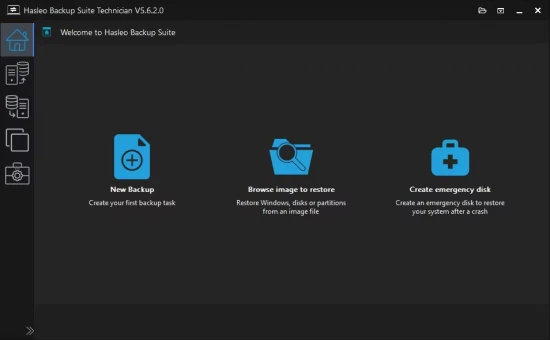
The backup and restore feature in Hasleo Backup Suite can help you back up and restore the Windows operating system, disks, or partitions to ensure the security of your Windows OS and personal data. The cloning feature supports migrating Windows to a new disk and upgrading disks to SSDs or higher-capacity disks.

System Backup & Restore
Back up all partitions related to the normal operation of the Windows operating system, including the system partition, boot partition, and recovery partition, ensures fast system recovery in case of a Windows operating system crash.

Disk/Partition Backup & Restore
Viruses, power outages, or other unexpected issues may cause data loss, so it is a good habit to regularly back up the drive where you store important files. This way, you can recover lost files from the backup image files if accidents happen.

File Backup & Restore
Back up only specified files/folders (instead of the full drive) to another location to protect your data. This allows you to restore them quickly from the backup image files when needed.

System Clone
Clone the Windows operating system from one disk to another SSD or higher-capacity drive without reinstalling Windows, applications and drivers.

Disk Clone
Clone the entire source disk to the target disk and ensure that the target disk is an exact replica of the source disk.

Partition Clone
Precisely clone a partition to another location on the same disk or another disk, while ensuring data integrity and consistency.

Backup, Restore and Clone Windows OS, Disks, Partitions, Files/Folders.
Backup Modes: Full, Incremental, Differential.
Compress, Encrypt, Split, Merge, Delete, Mount and Check Backup Image Files.
Delta Clone/Restore Improves Clone/Restore Speed by Cloning/Restoring only Changed Blocks.
Advanced Backup Options: Filter, Scheduling and Retention Policies.
Create Bootable WinPE Emergency Disk and Support Command Line Interface (CLI).
Comprehensive Windows File System Compatibility: FAT, NTFS, exFAT, ReFS.
Supported OS: Windows Vista/Server 2008 or later Running on X86/X64/ARM64 Processors.

Release Name: Hasleo Backup Suite 5.8.2.2 + WinPE
Size: 773.9 MB
Links: HOMEPAGE – NFO – Torrent Search

Download: RAPiDGATOR

6 Comments