Please REGISTER or RENEW your account on RAPiDGATOR.net and support us by doing through all RAPiDGATOR working download links on main posts...
May 9

Fakin’ The Funk? 6.0.164

Fakin’ The Funk? is a tool that helps you to detect the true quality of your audio files in one batch.

Nowadays you can download tunes from anywhere.

But what is the real quality of these files?
What if you could check those tunes to see if they’re really that good, and not upscaled 128kbps to 320kbps MP3s?
You could batch-process them all without having to manually check them 1-by-1 using a spectrum analyzer?

Import your music files.

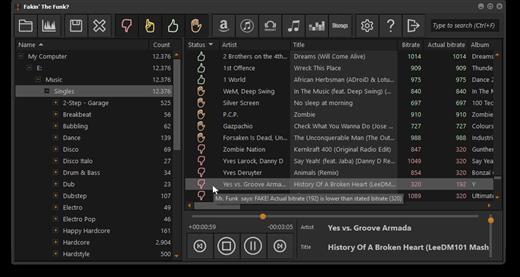
Fakin’ The Funk? will analyze the right bitrate and frequency.
If it finds a wrong bitrate or lower frequency-peak, it will show you the actual bitrate.
It’s up to you whether you want to rename those files, copy or move. Or just delete them.
Fakin’ The Funk? Keep it real.

What’s New

Version 6.0.164:


  • Release notes were unavailable when this listing was updated.
Compatibility

macOS 10.15 or later


Release Name: Fakin’ The Funk? 6.0.164
Size: 16.3 MB
Links: HOMEPAGE – NFO – Torrent Search

Download: RAPiDGATOR

7 Comments
May 9

ColorSnapper2 v1.7.0

ColorSnapper2 is the OS X color picker app for designers and developers which makes it easy to collect, adjust, organize, and export colors of any pixel of the screen. It is activated via a system-wide hotkey, giving you a magnifying glass to easily pick any pixel you need, even from retina displays. The resulting color is copied to the clipboard in a format of your preference.

Features


  • New Magnifying Glass — the original ColorSnapper magnifying glass — introduced in 2010 and adopted by every modern color picker app since then — just got even better! It works perfectly with multiple displays, different resolutions and with different pixel density. You can switch between Spaces and Applications having the magnifying glass on the screen while controlling it with gestures and keyboard shortcuts.
  • New Hi-Precision Mode allows you to choose every physical pixel on a retina screen, but also works great on displays with normal pixel density by increasing mouse sensitivity and magnification level.
  • Export to Adobe® Photoshop® and Illustrator® — set foreground and background color in your favorite designer tool directly from ColorSnapper.
  • Capture loupe image — new magnifying glass can be used as a review tool. Pressing P will copy the zoomed image to clipboard.
  • Favorites and History — with ColorSnapper2 you can now organize, adjust and export colors without leaving the application. Add colors you regularly pick to the favorites or go back in time to hundreds of colors.
  • Adjust colors — new user interface seamlessly integrates with the Apple’s Color Panel so you can adjust colors before you export them.
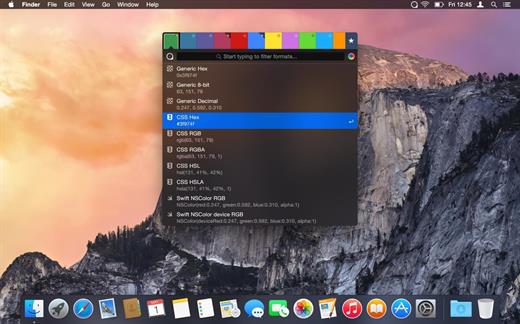
  • Quick formats filter — just start typing to quickly search through more than 30 export formats.
  • Automatic color profile conversion — converts colors picked from native OS X applications, including Safari and Xcode from the monitor’s color profile to sRGB. This means you’ll get the same RGB values as those used in your code.
  • Code style — use flexible color values formatters to match your coding style. Along with all new supported formats, including CSS3, NSColor and UIColor, Swift, Android, Java, .NET and many more, this results in even faster developer workflow.
What’s New

Version 1.7.0:


  • Update for license activation on macOS Big Sur
  • Fixes crash when assigning new global shortcuts on macOS 10.15
Compatibility

macOS 14.6 or later


Release Name: ColorSnapper2 v1.7.0
Size: 7.7 MB
Links: HOMEPAGE – NFO – Torrent Search

Download: RAPiDGATOR

4 Comments
May 9

Peakto 2.7.3 – AI Media Organizer

Peakto gathers and organizes all your photos and videos with AI, freeing you to focus on what matters most: unleashing your creativity.
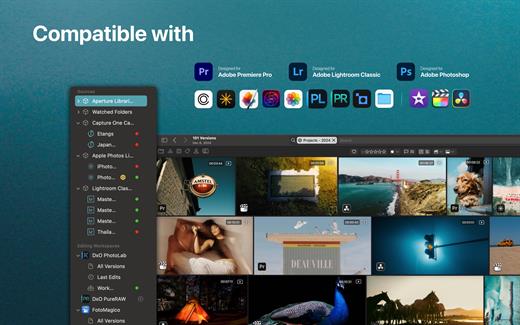
YOUR ASSETS IN ONE-PLACE, ORGANIZED LIKE MAGIC

Your photos and videos are spread across different devices, folders, and apps, making it hard to find the ones you want to see right away? That’s why Peakto unifies your thousands of files. By bringing everything together in one interface, Peakto offers unique centralized photo organization features, enhanced with AI, and unique perspectives on your work.

FIND YOUR BEST IMAGES AND VIDEOS INSTANTLY

AI-powered tagging, search by description, search by similar images, search for faces: Peakto is the perfect tool to help you find the right content for the right project, whether in your archives or your most recent shots. In this version 2, prompt-based search also applies to videos, enabling the retrieval of a specific scene in a film.

NEVER MISS THE BEST ASPECTS OF YOUR WORK AGAIN

Gain new views on your images to fuel creativity, guide edits, and stand out in the photography market. Peakto offers unique perspectives: automatically sorted views of all images by category; map views of all photos. Version 2.0 introduces a new Timeline view, allowing navigation through a chronological timeline and sorting images by dates.

CENTRALIZE YOUR PHOTOS AND VIDEOS FOR SUPER EASY ORGANIZATION!

Peakto’s centralized viewpoint makes it easy to choose photos to delete and free up memory. It allows you to identify individuals in images from multiple sources within the same interface. Peakto enables the creation of selections from content coming from multiple sources. It serves as the control tower from which you manage all your images and edit a photo in your favorite editing software with a single click. Always synchronized, Peakto reflects the latest changes made to your creation.

EFFICIENT SHARING AND EXPORT

Browse your images and videos with full-resolution previews and seamlessly craft albums from various sources such as different folders, catalogs, sessions, and libraries. Easily export images in batches at full resolution. Choose low-resolution for digital sharing. Manage your pictures without creating copies. Peakto provides you with powerful tools to manage and explore your digital assets.

CONFIGURATION
Optimized for Apple Silicon (M1, M2, M3…) but runs on Mac Intel with a powerful GPU too. Peakto requires macOS 12 (Monterey) and is fully compatible with macOS 15 (Sequoia).

Peakto is compatible with:


  • Aperture catalogs from version 3.1
  • Lightroom Classic catalogs from version 5
  • Lightroom Creative Cloud (current version)
  • Luminar Neo catalogs from version 1.0
  • Capture One catalogs from version 20 (v13.x)
  • Apple Photos catalogs from version 6 (Big Sur)
  • iView Media Pro catalogs from version 3
  • Pixelmator Pro documents from version 3
  • DXO PhotoLab v5-8 & PureRAW 2-3
  • ON1 Photo RAW 2023 and 2022
  • TOPAZ Photo AI version 3
    All Video formats natively supported by MacOS (mov, mp4….)
What’s New

Version 2.7.3:


  • Release notes were unavailable when this listing was updated.
Compatibility

macOS 12.4 or later.


Release Name: Peakto 2.7.3 – AI Media Organizer
Size: 363.5 MB
Links: HOMEPAGE – NFO – Torrent Search

Download: RAPiDGATOR

5 Comments
May 9

Timemator 3.2.2

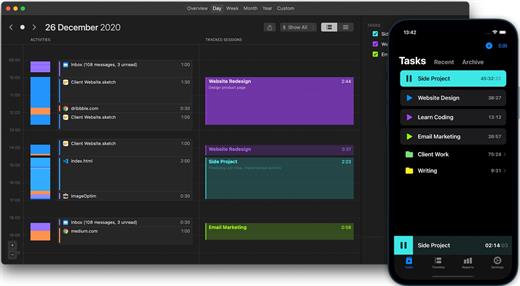
Timemator lets you fully automate your time-tracking based on your activities on the Mac. Just tell Timemator what files, applications or websites you use for your work and it will start the timer for you. Automatically!

Features:


  • Auto-tracking
  • Traditional timer
  • Flexible tasks structure
  • Quick access from the menu bar
  • Track billable hours and your revenue
  • Powerful reports
  • Works completely offline
  • Respects your privacy. No data is sent anywhere.
  • Native Mac-app
*** You need to disable the System Integrity Protection (SIP) to perform the selected Application.

What’s New

Version 3.2.2:


  • Release notes were unavailable when this listing was updated.
Compatibility

macOS 10.13.0 or later


Release Name: Timemator 3.2.2
Size: 29.3 MB
Links: HOMEPAGE – NFO – Torrent Search

Download: RAPiDGATOR

5 Comments
May 9

Structured 4.4.8

A visual daily planner to organize tasks, routines, and habits. Stay focused, reduce overwhelm, and plan your day in one clear timeline.

Finally take control of your day.
Plan with a clear visual timeline that brings your calendar, to-dos, routines, and habits together.

Join over 1.5 million active planners who feel calmer, focus faster, and get more done — every single day.

Perfect for work, study, travel, and busy ADHD minds. Plan in minutes and stay focused all day.


  • Organize your day and week in an intuitive timeline
  • Capture ideas instantly in Inbox and sort them later
  • Sync across iPhone, iPad, Apple Watch and Mac
  • Break big projects down with notes & sub-tasks
  • Stay on track with a Pomodoro focus timer, Live Activities, and interactive widgets
  • Personalize your planner with color-coding and hundreds of icons
  • Benefit from accessibility features like VoiceOver, Voice Control, a dyslexia-friendly font, and multiple languages
  • Get a complete overview by connecting your calendars and Reminders
  • Build recurring tasks & routines that actually stick
  • Powered by AI, draft your day in seconds
  • Replan, automatically reschedules missed or forgotten tasks
  • Customize notifications to match your workflow
What’s New

Version 4.4.8:


  • Release notes were unavailable when this listing was updated.
Compatibility

macOS 14.0 or later.


Release Name: Structured 4.4.8
Size: 75.1 MB
Links: HOMEPAGE – NFO – Torrent Search

Download: RAPiDGATOR

6 Comments
May 9

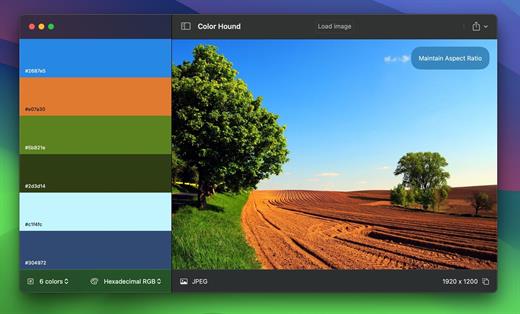
Color Hound 1.9.1

Image → Colors
Palette generator. Detect + export color palettes
from your images – instantly!

FEATURES


  • Show me the image! Simple, practical and ultra-easy to use: Just drag’n’drop your photo you want to analyze!
  • Tons of options Lots of options (number of colors, format, etc) to get exactly the result you wish.
  • Export Want to export to CSS? Maybe LESS? Maybe export the whole palette to an image? Done! and wait for a couple of seconds. Your application disk image will be ready befre you even notice!
What’s New

Version 1.9.1:


  • Release notes were unavailable when this listing was updated.
Compatibility

macOS 12.0 or later


Release Name: Color Hound 1.9.1
Size: 5.3 MB
Links: HOMEPAGE – NFO – Torrent Search

Download: RAPiDGATOR
7 Comments
May 9

Color Folder Pro 5.2

Color Folder can help you to change the icon of folder quickly, and to manage folders more efficiently

「Main Features」


  • quickly change folder icon color
  • Select any picture to set as folder icon
  • support changing multiple folder icons at the same time
  • save as Icon
  • provide a variety of icon templates (over 700+)
  • support any color to modify folder icons
What’s New

Version 5.2:


  • Release notes were unavailable when this listing was updated.
Compatibility

macOS 10.10 or later


Release Name: Color Folder Pro 5.2
Size: 23.1 MB
Links: HOMEPAGE – NFO – Torrent Search

Download: RAPiDGATOR
6 Comments
May 9

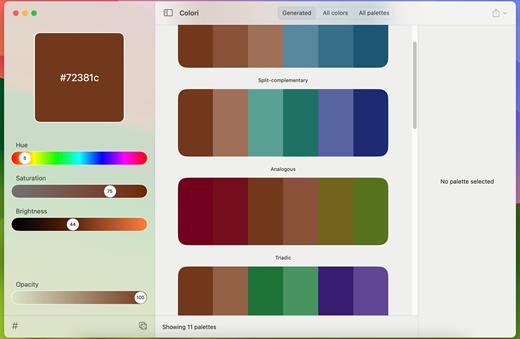
Colori 1.7.4

Generate a color palette from one color, organize your palettes, preview, and export

Beautiful color schemesright at your fingertips.

Features


  • Easy to use: Simple, practical and ultra-easy to use: Pick a color as a starting point and start experimenting: it had never been that easy!
  • Colors everywhere!: Lots and lots of colors + 100’s generated or ready-made palettes to choose from and make your next design project stand out!
  • Lots of options: Work elegantly and lightning-fast from your Mac. Do you want to export your palettes for use e.g. with web design and CSS/LESS/SASS? Done!
What’s New

Version 1.7.4:


  • Release notes were unavailable when this listing was updated.
Compatibility

macOS 12.0 or later


Release Name: Colori 1.7.4
Size: 5.6 MB
Links: HOMEPAGE – NFO – Torrent Search

Download: RAPiDGATOR
6 Comments
May 9

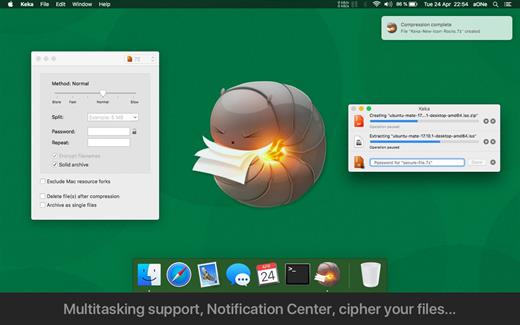
Keka 1.6.4

Keka is a file archiver for OS X. It is available for free, but donations are requested to further the project. Similar to making a donation, you can also purchase Keka on the Mac App Store for $1.99 USD.

Supported compression formats:


  • 7z
  • Zip
  • Tar
  • Gzip
  • Bzip2
Supported extraction formats:

  • RAR
  • 7z
  • Lzma
  • Zip
  • Tar
  • Gzip
  • Bzip2
  • ISO
  • EXE
  • CAB,
  • PAX
  • ACE
What’s New

Version 1.6.4:


  • Fixed possible crash when setting as the default uncompressor for macOS 26.4+
Compatibility

macOS 10.10 or later.
Apple Silicon or Intel Core processor


Release Name: Keka 1.6.4
Size: 35.6 MB
Links: HOMEPAGE – NFO – Torrent Search

Download: RAPiDGATOR

6 Comments
May 9

Loopback 2.4.10

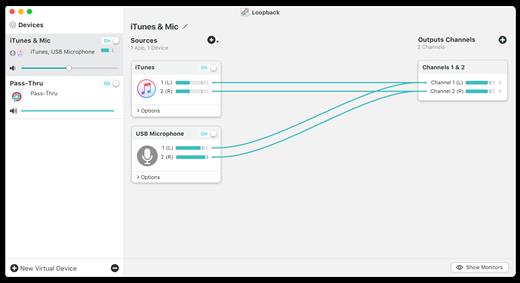
Loopback makes it easy to pass audio between applications on your Mac. Create virtual audio devices to take the sound from applications and audio input devices, then send it to audio processing applications. Loopback gives you the power of a high-end studio mixing board, right inside your computer!


  • Play Audio to All Your Podcast Guests – Combine your mic with audio sources like iTunes or QuickTime Player, then select your Loopback device as your source in Skype. Presto! Your guests all hear both your voice and your audio add-ons.
  • Record Gameplay Videos – Making gameplay videos with great audio can often be very difficult. If you’re using a device like Elgato’s Game Capture hardware and you want to record both your microphone and the game’s audio at once, Loopback can assist!
  • Combine Hardware Devices – Apps like GarageBand, Logic, and Ableton Live only record from a single audio device at once. Thankfully, they offer recording from many channels. With Loopback, you can combine multiple input devices into one virtual device for easy recording.
  • Create Top-Notch Screencasts – Screen recorders, including QuickTime Player, allow you to include your mic’s audio. Some allow recording of system audio instead, but neither option is ideal. Create a virtual device that grabs just the mic and the app’s audio to get exactly the audio you want.
  • Route Audio For Broadcasts – Set a simple (pass-thru) device as the output at the end of an Audio Hijack chain, and then as the input source in Nicecast. Now listeners can tune in to a live stream of your podcast as you record it!
Features

  • Combine Audio Sources – Configuring a virtual audio device from multiple sources is easy. Just add the applications and physical audio devices you want to include to the Audio Sources table to get started.
  • Available System-Wide – Your Mac will show Loopback’s virtual devices exactly like physical devices. Find them listed among other devices in System Preferences or select them as an input or output in any audio app.
  • Send Audio Between Apps – Loopback can also create pass-thru devices, which send audio from one app to another. Set the Loopback device as the output in one app and the input in another to make audio flow directly between the applications.
  • Works With Any Application – Make a virtual audio device with audio from the applications on your Mac, including production apps like Logic or Reason, as well as simple audio players, like iTunes or QuickTime.
  • Works With Any Input Device – Pull audio from the physical audio devices connected to your Mac. Whether you’ve got simple USB microphones, or high-end studio mixers, Loopback can access it all.
  • Combine Apps and Physical Devices – Of course, you can create a virtual audio device that includes audio from both apps and physical audio devices.
  • Multichannel Audio – Your virtual audio devices can be configured to have up to 32 channels, providing tremendous power.
  • Custom Channel Mapping – By default, Loopback sets up channel mapping automatically. If you want to manually configure things, though, you’ve got powerful options!
  • Nested Devices – You can now nest one Loopback device inside another, allowing for easier configuration, as well as even more power and control.
What’s New

Version 2.4.10:


  • Release notes were unavailable when this listing was updated.
Compatibility

macOS 10.13.0 or later
Support M1 Apple silicon.


Release Name: Loopback 2.4.10
Size: 34.6 MB
Links: HOMEPAGE – NFO – Torrent Search

Download: RAPiDGATOR
6 Comments