Please REGISTER or RENEW your account on RAPiDGATOR.net and support us by doing through all RAPiDGATOR working download links on main posts...
June 13

Screenpresso Pro 2.2.13
Description: Screenpresso captures your desktop (screenshots and HD videos) for your training documents, collaborative design work, IT bug reports, and more… Screenpresso is a NEW Light-weight screen grab tool with built-in image editor, user guide generator and sharing options.
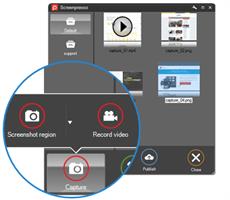
Capture in Videos or Images
Capture what you see on your screen with just a few clicks. Manage your capture history by workspaces.

Create great looking images and documents
Edit and highlight what matter in your screenshots with our built-in image editor. Create PDF documents with our document generator.

Share your screen captures
Drag & drop your captures to your emails to create attachments in 1 second. Share videos and images with Screenpresso Cloud without registration. Publish to Google Drive, Twitter, OneDrive, Dropbox and more…

Capture screenshots including scrolling parts
Press the Print Screen button, and you will see how Screenpresso magically assists you in screen capture:
The mouse cursor will turn into a crosshair, and moving it around the screen will automatically highlight the area that can be captured in red. It does some pretty cool edge snapping to the screen, so you can choose to grab part of a window, or the entire window, or even the whole screen.
Capture full screen, part of the screen or a specific window with the same shortcut/hotkey
Make sure to capture what you need. Click and drag anywhere on your screen to select a region with pixel-perfect accuracy thanks to the zoom lens at the right bottom of the screen
Capture scrolling windows: Can’t fit it on the screen? Make a unique image of scrolling windows thanks to the stitching mechanism
Capture your mouse cursor and the context of the capture
Delay capture for capturing context menu

Capture your screen in HD videos
A small video is a key to reduce misunderstanding in documentation.
Screenpresso records your screen in a video and produces lightweight MP4 video files for easy sharing.
Capture in MP4 format for lightweight files
Capture sounds and webcam
Export frames/images
Crop the video
Mute, change video speed, or change the format

Smooth workflow It has a 3-step process:
Press [PrintScreen] key to start a Capture. You don’t need to bother on filename
Edit your capture with built-in editor
Publish your capture (PDF, email attachment, drag anywhere or post online)

Powerful built-in image editor
Screenpresso provides a built-in vector image editor to mark up your screen captures.
Double-click on an image in the Screenpresso’s workspace to open the editor or click on the Edit button
Add arrows, spotlight an area, colorful speech bubbles, rectangles, ellipses, text boxes, callouts and more
Crop, add drop-shadow, rounded corners, reflection, torn edges and more fancy border effects
Step Tool: quickly highlight a series of steps: each click gets the next number in the series

Release Name: Screenpresso Pro 2.2.13
Size: 46.3 MB
Links: HOMEPAGE – NFO – Torrent Search

Download: RAPiDGATOR

6 Comments
June 13

Maxon CINEMA 4D 2026.3.0

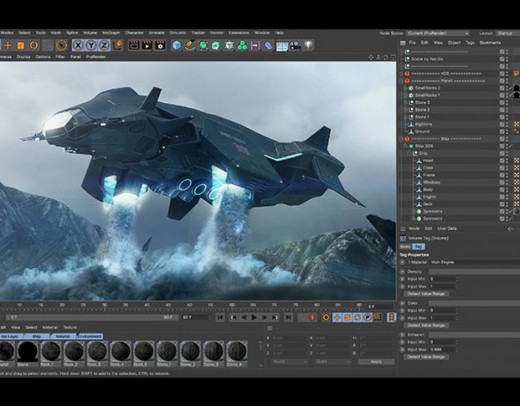
Description: Cinema 4D is a professional 3D animation, modeling, simulation and rendering software solution. Fast, powerful, flexible, and stable, this powerful toolset makes 3D workflows more accessible and efficient for design, motion graphics, VFX, AR/MR/VR, game development, and all types of visualization.

What's New
Cinema 4D 2025.1 delivers enhanced performance and reliability with an all-new Booleans system for precisely combining and subtracting shapes, allowing you to create unique and intricate models that defy cookie cutter conventions. The new Booleans produce clean geometry, ensuring final results are both visually appealing and technically sound. Multiple shapes can be combined in a single hierarchy, which makes it easy to animate cuts with Cinema 4D’s MoGraph toolset. Advancements in particle and rigid body dynamics allow for precise control over particle behavior, seamlessly integrating across various modifiers and emitters. Leverage the versatile Particle Node Modifier to craft intricate particle simulations using Scene Nodes, offering greater flexibility and creativity. Simulations benefit from enhanced collision detection in Rigid Body dynamics, ensuring realistic interactions. Improvements to USD Import and Export offer support for skeletal animation as well as camera and light properties. The modernized XRef system handles complex scenes with ease, allowing for easier team collaboration and better interoperability. Additionally, Cinema 4D introduces new training tools designed to help new users kickstart their journey into the 3D world.

Powerful 3D Modeling
Cinema 4D offers robust tools for creating intricate 3D models with ease and precision.

Animation Workflow
Cinema 4D provides a smooth and intuitive animation workflow, allowing users to bring their creations to life seamlessly.

Extensive MoGraph Tools
Cinema 4D’s comprehensive MoGraph toolkit empowers users to create complex motion graphics and procedural animations effortlessly.

Dynamic Simulation
Cinema 4D excels in dynamic simulations, enabling realistic 3D animations of fluids, cloth, rigid bodies, particles, and more.

Rendering
The integrated GPU-accelerated Redshift render engine is ready meet the challenging demands of creative individuals and studios of every size.

Transition seamlessly between 3D animation and rendering!
Now with Redshift, the powerful GPU-accelerated renderer in Cinema 4D, you can achieve professional-looking results faster with powerful tools and optimized workflows! Tailored to meet the specific demands of contemporary high-end production rendering, Redshift supports complex, advanced shading networks and texturing capabilities, ensuring production-quality rendering.

Release Name: Maxon CINEMA 4D 2026.3.0
Size: 1.3 GB
Links: HOMEPAGE – NFO – Torrent Search

Download: RAPiDGATOR
4 Comments
June 13

Valentina Studio Pro 17.5

Description: Create, administer, query and explore DuckDB, ValentinaDB, MongoDB, MySQL, MariaDB, PostgreSQL, MS SQL Server & SQLite databases for free.

Valentina Studio is your universal database management tool for working with DuckDB, MariaDB, MySQL, MongoDB, SQL Server, PostgreSQL, SQLite and Valentina DB databases. Valentina Studio lets you connect with all major databases, run queries and generate diagrams to better understand your mission critical business data - and that is the free version of Valentina Studio.

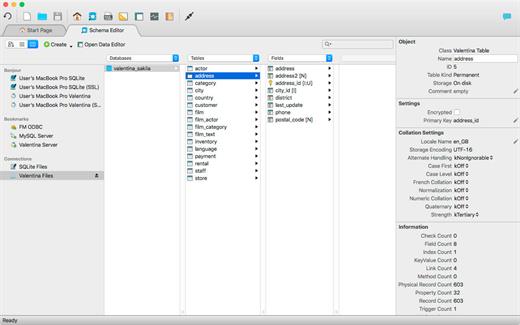
Schema Editor
Work with databases using diagrams, tree or column view.

Database Management
Universal database management tool for all major databases.

Virtual Links
Create virtual links where you need the functionality of foreign keys without creating foreign keys.

Database Query Builder
Build, test and execute SQL queries visually, drag-drop with Query Builder.

Data Editor
Clean data editor with high productivity tools for working with tables, records and fields.

Data Transfer
Specify mapping of source/target tables and fields and load records from db1 to db2.

Workspaces
Organize your tools, preferences, lists of recent datasources and more for individual projects.

SQL DIFF
Compare schemas of two databases and  transform the first schema into the second.

Valentina Forms
Create and add forms visually, and then your users can work with them in free Valentina Studio.

Report Designer
Transforms queries into visually stunning enterprise reports with full suite of design elements.

Continuous Integration
Continuous Integration (CI) tools for better software practices for databases.

SQL Editor
Full featured SQL Editor for writing, testing and executing queries with all supported databases.

Release Name: Valentina Studio Pro 17.5
Size: 148.1 MB
Links: HOMEPAGE – NFO – Torrent Search

Download: RAPiDGATOR

5 Comments
June 13

Easy System Utility Pro 1.1.63

Description: Easy System Utility is a powerful, all-in-one program designed for Windows 10 and 11 users. This versatile tool will be your main choice for making your computer experience better!

Home Tab
Identify your computer’s hardware specifications with the system overview.
You can view your operating system, CPU model, GPU, Memory, Motherboard, Network, and also drivers.
This will save you time as all the info is in one place.

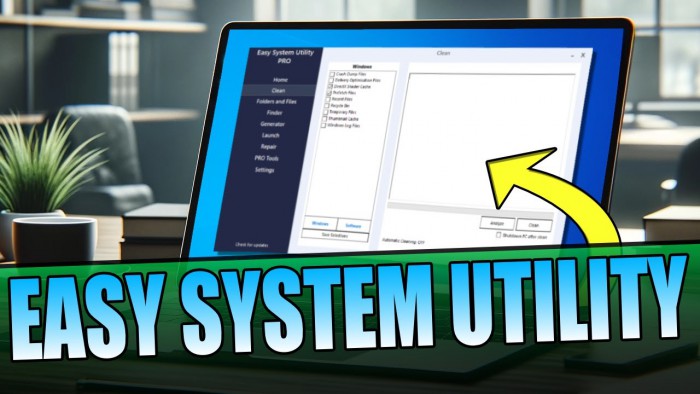
Clean Tab
Clear out unnecessary Windows and software files and junk files.
You can analyze the files first and then quickly and easily clean and remove them from your PC or laptop.
Choose your options from DirectX Shader Cache, Prefetch Files, Recycle Bin, Temp files, Thumbnail Cache, and Windows Log Files. This will save you disk space on your computer.
Over on the Software tab, there are many more options to choose from to further clear old temp files. This will free up even more disk space!

Folders/Files Tab
This tab has many tools related to Files and Folders.
Unlock files and folders with permission issues, easily reduce image sizes, and add watermarks to images.
You can also rename folders and remove large folders hogging up valuable space on your PC.
If you want to use the bulk features you will need to purchase PRO.

Password Generator
This tab will allow you to create random and secure passwords with a variety of different characters.
You can customize the password length as well as change numbers, symbols, uppercase, and lowercase.

Launch Tab
Launch programs, files, and folders from the ESU system tray icon so you don’t have to keep opening them up.
If you use a certain folder often or want to launch a program without having to keep searching for it, then you can add it to the ESU system tray icon to be able to quickly launch at any time.

Check For Dead & Stuck Pixels
Check for stuck and dead pixels on your screen. And hopefully fix the stuck pixels using the attempt fix button.
Sometimes a problematic pixel can be fixed, so if you are having this problem give EGU a try at solving it for you.

System Requirements:
Easy System Utility will require the following: .NET Framework Windows 10 / Windows 11 operating system Internet connection required

Release Name: Easy System Utility Pro 1.1.63
Size: 2.8 MB
Links: HOMEPAGE – NFO – Torrent Search

Download: RAPiDGATOR
5 Comments
June 13

MediaHuman YouTube To MP3 Converter 3.9.20 (1206)

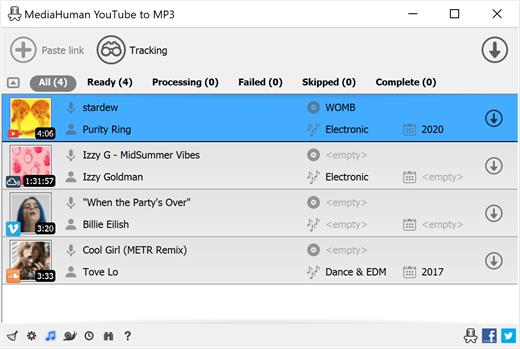
Description: You like to listen to music on YouTube, SoundCloud or Bandcamp and want to save it for offline playing. Or you want to download the soundtrack of a new movie. Then we recommend you to try out this software developed specifically for this purpose.

Downloads all music from a playlist or channel
Tracks playlist/channel updates and downloads only new videos
Downloads highest available quality up to 320 kbps
Supports YouTube, Vimeo, SoundCloud, Mixcloud, etc.
Downloads simultaneously several tracks
Includes simple tag editor with cover art image support
Works on all modern platforms (macOS, Windows, Ubuntu)
Exports downloaded files to iTunes/Music.app

Main Features:
Playlists and channels
The software supports downloading all videos in a playlist or channel. There is also an option to subscribe and download only newly uploaded tracks.

iTunes/Music.app support
In the app preferences, you can select the option to automatically add the downloaded tracks to your iTunes/Music.app library. You can also specify the playlist to which the converted tracks will be added.

Saves your time & traffic
The app detects audio track in YouTube video clip and downloads it, skipping the video part. As a result download speed increases dramatically, especially on HD-quality content and higher.

Simple tag editor
Application automatically detects artist name and track title of the video and saves it in the downloaded file. But at the same time, you can easily change tags to whatever you want. You can even change a cover art image.

Original format, no conversions
You can save audio tracks in original quality without any conversion. It means that there will be no loss of quality and it greatly reduces the downloading time.

Free music
There is a great amount of music on YouTube. And our app will help you to convert YouTube videos to MP3 or save it on your computer in original M4A/AAC format. Just find the track you like and download it in the quality you need.

Not only YouTube
Vevo.com, Vimeo, DailyMotion, Soundcloud, Bandcamp, HypeMachine, MixCloud, MixUpload, Audiomack, UOL, Hearthis.at, Play.fm, Naver, BitChute, Brandnewtube, Brighteon, Rumble and many other sites are also supported. So you can download music just as easily as you can from YouTube.

Clipboard tracking
The program tracks the content of the system clipboard. It means that you can easily add a video clip to the download list without switching from your favorite browser. Just copy an URL into the clipboard and it will be added to the download queue.

Multilingual interface
Localized to: Arabic, Armenian, Azerbaijani, Bulgarian, Catalan, Chinese (Hong Kong SAR China), Chinese (Simplified), Chinese (Taiwan), Croatian, Czech, Danish, Dutch, English, Esperanto, French, German, Greek, Hebrew (Israel), Hungarian, Indonesian, Italian, Japanese, Korean, Latvian, Lithuanian, Malay, Norwegian Bokmål, Polish, Portuguese, Portuguese (Brazil), Romanian, Russian, Serbian, Slovenian, Spanish, Swedish, Turkish, Vietnamese

Release Name: MediaHuman YouTube To MP3 Converter 3.9.20 (1206)
Size: 82.4 MB
Links: HOMEPAGE – NFO – Torrent Search

Download: RAPiDGATOR

5 Comments
June 13

Lumenzia 12.0.3

Description: Lumenzia or (Luminosity Masking Panel) is a software integrated into the photoshop as Extension. It helps you to edit the landscape image with the strengthening or reduction of the color saturation, from which to make your photo more beautiful.

With Lumenzia, you will get a preview of the entire screen of the mask before applying. The interaction click on the image to choose (or opt out) tones the color/color at the level you want. There is no need for an interview with the channel plus and minus. Isolate the mask with the specific sections of the image with a simple selection. And you can combine the team mask to easily see the overall mask impact.

Lumenzia offers a compact panel with just the buttons you need and completely remove the need for the channel pallet. Just draw the selection area around the target area to create the texture size, sharpness, or any location in the image. The texture can be easily modified, reversed (to light the central area) or in combination with an increased brightness (to avoid too much darkness).

The features of Lumenzia


  • The work process is fully streamlined and the mask is fully customized
  • BlendIf mask and Vector mask (to save the considerable file capacity and avoid the mask update)
  • Add, except or cut any mask or select area for advanced control
  • Color mask (select in color and/or brightness, visually)
  • Increased the intensity of local contrast (easily and automatically made more details)
  • Direct mask (see as a result of mixing and testing different masks)
  • Area mask for correctable precision
  • Area selection The scope and scope (select a mask that fits visually)
  • The area map to visualize the image in the 0-10 areas.
  • The mask is "brighter/darker" (selecting pixels compared to the surrounding pixels)
  • Custom mask for locations or colors in the image
  • Custom Painting
  • Blurred and writable
  • Storm mask (which controls a particular color saturation)
  • Apply or replace the mask on existing layers with only one click
  • Light and dust imaging tools to easily find and correct. Perspective
  • Advanced method of toning for the portrait (to blur the surface) and landscape (overpass)
  • The actions can be recorded to include light masks and dark/choice in your own actions.
  • The training and support video, as well as the comprehensive usage guide
Release Name: Lumenzia 12.0.3
Size: 122.5 MB
Links: HOMEPAGE – NFO – Torrent Search

Download: RAPiDGATOR
6 Comments
June 13

Syncovery Premium 12.0.5.29

Description: The ultimate sync, backup, copy and migration tool. Syncovery will copy your data the way you need it - and fast!

Multiple Platforms
Syncovery will easily fulfill your requirements: on Windows, macOS, Linux, FreeBSD, and NAS systems. Copy between local drives, network shares, mobile devices via MTP, or using FTP, SFTP, or WebDAV and many others.

Cloud Support
Includes support for many different cloud storages, such as Google Drive, Box, Amazon S3, Azure, DropBox, OneDrive, Rackspace, Sharepoint, Backblaze B2, Citrix Sharefile, and many others.

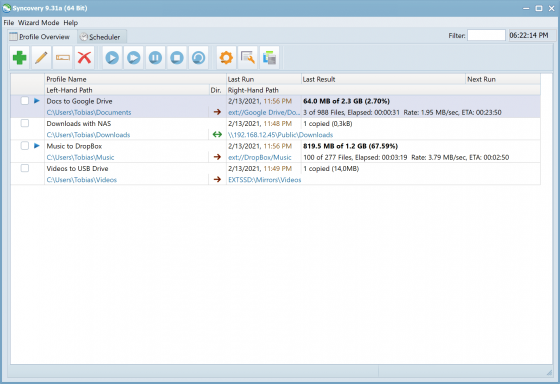
Create multiple Jobs
Create as many different jobs as you need. Run them manually (with Sync Preview), or let the scheduler run them automatically.

Handle complex Tasks
Syncovery is rich in features, including real-time sync, compression, encryption, email notifications, and much more. It can be extended via PascalScript.

Wizard Mode makes it easy to create your first profile.
Create your first sync or backup job step by step, with explanations of the main settings you need to make. Each job (or profile) works with two paths – source and destination, or just the left and right path (since profiles can be 2-way copy tasks also).

Extremely Fast Scanning
Syncovery’s multi-threaded folder listing algorithm provides an unparalleled speed, and easily handles millions of files and huge numbers of folders. Even more speed can be gained with our Destination File List Cache and Remote Service features.

Block Level Copying
This will help you save bandwidth as well as backup space. Syncovery can detect changed blocks in large files, and copy only these. The detection works by keeping checksums in a database, or with the help of the Syncovery Remote Service, or by using our revolutionary File System Monitoring Service (the File Sytem Monitoring Service is Windows only).

Real-Time Synchronization
Real-Time Synchronization will make sure that changes are synced quickly. Syncovery listens to file system events and quickly performs the appropriate actions. For cloud servers, it can use polling to detect changes. These features are available on Windows and macOS only.

SmartTracking
The SmartTracking sync mode is frequently used in two-way sync jobs. It can detect moved files, deleted files, and conflicts (files changed on both sides).

Versioning
Syncovery allows you to keep multiple versions of modified files, allowing you to restore your files from an earlier date. The restore date can be chosen for individual files or multiple files, in our Restore Wizard.

File Server Migration
Syncovery’s advanced NTFS copying features, high speed, and scaleability enable you to perform large-scale migrations. Read our new, comprehensive Server Migration Guide.

Release Name: Syncovery Premium 12.0.5.29
Size: 101.1 MB
Links: HOMEPAGE – NFO – Torrent Search

Download: RAPiDGATOR

5 Comments
June 13

RightFont 10.0.1 (4541)

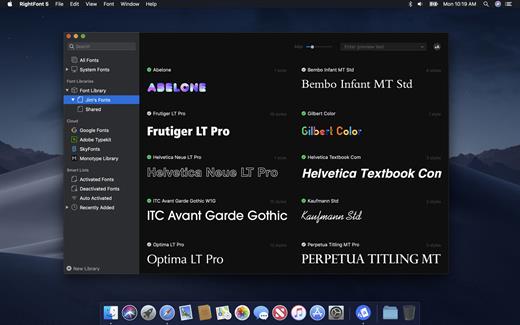
RightFont is a lightweight font manager with a clean, beautiful interface. It offers many features which help you manage all your local fonts with ease.


  • Font-management access anytime directly from your menubar
  • Mark any font as starred with a click
  • Create and manage font lists
  • Access fonts directly in Adobe Creative Cloud (Photoshop, Illustrator, InDesign, Flash, AfterEffect), Sketch, etc.
  • Instant search results as you type
  • Change font preview and font size in real-time
  • Find the right font faster
  • Easily filter fonts by classifications (sans serif, serif, script, etc.), font width and font weight. Even Google fonts and Adobe TypeKit fonts are listed separately for you.
  • Effortless integrations – You can use RightFont with design software. With a simple double-click, the font used in your text layer can be changed.
What’s New

Version 10.0.1:


  • Release notes were unavailable when this listing was updated.
Compatibility

macOS 10.13 or later
Apple Silicon or Intel Core processor


Release Name: RightFont 10.0.1 (4541)
Size: 18.6 MB
Links: HOMEPAGE – NFO – Torrent Search

Download: RAPiDGATOR
7 Comments
June 13

PDF Merge & PDF Splitter + 6.4.5

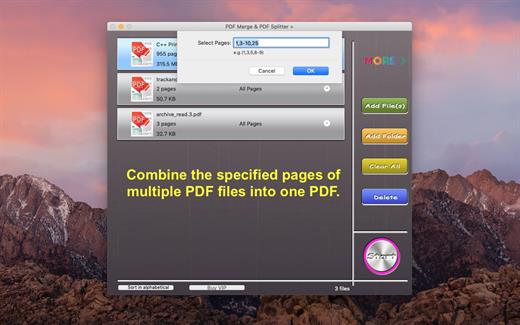
PDF Merge and PDF Splitter + is a very easy-to-use app that allows you to quickly merge multiple PDFs into one PDF or split specified pages into a new PDF.

Key Features:


  • Merge multiple PDF files into one PDF.
  • Merge password-protected PDF files, but you must know the password.
  • Support drag and drop.
  • Support drag item to sort.
  • Sort in alphabetical.
What’s New

Version 6.4.5:


  • Release notes were unavailable when this listing was updated.
Compatibility

macOS 10.12 or later


Release Name: PDF Merge & PDF Splitter + 6.4.5
Size: 6.5 MB
Links: HOMEPAGE – NFO – Torrent Search

Download: RAPiDGATOR

4 Comments