Please REGISTER or RENEW your account on RAPiDGATOR.net and support us by doing through all RAPiDGATOR working download links on main posts...
July 30

Guitar Pro 8.1.5 Build 31

Guitar Pro 8 is the ultimate guitarist’s toolbox and the leading software for reading and editing tabs. For 25 years, Guitar Pro has been helping musicians worldwide learn to play the guitar, compose songs, and transcribe and edit songbooks.
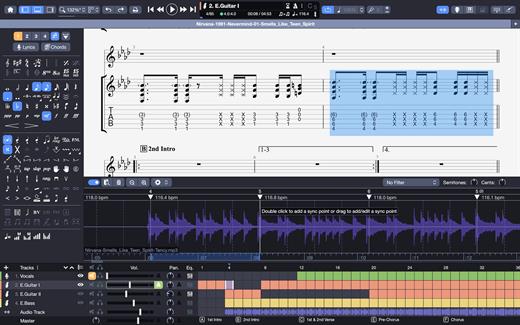
This new version of Guitar Pro offers many improvements and new features to users. This time, we have made our best to offer you a better product without changing the user experience.

→ Guitar Pro’s features:

Play accompanied
Hit play and learn your favourite songs accompanied by the score.

Create
Edit your scores easily with numerous editing tools such as scale and chord diagrams.

Craft your sound
Play with more than 100 instruments to create your own tabs: guitars, basses, drums…

Customize your tabs
Create professionally designed sheet music for your songbooks or students.

Share
The Guitar Pro file is the most widespread and shared among musicians and guitarists worldwide.

Enlarge your repertoire
Subscribe to mySongBook to access thousands of scores for all levels directly in the software.

→ TABLATURE AND SHEET MUSIC PLAYER
Learn faster, develop your technique and create your repertoire of songs by downloading any tablature online.

Learn songs without knowing music theory
Guitar Pro lets you choose your notation, whatever the instrument: tablature, standard notation, or rhythmic notation. No need to master music theory to learn a song.

Use advanced playback features
Metronome, visual countdown, looping, solo/mute, speed trainer… Guitar Pro offers many tools to help you learn.

Take advantage of the chord and scale tools
Guitar Pro includes libraries containing thousands of chords and scales to develop your creativity.

And many other playing features


  • Use the audio player to accompany you and learn faster: loop, speed trainer, metronome, visual countdown, etc…
  • 3 musical notations are available: tablature, standard and rhythmic notation
  • Find hundreds of thousands of free tablatures on the internet
  • Use the virtual guitar neck to find notes more easily and to visualize left-hand positions
  • Import an audio track to make your file a real backing track
  • And many others…

→ TABLATURES EDITOR
Compose complete songs, transcribe songs, and create educational content for your students. Guitar Pro has been the reference in tablature editing for many years. We continue to innovate in order to offer you more practical editing features to save you time.

Create tablatures with many instruments
You can compose for dozens of different instruments. Guitar Pro allows you to edit instruments from 3 to 10 strings, keyboards, drums, percussion, and much more.

Enjoy specific guitar technique notations
Bends, vibratos, slides, palm mute, let ring… every effect or notation element can be edited in Guitar Pro. Express your creativity to the fullest!

Use the audio track to transcribe faster
Import an audio track into your project to create realistic backing tracks. You can also use your audio track to transcribe songs more easily.

And many other editing features


  • Set the number of strings (from 3 to 10) and the tuning of your guitars
  • Easily set tempo, rhythmic signature and automation
  • Use the chords and scales tools to compose more easily
  • Use the command palette to edit faster
  • Transpose or detune your scores at any time
  • And many others…

→ AUDIO ENGINE AND SOUND OPTIONS
Create backing tracks and emulate more than 100 instruments: guitars, basses, drums, pianos, ukuleles, winds, brass or traditional instruments.

Virtual effects chain
Reverb, chorus, delay, compressor, EQ, tremolo… Guitar Pro comes with dozens of legendary pedals to help you fine-tune your sound.

Mixing each track and mastering your project
Apply mixing and panning effects to each track to create a consistent mix for your song. Mastering options also allow you to improve the sound of your tabs.

Adding an audio track to your project
The audio track is an excellent way to make your scores more realistic. For example, you can ask your singer or drummer to record himself and then import his audio file into Guitar Pro to create a pre-prod of your future song.

And many other sound features


  • Use the detune feature to try another tuning in one click
  • Mix MIDI and RSE (Realistic Sound Engine) on any track
  • Manage pan and volume automations to create realistic renderings
  • Use the focus/unfocus mode to quickly isolate one track from the others
  • Fine-tune the sound of each note to create more precise and realistic scores
  • Mix each drum element separately
  • And many others…

→ LAYOUT OPTIONS
Create professionally-looking sheet music to edit your own songbooks or share your files.

The exceptional quality of the scores
Guitar Pro respects the standards of music writing and allows you to enjoy a very high resolution for your scores.

Use the design mode for a clean layout
The design mode allows you to set up each element of your score: spacing between notes, bar alignments, etc…

Setup all the elements of the partition
The stylesheet gives you the possibility to configure the fonts and graphic aspects of your scores to make them unique and professional.

And many other layout features


  • Add detailed information about your scores (copyright, author, etc…)
  • Display chord or scale diagrams on your files
  • Add lyrics or indications on the score
  • Align your bars easily with the new design mode
  • And many others…

→ COLLABORATE AND SHARE
Use the most popular file extension on the market, download and access thousands of free tablatures on the internet, and share your work easily with other musicians.

Music teacher
Create your teaching materials quickly and train your students with interactive scores. Share your knowledge with an effective teaching tool.

Bands, solo artists and composers
Collaborate with other musicians and compose your future hits together. Guitar Pro allows you to move forward outside of your weekly rehearsal!

Journalists and bloggers
Edit the scores that will be published in your future educational pages of your magazines and blog posts.

Multi-instrumentalists
Guitar Pro is not just for guitarists! Edit or play scores for bass, drums, piano, ukulele, violins and much more!

Students
Learn to play in rhythm and accompanied by virtual instruments. Slow down the tempo, listen and visualize the score to progress at your own pace.

Influencers and content creators
Create, edit and share your scores with your community.

And many other sharing features


  • File import formats: .gtp, .gp3, .gp4, .gp5, .gpx, .gp, PowerTab, MIDI, ASCII, TablEdit, MusicXML and audio (.mp3, .wav)
  • File export formats: .gp5, .gp, .gpx, PowerTab, MIDI, ASCII, TablEdit, .mp3, .wav, FLAC, OGG, AIFF and .pdf
  • Use the password file lock feature to secure your work
  • And many others…

→ mySongBook SCORES LIBRARY
Access thousands of quality scores made by professional transcribers.

Subscribe to get access to a lot of “Full Score” with tracks for bass, drums, vocals and other instruments. Play solo guitar arrangements, and duets for voice and guitar in many musical genres such as Rock, Pop, Metal, Funk, Reggae, Blues, Jazz, Classical, Country and many more.

New tabs added every week
The mySongBook team of transcribers offers you new content every week to feed your passion for the guitar!

Play accompanied by scores containing an audio file
Discover our new file format including tablature for all tracks and a backing track for the voice.

Access your tabs directly in Guitar Pro
The mySongBook library is directly integrated into Guitar Pro. You can access your files directly in the software. No need to search for badly transcribed tablatures on the Internet.

And many other features are available on mySongBook


  • Access many arrangements: full scores, guitar and vocals, solo guitar, simplified songs, and scores with an integrated audio track to play along with a backing track
  • Learn to play all the tracks of your favourite songs: rhythm and solo guitars, bass, drums, piano, vocal track
  • Learn more easily with our simplified scores specially made for beginning musicians
  • Access your mySongBook tablatures on the Guitar Pro applications for iOS and Android compatible with smartphone and tablet
  • And many others…
What’s New

Version 8.1.5:


  • Release notes were unavailable when this listing was updated.
Compatibility

macOS 10.13 or later.
Apple Silicon or Intel Core processor


Release Name: Guitar Pro 8.1.5 Build 31
Size: 1000 MB
Links: HOMEPAGE – NFO – Torrent Search

Download: RAPiDGATOR

5 Comments
July 30

Nik Collection 9.1.0

The creative photo-editing software designed by photographers, for photographers. The ideal solution for addressing every aspect of creative photography—from color and white-and-black photography to analog simulation. Add the power of the Nik Collection by DxO to your workflow today and create stunning images faster. The most complete collection of plug-ins from Nik Collection by DxO companies using proprietary U Point, which allows you to subtly adjust the brightness, contrast, color saturation and other parameters of individual objects or areas of the photograph.

8 Premium Plugins for Photoshop and Lightroom Classic to Supercharge Your Photos

Nik Color Efex

Countless striking filters for color, tone, contrast, and more

Nik Silver Efex

Darkroom-inspired controls for the ultimate in black-and-white photo editing

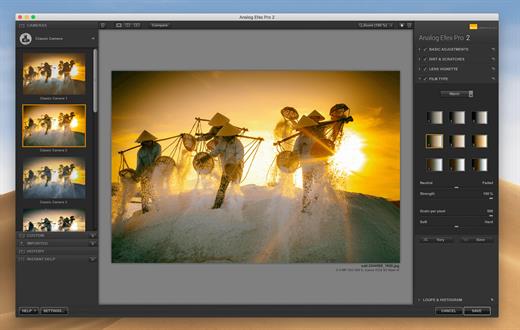
Nik Analog Efex

Dive into history and discover endless analog effects to give your photos a vintage feel

Nik Viveza

Shape color, manipulate tones, be bold, and inject passion

Nik Dfine

Remove digital noise exactly where required, without destroying the detail

Nik Sharpener

Enhance images with perfect sharpness, exactly where you need it

Nik HDR Efex

Harmonize intense highlights and shadows for photos with a gorgeous dynamic range

Nik Perspective

Fix perspectives and distortion for geometric perfection or creative effect

What’s New

Version 9.1.0:


  • Release notes were unavailable when this listing was updated.
Compatibility

macOS 11.6 or later


Release Name: Nik Collection 9.1.0
Size: 3.4 GB
Links: HOMEPAGE – NFO – Torrent Search

Download: RAPiDGATOR
3 Comments
July 30

Proxyman 6.14.0

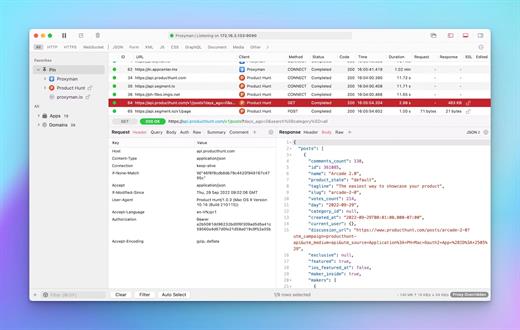
Proxyman is a high-performance macOS app, which enables developers to view HTTP/HTTPS requests from apps and domains.

Features


  • ? Native macOS app. Written by Swift, Objective-C. Powered by Apple SwiftNIO for the high-performance network application.
  • ? Fully support Apple Chip (e.g M1, M2, M1 Pro/Max).
  • ? Built for macOS Monterey & Ventura.
  • ✅ Hassle-free Intercept HTTP/HTTPS requests/response and WebSocket from Web Browsers, iOS, and Android devices.
  • ✅ Modern and intuitive UI
  • ? Multiple filters
  • Comprehensive Guideline to set up with iOS simulator and iOS and Android devices.
  • Basic debugging tools: Compose, Repeat, Wildcard/Regex Filter, Multiple Filters, Customize Columns, Toolbar…
  • Advanced Tools: Breakpoint, Map Local, Map Remote, Backlist, External Proxying, No Caching, Protobuf, Clear Cache, Custom Certificates, Scripting, Network Conditions, Reverse Proxy, Diff, Access Control etc
  • Automatic Setup for Backend Development: Auto capture HTTP(s) traffic from NodeJS, Ruby and Python.
  • macOS 10.15+
What’s New

Version 6.14.0:


  • Release notes were unavailable when this listing was updated.
Compatibility

macOS 10.15 or later


Release Name: Proxyman 6.14.0
Size: 54.5 MB
Links: HOMEPAGE – NFO – Torrent Search

Download: RAPiDGATOR

5 Comments
July 30

KONTAKT 8.12.0

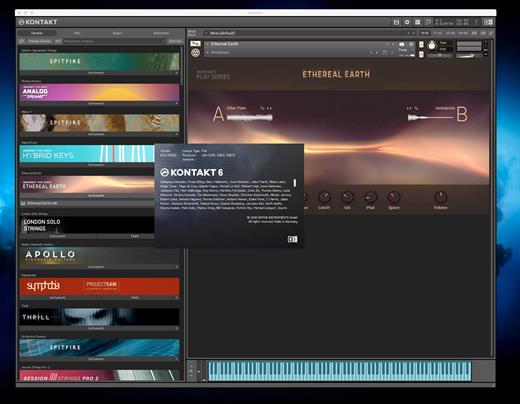
KONTAKT 8 The virtual instrument platform reinvented.
Imagine any sound – Kontakt lets you find it, create it, and transform it. The latest edition of our revolutionary sampling platform combines a brand-new set of intelligent tools with countless sound design options, redefining how you generate ideas and make music. A huge choice of sound. Kontakt hosts the world’s largest range of virtual instruments. With thousands of libraries, it’s the gateway to quality sound from Native Instruments, our official partners, and scores of indie developers. Plus, everything is completely tweakable, so you can make any sound your own.

A huge choice of sound

Kontakt hosts the world’s largest range of virtual instruments. With thousands of libraries, it’s the gateway to quality sound from Native Instruments, our official partners, and scores of indie developers. Plus, everything is completely tweakable, so you can make any sound your own.

What’s new in Kontakt 8?

Our most feature-packed release yet is here to transform the way you generate, modulate, and playback sound. Plus, it’s packed with performance updates so you can work faster than ever.

Smash writer’s block

Tools add a completely new layer of creative features to get the ideas flowing. And they work with any Kontakt instrument, old and new. For our first drop, we’re launching MIDI content and randomization features with Chords and Phrases, designed to spark new ideas and get you in the zone fast.

Fast and fun loop control

Leap is an ultra-fast and playful way to play and manipulate loops. Spark fresh ideas, sprinkle in expressive performance effects, or just jam. Breathe new life into your sample collection or try something totally fresh with our new Leap Expansions series, starting with 12 curated packs for specific genres and styles.

Get going with hundreds of included instruments

Kontakt’s Factory Library comes packed with over hundreds of meticulously sampled instruments. Get started with a huge playable and tweakable selection of acoustic and electronic options, including the renowned collection from Orchestral Tools, plus Hybrid Keys.

Dream it, build it

All your favorite Kontakt instruments are built right here. The powerful feature set makes Kontakt the first choice for instrument developers worldwide, and it just got even bigger with enhanced synth capabilities, including real-time wavetable, frequency modulation, and ring modulation oscillators.

What’s New

Version 8.12.0:


  • Release notes were unavailable when this listing was updated.
Compatibility

macOS 13.0 or later


Release Name: KONTAKT 8.12.0
Size: 1.7 GB
Links: HOMEPAGE – NFO – Torrent Search

Download: RAPiDGATOR
4 Comments
July 30

Movist Pro 2.17.1

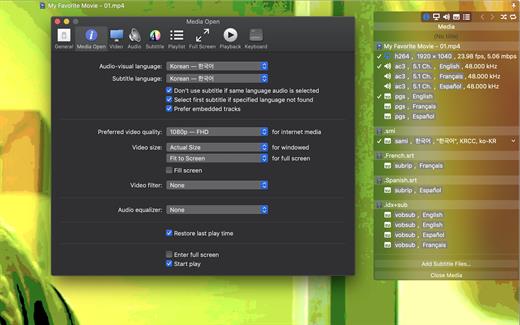
Movist is a movie player based on QuickTime and FFmpeg.

Features:


  • Supports QuickTime and FFmpeg
  • Customizable high quality caption
  • Supports smi, srt format captions
  • Playlist support
  • Media playback control
  • Full screen control panel
  • Simple user interface
  • Universal binary
Additional features for Movist Pro

  • Safari, Chrome Browser Extension
  • Supports Web Meida such as YouTube, Ted and so on
  • Picture in Picture 기능
  • Open URL
  • Default Application Setting
  • No Access Folder Permissions Required
  • Supports Networm Server such as FTP, SFTP, WebDAV and SMB (to be added)
  • Supports Media Keys (to be added)
  • Supports AirPlay (to be added)
What’s New

Version 2.17.1:


  • Release notes were unavailable when this listing was updated.
Compatibility

macOS 10.13 or later
Apple Silicon or Intel Core processor


Release Name: Movist Pro 2.17.1
Size: 63.6 MB
Links: HOMEPAGE – NFO – Torrent Search

Download: RAPiDGATOR

5 Comments
July 30

Kaleidoscope 7.0

Kaleidoscope spots differences in text and image files.

Kaleidoscope Features


  • General

    • Single window workflow: One tab per comparison
    • Compare two+ files: Add any number of files per tab
    • Always up to date: Auto-refreshes when files change
    • File Shelf: Quickly go from file to file
    • Path Bar: See where your files are
    • Keyboard shortcuts: Every action has a shortcut
  • Text Scope

    • Supports any text file: Plain text, source code, HTML, etc.
    • Clear comparisons
    • Three layouts: Blocks, Fluid, and Unified
    • Compare documents: Imports text from .doc and .rtf files
    • Instant search
    • Change Stepper: Quickly jump from change to change
    • Highlights: Added, deleted and changed text
  • Image Scope

    • All popular image file formats: JPEG, TIFF, PNG, PSD and more.
    • Four connected layouts: Two-Up, One-Up, Split, and Difference
    • Comprehensive image support: RGB/CMYK/LAB, alpha, any size.
    • Multi-touch support: Smooth scrolling and pinch to zoom
    • Customizable environment: Change background color, difference mask and checkerboard settings
    • Two difference mask modes: Spot absolute or relative changes
  • Integration

    • Git, Mercurial, SVN, and Bazaar: Integrate with a couple of clicks
    • Versions
    • TextMate SVN
    • Cornerstone
    • ksdiff Command-line tool: Integrate with practically anything
What’s New

Version 7.0:


  • Release notes were unavailable when this listing was updated.
Compatibility

macOS 11.1.0 or later
Apple Silicon or Intel Core processor


Release Name: Kaleidoscope 7.0
Size: 43.9 MB
Links: HOMEPAGE – NFO – Torrent Search

Download: RAPiDGATOR
5 Comments
July 30

Cotypist 2026.3.1

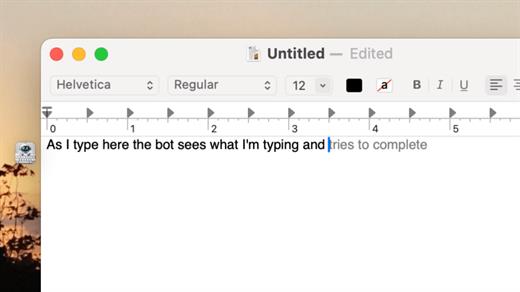
Cotypist is an innovative, AI-powered writing assistant designed to speed up your typing and enhance your writing flow across all your favorite macOS applications. Unlike traditional AI tools that force you to copy-paste prompts into a separate chatbot, Cotypist works seamlessly in the background, predicting your next words inline as fast as you can think them.

Key Features


  • Works Everywhere: It integrates perfectly into Apple Mail, Slack, Notion, Obsidian, Safari, Chrome, and most other Mac text fields with zero per-app configuration required.
  • Learns Your Voice: Rather than replacing your creativity with a robotic wall of text, Cotypist learns your unique vocabulary, phrasing style, and names over time.
  • Inline Typo & Emoji Fixes: It automatically spots typos as you write and offers instant corrections. You can also type a colon (:) to get smart emoji suggestions without opening a separate picker.
  • Highly Inclusive: It is an excellent accessibility tool for non-native English speakers, dyslexic typists, and anyone looking to reduce wrist strain or carpal tunnel risks.
What’s New

Version 2026.3.1:


  • Release notes were unavailable when this listing was updated.
Compatibility

macOS 14.0 or later


Release Name: Cotypist 2026.3.1
Size: 13 MB
Links: HOMEPAGE – NFO – Torrent Search

Download: RAPiDGATOR

5 Comments
July 30

PullTube 1.8.6.36

Sharing videos via online hosting services, such as YouTube or Vimeo is a common practice, yet streaming the content might not work as expected if you have a slow internet connection.

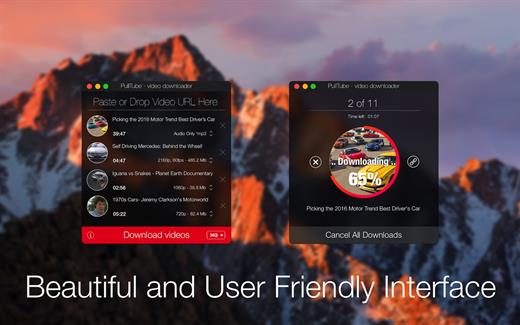
PullTube offers you the possibility to download videos from both sources (YouTube and Vimeo), while other platforms might be added at a later time. The app can handle playlists, allows you to select the output quality, and can even extract only the audio.

Video downloader that can import links with drag and drop and can detect playlists

The PullTube user interface is represented by a small window where you get to quickly paste the video URL. Note that you can also add a video by dropping the link on top of the PullTube window.

Worth mentioning is that, if PullTube detects that the video is part of a playlist, will offer to download the entire collection: will fetch the data for each entry and handle the downloads consecutively.

Download videos hosted on YouTube or Vimeo to different output sizes and formats

PullTube will start fetching the video data right away so you can see the video name, duration, and a small thumbnail. When configuring a download, you get to select the output quality (highest, 4K, HD or regular with different resolutions) or choose to export only the audio to an M4A or MP3 file.

Via the PullTube Settings panel, you can change the default download location and the default MP3 bitrate (320Kbps, 256Kbps, 128Kbps, 64Kbps). You can also add the quality info to the video’s name and choose to quit the app when all downloads are completed.

Get offline access to videos hosted online in just a few steps

PullTube proposes a streamlined workflow for quickly downloading videos from YouTube or Vimeo, provides control over the output quality, and enables you to extract the audio to MP3 or M4A files.

However, during our tests, we have noticed that PullTube has trouble completing the download when handling videos that are longer that 2 minutes. The process stops without any explanation, and you can eventually complete the task, but you need to add the link to download tool multiple times.

What’s New

Version 1.8.6.36:


  • Release notes were unavailable when this listing was updated.
Compatibility

macOS 10.12 or later


Release Name: PullTube 1.8.6.36
Size: 249.8 MB
Links: HOMEPAGE – NFO – Torrent Search

Download: RAPiDGATOR
6 Comments
July 30

HyperSnap 10.2.1

Description: HyperSnap 10 is the fastest and easiest way to take screenshots from Windows. HyperSnap combines the power of a first-class screen capture application with an advanced image editing utility, and editable text capture through OCR - wrapped into one easy-to-use tool. Windows 10 and 11 only.

HyperSnap is perfect for capturing images and texts that you want to include in your Help system, online tutorials, manuals, training handouts, presentations, marketing materials, Web pages, emails and more. Use HyperSnap to quickly share a picture-perfect representation of anything on your screen.

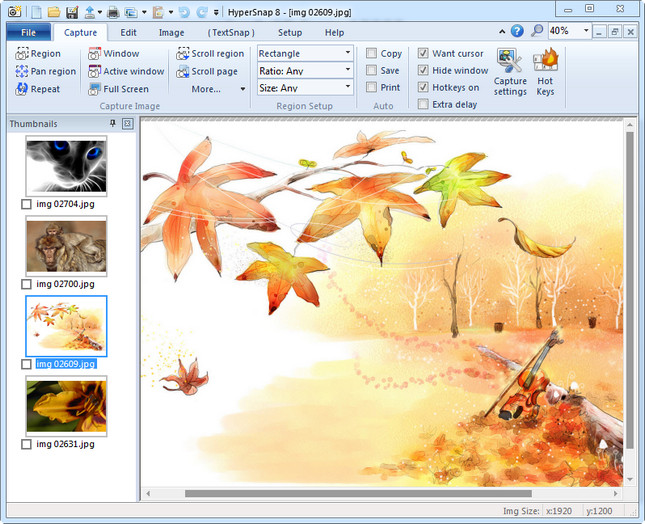
HyperSnap is versatile and extremely easy-to-use. You can switch between modern "ribbon" interface shown on the image above, or tranditional menu and toolbars.

Top Features
Image captures from any where on the screen or multiple monitors, in any shape or size.
New & powerful image capture, editing, annotation and  manipulation tools. Objects drawn over images can now be selected, edited, shown and hidden, moved, deleted any time. A new native file format saves the objects drawn for further editing later, or save a standard image and have the object "imprinted" permanently on them.
Unlimited undo/redo.
Capture dropdown menus and lists with hotkey feature or delayed capture.
Image stamps, frames, drop shadow, free-hand capture, FTP server uploads, more.
Automatic color substitution.
Non-rectangular window capture.
Button Capture  - perfect for professional technical writers who need to snap and document dozens of buttons!
Auto-scrolls and concurrently captures long web pages and other. documents, enabling it to grab more than is visible on the screen.
Tightly integrates with the MS Windows clipboard to automate repetitive tasks - will even automatically PASTE capture images where needed!
Automatically saves your captures to graphics files.
Doubles as effective image viewer, format converter (over 20 image formats supported).
Fully customizable user interface. Rearrange menus and toolbars any way you want, assign any keyboard shortcuts you like, tear off menus to create instant toolbars, even control HyperSnap with voice commands!

Release Name: HyperSnap 10.2.1
Size: 25.8 MB
Links: HOMEPAGE – NFO – Torrent Search

Download: RAPiDGATOR
5 Comments
July 30

KLS Backup Professional 2025 v14.0.5

Description: KLS Backup 2025 is a powerful backup and synchronization program that allows you to backup or synchronize your data to local and network drives or cloud storage.

The backup files can be stored uncompressed or compressed in standard Zip or 7z format. KLS Backup 2025 can backup: files and folders from local drives, network locations or cloud storage, databases, mail boxes and other application specific data (profiles). Advanced version management, makes possible to find and restore any backup version within seconds. The synchronization feature allows you to easily synchronize the contents of two different folders.

Key features
Easy-to-use but powerful integrated workspace
Backup data from local and network drives, cloud storage, SFTP, FTP and WebDAV servers
Backup of databases (Microsoft SQL Server, MySQL) and application data (Outlook, Thunderbird)
Backup to local and network drives, SFTP, FTP and WebDAV servers, CD/DVD media
Backup to cloud: Microsoft Azure, Amazon S3, Google Cloud Storage, OpenStack, OneDrive, Dropbox
Full, incremental and differential backups
Backup of open files and NTFS permissions
Highly configurable backup profiles and plugins
Standard Zip compression, Zip64 support, 7z and a custom encryption format
Powerful archive management and search functions
Selective restore of files and folders to original or custom locations
Secure archives with AES encryption, SSL/TLS support for remote transfers
Two-way file synchronization engine with version support
Automated backups with the built-in scheduler service
Detailed backup logs and email notifications
Web Interface (Monitor)
Command Line Interface (Console)

System requirements:
Windows 11/10 32/64bit (all editions)
Windows Server 2022/2019/2016/2012R2 (all editions)
Hard drive with at least 200MB free disk space for installation
Internet access

Release Name: KLS Backup Professional 2025 v14.0.5
Size: 51.7 MB
Links: HOMEPAGE – NFO – Torrent Search

Download: RAPiDGATOR
4 Comments