Please REGISTER or RENEW your account on RAPiDGATOR.net and support us by doing through all RAPiDGATOR working download links on main posts...
July 17

CleanShot X 4.8.9

CleanShot is the ultimate screen recording app made for macOS. With its rich toolkit, CleanShot actually feels like 6 apps in one. You can use it to swiftly capture Mac’s screen without desktop icons, record and trim video, annotate, save screenshots to dedicated cloud, and more.
Features:

CleanShot Cloud

You can instantly save your screen captures to CleanShot Cloud, dedicated screenshots hosting integrated with the app. Right from the quick menu, upload your screenshot to the cloud, and get a link to it in a click.

Hide desktop icons

CleanShot hides desktop icons, so that you can capture your Mac’s screen on the spot, without wasting time on a cleanup. If you need a quick capture, toggle the icons and bring them back once you’re finished. You can even set a custom wallpaper like an image or plain color for your screenshots.

Record screen

CleanShots lets you choose between recording a video or a GIF, whether you capture a specific window, part of the screen, or fullscreen. Even set your custom dimensions before hitting the Record button. You can also disable desktop notifications for when you’re recording.

Quick Access Overlay

Right after taking a screenshot, you’ll see a small pop-up window appear on the screen. It’s the shortcut to viewing, annotating, or sharing whatever you’ve just captured. Essentially, Quick Access Overlay gives you an instant editing toolkit, plus saves you from searching and reopening screenshots.

Simple yet powerful

CleanShot teaches you to use simple actions while capturing the screen — yet provides tons of options to do it. You can grab the area, fullscreen, window, or even a scrolling window. Set a timer if you need a few seconds to capture the right moment. In your hands, it caters for your needs.

Annotate, highlight or blur

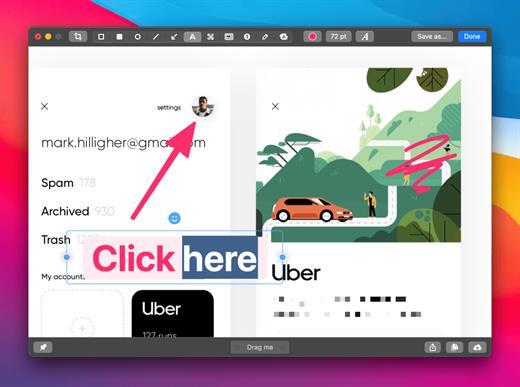
No screenshot is perfect. Using CleanShot’s built-in editor, you can highlight or hide specific parts of your screenshots as well as add annotations flexibly. Just click on the pencil icon in the Quick Access Overlay to edit screen captures in a flash.

What’s New

Version 4.8.9:


  • Fixed an issue that caused CleanShot to crash during screen recording
Compatibility

macOS 10.14.4 or later
Apple Silicon or Intel Core processor


Release Name: CleanShot X 4.8.9
Size: 45.2 MB
Links: HOMEPAGE – NFO – Torrent Search

Download: RAPiDGATOR
5 Comments
July 17

Text Workflow 2.8.0

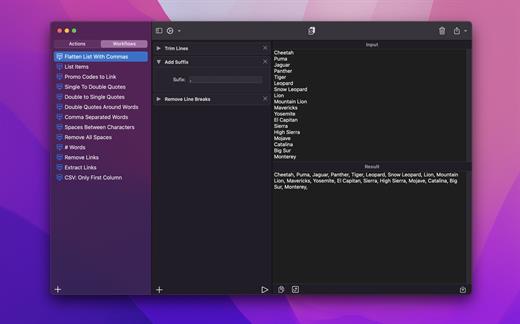
A powerful and easy to use tool that will help you transform your text. Text Workflow removes the need to perform repetitive tasks manually on your text.

Combine transformation actions to create powerful automations for your text. Save your transformation workflows to use them any time you want.

Available text transformation actions

• Add prefix
• Add suffix
• Replace text
• Sort lines


  • alphabetically
  • reverse
  • shuffle
  • by length
    • Trim Lines
    • Add line number
    • Break lines
  • after every word
  • after every sentence
  • after text
  • before text
    • Convert Case
  • uppercase
  • lowercase
  • title case
  • camel case
  • pascal case
    • Delete Characters
  • selected characters
  • non-alphanumeric
  • numeric characters
  • non numeric
  • tabs
  • spaces
  • characters after position
  • characters before position
  • last characters
  • emojis
  • characters after text
  • characters before text
    • Insert Text
  • at first line
  • at last line
  • every line (position)
  • before every word
  • after every word
  • before text
  • after text
  • after every character
    • Delete Lines
  • containing text
  • starting with text
  • not containing text
  • not starting with text
    • Remove line breaks
    • Remove multiple spaces
    • Remove duplicates lines
    • Remove duplicates words
    • Remove empty lines
    • Delete/Filter words
  • containing text
  • starting with text
  • not containing text
  • not starting with text
    • Spell out lines
    • Get Statistics
  • count characters
  • count words
  • count lines
    • Encode/Decode
  • Base64
  • URL
    • Encrypt/Decrypt Text with password
    • Beautify JSON
    • Beautify XML

You can combine all these actions to create your custom transformation workflows!
Export your workflows to file and share them easily with other users!

What’s New

Version 2.8.0:


  • Release notes were unavailable when this listing was updated.
Compatibility

macOS 11.2 or later


Release Name: Text Workflow 2.8.0
Size: 17.2 MB
Links: HOMEPAGE – NFO – Torrent Search

Download: RAPiDGATOR
4 Comments
July 17

SpamSieve 3.3.1

SpamSieve is a robust spam filter for major email clients that uses powerful Bayesian spam filtering.

SpamSieve understands what your spam looks like in order to block it all, but also learns what your legitimate messages look like to avoid confusion. SpamSieve only marks spam in your email client so you never lose any mail.

The following is a partial list of SpamSieve’s features, so that you can quickly see what it can do and how it’s unique:


  • Powerful Bayesian spam filtering results in high accuracy and almost no false positives. It adapts to the mail that you receive to get even better with time. Some other e-mail programs include Bayesian filters, but SpamSieve is more accurate.
  • Integrates with your e-mail program for a superior user experience. Plus, you get the same great filtering if you ever switch e-mail programs or use more than one at a time.
  • SpamSieve works with any mail provider/host. It filters all your mail accounts. There is no extra charge for additional addresses or devices.
  • SpamSieve running on your Mac can keep the spam off your iPhone/iPad, and you can even train SpamSieve from afar.
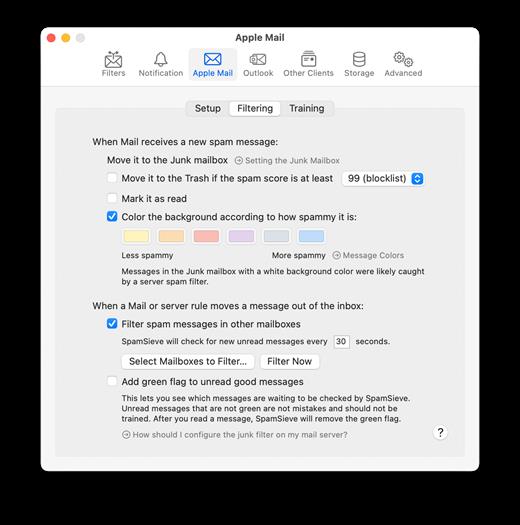
  • Colors show how spammy each message is, so you can quickly focus on the borderline ones if you want to check SpamSieve’s work.
  • Integrates with the macOS Contacts app (and also Eudora’s and Entourage’s address books) so that messages from friends and colleagues are never marked as spam.
  • Automatically maintains a blocklist so that it can instantly adapt to spam messages sent from particular addresses, and catch 100% of them.
  • Automatically maintains a whitelist to guarantee that messages from particular senders or mailing lists are never marked as spam, without cluttering your address book with these addresses.
  • You can customize the whitelist and blocklist, adding sophisticated rules that match various message headers, or the message body. The rules can match text in a variety of ways, including using regular expressions.
  • Can use the Habeas Safelist, which indicates messages that are not spam, as well as the “ADV” subject tag indicating that a message is spam.
  • Many spammers encode the contents of their messages so that filters cannot see the incriminating words they contain. SpamSieve can decode and look inside these messages. Optionally it can mark them all as spam, on the theory that legitimate senders do not try to obscure their messages.
  • SpamSieve keeps track of how accurate it is, how many good and spam messages you receive, and how these numbers change over time.
  • Turn off new-mail notification in your e-mail program, and let SpamSieve notify you only when you receive non-spam messages.
  • The corpus window and log let you see how each spam message was caught.
  • Unlike server-based spam filtering services, your mail data stays on your own Mac, so your privacy is preserved.
  • SpamSieve supports AppleScript, so you can connect it to additional apps and fully integrate it into a custom workflow.
What’s New

Version 3.3.1:


  • Release notes were unavailable when this listing was updated.
Compatibility

macOS 10.10 or later


Release Name: SpamSieve 3.3.1
Size: 62.5 MB
Links: HOMEPAGE – NFO – Torrent Search

Download: RAPiDGATOR

4 Comments
July 17

PDF Reader Pro 5.3.5

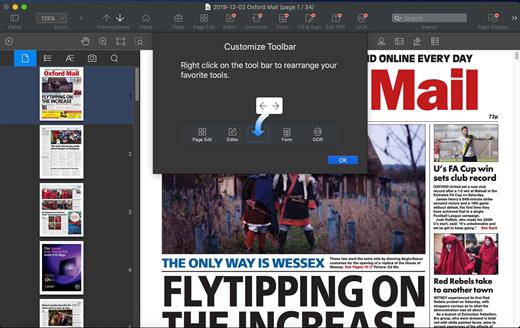
PDF Reader Pro is a PDF editing application that has a wide variety of tools. Building on solid features such as annotation, comment, OCR, Convert, form filling and bookmarking, PDF Reader Pro allows you to maneuver through your PDF files. PDF Reader Pro Edition offers even more – combining multiple documents, splitting your PDF into several files, inserting pages from another PDF and PDF files. The app has Text-to-Speech functionality that can read the doc to you in six different languages. You can simply sync your files with Dropbox to make the best use of PDF Reader Pro Edition. The app has a presentation mode that will allow you to showcase your PDF document to others.

Now you can enjoy the best PDF to Office Converter! Export from PDF to Microsoft Word (.docx), PowerPoint (.pptx), Excel (.xlsx), RTF, HTML, Text, Image, CSV, and more Offline

Support free trials and special education discounts

Main features:

  • Annotate PDFs with highlights, underlines, lines, circles, freehand writing, and so much more.
  • Create & Edit & Fill PDF Forms. Create fillable PDF Forms from interactive field objects, such as buttons, check boxes, radio buttons, list boxes, and drop-down lists.
  • Create tables. A table consists of rows and columns of cells. A cell is like a text frame in which you can add text, or other tables. You can use headers or footers to repeat the information at the top or bottom of each divided portion of the table.
  • Sign – Create multiple signatures for any situations with trackpad, keyboard or images
  • Insert stamps, comments and notes.
  • Link – Add hyperlinks to redirect other destinations, and edit your links as you like
  • Export from PDF to Microsoft Word (.docx), PowerPoint (.pptx), Excel (.xlsx), RTF, HTML, Text, Image, CSV, and more Offline
  • PDF to Image. Convert PDFs to JPG, PNG, bmp, gif, tiff, tga and jp2
  • OCR (Optical Character Recognition). Convert scanned PDF & images into editable and searchable PDFs or TXT files. 50+ languages supported!
  • Annotation history – Access important sections of documents instantly.
  • Edit pages with headers, footers, or page numbers
  • Add PDF watermarks to the background of pages
  • Bates number
  • Combine multiple files into one document
  • Insert another file (entire files or specific page ranges) into the existing file
  • Replace PDF pages from another PDF file
  • Merge, Split, Extract, Append, Rotate, delete, replace, and crop pdf pages
  • Directly present your PDFs with annotations
  • Supports radio boxes, check boxes, combo boxes, and list boxes
  • Reading modes: full-screen, page-fit, horizontal or vertical orientation, continuous and page break
  • Bookmark specific pages or sections of PDFs
  • Create, Edit and Search outlines to easily navigate through the whole file
  • Night mode supported
  • Reduce PDF size to make your documents much lighter
  • Create a new PDF by importing your clipboard content
  • Select a passage or document to be read aloud by the TTS engine
  • Set a password and authorization to edit, modify or print PDFs
What’s New

Version 5.3.5:


  • Release notes were unavailable when this listing was updated.
Compatibility

macOS 10.10 or later


Release Name: PDF Reader Pro 5.3.5
Size: 416 MB
Links: HOMEPAGE – NFO – Torrent Search

Download: RAPiDGATOR
5 Comments
July 17

Dropzone Pro 5.0.10

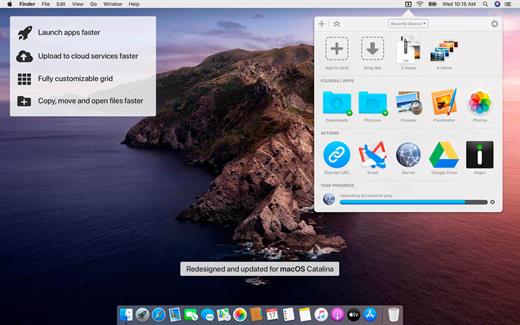
Dropzone makes it faster and easier to copy and move files, open applications and share files with many different services. Dropzone is a unique and amazing app that’s like nothing you’ve ever used before. We’ve paid fanatical attention to every detail and built an app that looks and feels like an integral part of macOS.

Dropzone ships with a powerful scripting API and with a little programming knowledge you can modify any of your actions or even create entirely new ones. This gives Dropzone unlimited extendability and utility. We’re always thinking up new actions so Dropzone will become even more useful over time.

Dropzone also includes Drop Bar – Drop Bar makes it easy to stash files you know you’ll need later. Just drop files on the Drop Bar icon in the grid and they will stick there until you’re ready to use them.

Features

  • Open applications, move and copy files faster than ever before.
  • Shorten URLs quickly using Tinyurl shortener. Just select a URL to shorten and press Ctrl+Option+Cmd+S and the shortened URL is automatically copied to the clipboard.
  • AirDrop integration lets you drop files or folders from any app and share them with your other Macs over the network.
  • Imgur integration lets you share images fast and get a link for pasting.
  • Upload files to Amazon S3 (Dropzone Pro feature).
  • Upload files to your FTP server (Dropzone Pro feature).
  • Upload files to your Google Drive (Dropzone Pro feature).
  • Download and install add-on actions that let you upload to services like Google Drive, YouTube and many others (Dropzone Pro feature).
  • Powerful multi-tasking engine allows you to run multiple tasks at once and track the progress of each one through the in-grid task status area.
  • See how tasks are progressing at a glance in the animated menu item.
  • Launch Dropzone actions with the newly added keyboard shortcuts feature (Dropzone Pro feature).
  • Add applications, folders or actions to your grid easily by dragging and dropping them on the Add to Grid area.
  • Develop your own actions using the updated and massively improved Ruby or Python API (Dropzone Pro feature).
What’s New

Version 5.0.10:


  • Release notes were unavailable when this listing was updated.
Compatibility

macOS 10.15.0 or later
Apple Silicon or Intel Core processor


Release Name: Dropzone Pro 5.0.10
Size: 69.1 MB
Links: HOMEPAGE – NFO – Torrent Search

Download: RAPiDGATOR
6 Comments
July 17

SpectraLayers Pro 13.0.10

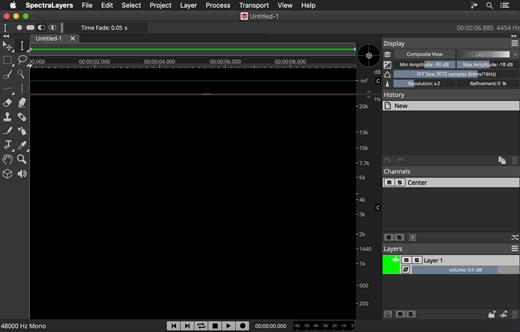
SpectraLayers is a new approach to audio editing, with new concepts to transform the way you work. For the first time you can directly edit spectral data, opening advanced sonic worlds, and use innovative enhancements to traditional techniques. Visualize audio in astonishing new ways, including 3D. Work with mixes like they were tracks. Integrate these abilities into your DAW and other tools. And all in a familiar interface that you didn’t realize you already knew.

The Advanced Tool You Already Know

SpectraLayers is the first completely visual editing system for audio. It extends the traditional visualization of spectral editors to every aspect of editing sounds, including how they mix together. To make this approach intuitive, SpectraLayers employs the model of high-end image editors – not just the interface, but what you can do with sound and how you do it. So, despite its advanced technology, SpectraLayers is immediately familiar and instantly powerful.

Features

Retouch Audio

The most natural, powerful and precise editing is made directly in the medium. Paint and brushes, retouching and photographs, video and frames. SpectraLayers introduces this way of editing to audio. Start with the spectral domain, where time, frequency and amplitude are all visible. Use the power of 22 advanced tools – modification, drawing, selection, measurement, marking and listening with your mouse, or a pressure-sensitive stylus.

Advanced Selection Engine

Transcend traditional audio editing with the industry’s most advanced selection engine. Create any selection shape – drawn freehand, with geometry-based tools or automatically based on audio features. Add fully visualized crossfade masks and real-time previews. Use selections for spectral playback, selection-based effects, and our Visual Transformation Engine. Alternatively, use selections to protect audio from modification, extract selections to other Layers, and compose 2D soundscapes. Even save and recall them.

Selection-Based Effects: Re-Imagined

SpectraLayers re-imagines selection-based processing, the editing technique most common in other spectral tools. It starts with our Advanced Selection Engine (ASE). Apply SpectraLayers’ industry-standard restoration effects, such as spectral noise reduction and audio healing. In another industry first, you can also use External Editor Processing to use the effects in your other audio tools, such as WaveLab, iZotope RX® and Melodyne® with full ASE compatibility. Undo and redo these edits like any other – instantly.

Transpose the Way You Transform

SpectraLayers employs the industry’s only visual transformation system for sound. And it’s real-time, with full-resolution previewing. Move, scale and stretch audio as you drag your mouse (or stylus) to align musical features while you transform, and measure your changes with markers and timelines. Of course, you can also do it how everyone else does, using numbers. Either way, all transformations are powered by the Advanced Selection Engine.

Tracks and Regions, Evolved

Layers are at the heart of SpectraLayers. They’re compatible with regions and tracks, but more powerful. Seeing them shows you how they sound – both individually and mixed with other Layers. You can edit them while seeing how your changes affect other tracks – in real-time. Using any editing method, instantly previewed with every tool.

What’s New

Version 13.0.10:


  • Release notes were unavailable when this listing was updated.
Compatibility

macOS 10.12 or later, 64-bit processor


Release Name: SpectraLayers Pro 13.0.10
Size: 4 GB
Links: HOMEPAGE – NFO – Torrent Search

Download: RAPiDGATOR
0 Comments
July 17

Whisper Transcription 14.3

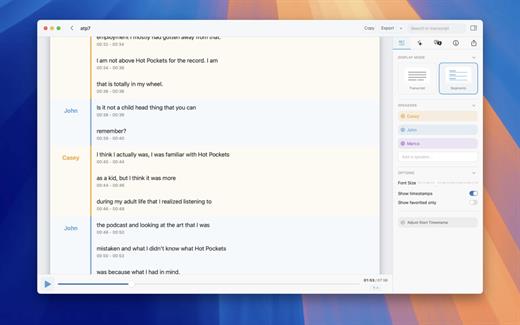
Whisper Transcription converts audio files into text using the Whisper machine learning model for speech recognition and transcription — making it easy to transcribe meetings, lectures, and other recordings.

Key Features


  • Easy Transcription: Drag and drop audio files for instant conversion.
  • On-Device Processing: 100% local transcription—no data leaves your machine.
  • Fast & Accurate: Get text multiple times faster than real-time with Metal & GPU acceleration (depending on the system).
  • Search & Edit: Highlight, edit, and delete transcript sections.
  • Audio Playback: Sync playback with the transcript for easy review.
  • Multi-Language Support: Transcribes in 100+ languages (fastest in English).
  • Subtitle Export: Save transcripts as .srt & .vtt files.
  • Batch Processing & System Audio Capture: Transcribe multiple files simultaneously and capture system audio (Zoom calls, podcasts, etc.).
  • Flexible Output: Export transcripts to Word, PDF, HTML, and subtitles.
  • Speaker Separation: Detect and split transcripts by speaker.
  • Reader Mode: Focused reading experience.
  • Advanced Model Support: Choose from various models for different accuracy and speed levels.
  • Supported Formats: Works with mp3, wav, m4a, mp4, mov, ogg, opus and more.
  • Pro Unlock: Upgrade for industry-leading transcription quality with Medium & Large models, batch processing, system audio recording, podcast transcription, and more.
What’s New

Version 14.3:


  • Release notes were unavailable when this listing was updated.
Compatibility

macOS 14.0 or later.


Release Name: Whisper Transcription 14.3
Size: 47.4 MB
Links: HOMEPAGE – NFO – Torrent Search

Download: RAPiDGATOR
4 Comments
July 17

JP Software Take Command 36.51.76

Description: Replace Your Windows Console and CMD Command Prompt Windows. The Windows Command Prompt shortcut is a Windows console (command line, or character mode) session that runs the default Windows command shell CMD.EXE.

The command line is essential for developers, systems administrators and advanced users. Unfortunately, CMD Windows commands and the Windows console UI have always been woefully lacking in ability compared to what is available in most other operating systems. Because of the limitations in CMD and the Windows console, users have been forced to use the GUI for inappropriate tasks, or even to write custom programs to perform simple tasks that CMD should have been able to handle.

Take Command is a comprehensive interactive GUI and Windows command line toolkit that makes your command prompt windows easier to use and far more powerful. Take Command includes optional Windows Explorer integration, tabbed console windows, and major enhancements to standard Windows CMD commands such as COPY, DEL, DIR, FOR, MOVE, REN, SET, and START And it and adds more than 235 new commands, command dialogs, command line syntax coloring, vastly improved command line editing, programmable filename and directory tab completion, and thousands of other features.

Take Command is also a powerful batch file programming tool, including an integrated IDE with a sophisticated editor and batch debugger. Take Command offers extensions such as DO loops, SWITCH statements, error and exception handling, system monitoring and event triggers, and more than 780 built-in variables and functions. And you can extend that with 3rd-party plugins and user-defined functions.

12 Reasons Why You Should Replace Your Windows Console
The Windows console is responsible for running character-mode applications, including CMD, PowerShell, WSL bash, etc. It was introduced in Windows NT 3.1 in 1993, and some major internal architectural improvements were made in Windows 10 and 11.

Unfortunately, the improvements to the user interface were relatively minor, and though some efforts were made to improve the CMD console UI in Windows Terminal, they fall far short of what Take Command has been providing for years.

So why replace it with Take Command?

The Windows console is slow, and even slower when using Windows Terminal. Take Command's tab windows typically display output between 20% and 300% faster.
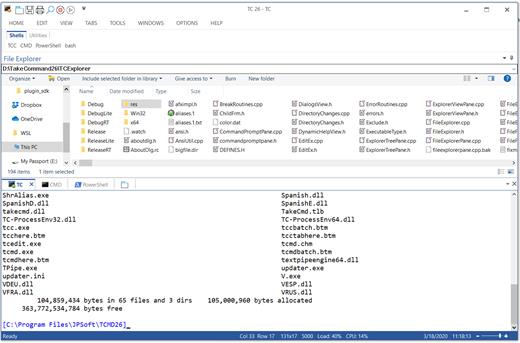
Take Command (like Windows Terminal) offers tabbed windows to run your character-mode applications. But Take Command takes it to another level by including vertical or horizontal tab groups and splitter windows.
Tabbed windows can be reordered, detached, or torn off, and existing console windows can be attached as new Take Command tab windows.
Take Command provides an optional embedded Windows File Explorer window that displays a tree view of the folders on your system and the contents of the selected folder (List View) on the right. You can drag folders and files from the Explorer window and drop them in a command prompt window.
Take Command can be easily configured for your preferences with its configuration dialogs.
Take Command has an optional tabbed tool bar that you can use to execute internal or external commands, aliases, or batch files with the click of a mouse (or an accelerator key). You can define up to 20 tabs, each with up to 50 toolbar buttons.
Take Command provides a configurable Status Bar that can display quick help for the current command, tooltips, and system information, including tab window size, CPU usage, memory usage, date & time, character values at the cursor location, and a slider control for window transparency.
Cut and Paste options are limited in the default CMD console or Windows Terminal. Take Command adds both line and column selection, double-click or triple-click selections, overwriting or appending to the Windows clipboard, and a variety of paste options.
Take Command windows can be styled with a choice of 18 themes.
Take Command and TCC offer a wide variety of colorization options, not just foreground and background colors.
Take Command includes invaluable tools, including a batch file debugging IDE, a regular expression creator / analyzer, search and replace in files, and a macro recorder / playback.
Extensive help (quick help, context sensitive help, and general help) is available in English, French, German, and Spanish at the touch of a button.

Release Name: JP Software Take Command 36.51.76
Size: 59.8 MB
Links: HOMEPAGE – NFO – Torrent Search

Download: RAPiDGATOR
4 Comments
July 17

DP Animation Maker 3.5.52

Description: Smart 2D animation software that lets you turn still images into live moving scenes. Create living, breathing worlds from your still image with minimum effort. DP Animation Maker lets you make natural scenes burst with vibrancy and give motion to people and objects.

Ever wonder how your friends and colleagues get those neat animations in their photos, slideshows, and videos?
Adding lively effects to images is a lot easier than you think. The secret is DP Animation Maker. It's a super simple way to transform any image into a vibrant animation.

Fun software, with a wide variety of uses
DP Animation Maker helps you make animated videos for lots of stuff. Whether for business or personal use, some of the most popular items people create with the software include:

Animated videos
Web banners
YouTube videos
Digital greeting cards
Mobile phone backgrounds
PowerPoint presentations
Music videos
Video footage
And more!

Sky's the limit! So why settle for boring, static photos or slideshows? With DP Animation Maker you can bring your images to life by making waves crash at the ocean, snow fall on mountains, and flames flicker on candle wicks.

It's fast and easy-to-use
The good news is, you don't have to be a tech guru to use this software. Thanks to our easy-to-understand interface, no special skills are required. Anyone can use it.

But tech savvy graphic artists benefit, too. That's because DP Animation Maker takes the guesswork out of the time-consuming programming aspect of the animation process. Artists can concentrate on image design and artwork instead.

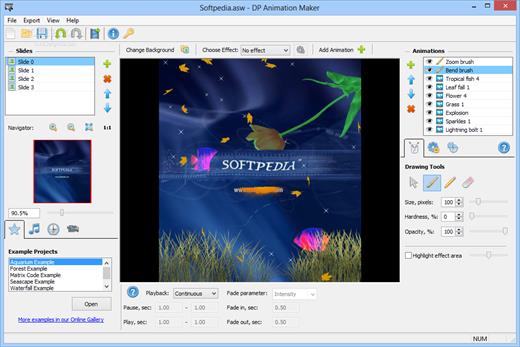
No matter your level of tech sophistication, our process is painless. Simply open an image, select an effect, add moving objects, export to your preferred format, and voilà — you're ready to share your animation with the world. It's that fast. With the press of a button, you can adjust motion, speed, and other key elements of any moving object. Ready-to-use, animated images are available within minutes.

Plenty of features to choose from
Our prebuilt animations are designed to give you a lot of options. Whether you have a single image or need to create a long slideshow, DP Animation Maker has the rich set of tools you need to put all the pieces together.

Once you select your images, it’s easy to go from ‘static’ to ‘alive’ with our wide range of effects, stationary objects, moving objects, brushes, music, timing, and camera adjustment features. You can also import your own animated GIF files if you want to add more effects to them as well.

Effects
Give images the appearance of being underwater, of having a reflection, or of being on fire. After you select a desired effect, you can fine-tune the height of your flames or the speed of your waves by tweaking the adjustment settings.

Release Name: DP Animation Maker 3.5.52
Size: 26.9 MB
Links: HOMEPAGE – NFO – Torrent Search

Download: RAPiDGATOR
4 Comments
July 17

Luxion KeyShot Studio Enterprise 2026.2.1 v15.1.1.5

Description: Take your design to the next level. Discover KeyShot Studio, formerly known as KeyShot. The cutting-edge 3D rendering tool that brings your designs to life with photorealistic accuracy.

Create visuals faster with KeyShot Studio
Experience state-of-the-art rendering and bring your brilliant ideas to life with the fastest, most precise studio available for your product visualization.

Experience unparalleled 3D visualization every time you create.
KeyShot Studio is the culmination of decades of innovation and collaboration with product industry leaders. Designed for those who demand ultimate accuracy and instant results in 3D rendering, it integrates cutting-edge technology into a sleek, easy-to-use solution.

User-friendly
Intuitive design
You don’t have to be a rendering expert to create photorealistic images of your 3D models. Simply import your data, assign materials by dragging and dropping them onto the model, adjust the lighting, and move the camera. Done.

Render speed
Lightning-fast rendering
KeyShot Studio excels in fast 3D rendering, producing stunning visuals quickly. As a comprehensive solution, it ensures efficiency for tight deadlines and rapid design changes. Focus on creativity, not waiting.

Render quality
Photorealistic every time
For over 20 years, KeyShot Studio has set the standard for photorealistic images, enhancing design and marketing with high-quality renders. Trust KeyShot Studio to bring your ideas to life swiftly and accurately.

Extensive 3D format support
KeyShot Studio supports 34 different 3D formats, including popular CAD files like SOLIDWORKS, AutoCAD, CATIA, and Rhino. This wide compatibility ensures you can easily import and work with your models, focusing on creativity and innovation without file compatibility concerns. KeyShot ensures that you can work with virtually any file format

Upload your model for
instant visualization
Accelerate your design process by creating photorealistic prototypes with KeyShot Studio. Simply upload your CAD files and let our intuitive tools help you visualize your ideas with precision, enhancing collaboration and decision-making.

Release Name: Luxion KeyShot Studio Enterprise 2026.2.1 v15.1.1.5
Size: 2.1 GB
Links: HOMEPAGE – NFO – Torrent Search

Download: RAPiDGATOR
2 Comments