Please REGISTER or RENEW your account on RAPiDGATOR.net and support us by doing through all RAPiDGATOR working download links on main posts...
July 16

Sejda PDF Desktop Pro 7.9.7

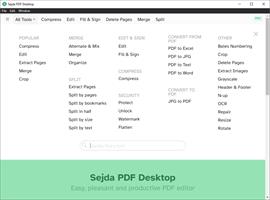
Description: Sejda PDF Desktop - pleasant and productive PDF software that you'll love to use. Full-featured to help you with your PDF tasks. Sejda PDF Desktop is free to use within daily limits. Upgrade for premium features and unlimited use.

Merge files into one PDF.
Visually combine and reorder pages, merge multiple PDF files. Alternate and mix odd and even page files.

Split PDF files.
Split documents by pages. Extract separate documents. Split by size, bookmarks or text occurrences. Divide two page layout scans.

Convert PDF files to Office and image formats.
Convert PDF files to Word, Excel and to image. Convert images to PDF file.

Compress PDF.
Reduce the size of PDF files. Optimize images and resources.

Edit PDF files.
Add, edit or move text in your PDF. Change the font type, size and style. Insert, reorder, move or delete pages.

Apply PDF passwords and permissions.
Add copy and edit protection to a PDF. Include a password to protect your PDF from unapproved access.

Watermark PDF.
Add image or text watermark to PDF documents.

Grayscale PDF.
Convert PDF text and images to grayscale.

Crop PDF.
Trim PDF margins, adjust visible page area, change PDF page size.

System Requirements
Windows 8.1, 10, 11 (64-bit)

Release Name: Sejda PDF Desktop Pro 7.9.7
Size: 340 MB
Links: HOMEPAGE – NFO – Torrent Search

Download: RAPiDGATOR

4 Comments
July 16

IObit Driver Booster Pro 13.5.1.400

Description: Updating drivers is usually an initial step to avoid hardware failure, system instability and hidden security vulnerabilities. To update drivers regularly is also an effective way to enhance your overall PC performance, and maximize your gaming experience. While this process could be risky and frustrating if done manually.

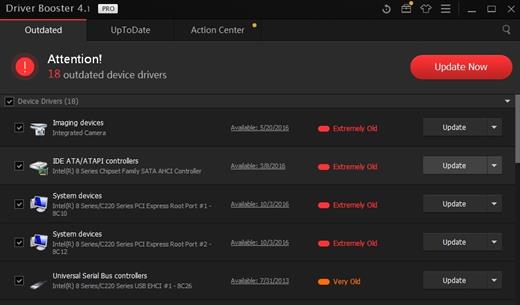
Driver Booster PRO is introduced to download and update drivers for you automatically with just one click. Based on cloud library, Driver Booster PRO can always be the first to identify outdated drivers, and download and update driver at an unrivaled speed. With the backup feature, it is an easy, effective and risk free solution to keep your drivers up-to-date.

Update Outdated Drivers Safely and Rapidly
- Support More Hardware Devices & Improve PC Performance
- Update Drivers 300% Faster with Just One Click
- Specialized Driver Tweaking for Top Gaming Experience
- Backup Drivers for Safe Restore

Driver Booster Pro Features:
- Download and Update Outdated Drivers with One Click
- Enhance Hardware Functionality for Top Performance
- Specialized Driver Tweaking for Top Gaming Experience
- Automatically Identify Outdated Drivers
- Support More Comprehensive Hardware Devices
- Enjoy Priority to Update Outdated Drivers Promptly
- Backup Drivers for Safe Restore
- Download and Update Drivers up to 300% Faster
- Automatically Update to the Latest Version

Release Name: IObit Driver Booster Pro 13.5.1.400
Size: 37 MB
Links: HOMEPAGE – NFO – Torrent Search

Download: RAPiDGATOR

5 Comments
July 16

PhraseExpress 18.0.76

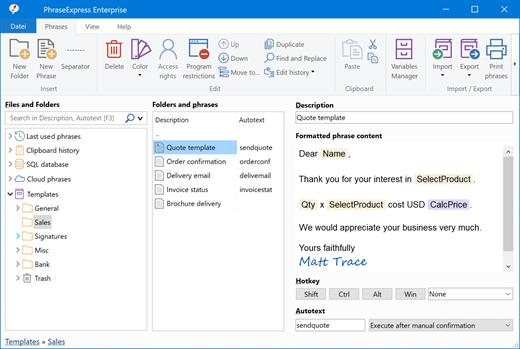
Description: No More Typing the Same Phrase Again. The text expander software PhraseExpress manages frequently used text templates for use in any program. Phrases can be shared in the cloud, on a NAS, or via Microsoft SQL Server.

Universal Text Snippet Manager
Speed up your typing in any program, such text editors, email programs, web browsers, database applications, EMR, etc.
Organize text snippets in customizable categories for instant access.
PhraseExpress can save hours of typing in help desk, call center, law offices, expert appraisers and medical transcription.

Text Expander Benefits
PhraseExpress offers a variety of benefits in the enterprise:
Time savings: Employees save time by not having to write repetitive texts repeatedly.
Consistent quality: A text template management system helps maintain consistency in style, tone, and language.
Cost savings: Communication becomes not only more consistent but also quicker. Pre-defined text snippets help prevent errors.
Customer Satisfaction: Clients or customers benefit from receiving consistent and prompt information.

AI Integration
Process your phrases with Artificial Intelligence
AI can summarize or rewrite your phrases in different styles (formal/informal). PhraseExpress stores the processed phrases, so you only need to AI-process the text once. PhraseExpress also allows you to use AI in any application on your computer at the touch of a button.

Privacy First
Your data remains on your computer!
PhraseExpress is locally installed, eliminating the need for external cloud services. No need to "log-in" into anything.
this includes AI language models, which run locally on your computer.
No data must be sent or stored off-site. You retain complete ownership of your data and maintain total control over the application.
For added security, phrases can be encrypted using AES and safeguarded with a password.

Share Phrases with your Team
Share phrases with other users in the local network or in the cloud – On-premise or over the internet.
Each phrase can be set private or made public to selected users.
The client-/server architecture prevents edit collisions.
PhraseExpress supports Microsoft SQL server and Citrix/TerminalServer.

Cloud Support
Optional cloud synchronisation allows you to share phrases with other users.
PhraseExpress supports any popular cloud service, such as Dropbox, Microsoft OneDrive, Google Drive and on-premise cloud solutions like OwnCloud and Synology CloudStation.
You can alternatively use any NAS or network-shared folder to sync your phrases between multiple Windows and Mac computers.

Cross-Platform Support. Work faster everywhere!
PhraseExpress is available for Windows and the TextExpander alternative saves typing on your Mac, too. The Free Text Expander App for iPhone and iPad provides the productivity benefits on tablet or smartphone devices.
* Features advertised on our website refer to the Windows version, unless specified otherwise.

Multi Language Phrases
Take your templates to the next level - Literally!
PhraseExpress can organize phrases not only in a tree structure but also in multiple dimensions.
The same phrase library can be switched instantly into different languages, making it an ideal solution for multi-lingual call centers!
PhraseExpress can even translate your phrases into another language.

Macro Automation
Takes out the tedious from your tasks
PhraseExpress integrates a powerful Macro Recorder to record and playback repetitive tasks.
Macro Recorder records your actions like a tape recorder for infinite playback.

Document Generator
The Document Generator can generate an entire document based on a custom selection of your text templates:
Lawyers create custom contracts in no time: Just select the terms to be included and PhraseExpress saves the custom contract as a Microsoft Word document on your desktop.
Technical writers can re-use common parts of a documentation to quickly create a variation of existing user manuals.
Medical doctors can select applicable items from the list of common procedures to create a customized medical report.

Release Name: PhraseExpress 18.0.76
Size: 57.5 MB
Links: HOMEPAGE – NFO – Torrent Search

Download: RAPiDGATOR

5 Comments
July 16

COAA PlanePlotter 6.7.7.1

Description: PlanePlotter receives and decodes live digital position reports from aircraft and plots them on a chart. Using PlanePlotter, you can see a radar-like display of all those aircraft around you that are transmitting the appropriate digital messages including ACARS, ADS-B and HFDL.

PlanePlotter - Features
The animated screen grab from PlanePlotter (left) was kindly provided by John Locker.

Message display
PlanePlotter shows a table display of messages received and decoded from live aircraft transmissions.

Data saving
PlanePlotter archives all the digital data that it receives and decodes to a log file.

Chart display
PlanePlotter plots aircraft positions, altitudes and times decoded from the message traffic that it receives. These include embedded position reports, AMDAR reports and ADS reports contained in ACARS messages, ADS-B position reports received by the Kinetic SBS1(tm) or AirNav System RadarBox(tm) Mode-S receivers, and position reports on HF using Charles Brain's PC-HFDL software. The plot can be superimposed on a suitable aeronatical chart that you have prepared, or PlanePlotter can download satellite imagery and plot the aircraft symbols on that. Where altitude information is available (eg Mode-S messages), you can select the data by altitude band to distinguish low level and high level traffic.

Google Earth server
If you are receiving Mode-S ADS-B position reports, PlanePlotter can interface to Google Earth to display aircraft positions over the Google Earth base map. It can even give you a dynamic real-time view from the flight deck of an aircraft that you designate.

Direction finding
PlanePlotter can determine and display the direction of any transmission using a simple passive antenna switch. This allows aircraft to be located even if they are not equipped with ACARS or Mode-S/ADS-B.

Input signals
PlanePlotter can decode ACARS messages, display the message content and plot any positions on a chart.
PlanePlotter can process and display Mode-S/ADS-B position reports captured by the Kinetic SBS1(tm), the AirNav Systems RadarBox(tm), the RxControl Mode-S receiver, the PlaneGadget Radar, the miniADSB, the microADBS and the FPGA Beast.
PlanePlotter can also work in conjunction with Charles Brain's PC-HFDL software (http://www.chbrain.dircon.co.uk/pchfdl.html) by automatically extracting position reports from the log file and plotting them in real time on the same chart display. PlanePlotter adds value by calculating course and heading from successive reports from the same aircraft and plotting the predicted position between reports (right).
PlanePlotter can drive a passive antenna switch and display the direction (QDM) of any aircraft voice transmission.

GPX overlays
PlanePlotter can display waypoints, tracks or routes over the current chart using data from a user-defined GPX format file.

Alerts
PlanePlotter can generate visible and audible alerts on detection of a specified registration, flight number or ADS identifier, on detection of any new aircraft, or on detection of an aircraft whose position is inside a user-defined Alert zone polygon.

Memory-Map Navigator support
PlanePlotter can direct the Memory-Map Navigator program (www.memory-map.com) to display dynamic aircraft position symbols over its proprietary maps using data from either ACARS or Mode-S ADS-B (in conjunction with the SBS1 receiver).

OLE/COM interface
You can access the position and other data for each aircraft known to PlanePlotter using a simple VB script or other OLE/COM capable program. You can use the same interface to update data held by PlanePlotter and to control the user interface.

Release Name: COAA PlanePlotter 6.7.7.1
Size: 7.6 MB
Links: HOMEPAGE – NFO – Torrent Search

Download: RAPiDGATOR

5 Comments
July 16

Benthic GoldSqall 2.4.244

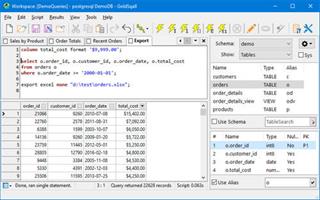
Description: GoldSqall is an SQL query, editing and exporting tool. GoldSqall can natively connect to Oracle, PostgreSQL, MySQL, Firebird and SQL Server. GoldSqall also allows connecting to any database with OLEDB or ODBC drivers. GoldSqall has an advanced syntax highlighting SQL Editor and formatter, a lightning fast datagrid with sorting, filtering, data formatting and a transposed view mode.

Features:
Native driver support for Oracle, MySQL, PostgreSQL, Firebird and SQLServer.
OLEDB and ODBC support for any database
SQL query and script running including database specific commands, stored procedures, etc.
Bind variable (:bindvar) and prompt variable (&AskMe) support.
Language copy & paste feature for integration with programming tools. C++, PHP, Object Pascal and more.
Support for viewing tables, columns, stored procedures, schemas, etc.
Incredibly fast data grid with support for transposed mode, sorting, custom formatting, filtering and more.
Cell detail window for multi-line or formatted Text.
Image viewer cell detail window with support for Jpg, Gif, Png, Bmp, Tif, MultiPage Tif, etc.
Export data directly to Excel, Calc, CSV, XML, insert statement scripts, and more.
Export directly to Excel files even if Excel is not installed.
Script autorun support and full command-line options

Release Name: Benthic GoldSqall 2.4.244
Size: 28.6 MB
Links: HOMEPAGE – NFO – Torrent Search

Download: RAPiDGATOR

5 Comments
July 16

Photo Organizer AI Premium 5.5.5

Description: Organize Scattered Photos into Proper Event Albums. Tame the chaos in your directories. Photo Organizer AI automatically clusters random, unstructured files into clean, chronologically matched event albums while sorting out duplicates and low-quality photos.

Supercharged Culling & Organization
A high-performance workspace designed specifically for professional photographers and digital collectors.

AI Subject & Scene Classification
Automatically tag subjects and classify scenes like mountains, water, rain, document, and documents using embedded local ONNX classifiers.

Blur & Focus Inspection
Detect blurry, grainy, out-of-focus photos, and red eyes automatically. Slide to cull items beneath your customized quality threshold.

DirectML GPU Acceleration
Unchain the power of your graphics hardware. Runs all deep learning culling networks locally using DirectML with stunning frame speeds.

Virtual Event Albums
Group similar chronological events together dynamically. Split, merge, paste, and organize virtual albums without altering physical folders.

Identical & Near-Duplicates
Scan for files with identical image checksums or extremely high visual similarities, and group them so you can retain the best frame.

100% Local & Private
Zero cloud uploads. All analysis, photo scanning, duplicate detection, and file management happen entirely on your computer, keeping your photos secure.

Turn Scattered Photos into Proper Event Albums Today
Save hours of manual sorting and culling. Let local AI group your random scattered pictures into clean, beautifully structured event albums automatically.

Release Name: Photo Organizer AI Premium 5.5.5
Size: 460.5 MB
Links: HOMEPAGE – NFO – Torrent Search

Download: RAPiDGATOR

6 Comments
July 16

DBF Converter 7.88

Description: DBF Converter is a universal solution to all your DBF format conversion needs. Whenever you need to extract data from a DBF file to CSV, XLS, XLSX, SQL or plain text, the software delivers a straightforward way to do this with minimum efforts.

Key Features

3-Steps conversion
Working with DBF Converter is easy. You specify a DBF file or a folder with DBF files you want to convert, select fields and filter out records you need. Then it's just a matter of one click for DBF Converter to turn source files into the format of your choice.

Powerful data filtering
Data filtering in DBF Converter is visual. This means the program takes a sample of records in the DBF file and allows you to apply custom filter rules and masks and instantly see the sample changes according to your choice.

Batch conversion for multiple DBF files
When you have dozens of those DBFs, converting them could be tricky. But thanks to DBF Converter there's no difference whether you need to process one file or a hundred. The program accepts a folder containing your source DBF files and converts them all one by one. And thanks to the low-level access to data the conversion remains fast and accurate.
Convert DBF to XLS
Convert DBF to XLSX
Convert DBF to CSV
Convert DBF to XML
Convert DBF to SQL
Convert DBF to TXT
Convert DBF to SDF
Convert DBF to HTML
Convert dBase Level 7 to dBase III format
Command Line support

Release Name: DBF Converter 7.88
Size: 3.7 MB
Links: HOMEPAGE – NFO – Torrent Search

Download: RAPiDGATOR

6 Comments
July 16

QueueExplorer Professional 5.0.89

Description: Explorer-like management for queues. Works with multiple queuing systems. QueueExplorer supports multiple systems from the same installation, without need for additional licensing: MSMQ, Azure Service Bus, RabbitMQ, and ActiveMQ. With QueueExplorer you can do much more than with built-in management console - copy, move or delete messages, save and load, stress test, view and edit full message bodies (with support for XML, JSON, .Net objects...), and much more. QueueExplorer is a fast, native Windows application.

The indispensable tool for working with queues and messages:
understand and manage your system
figure out what went wrong
fix it

Find out all about your messages
With QueueExplorer you can dig into your queues and see which message went where, whether they were correctly formatted, with correct headers and settings, etc. Multiple viewers are at your disposal: JSON, XML, WCF, Hex, text with different encodings...

Develop and test producers and consumers separately
With QueueExplorer you can test individual pieces of your solution, or even simulate third party messages going in or out. You can create and edit test messages, send one by one or bunch of them together.

Test performance and load handling of your app
Send thousands of messages for performance testing to see how system handles that load.

Troubleshoot, fix, and resend problematic messages
If something is wrong, QueueExplorer is the fastest and easiest way to investigate and fix incorrect, poison, or failed/deadletter messages.

See status of your system at glance
Check if some of queues are growing too large, if there are messages in deadletter queues, etc. With autorefresh functionality see how entire system works in near real time.

Filter and sort messages to quickly find important data
QueueExplorer allows you to quickly find messages you're interested in. Professional edition allows you to even extract your business data from within messages using XPath, JSON, or Regex, and to immediately see e.g. invoice totals, etc.

Backup and restore messages
Backup messages to files, or move/copy them to another queue.

Copy, compare and sync queues, topics and other schema (metadata) objects
This can be used to migrate queues (and other objects) to another server, e.g. to propagate from development to production. Or just to compare and see which changes were made. Or to backup schema before changes are made. You can also duplicate queues with all their settings on the same server (Professional).

Release Name: QueueExplorer Professional 5.0.89
Size: 36.2 MB
Links: HOMEPAGE – NFO – Torrent Search

Download: RAPiDGATOR

6 Comments
July 16

AI Image Object Remover Pro 1.0.3

Description: Effortlessly clean up your photos with AI Image Object Remover Pro, the ultimate tool for removing any unwanted objects, people, text, or blemishes in seconds. Powered by the advanced LaMa (Large Mask Inpainting) AI model, our application intelligently reconstructs the background behind the removed object, delivering natural and seamless results that are impossible to achieve with traditional clone stamp tools.

Whether you're a professional photographer retouching a portrait, a real estate agent removing clutter from property photos, or just someone wanting to erase photobombers from a precious memory, AI Image Object Remover Pro provides the power you need in a simple, intuitive interface.

How It Works (It's as easy as 1-2-3!)
1. Select Your Image: Open any standard image file (JPG, PNG, WEBP, etc.).
2. Create a Mask: Use our powerful built-in editor to simply paint over the items you want to remove. The intuitive brush, eraser, and zoom tools make it easy to be precise.
3. Process with AI: Click the "Start" button and let the AI work its magic. Your cleaned image is saved automatically.

Remove People
Easily erase photobombers or unwanted individuals from group shots and travel photos.

Erase Text & Watermarks
Clean up images by removing distracting text, logos, and date stamps.

Blemish & Skin Retouching
Remove acne, scars, and other skin imperfections for flawless portraits.

Delete Unwanted Objects
Get rid of trash cans, power lines, street signs, and any other distracting elements to create the perfect composition.

Best of all, AI Image Object Remover Pro runs 100% offline on your computer. Your photos are never uploaded to the cloud, guaranteeing complete privacy and security. No subscriptions, no credits, just unlimited, high-quality object removal.

System Requirements
- OS: Windows 10 version 17763.0 or higher
- Memory: 4 GB (Minimum), 8 GB (Recommended)
- Processor: Dual-core processor (Intel Core i3 / AMD Ryzen 3 or equivalent) (Minimum), Quad-core processor (Intel Core i5 / AMD Ryzen 5 or equivalent) (Recommended)
- Graphics Processor: Integrated Graphics (for CPU processing) (Minimum), NVIDIA GPU with CUDA support (e.g., GTX 1060 or newer) for significantly faster performance (Recommended)

* Internet connection is required only for launching the program.

Microsoft Store - Full Version

Release Name: AI Image Object Remover Pro 1.0.3
Size: 1.6 GB
Links: HOMEPAGE – NFO – Torrent Search

Download: RAPiDGATOR

3 Comments
July 16

Corel AfterShot Pro 3.7.0.457

Description: Corel® AfterShot™ Pro 3 is up to 4x faster than Adobe® Lightroom®*. It's the photo editor that reveals your true creative potential and frees you: from high costs, from endless subscriptions, from hours spent editing at your computer. Import, process and output faster, and get back behind the camera where you belong with AfterShot™ Pro 3.
Simple photo management
Sort, organize and view all your photos in one place, quickly and easily with flexible file management options--no importing required.

Ultra-fast workflow
Experience dramatically faster loading, selecting, editing and output with the world's fastest RAW conversion software, featuring performance that's up to 4x faster than Adobe Lightroom.

Powerful batch processing
Edit and perfect one or thousands of photos with powerful batch processing controls and presets that let you quickly bring out the best in every image.

Comprehensive Watermarking
Protect and promote your work with versatile Watermarking features. Deter unauthorized copying, brand your photos with your logo or contact info, or add text and graphics. Apply watermarks to individual photos or batches, and easily adjust size, rotation, position, transparency and more.

Enhanced! Highlight Recovery
Regain more of the detail and tone from your overexposed photos with enhanced Highlight Recovery. Powered by a new algorithm, this feature lets you access more of the data in your RAW files for superior image quality.

Enhanced! Blemish Remover
Save time and edit faster by doing more touchups and photo corrections in AfterShot Pro 3, rather than jumping to PaintShop Pro or Adobe® Photoshop®. The new Blemish Remover offers circle, brush, polygon and freehand tools for detailed editing, making portrait editing faster and easier. Remove dust, spots, smudges and a variety of imperfections on any photo.

New! Image Preset Library
Now it's easier to tap into the power of presets to automate more of your repetitive processing jobs or quickly reproduce a look that would otherwise be tedious to replicate. The new Image Preset Library^ lets you browse, preview and download free and for-purchase presets.

New! Lens Correction Development Kit
Make and share your own lens corrections—ideal for photographers working with rare, unique or spanking new glass. Simply follow the instructions, save your correction, then load it into AfterShot Pro 3—or share online.

New! Lens Corrections
Update to AfterShot Pro 3 for new, sought-after lens corrections that build on the hundreds of lenses already supported by AfterShot to quickly correct the different types of distortion introduced by various lenses. Join the AfterShot Pro community on Facebook to discover when new lens corrections are posted or to share your own.
See what's new with plugins

Enhanced!
Find and install free and for-purchase plugins, and get updates in a flash with AfterShot Pro 3's new Plugin Manager^. Or make your own with our unique plugin API—a love of photography, a knowledge of C++ and the updated Plugin SDK are all you need. Share your plugins freely with the AfterShot community, or work with Corel to sell them.

New! Updated RAW camera profiles
We're committed to constantly delivering support for today's most popular, powerful and creative cameras, including professional DSLRs, flexible and high-quality mirrorless cameras, and many more. A new dynamic camera profile updater^ notifies you when new cameras are added a new feedback mechanism captures and prioritizes your requests with Corel.

New! Modular Camera Profiles
Get the latest camera profiles sooner—and without patching your software—with dynamic camera updates^. Simply browse and download directly from AfterShot Pro 3. Don't see a camera you want? Hit the 'feedback' button and log your request directly to the AfterShot Pro development team.

New! Get involved!
AfterShot Pro wants you! Corel has built AfterShot Pro to give you, the photographer, control, letting you make you own plugins, lens corrections and presets. Now a new feedback loop makes it easier for you to send your ideas and requests to the Corel Photo team--better helping us to meet your needs. Simply click 'feedback' and send us your comments.

Powerful adjustments
Whether you're shooting in RAW or JPEG, you can alter your photos using a wide variety of adjustment tools, including Crop, Straighten, Highlight Recovery, Noise Removal, Color, Temperature, Exposure, Highlights, Fill Light and more.

Multi-version editing
Easily make adjustments to multiple versions of your master photo without ever changing your original file. Make an unlimited number of versions of one image, with a wide variety of corrections and customizable presets, including Black & White, Cross Processing and more.

Precise control with Selective Editing
Apply adjustments exactly where you want them with unique Layers and Regions capabilities that isolate precise areas of your photo for adjustment.

Local Contrast
Recreate the look of a high-end camera lens and make objects within an image 'pop' by bringing out the texture and dimension in your photos.

High Dynamic Range (HDR) tools
Create impressive photos with intense visual contrast using High Dynamic Range (HDR) tools. Combine multiple exposures to create a single, stunning HDR photo. Within the AfterShot HDR module, apply Smart Photo Fix, White Balance, Brightness/Contrast, Fill Light/Clarity, Local Tone Mapping, High Pass Sharpening, and Digital Noise Removal.

Noise reduction by Athentech
Optimize your images with Athentech Imaging Noise Removal. This award-winning technology automatically adjusts lighting for every pixel in a shot while maintaining true color and zero clipping.

Red eye removal
Get precise control when cleaning up red eye in your photos.
Get complete control with a personalized workflow

Customizable workspace
Easily change the AfterShot Pro workspace any time to suit your task. Hide or show the Thumbnail, Preview, Browse and Tools panel. Choose from several viewing options, including Slideshow, Full Screen and Multi-Image view.

Easy integration with photo editors
Process your RAW photos quickly in AfterShot Pro, then simply click the "Send to External Editor" button to quickly export in TIF to PaintShop Pro, Photoshop or another editor for more detailed editing.

Accurate color correction
Fine tune the color in your photos with several adjustment tools, including Vibrance, Saturation, Color Balance and Mixer and Selective Color Control. Adjust everything from the overall color intensity for the entire image to the intensity of any single color.

Curves and Levels
Apply adjustments exactly where you want them with unique Layers and Regions capabilities that isolate precise areas of your photo for adjustment.

A complete photo manager
Take charge of your photos with extensive photo management support that lets you quickly organize your existing photos, and easily add new ones or catalogs any time. Powerful search tools, star ratings and other management tools let you quickly find photos even in very large collections.

Quick review
Easily compare, filter and select your best photos from any number of similar shots.

Robust search tools
Finding the right photo in a collection of hundreds or thousands is fast with powerful Metadata tools. Add your own searchable keywords, ratings, tags and labels. Or search by camera-written data like date, camera type, settings, aperture and more.

Customizable asset management
Unlike other workflow tools, AfterShot Pro 2 does not force you to import your images into a catalog just to work with them. Easily access your photos in existing folders, on a network or on a memory card. If you wish, try catalogs to take advantage of powerful digital asset management tools to organize your collection as it grows.

Create web galleries
Quickly create a web gallery to share your images online with friends, colleagues or clients. Choose from various gallery styles to control how your photos are displayed.

Back up and archive
Use batches to easily back up and archive your AfterShot Pro catalogs.

System Requirements
- Windows 11, Windows 10, Windows 8.1, Windows 8, Windows 7 with latest service pack (64-bit editions)
- 64-bit Intel or AMD processor (multi-core processor recommended)
- 2 GB of RAM (4 GB recommended for HDR)
- 400 MB of available hard-disk space required
- 1024x768 resolution with 16-bit color display (1280 x 768 resolution with 24 bit or higher color display recommended). 16MB or more of dedicated VRAM required to use OpenCL Hardware Acceleration

Release Name: Corel AfterShot Pro 3.7.0.457
Size: 144.7 MB
Links: HOMEPAGE – NFO – Torrent Search

Download: RAPiDGATOR

5 Comments