Please REGISTER or RENEW your account on RAPiDGATOR.net and support us by doing through all RAPiDGATOR working download links on main posts...
July 13

Permute 4.0.5

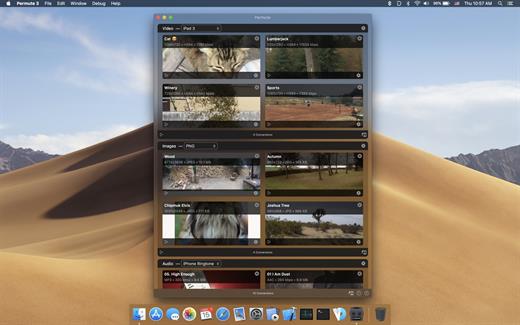
Permute offers easy-to-use drag-and-drop video conversion.
Features:


  • Easy to Use – built from the ground up, Permute is a perfect example of what a Mac app should be. With a gorgeous interface and drag & drop simplicity no need for complicated options.
  • Insanely Fast – Permute was engineered to be incredibly fast. Let us take care of the hard stuff. Just select the video format you want and it’ll be done faster than you can say “hardware acceleration” – MP4 and HEVC presets now take advantage of your machine’s hardware acceleration capabitlities, speeding up HEVC conversions more than 3 times over previous versions of Permute!
  • PDF Support – Permute 3 now includes support for stitching multiple images into a single PDF.
  • Everything Included – It doesn’t matter if you’re converting home movies or processing images. Permute can do it all. We support nearly every format and have plenty of device presets to choose from.
  • Looks Amazing – Whether you use dark mode or not, Permute will look amazing. Taking advantage of the modern technologies, Permute will even change its icon in dark mode.
  • Keep the Schedule – Video re-encoding is quite demanding on computer resources. This is why you can now schedule Permute to convert videos e.g. at night when you’re not using your computer.
  • And so much more! – There are so many other great features in Permute – adjust volume of an audio file or an audio track in a video. Batch-resize, rotate and flip images and videos. And more!
What’s New

Version 4.0.5:


  • Release notes were unavailable when this listing was updated.
Compatibility

macOS 10.12.0 or later


Release Name: Permute 4.0.5
Size: 51.2 MB
Links: HOMEPAGE – NFO – Torrent Search

Download: RAPiDGATOR

4 Comments
July 13

iA Writer 8.0.4

iA Writer (was iA Writer Pro) is a professional writing suite that gives you full control over your notes, drafts and edits.


  • Workflow: Note – Write – Edit – Read. Each stage has a task-specific typeface and color.
  • Syntax Control scans the syntax of English, French, German, Italian, and Spanish text and highlights your adjectives, nouns, verbs, adverbs, prepositions or conjunctions.
  • Precision Writing Tools:

    • Auto Markdown formats text on-screen — your hands stay on the keyboard
    • Syntax Control introduces syntactic markup for natural language text. It covers English, French, German, Italian, and Spanish. Patent pending.
    • Convert Markdown to Microsoft Word 2007 .docx, and back again
Features

  • Workflow states
  • Custom typefaces, carefully set for optimal readability
  • In-app preview
  • Reading time, plus sentence, word, and character count
  • Real-time iCloud sync
  • Ready for Retina displays
  • Full-screen
What’s New

Version 8.0.4:


  • Release notes were unavailable when this listing was updated.
Compatibility

macOS 10.15 or later


Release Name: iA Writer 8.0.4
Size: 26.4 MB
Links: HOMEPAGE – NFO – Torrent Search

Download: RAPiDGATOR

4 Comments
July 13

OmniOutliner Pro 6.2

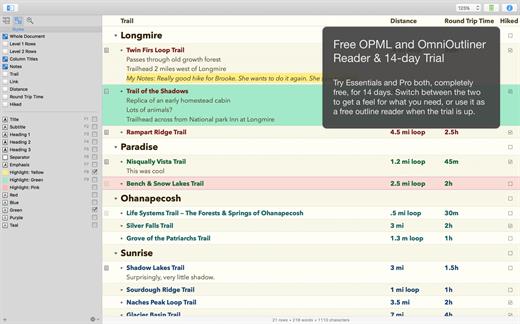
OmniOutliner Pro is a flexible program for creating, collecting, and organizing information. Give your creativity a kick start by using an application that’s actually designed to help you think. It’s like having an extra brain – one that doesn’t keep losing the car keys.

You can use OmniOutliner’s document structure to create hierarchies of main headings and subpoints that can be expanded and collapsed, which are immensely useful when it comes to brainstorming new ideas, drilling out specifics, and lining up steps needed to get everything done. But you aren’t limited to outlines – you’ve got multiple columns, smart checkboxes, customizable popup lists, and an über-innovative styles system at your disposal.

OmniOutliner Professional includes in-depth outlining features like folded editing, clipping service support, audio recording, a new sections drawer, and saved templates. With OmniOutliner Professional, you can actively hide and display the information in your outlines – or quickly jump from one place to another – so you can save time and be more productive by focusing on exactly what you want to see. The new Names Styles feature in OmniOutliner Professional gives you even more options for fast and powerful editing. Download the Pro version today and try it for yourself!

What’s New

Version 6.2:


  • Release notes were unavailable when this listing was updated.
Compatibility

macOS 15.0 or later.


Release Name: OmniOutliner Pro 6.2
Size: 60.4 MB
Links: HOMEPAGE – NFO – Torrent Search

Download: RAPiDGATOR

4 Comments
July 13

XMind Pro 26.04.01337

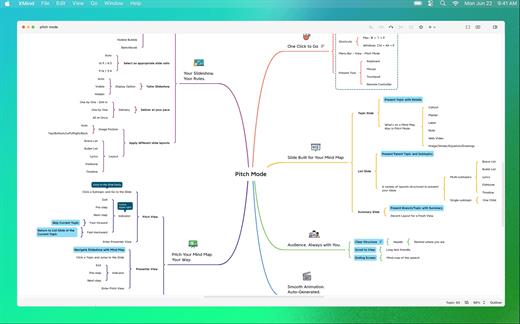
XMind Pro claims to be the most popular mind-mapping tool on the planet. You can use it to work through an individual brainstorming session and it will record and collect inspirations as you go. It can display as a mind-map or in a Gantt chart, and it works well with Office and can export in a number of ways to facilitate making reports. Version 8 has a refreshed look and a new slide-based presentation mode and the popular Walk Through presentation mode is still available.

XMind is an open source project, which means it’s free to download and free to use forever as a version that allows you to make all kinds of diagrams. The price shown here is for Xmind Pro which includes all of the following features:


  • Customizable Theme
  • Export to PDF/SVG
  • Export to Word/Excel/PPT
  • Clip Art
  • Brainstorming Mode
  • Presentation Mode*
  • Gantt Chart
  • Audio Notes
  • Encrypt with Password
  • 60,000+ Icons

If the error is “The application is damaged,” then enter in the terminal (the application must be in the program folder):

What’s New

Version 26.04.01337 :


  • Release notes were unavailable when this listing was updated.
Compatibility

macOS 10.13 or later
Apple Silicon or Intel Core processor


Release Name: XMind Pro 26.04.01337
Size: 697 MB
Links: HOMEPAGE – NFO – Torrent Search

Download: RAPiDGATOR
6 Comments
July 13

Pixea Plus 8.2.0

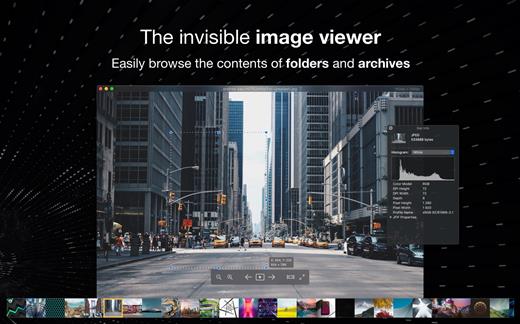
Pixea is an image viewer for macOS with a nice minimal modern user interface. Pixea works great with JPEG, HEIC, PSD, RAW, WEBP, PNG, GIF, and many other formats. Provides basic image processing, including flip and rotate, shows a color histogram, EXIF, and other information.

Supports keyboard shortcuts and trackpad gestures. Shows images inside archives, without extracting them.

Supported formats
JPEG, HEIC, GIF, PNG, TIFF, Photoshop (PSD), BMP, Fax images, macOS and Windows icons, Radiance images, Google’s WebP. RAW formats: Leica DNG and RAW, Sony ARW, Olympus ORF, Minolta MRW, Nikon NEF, Fuji RAF, Canon CR2 and CRW, Hasselblad 3FR. Sketch files (preview only). ZIP-archives.

Export formats

JPEG, JPEG-2000, PNG, TIFF, BMP.

What’s New

Version 8.2.0:


  • Release notes were unavailable when this listing was updated.
Compatibility

macOS 10.13 or later


Release Name: Pixea Plus 8.2.0
Size: 225.2 MB
Links: HOMEPAGE – NFO – Torrent Search

Download: RAPiDGATOR

4 Comments
July 13

LookAway 2.2.6

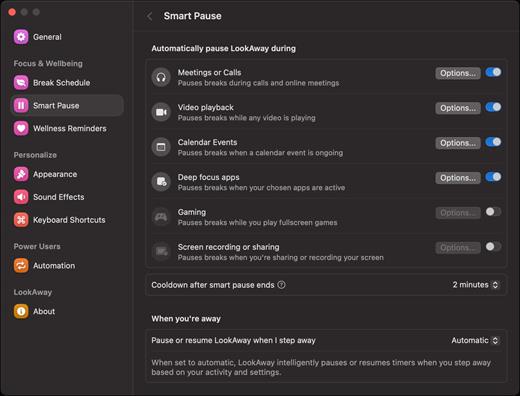
LookAway puts your mac in rest mode at regular intervals to help you rest your eyes. It’s gentle, smart, and fully customizable.

Features:


  • Regular eye breaks
  • Pre-Break Alert
  • At your fingertips
  • Fully customizable
  • Intelligent Pausing
  • Delightful Design
What’s New

Version 2.2.6:


  • Release notes were unavailable when this listing was updated.
Compatibility

macOS 12 or later


Release Name: LookAway 2.2.6
Size: 27.4 MB
Links: HOMEPAGE – NFO – Torrent Search

Download: RAPiDGATOR
4 Comments
July 13

Bloom 1.5.36

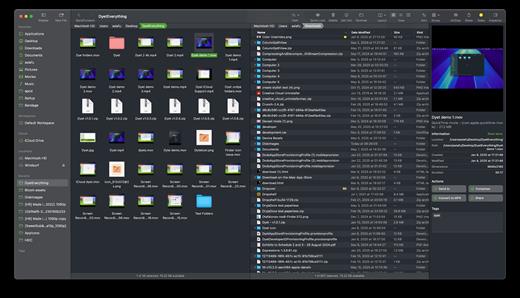
Bloom is a refined file management tool designed to enhance your search and navigation experience on macOS, offering a more intuitive and feature-rich alternative to Finder. With Bloom, you can instantly navigate to any location system-wide using the shortcut ⌘⇧⏎, making file access seamless and efficient .

Key Features


  • Enhanced Search Capabilities: Bloom allows you to search files by keyword within predefined locations, scanning tens of thousands of files in seconds for lightning-fast results. You can also search directly in any folder with ⌘F and refresh results with ⌘R .
  • Portal Mode: A compact window without sidebar or preview, Portal retains core functionalities and can be pinned on top of other windows or collapsed into the screen edge for convenience .
  • Archive Viewing: Browse contents of compressed files without extraction and preview text, images, or PDFs under 10MB by pressing Space or double-clicking .
  • Advanced File Management: Features like auto-resizing columns, advanced rename with regex support, workspace customization, iCloud Drive integration, and tag management elevate your file-browsing experience .
  • Media and Productivity Tools: Convert and optimize images, create various file types easily, paste images from the web, and organize files by kind or date. Additionally, Bloom records every operation for easy reversion and supports starting a terminal directly from a folder .
  • Disk Analysis and Task Management: Use Folder Scan to visualize disk usage through a treemap and manage file operations with a Task Scheduler to track progress .
What’s New

Version 1.5.36:


  • Release notes were unavailable when this listing was updated.
Compatibility

macOS 14.0 or later
Apple Silicon or Intel Core processor


Release Name: Bloom 1.5.36
Size: 14.9 MB
Links: HOMEPAGE – NFO – Torrent Search

Download: RAPiDGATOR

4 Comments
July 10

Amadine 1.8.3

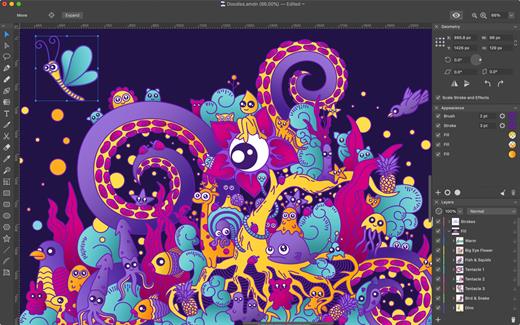
Amadine is a vector drawing software with perfectly balanced UI that guarantees smooth workflow and quick learning.

The app is perfect for illustrations, designing websites, user interface, laying out flyers and brochures, creating logos and icons.

Developed with precision and attention to what users need, Amadine offers everything you may require to bring the craziest illustration ideas to life.

Tools:

  • Use more that 30 tools for selecting, drawing, editing, slicing and typing.
  • Select and modify objects: Move, Selection, Lasso, Eyedropper, Scissors, Eraser, Zoom.
  • Draw and edit paths: Pen, Convert, Draw (combines Pencil and Brush), Width, Gradient, Rectangle, Rounded Rectangle, Ellipse, Polygon, Star, Line, Arc.
  • Transform shapes: Free Transform, Symmetrical Distortion, Free Distortion.
  • Organize artboards: Sheets.
  • Type and edit text: Text (combines text in place and text in box), Text on Path, Text in Shape.
What’s New

Version 1.8.3:


  • Release notes were unavailable when this listing was updated.
Compatibility

macOS 10.12 or later, 64-bit processor


Release Name: Amadine 1.8.3
Size: 56.1 MB
Links: HOMEPAGE – NFO – Torrent Search

Download: RAPiDGATOR
4 Comments
July 10

Lyn 2.4.10

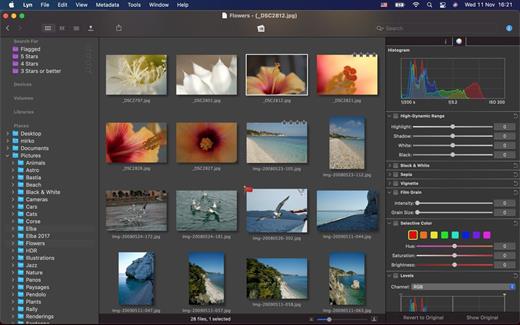
Lyn for macOS is a lightweight, and fast media browser and viewer for designed for Photographers, Graphic Artists and Web Designers.

Featuring an extremely versatile and aesthetically pleasing interface, Lyn delivers an easy to use geotagging technology, image editing and a complete solution for sharing your photographs.

Lyn natively supports all popular image formats from standard formats to HDR and RAW plus any other image format supported by macOS. It also integrates a movie player to watch camera recordings and a simple PDF viewer.

The new editing inspector gives you everything to turn your shots into great photos. Adjust exposure, color temperature, brightness, contrast or reveal image details with highlight and shadow. You change the individual curves and levels, or you can alter colors selectively. You can experiment and convert your color photos to black and white, try a classic sepia tone or add a vignette border or film grain.

Features:


  • Progressive display, on single- or multiple-monitor configurations, of images of virtually any size.
  • Multi-threading to take advantage of multicore CPUs.
  • Display color-corrected images and soft-proofing function.
  • Compatible with High Dynamic-Range images like TIFF float as well as Radiance and OpenEXR.
  • Common metadata parser: EXIF, Camera’s makernote, GPS, GeoTIFF, IPCT.
  • Image navigation with Apple Remote Control or Magic Trackpad.
  • User-switchable thumbnails cache.
  • Filtering by tags and metadata.
  • Fullscreen and slideshow with music.
  • Full IPTC editing with user-defined presets.
  • Batch operations: convert and rename.
  • User-defined places.
  • Non-destructive editing.
  • Editing inspector with filters and effects: temperature and tint, exposure, brightness, contrast, highlight, and shadow. Black and white, sepia tone, and vignette.
  • Easily browse your iPhoto, Aperture, and Lightroom libraries!
  • Facebook, Flickr, Dropbox, SmugMug, 500px, and Picasa Web Albums sharing!
  • Maps layout: geotag your photographs and edit locations with a simple drag and drop.
  • Integrated QuickTime video player
What’s New

Version 2.4.10:


  • Release notes were unavailable when this listing was updated.
Compatibility

macOS 10.11 or later


Release Name: Lyn 2.4.10
Size: 38.8 MB
Links: HOMEPAGE – NFO – Torrent Search

Download: RAPiDGATOR

4 Comments
July 10

iNet Network Scanner 4.0

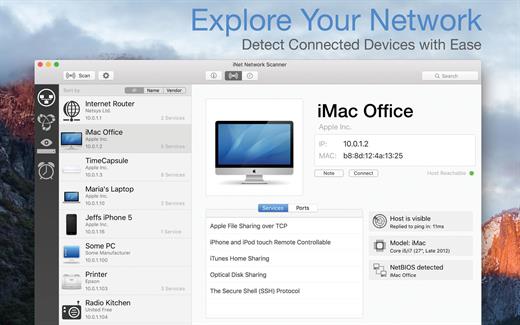
iNet Network Scanner provides you with information about networks your Mac is connected to. Its very easy and user friendly design allows even the unexperienced user to get a profound and understandable overview of a network and the running services. iNet is also available as iPhone and iPad app via the iTunes Store.

What’s New

Version 4.0:


  • [Improved] Icon copy handling and image checks
  • [Added] Display of SSID (WiFi name) in network info
  • [Updated] Vendor and Services Databases
  • [Fixed] Possible crash on startup
Compatibility

macOS 11.0 or later


Release Name: iNet Network Scanner 4.0
Size: 327.3 MB
Links: HOMEPAGE – NFO – Torrent Search

Download: RAPiDGATOR
5 Comments