Please REGISTER or RENEW your account on RAPiDGATOR.net and support us by doing through all RAPiDGATOR working download links on main posts...
July 3

Wondershare Recoverit 14.0.30.13

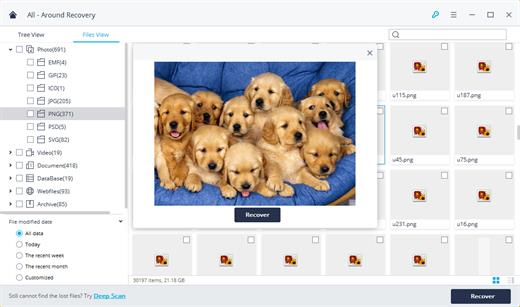
Description: Recover Files in Minutes, No Tech Skills Needed. 2000+ storage devices supported. Recover 1000+ file types. Success recovery rate of 99.5%. 3 simple steps to recover unlimited data.
2000+ Storage Devices Supported
The high-tech data recovery tool can easily recover lost data from almost any devices or storage media.

Laptops, PCs & NAS
Recyle bin, internal drives, partitions; NAS (Network Attached Storage)

Memory Cards
SD/CF card, microSD, miniSD, Sandisk, memory card/stick, TF memory card…

Internal Hard Drive
Hard Drive (Basic & Dynamic), SSD (Solid State Drive)

External Hard Drive
We Support Nearly All External Hard Drive That You Use

Flash Drives
USB Drives, Jump Drives, Pen Drives, Thumb Drives…

Other Storage Media
Camera (Canon, Sony, Nikon, Fuji), Music/Video Player, Camera Drones (GoPro, DJI)

Recoverit Support 1000+ File Types and Formats
We support recovery of all types of files and file systems, e.g. NTFS, FAT, HFS+, APF.

Document
DOC, DOCX, RTF, XLS, XLSX, XLSB, PPT, PPTX, PPS, PDF, DOT, DOTX, XLSB, XLT, XLTX, POT, PPSX, etc.

Photo
CRW, JPEG, JPG, PNG, PSD, RAW, RGB, 3DM, 3DMF, 3FR, ABM, AFX, ANI, ART, ARW, BIZ, BLD, etc.

Video
AVI, FLA, FLV, M4V, MOV, MP4, WMV, 3G2, 3GP, 3GP2, 3GPP, AMV, ANM, ASF, ASX, etc.

Audio
AAC, AIFF, ALAC, FLAC, MP3, OGG, PCM, WAV, WMA, A52, AA, AA3, AAC, AC3, ACC,AFC, AIF, etc.

Archive
7Z, WAR, ZIP, exe, 7zip, etc.

Other Files
MSG, PST, OST, EML, EMLX, MBOX, EPUB, JIS, KEY, LOG, MPS, 3DA, 3DS, 3TF, 3WS, ABD, etc.

Release Name: Wondershare Recoverit 14.0.30.13
Size: 256 MB
Links: HOMEPAGE – NFO – Torrent Search

Download: RAPiDGATOR
5 Comments
July 3

Photo Organizer AI Premium 5.5.0

Description: Organize Scattered Photos into Proper Event Albums. Tame the chaos in your directories. Photo Organizer AI automatically clusters random, unstructured files into clean, chronologically matched event albums while sorting out duplicates and low-quality photos.

Supercharged Culling & Organization
A high-performance workspace designed specifically for professional photographers and digital collectors.

AI Subject & Scene Classification
Automatically tag subjects and classify scenes like mountains, water, rain, document, and documents using embedded local ONNX classifiers.

Blur & Focus Inspection
Detect blurry, grainy, out-of-focus photos, and red eyes automatically. Slide to cull items beneath your customized quality threshold.

DirectML GPU Acceleration
Unchain the power of your graphics hardware. Runs all deep learning culling networks locally using DirectML with stunning frame speeds.

Virtual Event Albums
Group similar chronological events together dynamically. Split, merge, paste, and organize virtual albums without altering physical folders.

Identical & Near-Duplicates
Scan for files with identical image checksums or extremely high visual similarities, and group them so you can retain the best frame.

100% Local & Private
Zero cloud uploads. All analysis, photo scanning, duplicate detection, and file management happen entirely on your computer, keeping your photos secure.

Turn Scattered Photos into Proper Event Albums Today
Save hours of manual sorting and culling. Let local AI group your random scattered pictures into clean, beautifully structured event albums automatically.

Release Name: Photo Organizer AI Premium 5.5.0
Size: 456 MB
Links: HOMEPAGE – NFO – Torrent Search

Download: RAPiDGATOR

5 Comments
July 3

Statistical Discovery JMP Pro 19.1.3

Description: JMP is powerful statistical software designed with scientists and engineers in mind, but ideal for anyone solving problems with data. Packed with tools for data preparation, analysis, graphing, and so much more, JMP has everything you and your organization need to be truly unstoppable with data.

Features of JMP Pro


  • Statistics made visual, powerful, and approachable.
    JMP makes it easy to take on the most complex data challenges. Its simple, interactive interface lets you take your productivity further, and with no code required, there are no obstacles between you and any analysis or graph you want to create.
  • Get insights faster. Get home earlier.
    Your time matters. With JMP’s extensive suite of capabilities and code-free automation, you can quickly go from raw data to actionable insight—all within one streamlined, self-service platform.
  • Unlock efficiency gains to accelerate innovation.
    Industries with high product and process innovation have complex problems to solve and often require statistics to solve them. With JMP, scientists and engineers in these industries can seamlessly apply statistical techniques that support engineering efficiency and help propel their organizations to the forefront of the market.
  • Maximize your potential.
    Realizing potential requires the right support. With JMP, no matter where you are in your analytic journey, you have a partner in life-long learning. Our user community, support experts and learning resources are purpose-built to empower anyone looking to start, build, advance, or apply their skills with data.
System Requirements for JMP Pro

RAM: 4 GB

Processor: 64-bit; x64 processor only

Operating System: Windows 10 and 11

Space Required: 2 GB

Release Name: Statistical Discovery JMP Pro 19.1.3
Size: 600 MB
Links: HOMEPAGE – NFO – Torrent Search

Download: RAPiDGATOR
2 Comments
July 3

Spotify v1.2.92.148 (Ad-Free) Portable Cracked

Description: Online music player is now one of the most popular and widely used applications, as they bring music to people wherever they are and anytime. There is even a special chart for such apps, and Spotify is one of the chart’s top-ranking apps. Fortunately, this article will go into how great it is and analyze the features that made it so brilliant today.

Features :


  • AN EXPANSIVE MUSIC LIBRARY WITH TRENDY CONTENT AND MORE​
    Spotify is currently the top-charting app for music players, and its huge music library is one of the same reasons. Furthermore, all of the app content is free, and users can directly interact with them with options like bookmarks, loop, read comments, and add to playlist. The app constantly updates new content every day but only works mainly on recommendations and always brings new content that they are interested in. Furthermore, the app is friendly to every singer, and users will have the opportunity to share works they are most proud of on the platform.
  • THE BEST RECOMMENDATION BASED ON YOUR ARTIST​
    After users successfully create an account for the app, the first thing that comes from the app is to ask which musicians or bands the user likes the most. The app knows that everyone’s preferences are different. By relying on the musicians the user likes, the app will immediately recommend all the related works or results on the screen. It’s just the beginning of everything, and the app will continuously recommend to users all the songs of related genres, even following the user’s most prominent activities.
  • THE BEST MUSIC LISTENING EXPERIENCE WITH INTUITIVE FEATURES​
    Many users have always been impressed with Spotify’s ability to recommend music, but that makes it perfect in many ways, along with other functions. In particular, the user’s listening experience is always the top priority of the application and comes with many options that allow users to customize everything according to their feelings. However, the user must always be connected to the internet to listen to songs, as the application uses the streaming function to bring to all the music in the world. Not only that, but users can listen to music and hide apps in the background to do other work on any platform they want.
  • CREATE VARIOUS PLAYLISTS AND SHARE IT​
    Since all music on Spotify is free to stream, the app will help users share their personal preferences to the world through playlists. That is also why this application becomes so user-friendly and easy to connect people since everyone can share playlists in many different ways. Furthermore, users can set privacy for each playlist, as the app adds their playlists to other people’s search results. Playlist sharing is a rare feature in other music players, making Spotify more popular and easily accessible to many users.
Release Name: Spotify v1.2.92.148 (Ad-Free) Portable Cracked
Size: 479 MB
Links: HOMEPAGE – NFO – Torrent Search

Download: RAPiDGATOR

4 Comments
July 3

Syncovery Premium 12.2.3.43

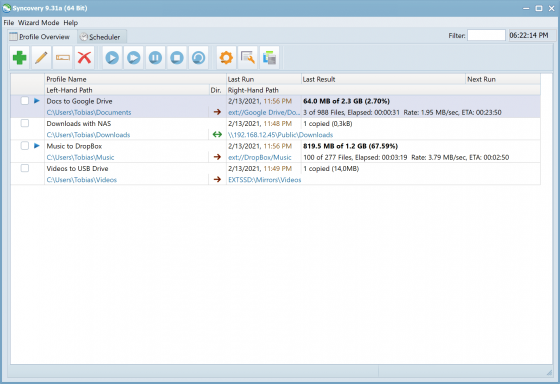
Description: The ultimate sync, backup, copy and migration tool. Syncovery will copy your data the way you need it - and fast!

Multiple Platforms
Syncovery will easily fulfill your requirements: on Windows, macOS, Linux, FreeBSD, and NAS systems. Copy between local drives, network shares, mobile devices via MTP, or using FTP, SFTP, or WebDAV and many others.

Cloud Support
Includes support for many different cloud storages, such as Google Drive, Box, Amazon S3, Azure, DropBox, OneDrive, Rackspace, Sharepoint, Backblaze B2, Citrix Sharefile, and many others.

Create multiple Jobs
Create as many different jobs as you need. Run them manually (with Sync Preview), or let the scheduler run them automatically.

Handle complex Tasks
Syncovery is rich in features, including real-time sync, compression, encryption, email notifications, and much more. It can be extended via PascalScript.

Wizard Mode makes it easy to create your first profile.
Create your first sync or backup job step by step, with explanations of the main settings you need to make. Each job (or profile) works with two paths – source and destination, or just the left and right path (since profiles can be 2-way copy tasks also).

Extremely Fast Scanning
Syncovery’s multi-threaded folder listing algorithm provides an unparalleled speed, and easily handles millions of files and huge numbers of folders. Even more speed can be gained with our Destination File List Cache and Remote Service features.

Block Level Copying
This will help you save bandwidth as well as backup space. Syncovery can detect changed blocks in large files, and copy only these. The detection works by keeping checksums in a database, or with the help of the Syncovery Remote Service, or by using our revolutionary File System Monitoring Service (the File Sytem Monitoring Service is Windows only).

Real-Time Synchronization
Real-Time Synchronization will make sure that changes are synced quickly. Syncovery listens to file system events and quickly performs the appropriate actions. For cloud servers, it can use polling to detect changes. These features are available on Windows and macOS only.

SmartTracking
The SmartTracking sync mode is frequently used in two-way sync jobs. It can detect moved files, deleted files, and conflicts (files changed on both sides).

Versioning
Syncovery allows you to keep multiple versions of modified files, allowing you to restore your files from an earlier date. The restore date can be chosen for individual files or multiple files, in our Restore Wizard.

File Server Migration
Syncovery’s advanced NTFS copying features, high speed, and scaleability enable you to perform large-scale migrations. Read our new, comprehensive Server Migration Guide.

Release Name: Syncovery Premium 12.2.3.43
Size: 101.4 MB
Links: HOMEPAGE – NFO – Torrent Search

Download: RAPiDGATOR
4 Comments
July 3

PVsyst 8.1.4.48838

Description: PVsyst 8 brings major enhancements to our software features, demonstrating our ongoing commitment to the development and simulation of photovoltaic projects.

Define your project
System design: Rapidly design grid-connected, standalone, or pumping photovoltaic systems. The program guides you in selecting components for sizing your project.
System sizing: Visualize sizing constraints for modules and inverters, including I/V curves and power distribution, focusing on optimal inverter sizing and comprehensive loss analysis.
New orientations: Benefit from flexibility in project customization by defining unlimited orientations and explore the possibility of combining trackers and fixed plans in a single simulation.
Sub-hourly simulation: Import meteorological data at sub-hourly intervals from Meteonorm 9 or through PVsyst import tools, and then simulate your systems with greater accuracy.
Simulation and results: Calculate annual energy distribution, analyze key metrics such as total energy, yield, and specific energy, through detailed reports on gains and losses.

Setup shadings
Near shadings: Model your 3D scene directly or import it from another CAD tool. Fast design tools, orientation identification, scene validation, and advanced multithreading calculations will allow you to define your system as close to reality as possible.
Horizon: Simply define distant shadows by determining the sun positions to which your system will be directly exposed. The tool allows you to import horizon data directly via Meteonorm and PVGIS.
Layout: Precisely calculate electrical shading losses (mismatch) by calculating the I/V characteristics of the photovoltaic array, by adding the voltage of each module in a string, and aggregating the string currents.

Many different tools
Grid storage and self-consumption: Choose your storage and self-consumption strategy. Grid storage involves storing excess energy from the photovoltaic array for future use, improving energy management and reliability. Self-consumption involves the direct use of photovoltaic energy on the production site, minimising grid dependence and optimizing the use of solar energy.
Bifacial systems and trackers: Simulate bifacial installations and photovoltaic systems on single or dual-axis trackers, with safety and backtracking options.
Meteorological databases: Use on-board mapping (Bing or OpenStreetMaps) to locate your project and automatically import meteorological data from one of these databases: Meteonorm 8.2, NASA-SSE, PVGIS-TMY (5.1 & 5.2), NREL/NSRDB TMY, Solcast TMY, Solar Anywhere TGY, and Solargis. Many other formats can also be imported manually.
Ageing, optimization, and batch processing: Explore our suite of advanced tools providing detailed results for advanced design decisions. Combine multi-year batch simulation for serialised simulations, including row spacing and bifacial height adjustments, and photovoltaic module ageing.
Economic assessment: Evaluate the costs of your systems (CAPEX, OPEX, custom costs), establish detailed pricing strategies. The result of this assessment will calculate NPV, LCOE, ROI, and various profitability metrics.
Components: Access a verified and regularly updated database including photovoltaic panels, inverters, batteries, pumps, and optimizers (AMPT, Huawei, Maxim, Sungrow, SolarEdge, TIGO) for realistic simulations.

Off-grid systems
Pumping systems: Simulate your sun-tracking pumping systems by integrating hydraulic properties and characteristics, water storage, and water requirements through the selection of various components.
Standalone systems: Evaluate the efficiency of your off-grid installations with energy storage, focusing on defining user electrical needs for an accurate assessment of stand-alone systems.

Minimum required configuration:
At least 2 GB of RAM
At least 2 GB of free space on the hard drive
Minimum screen resolution of 1280 × 720 pixels
Graphics card supporting OpenGL 2.0 or higher
.NET 4.8 framework (for Meteonorm)
PVsyst workspace does not support shared or remotely-synced drives / folders (including OneDrive, Google Drive, Dropbox, etc.). Files and workspaces can be synced as a separate task, once PVsyst has been closed

Release Name: PVsyst 8.1.4.48838
Size: 811.6 MB
Links: HOMEPAGE – NFO – Torrent Search

Download: RAPiDGATOR
6 Comments
July 2

Blackmagic Design DaVinci 21.0.1.11

Description: DaVinci Resolve is the world’s only solution that combines editing, color correction, visual effects, motion graphics and audio post production all in one software tool! Its elegant, modern interface is fast to learn and easy for new users, yet powerful for professionals. DaVinci Resolve lets you work faster and at a higher quality because you don’t have to learn multiple apps or switch software for different tasks.

That means you can work with camera original quality images throughout the entire process. It’s like having your own post production studio in a single app! Best of all, by learning DaVinci Resolve, you’re learning how to use the exact same tools used by Hollywood professionals!

Hollywood's #1 Post Solution
High end professionals working on feature films and television shows use DaVinci Resolve more than any other solution! That’s because it’s known for incredible quality and creative tools that are light years beyond the competition. You get DaVinci’s Emmy™ award winning image technology with 32-bit float processing, patented YRGB color science and a massive wide gamut color space for the latest HDR workflows. You also get the legendary quality of Fairlight audio processing for the best sound in the industry! With DaVinci Resolve, you get the same tools professional colorists, editors, VFX artists and sound engineers use every day to finish your favorite films and streaming television shows!

What’s New in DaVinci Resolve 20
DaVinci Resolve 20 introduces more than 100 new features including powerful AI tools designed to assist you with all stages of your workflow. Use AI IntelliScript to create timelines based on a text script, AI Animated Subtitles to animate words as they are spoken, and AI Multicam SmartSwitch to assemble a timeline with camera angles based on speaker detection. The cut and edit pages introduce a dedicated keyframe editor and voiceover palettes, and AI Audio Assistant analyzes your audio and intelligently creates a professional audio mix. In Fusion, explore advanced multi layer compositing workflows. The Color Warper now includes Chroma Warp, plus Magic Mask and Depth Map have huge updates.

Multi User Collaboration
DaVinci Resolve is the only solution that lets you grow and build your own multi user post production studio! The project libraries are built for real time local and remote collaboration. While the Blackmagic Cloud website lets you host and access your projects and media from anywhere in the world. Now you can collaborate with editors, colorists, visual effects artists, and sound engineers all working together at the same time. Best of all, you no longer have to import and export files, translate projects, lose work, or conform and manage changes. DaVinci Resolve is the only application in the world that lets everyone work together in parallel on the same project and at the same time!

All In One Solution for Post Production
DaVinci Resolve is divided into "pages," each of which gives you a dedicated workspace and tools for a specific task. Editing is done on the cut and edit pages, visual effects and motion graphics on the Fusion page, color correction on the color page, audio on the Fairlight page, and media organization and output on the media and deliver pages. All it takes is a single click to switch between tasks!

Edit
The world's fastest and most advanced professional NLE
The edit page is the world’s most advanced professional non-linear editor. The familiar track layout, dual monitor design and traditional workflow makes it easy for new users to learn while still being powerful enough for professional editors. It’s perfect for larger projects such as feature films, television shows, streaming, commercials, documentaries and more. The edit page features drag and drop editing, context sensitive automatic trimming tools, fully customizable keyboard shortcuts so you can work faster, and a library full of hundreds of titles, transitions, and effects that you can add and animate. You also get complete media management, organization and timeline management tools.

Cut
Designed for editors to turn around work fast!
The cut page is perfect for projects with tight deadlines that you have to turn around quickly. The cut page has a streamlined interface that’s fast to learn and designed for speed. Features such as source tape, dual timelines, fast review, and smart editing tools help you work faster than ever. The sync bin and source overwrite tools let you quickly edit multicam programs. It’s also great for documentaries and now live broadcast editing and replay. Multi Source is the fastest way to see your cameras and edit to the timeline while the cameras are still recording! Everything on the cut page is action based so every click does something. That means you’ll spend more time editing and less time hunting for commands.

Color
Hollywood’s favorite color corrector!
The DaVinci Resolve color page is Hollywood’s most advanced color corrector and has been used to color and finish more high end feature films and television shows than any other system! It’s also approachable with features designed to make it easier for new users to get great results while they continue to learn the advanced tools. For example, primary control sliders will be familiar to anyone who’s used image editing software, making it easy to adjust contrast, temperature, midtone detail, saturation and more. The color page has an incredible range of primary and secondary color grading features including PowerWindows™, qualifiers, tracking, advanced HDR grading tools and more!

Fusion
Cinematic quality visual effects and motion graphics!
The Fusion page lets you create cinematic visual effects and broadcast quality motion graphics right inside of DaVinci Resolve! Fusion features a node based workflow that makes it faster and easier to create sophisticated effects and animations than you could ever create using a layer based approach. You get hundreds of 2D and 3D tools for visual effects and motion graphics, along with advanced animation curve and keyframe editors that allow you to create incredibly organic and realistic animations. Fusion has everything from point, planar and 3D camera tracking to rotoscope and keying tools for creating photorealistic composites, stunning animated titles, 3D particle systems and more!

Fairlight
Professional tools designed for audio post production
The Fairlight page features hundreds of pro tools for audio post production. It’s like having a professional digital audio workstation (DAW) built into your editing and color system! The Fairlight Audio Core lets you work with up to 2,000 tracks at a time with realtime effects, EQ, and dynamics processing! You get sample accurate editing tools, advanced ADR and Foley, and Fairlight FX such as reverb, de-esser, and hum remover, plus AI effects like Voice Isolation and Music Remixer and more. IntelliTrack AI tracking lets you use video to track the Fairlight audio panner and you can mix and master stereo, 5.1, 7.1, and even immersive 3D audio formats including 5th order ambisonics!

Media and Delivery
Incredibly wide format support, finishing and mastering!
The media and delivery pages have everything you need to import, manage and deliver final projects. The media page is a dedicated full screen workspace that lets you prepare footage, sync clips, organize media into bins and add metadata before you start editing. Use the clone palette to ensure every bit of data in the camera media cards is copied during backup. During edit or grading, stream video outputs to a remote client monitor via DeckLink. You can output and upload files to YouTube, Vimeo and X from anywhere page using the quick export tool. The deliver page gives you total control over all encoding options and formats, along with a render queue for exporting multiple jobs!

Resolve FX
DaVinci Resolve Studio 20 features over 100 GPU and CPU accelerated Resolve FX such as blurs, light effects, noise, image restoration, lens flair, stylize and more! Version 19 adds even more plugins such as background defocus for portrait shots and film look creator. Film look creator alters color shading, vibrance, hue and the luminance of an image so you can easily apply many film looks. You can even add film grain! There are improvements to the face refinement box and profile handling, additional controls for skin refinements, smoother sub pixel animation and finer control for directional blur. All Resolve FX effects can be applied and animated in the cut, edit, Fusion and color pages!

Release Name: Blackmagic Design DaVinci 21.0.1.11
Size: 9.5 GB
Links: HOMEPAGE – NFO – Torrent Search

Download: RAPiDGATOR
1 Comments
July 2

Disk Graph 3.2.1

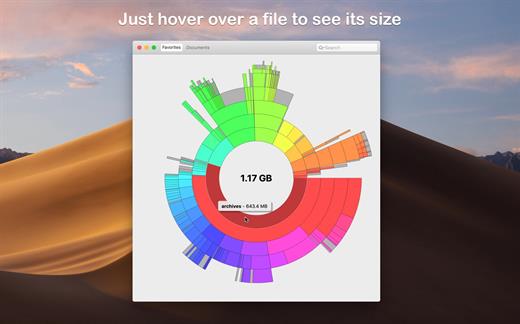
Disk Graph is a tool that allows you to inspect your disk and easily find the files that take away most of your disk space. With its beautiful interface and its pie-like graph, locating big files has never been easier.

Features:


  • Any directory reachable in the Finder (i.e. on your local machine, on an external drive or even on a remote server) can be selected and immediately analyzed
  • Freely navigate inside the subdirectories of an analyzed folder or device
  • Smooth animations manage the transitions between selected directories
  • Move the mouse over a file to see its name and size
  • Use the context menu to trash selected files
  • Quickly search for filenames
  • Save your favorite locations and access them with one click from the main window
  • Choose between two modes: File Size Mode (where section sizes are relative to the respective file size) and File Count Mode (where section sizes represent the number of contained files)
What’s New

Version 3.2.1:


  • Improved compatibility with macOS 26.
  • Improved accessibility: the graph renders with increased contrast, reduced transparency, or reduced motion (by replacing animations with a fade transition) based on the Accessibility options in System Settings.
  • Fixed a rendering issue that could happen when scanning a folder after enabling the option “Show Available Space”.
  • Fixed an issue that caused directories containing search results to be collapsed.
Compatibility

macOS 10.3 or later.
Apple Silicon or Intel Core processor


Release Name: Disk Graph 3.2.1
Size: 9.5 MB
Links: HOMEPAGE – NFO – Torrent Search

Download: RAPiDGATOR
4 Comments
July 2

Storyist 4.4.1

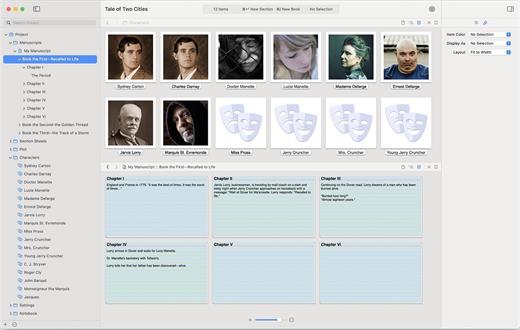
Storyist is a powerful story development tool for novelists and screenwriters. With an intuitive interface that puts you in control, Storyist provides:


  • A word processor with a page layout view and support for headers, footers, and style sheets.
  • A storyboard with customizable story sheets for tracking your plot, characters, and settings.
  • A project manager with fast, project-wide search capabilities to keep your writing organized and accessible.
What’s New

Version 4.4.1:


  • Release notes were unavailable when this listing was updated.
Compatibility

macOS 10.14.0 or later


Release Name: Storyist 4.4.1
Size: 24.3 MB
Links: HOMEPAGE – NFO – Torrent Search

Download: RAPiDGATOR
4 Comments
July 2

Logic Pro 12.3

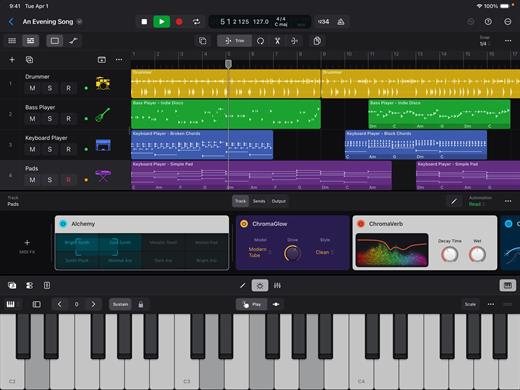
Logic Pro for Mac is a complete collection of sophisticated creative tools for songwriting, beat making, editing, and mixing, built around a modern interface that’s designed to get results quickly and also deliver more power whenever it’s needed. Logic Pro includes a massive collection of instruments, effects, loops, and samples, providing a complete toolkit to create amazing-sounding music.

Music Production


  • Use Stem Splitter to separate nearly any mixed audio recording into six distinct parts: Drums, Bass, Vocals, Guitar, Piano, and Other instruments
  • Smart Tempo instantly conforms imported or recorded audio to your project’s tempo
  • Record and edit MIDI or audio using a comprehensive set of editors and tools
  • Use Live Loops to capture inspiration and quickly build arrangements by mixing and matching loops, samples, and your recordings
  • Manipulate the pitch and timing of any recording with Flex Time and Flex Pitch
  • Keep takes organized with take folders and build comps quickly with Quick Swipe Comping
  • Track Alternatives let you create, duplicate, and then switch between different versions of tracks
  • Deliver a release-ready mix using Mastering Assistant

AI Session Players


  • Discover six virtual musicians designed to create nuanced performances that respond to your direction
  • Synth Player, Bass Player, Keyboard Player, Acoustic Drummer, Electronic Drummer, and Percussionist offer a wide range of genres and distinct playing styles

Beat Production


  • Reshuffle audio with Beat Breaker, a creative time and pitch effect
  • Build custom drum kits using your favorite samples
  • Create drum beats, bass lines, and melodic parts, and reshape sounds over time using Step Sequencer

Sampling


  • Use Sampler to quickly create and edit sophisticated multi-sampled instruments
  • Use Sample Alchemy to transform audio into entirely new malleable sounds
  • Chop and manipulate samples using Quick Sampler

Professional Instrument and Effects Plug-ins


  • Create music with a massive collection of powerful software instruments
  • Shape your sound using a wide variety of high-quality effects

Compatibility


  • Roundtrip capabilities let you open projects back-and-forth between Logic Pro for Mac or Logic Pro for iPad
  • Import and export XML to support Final Cut Pro workflows

System Requirements: 6GB available storage space for minimum install / 44GB or more storage space for full Sound Library installation

What’s New

Version 12.3:


  • Release notes were unavailable when this listing was updated.
Compatibility

macOS 15.6 or later and a Mac with Apple M1 chip or later.


Release Name: Logic Pro 12.3
Size: 1.6 GB
Links: HOMEPAGE – NFO – Torrent Search

Download: RAPiDGATOR
3 Comments