Please REGISTER or RENEW your account on RAPiDGATOR.net and support us by doing through all RAPiDGATOR working download links on main posts...
July 1

PixelForge AI 1.0.0

Description: PixelForge is your powerful, all-in-one image enhancement tool designed for creators, professionals, and everyday users. Experience studio-quality editing with zero learning curve—no subscriptions, no internet, and total privacy.

What You Can Do with PixelForge
Enhance & Enlarge: Upscale images up to 8x with crystal-clear AI detail. Turn blurry old photos or small web images into high-res masterpieces. One-Click Background Erase: Extract people, products, or objects instantly with flawless edges. Flawless Object Removal: Easily erase unwanted objects, text, or people from your photos, and watch the background magically rebuild itself. Just drag, drop, and let the local AI work its magic. Perfect for restoring memories, creating e-commerce listings, or refining presentations in a unified, lightning-fast workflow.

Upscale Images
Increase resolution by 2×, 4×, or 8× using advanced AI models. Enlarged images retain crisp details and natural textures — no blurry results. Handles small web graphics and massive pr

Remove Backgrounds
One click removes the background and replaces it with transparency. Works on portraits, product photos, and complex subjects. The result is ready to place on any backdrop.

Inpaint & Repair
Select unwanted objects, scratches, or blemishes and let AI fill the area with natural-looking content. Perfect for restoring old photos, removing distractions, and cleaning up imag

Batch Processing
Process hundreds of images at once. Drag in an entire folder, set your settings once, and let PixelForge work through them all. Real-time progress shows status for every file.

Before & After Preview
Compare results side by side. See exactly what changed before saving.

Smart Pipeline
Chain multiple operations together: upscale → remove background → repair. Each step shows its own progress. Save custom workflows as presets for one-click reuse.

Full Privacy
Everything runs on your machine. No data is uploaded, no account is needed, and no internet connection is required after initial download.

Supported formats
PNG, JPEG, BMP, WebP, GIF (including animated)

System Requirements
- OS: Windows 10 version 17763.0 or higher
- Memory: 8 GB (Minimum), 16 GB (Recommended)
- Processor: Quad-core 2.0 GHz (Intel i5-8400 / AMD Ryzen 5 2600) (Minimum), 8-core 3.0 GHz (Intel i7-12700 / AMD Ryzen 7 5700X) (Recommended)

Release Name: PixelForge AI 1.0.0
Size: 566.5 MB
Links: HOMEPAGE – NFO – Torrent Search

Download: RAPiDGATOR

4 Comments
July 1

Avast Premium Security 26.6.11052

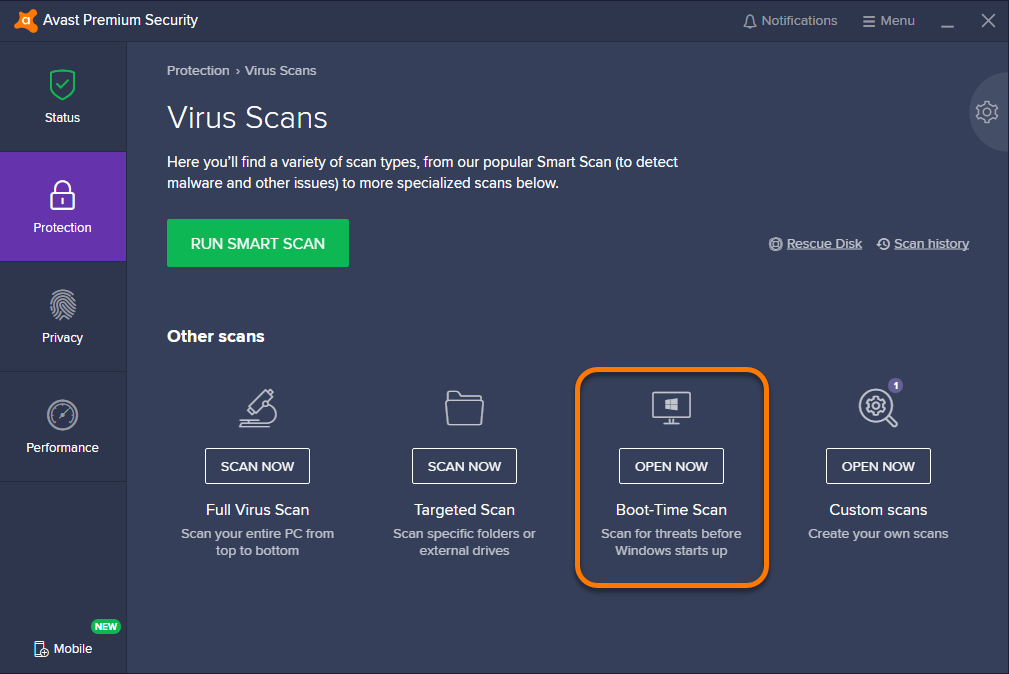
Description: Avast Premium Security is an Avast product that offers antivirus protection and advanced security for your PC against online threats. It allows users to safely shop and bank online, avoid fake websites and phishing scams, block web spies, and more. Avast Premium Security also includes key features from Avast Internet Security and Avast Premier products, both of which no longer exist.

Avast Premium Security protects against all online threats, including spoofed websites and ransomware. Complemented by SafeZone technology, it creates an isolated virtual desktop, invisible to any possible attacker, where you can do your online shopping and banking securely.

The Avast award-winning and certified antivirus engine and shields stop even previously unknown threats – for peace of mind when you chat or spend time on Facebook, Twitter, or other websites.

The silent firewall stops hackers and other unauthorized entry attempts to your PC, to keep your data where it belongs – safe and sound. The antispam feature blocks both spam and sophisticated “phishing” attempts, to keep you from clicking “harmless” links that really can cause damage.

Safely shop and bank online
Spoofed (fake) websites are one of the oldest hacking tricks in the book. Avast Premium Security scans websites for security risks on both your computer and mobile phone, so you can finally shop and bank online safely on any device.

Avoid becoming the victim of digital extortion
Ransomware is quickly becoming one of the most common – and dangerous – types of malware out there. Avast Premium Security protects your devices against havoc-wreaking ransomware so you don’t become the victim of digital extortion.

Features
- Blocks viruses, spyware, and other threats in real-time
- Enjoy peace of mind with advanced ransomware protection
- Avoid fake websites for safer online shopping and banking
- Keep hackers off your computer with our advanced firewall
- Prevent strangers from watching you via your webcam

With Avast Premium Security for Windows, you also get
- Advanced antivirus. Blocks viruses, spyware, and other malware in real-time.
- Web Shield. Blocks dangerous downloads and websites.
- Wi-Fi Inspector. Detects weaknesses in both your home Wi-Fi network and public networks.
- Real Site. Prevents you from visiting fake sites designed to steal passwords and money.
- Sandbox. Lets you open suspicious files in a safe environment to protect your PC.
- Advanced Firewall. Monitors and controls what goes in and out of your computer.
- Ransomware Shield. Prevents ransomware from harming any files in your protected folders.
- Sensitive Data Shield. Stops spyware from accessing sensitive documents on your computer.
- Webcam Shield. Blocks untrusted apps from accessing your webcam.
- Data Shredder. Helps you permanently delete sensitive files so they can’t be recovered.
- Automatic Software Updater. Updates the most popular apps on your PC to help plug security holes.
- Passive Mode. Lets you safely use another antivirus on your PC alongside Avast Premium Security.
- Do Not Disturb Mode. Silences notifications from Windows, other apps, and even our own Avast apps.
- Real-time updates. Pushes security updates to you so you always have our best protection

Release Name: Avast Premium Security 26.6.11052
Size: 862.1 MB
Links: HOMEPAGE – NFO – Torrent Search

Download: RAPiDGATOR
4 Comments
July 1

Valentina Server 17.5.1

Description: Valentina Server combines a world class Enterprise Reports Server and two Database Servers into a single, powerful solution.

Valentina Server includes Valentina Reports Server, Valentina Forms Server, and two database servers: ValentinaDB Server and Valentina SQLite Server. Reports Server and Forms Server can use the internal database servers as well as most popular data sources. Valentina Server includes a RESTful architecture and native CLIENT runtimes support for every major development on Windows, Linux and MacOS (over 69) at no additional cost. Build Valentina Server solutions with PHP, C# / .net, Java, and many more.

Stored Procedures
Stored procedures with SQL, JavasScript and Python.

Valentina Client ADK for iOS
Build iOS apps with a free VCLIENT to Valentina Server.

Fast Web Applications
Build high performance server-side web applications.

Valentina Forms Server
Register Forms to Valentina Server to share with colleagues and clients.

REST & JSON Access Anywhere
Build solutions using these lightweight protocols.

Notifications
Push notifications through a notification channel to spread among subscribing applications asynchronously.

Hot Back Up Your Data
Back up to any directory on your network without having to shut down your server.

Valentina SQLite Server
Full featured, standards compliant multi-user access SQLite based database server.

Event Scheduler
Automate business, data management processes with support for triggers and event scheduling.

Valentina Reports Server
Serve reports, charts, graphs, barcodes, export to PDF, HTML, email for major databases and servers.

Auto Discover on Network
Optionally make Valentina Server securely discoverable on your network.

ValentinaDB Server
Blazingly fast object-relational database server based on the Valentina DB core model.

Release Name: Valentina Server 17.5.1
Size: 70.9 MB
Links: HOMEPAGE – NFO – Torrent Search

Download: RAPiDGATOR

4 Comments
July 1

Dragonrise Games YoloX 1.11

Description: Use YoloX to change your game crosshair. Includes inverted colors, audio sensor, motion sensor, anticheat safety, and other features never seen before. Evolve your aim with the next revolution in crosshair technology!

Effects: Inverted color and other effects.
Animations: Separate animations for main fire, alt fire, and jump.
Audio Sensor: Animated reactions to game audio. Now you can listen to your own music without missing key sounds.
Motion Sensor: Animated reactions to motion such as mouse movement.
Fullscreen: Just works in dedicated fullscreen and other modes.
Easy: No other apps or plugins, like gamebar, required.
Fast: Highly optimized using latest tech. No lag. No FPS drops.
Profiles: Crosshair, size, and offset assigned per game.
Crosshairs: Includes many crosshairs and more by community users, pros, and streamers.
Create: Create and publish your crosshairs to the community.
Autohide: Crosshairs show only when needed.
Scaling: Lossless scaling (sizing) between 200% and 25%.
Hotkeys: Hotkeys to change crosshair, scale, offset, and toggle.
Settings: Settings to autostart, autohide, limit FPS, Steam desync, and more.
Anticheat Compliant: Overlay Only. No dangerous hooks. Code Signed. Whitelisted.

Release Name: Dragonrise Games YoloX 1.11
Size: 7.8 MB
Links: HOMEPAGE – NFO – Torrent Search

Download: RAPiDGATOR
4 Comments
July 1

WinCatalog 2026.2.0.629

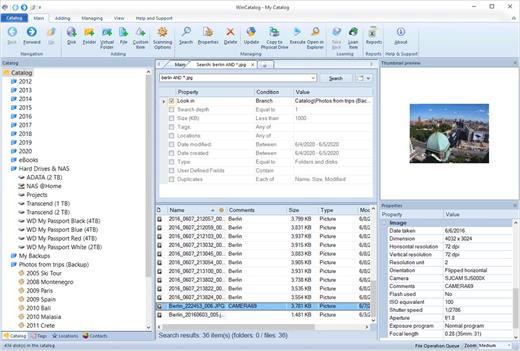
Description: Looking for a reliable and powerful disk catalog software to organize your huge collection of disks? WinCatalog 2024 disk cataloger is a perfect solution! On the market since 2001. Automatically create a catalog of all files, stored on your disks (HDDs, DVDs, CDs, network drives and other media storage devices): WinCatalog will automatically grab ID3 tags for music files, Exif tags and thumbnails for photos, thumbnails and basic information for video files, e-books, contents of archive files, thumbnails for images (pictures) and PDF files, ISO files, and much more.

Organize your file catalog, using virtual folders, tags (categories) and user defined fields, and find files in seconds, using powerful search, even when disks are not connected to the computer. Also easily use WinCatalog as a duplicate file finder. Your disk catalog can be automatically updated through Windows task scheduler.

And no matter how huge your collection of disks is - you will always have your file catalog on hand, perfectly organized.

Main features of WinCatalog Disk Catalog Software:

Ability to extract and store in a catalog thumbnails of graphic files (photos, pictures, RAW-images), as well as EXIF data of digital photos.
Thanks to WinCatalog 2024 disk catalog software you can automatically create and store thumbnails of graphic files (images, photos) saved in all popular formats (JPEG, PNG, BMP, ICO, GIF, Tiff, WMF, and EMF) or RAW image formats produced by most of modern digital photo cameras. You can also save EXIF data (comments, resolution, [photo camera model, focal distance, and other parameters) for photos. This means you can preview picture thumbnails in the catalog without the need to open the particular media. And it will allow you to quickly and easily locate a photo or an image in your image and photo catalog!

Fluently scan inside Zip, RAR, and 7z archives as well as ISO disk images, and add them as folders into the catalog
The program supports Zip, Zipx, RAR/RAR5, and 7z compressed files as well as ISO and NRG disk images. Files inside archives are displayed as files in folders.

Automatically extract supplemental information from music, video, Office Documents, PDF, HTML, TXT files during scanning a disk and creating a catalog
WinCatalog 2024 can display ID3 tags including artist name, song, album, disk cover and other information for music files in the following formats: MP3, WAV, WMA, OGG, OGA, ASF, M4A, M4B, M4P and MP4.
For video files WinCatalog extracts and adds to video catalog basic information including thumbnail, codec, video frame resolution, audio tracks information, etc. So you can successfully use WinCatalog as a video catalog software.
For E-books WinCatalog extracts a title, a description, authors' names, and a cover image. The supported formats of e-books are Epub, Mobi, and FB2.
For HTML files WinCatalog extracts and stores headings and tags.
For text files WinCatalog extracts a part of text and creates a preview that is displayed when you search for a particular document.
For PDF files WinCatalog creates a thumbnail for the first page and grabs text (if any) making them searchable by content.
For Office document files (Word, Excel, PowerPoint, OpenOffice, Markdown) WinCatalog creates a thumbnail for the first page and grabs text and document attributes making them searchable by content.

Release Name: WinCatalog 2026.2.0.629
Size: 73.5 MB
Links: HOMEPAGE – NFO – Torrent Search

Download: RAPiDGATOR

5 Comments
June 30

macOS Tahoe 26.5.2

macOS Tahoe 26 is the next major version of the macOS operating system, unveiled by Apple on June 9, 2025 at WWDC.

Named after Lake Tahoe, located on the California-Nevada border, it continues the tradition of naming macOS after iconic California locations.

The focus of macOS Tahoe is on a new design, improved integration with other Apple devices, and enhanced Apple Intelligence capabilities.

Key features of macOS Tahoe:

Liquid Glass design:


  • A completely redesigned interface using the new Liquid Glass visual language inspired by visionOS (Apple’s Vision Pro operating system). Interface elements such as menus, toolbars, and the dock have become translucent, creating the effect of glass reflecting and refracting light.
  • Fully transparent menu bar that visually expands the workspace.
  • Updated app icons unified with iOS and iPadOS, with support for light, dark, and color options, as well as a new transparent style.

Apple Intelligence:


  • Advanced artificial intelligence features, including Live Translation to automatically translate messages and subtitles in FaceTime.
  • Genmoji and Image Playground updates: Users can create new emoji by combining existing ones, and generate images in styles such as oil painting or vector graphics.
  • Improved reminders: Apple Intelligence analyzes emails, notes, and web pages, automatically categorizing tasks.

Improved Continuity integration:


  • The Phone app is now available on Mac, allowing you to take calls, view contacts, view voicemail, and use features like Call Screening and Hold Assist.
  • Live Activities support with iPhone: notifications such as shipping or travel status are displayed in the Mac menu bar.
    iPhone Mirroring lets you launch iPhone apps directly on your Mac via Spotlight.

Updated Spotlight:


  • Significantly improved search engine that now not only searches for files and apps, but also performs actions such as creating events, starting podcasts, or sending messages.
  • Support for customizable quick commands (like “sm” to send a message or “ar” to add a reminder).
    Integration with cloud services and the ability to search PDFs and other documents.

New apps and features:


  • Games app with a catalog of installed games, support for chat, invitations, and an overlay for settings while playing.
  • The Journal app is now available on Mac.
  • Safari improvements: updated tab design and song lyrics translation in Apple Music.
  • Removal of Launchpad, replaced by an “Apps” feature integrated into Spotlight, similar to App Library in iOS.

Accessibility:


  • New features such as Magnifier (using the iPhone camera to zoom in), Braille support, and Vehicle Motion Cues to reduce motion sickness.
  • Accessibility Nutrition Labels in the App Store that display information about supported accessibility features.

New numbering:


  • Apple switched to a unified numbering system where all operating systems (iOS, iPadOS, macOS, etc.) got version 26, which corresponds to the year after the announcement (2025-2026). macOS still retains its unique name, Tahoe.
What’s New

Version 26.5.2:


  • Release notes were unavailable when this listing was updated.
Compatibility

macOS 14.0 or later


Release Name: macOS Tahoe 26.5.2
Size: 17.1 GB
Links: HOMEPAGE – NFO – Torrent Search

Download: RAPiDGATOR

2 Comments
June 30

AirMail Pro 26.0.22

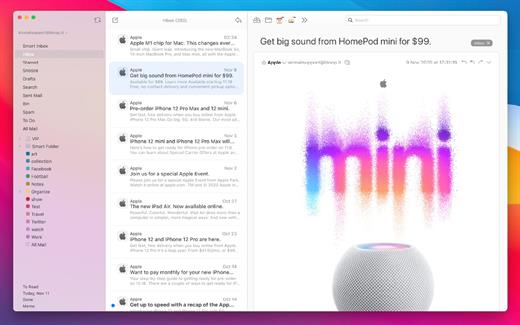
Airmail 4 is a new mail client designed with performance and intuitive interaction in mind optimized for macOS High Sierra! Support for iCloud™, MS Exchange, Gmail™, Google™ Apps, IMAP, POP3, Yahoo!™, AOL™, Outlook.com™, Live.com™

Airmail was designed from the ground UP to retain the same experience with a single or multiple accounts and provide a quick, modern and easy-to-use user experience. Airmail is clean and allows you to get to your emails without interruption – it’s the mail client for the 21st century.

We have taken usability and function to the next level with Airmail and bring a striking-design with support for all major email services. Switch between accounts like a breeze and quick reply to incoming messages within seconds – email has never been so easy and productive.


  • iCloud Account sync
  • iCloud attachment upload and share the link.
  • Handoff support, Composing Draft and folder selection are mirrored on different devices
  • Today Extension, quick access to your inbox.
  • Action Extension, Airmail Compose, Inline create and send messages directly form other apps
  • Action Extension, Airmail Share to quick send messages and attachments.
Accounting:

  • Unified Inbox
  • Alias with custom SMTP
  • Exchange, iCloud™, Gmail™, IMAP, POP3, Google™ Apps, Yahoo!™, AOL™, Outlook.com™, Live.com™
  • Local Accounts
  • Import from Apple Mail, MBOX archive, EML, EMLX, Airmail 1.x
Interactions:

  • Quick Reply
  • Undo History
  • Offline operations
  • Move messages on Different mailboxes
  • Interaction sounds
  • Multi Touch gestures
  • Exchange Meeting Invite
Shortcuts:

  • Gmail Shortcuts
  • Custom global shortcuts
  • Quick Label, Move, Label and Archive
  • Quick folder selection
Attachment:

  • Drag and drop
  • Quick Look preview
  • Google Drive, Dropbox, CloudApp, Box, Onedrive, Droplr, FTP
  • Inline image attachments
  • Winmail.dat preview
  • VCalendar
Conversations:

  • Group by id
  • Group by subject
  • Chronological Reverse
  • Muted CC’d conversation
Visual:

  • Multiple visual themes
  • Minimal and extended Mode
  • Plain Text Rendering
Notifications:

  • Per account notifications
  • Notification center support
  • Notification alerts with custom actions
Address:

  • Gmail, Exchange and OS X contacts
  • Contacts Group
  • Filter by address
  • Open Directory search
Composer:

  • Google App Directory
  • Exchange Global Address List
  • LDAP directory
  • Markdown, Html(Html Source for templates), and text only.
  • Custom settings per single account
  • Bullet and numbered list.
Sending:

  • Auto CC, BCC.
  • Pending operations
  • Send Delay
  • Redirect
  • Send again
  • Bounce
Advanced:

  • Split Screen Support
  • Time Machine friendly
  • Deckles mode
  • EML Import/Export
  • Disable GPU to save battery life
  • Applescript
  • Activity monitor
  • Data Detectors
Signatures:

  • Multiple Account Signatures
  • Markdown, Rich text, Html Source, and text only.
  • Signature above or below the quote
Search & Filtering:

  • Global search for multiple accounts
  • Realtime powerful filters
  • Sort messages, Date, Attachments, Conversations ….
  • Show messages of the same user
  • Flags and filters
Folders, Labels:

  • Nested folders
  • Create, Delete and edit folders
  • Custom colors synced by iCloud
  • Custom folder mappings
  • ToDo, Done, Memo
Send to:

  • Omnifocus
  • Fantastical
  • Evernote
  • Apple Reminder
  • Calendar
  • BusyCal
  • Things
  • 2To
  • Wunderlist
  • Todoist
Privacy:

  • Per user Autoload Remote Images,
  • Disable icon detection
What’s New

Version 26.0.22:


  • Release notes were unavailable when this listing was updated.
Compatibility

macOS 10.12 or later.
Apple Silicon or Intel Core processor


Release Name: AirMail Pro 26.0.22
Size: 48.4 MB
Links: HOMEPAGE – NFO – Torrent Search

Download: RAPiDGATOR

6 Comments
June 30

Tangrid 1.2.4

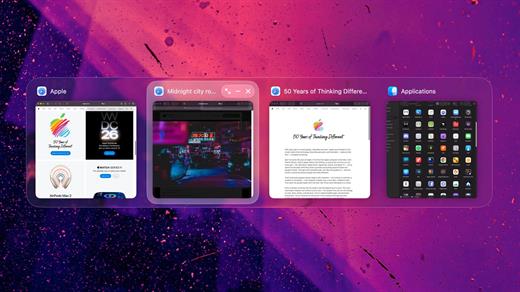
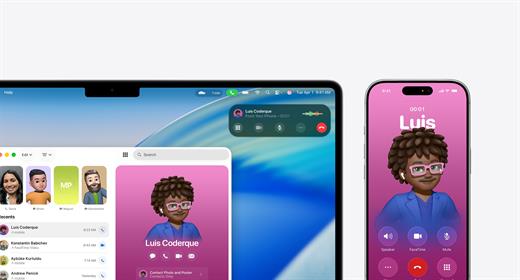
Tangrid is an all-in-one macOS productivity tool designed to bring order to your desktop. Built specifically for multi-display and multi-Space workflows, Tangrid seamlessly combines advanced window tiling, fluid window switching, and an enhanced Dock preview into a single, cohesive experience.

What’s New

Version 1.2.4:


  • Release notes were unavailable when this listing was updated.
Compatibility

macOS 14.0 or later


Release Name: Tangrid 1.2.4
Size: 17.2 MB
Links: HOMEPAGE – NFO – Torrent Search

Download: RAPiDGATOR
5 Comments
June 30

calibre 9.10.0

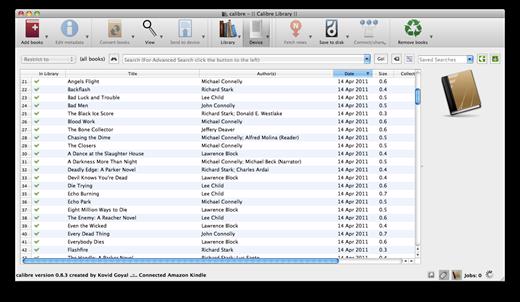
Calibre is a complete e-book library manager. Organize your collection, convert your books to multiple formats, and sync with all of your devices. Let Calibre be your multi-tasking digital librarian.

Manage, convert, sync, and more


  • Library management. Calibre keeps things orderly by creating single entries for books that contains multiple formats. Add tags and comments for better searchability.
  • Format conversion. Calibre’s robust conversion options support
What’s New

Version 9.10.0:


  • Release notes were unavailable when this listing was updated.
Compatibility

macOS 10.14 or later


Release Name: calibre 9.10.0
Size: 327.4 MB
Links: HOMEPAGE – NFO – Torrent Search

Download: RAPiDGATOR

6 Comments
June 30

Vibe Island 1.0.40

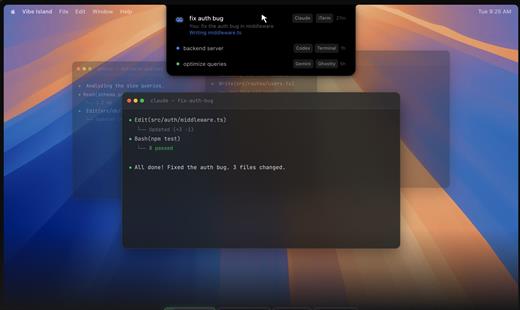
Vibe Island is a specialized productivity tool designed for developers who use terminal-based AI coding agents. It transforms your MacBook’s notch area into an interactive control center, allowing you to monitor, approve, and interact with various AI agents without ever leaving your IDE or breaking your focus. Whether you are using Claude Code, Cursor, or Gemini CLI, Vibe Island ensures you stay in the “flow” by bringing terminal activities to the forefront of your screen in a beautiful, non-intrusive overlay.

Key Features


  • Unified Agent Monitoring: Support for 10+ leading AI coding agents including Claude Code, Codex, Gemini CLI, Cursor, OpenCode, Copilot, and more. All your active sessions appear in one unified, sleek panel.
  • Two-Way Interaction: Go beyond simple monitoring. Approve or deny permission requests, answer “AskUser” questions, and review suggested plans with full Markdown rendering directly from the notch.
  • Precise Terminal Jump: Instantly jump back to the exact terminal tab, split pane, or tmux session where an agent is running with a single click. Compatible with iTerm2, Ghostty, Warp, and native Terminal.app.
  • Zero-Config Setup: On first launch, Vibe Island automatically configures hooks for your CLI tools. No manual editing of config files or API keys required.
  • Privacy-First & Local: Your data never leaves your machine. All communication between Vibe Island and your CLI tools happens locally on your Mac.
  • Native & Lightweight: Built with Pure Swift for Apple Silicon. It is incredibly fast, using under 50MB of RAM and near-zero CPU when idle.
  • Smart Feedback: Enjoy 8-bit synthesized sound alerts for event notifications and visual cues that keep you informed without being distracting.
What’s New

Version 1.0.40:


  • Release notes were unavailable when this listing was updated.
Compatibility

macOS 14.0 or later


Release Name: Vibe Island 1.0.40
Size: 29.8 MB
Links: HOMEPAGE – NFO – Torrent Search

Download: RAPiDGATOR
5 Comments