Please REGISTER or RENEW your account on RAPiDGATOR.net and support us by doing through all RAPiDGATOR working download links on main posts...
Apr 15

ACDSee Photo Studio 7.1.2020 macOS-P2P

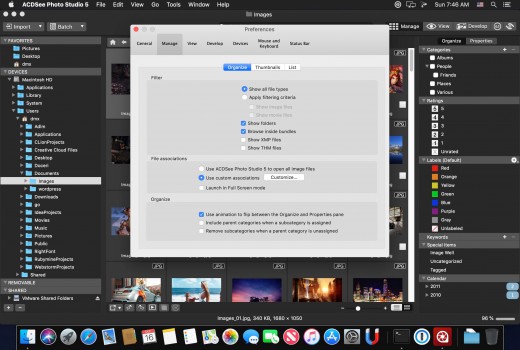
Description: ACDSe Photo Studio Home 2020 is a comprehensive application ideal for acquiring, organizing, viewing, enhancing and sharing your images. With the image browser, you can find, organize, and preview images and media files on your computer. Also you can efficiently acquire images from digital cameras, scanners, and other devices.

Feature :


  • Get files from the team over Dropbox ™ or OneDrive ™ or back up existing work with direct access to cloud sync root drives within Manage mode.
  • Create up to five image baskets to gather and hold images and media files from all over your hard drive. Name individual image baskets and use them to easily view, edit, or share their content.
  • Find duplicates across a variety of folders and locations. Rename or delete detected duplicates to keep your file collection under control.
  • Enjoy RAW viewing support for all the latest camera models.
  • Convert masses of files into other formats from one convenient, accessible dialog.
  • ACDSee now comes pre-loaded with a variety of usable sample quick keyword sets. Export keyword lists and share them with other users. Save countless hours of manual entry by importing established keyword lists.
  • Cloud Sync Drives available in Folders pane to support Dropbox and OneDrive
Release Names: ACDSee Photo Studio 7.1.2020 macOS-P2P
Size: 36.9 Mb
Links: HOMEPAGE – NFO – Torrent Search

Download: UPLOADGiGNiTROFLARERAPiDGATOR

9 Comments
Dec 17

ACDSee Photo Studio v5.0 MacOSX-P2P

Description: With RAW support for over 450 camera models, customizable batch presets, drag and drop searching, vast digital asset management features, and a full toolkit of non-destructive adjustments, ACDSee Photo Studio for Mac 4 is well-positioned as your go-to digital photography resource. Harness the flexibility and control of instant, import-free access to your images, professional processing enhancements, and enough organizational tools to suit even the most particular workflow.
RAW Parametric Power
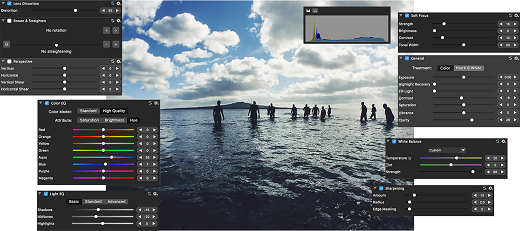
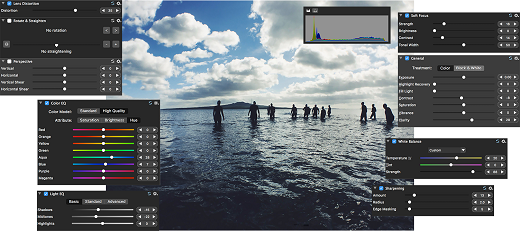
Take your RAW images from rough sensor data to eye-catching digital art with ACDSee Photo Studio’s powerful RAW processing engine. With built-in RAW support, you’ll have the freedom to parametrically correct exposure, clarity, sharpness, lighting, color, noise, details, and much more.

Control Your Collection
Make your own photography workflow rules with extensive tools for moving, finding, sorting, and sharing. Sort by date, rate images to keep track of your best work, and set categories and keywords using the method that works for you. Organize your collection, find duplicates to save space, view and edit EXIF and IPTC information, and embed your own metadata. Identify individual images for further processing with customizable color labels and visual tags.

Straighten it Out
Dull, blurry, crooked images are no match for ACDSee Photo Studio. You can draw a line across your image’s horizon, and the Straighten function will flawlessly correct its orientation to your line, ensuring it looks perfectly shot from the get-go. Then, achieve definition with a sharpening tool that is designed to preserve edge detail. Control the amount of sharpened pixels around each edge, coarse versus fine detail, and the appearance of noise.

Expose Every Detail
Take charge of the spectrum by boosting individual colors or all tones in your images. Increase or reduce exposure, recover highlights, and add fill light, contrast, and clarity, as desired. Produce a glamorous impact with the Soft Focus tool. Like a diffusion lens filter, the Soft Focus tool provides dreamy blur by reducing harsh lines and intensifying colors.

Lighten & Balance
Tonal range, temperature, tint, midtones, and highlights are all yours to command.  Select the RGB color channel to adjust the entire range of the image, or select a specific color. With our patented Light EQ™ technology, you can rescue details from shadows and restore an image’s natural brightness and contrast. This tool intuitively lightens shadows and darkens highlights in specific areas without affecting the image as a whole.

Release Name: ACDSee Photo Studio v5.0 MacOSX-P2P
Size: 40 MB
Links: HOMEPAGENFOTorrent Search

Download: UPLOADGiGNiTROFLARERAPiDGATOR

8 Comments
Sept 23

ACDSee Photo Studio v4.3 (912) MacOSX-P2P

Description: With RAW support for over 450 camera models, customizable batch presets, drag and drop searching, vast digital asset management features, and a full toolkit of non-destructive adjustments, ACDSee Photo Studio for Mac 4 is well-positioned as your go-to digital photography resource. Harness the flexibility and control of instant, import-free access to your images, professional processing enhancements, and enough organizational tools to suit even the most particular workflow.

Release Name: Acdsee-photo-studio-v4-3-912-macosx-p2p
Size: 32.1 MB
Links: HOMEPAGENFOTorrent Search

Download: UPLOADGiGNiTROFLARERAPiDGATOR

10 Comments
Nov 26

ACDSee Photo Studio v4.0-P2P

Description: With RAW support for over 450 camera models, customizable batch presets, drag and drop searching, vast digital asset management features, and a full toolkit of non-destructive adjustments, ACDSee Photo Studio for Mac 4 is well-positioned as your go-to digital photography resource. Harness the flexibility and control of instant, import-free access to your images, professional processing enhancements, and enough organizational tools to suit even the most particular workflow.

Release Name: ACDSee.Photo.Studio.v4.0-P2P
Size: 32.3 MB
Links: HOMEPAGE – NFO – Torrent Search

Download: UPLOADGiGNiTROFLARERAPiDGATOR

3 Comments