

Please REGISTER or RENEW your account on RAPiDGATOR.net and support us by doing through all RAPiDGATOR working download links on main posts...
Apr 22

AOMEI Backupper Technician Plus 8.3.0 + WinPE

Description: Complete Windows PC Data Protection and Clone Software. Automatically backup system, disk, files with different methods and schemes. Clone system and disk to another disk of different size without reinstalling. Keep files in two or more locations same via mirror, two-way or real-time sync.

Intelligent Backup
Backup system, disks, partitions, files, folders and all emails
Backup to internal/external storage, CD/DVD, NAS/network share, cloud as you want
Offer full, incremental and differential backup strategies to set customized backup plans
Backup to cloud storage with 3-2-1 backup strategy to save local space

Quick Restore
Restore system, disks, partitions, emails, files and folders to an earlier state
Restore the Windows system image to another computer and ensure it’s bootable
Create a bootable rescue media to restore the system easily when OS is unable to boot
Mount image files as virtual partitions to browse the contents and selectively restore certain contents as per your needs

Flexible Clone
Migrate an active OS from HDD to SSD without re-installation
Clone a hard drive to another disk, supporting conversion between MBR and GPT
Clone from a large disk to a small one, and vice versa

Diverse Sync
Sync files to local folders as well as other external storage devices
Provide different sync modes (“Basic Sync”, “Mirror Sync”, “Real-Time Sync”, “Two-Way Sync”) to personalize sync needs
Perform sync tasks automatically to keep a copy of frequently changed data

Cloud Backup is Ready
A local backup is the minimum requirement for data protection. However, adding online backup enables you to implement the 3-2-1 backup strategy. Cloud backup is an easy, secure, efficient method to add extra layer of protection for your data, reliably storing it off-site against hardware damage, ransomware, natural disaster, and other data loss risks. Meanwhile, economic cloud storage allows you to save expensive local drive costs.
1TB reliable and secure cloud storage
256-bit AES encryption
GDPR Compliance

Release Name: AOMEI Backupper Technician Plus 8.3.0 + WinPE
Size: 1.2 GB
Links: HOMEPAGE – NFO – Torrent Search

Download: RAPiDGATOR
5 Comments
Apr 22

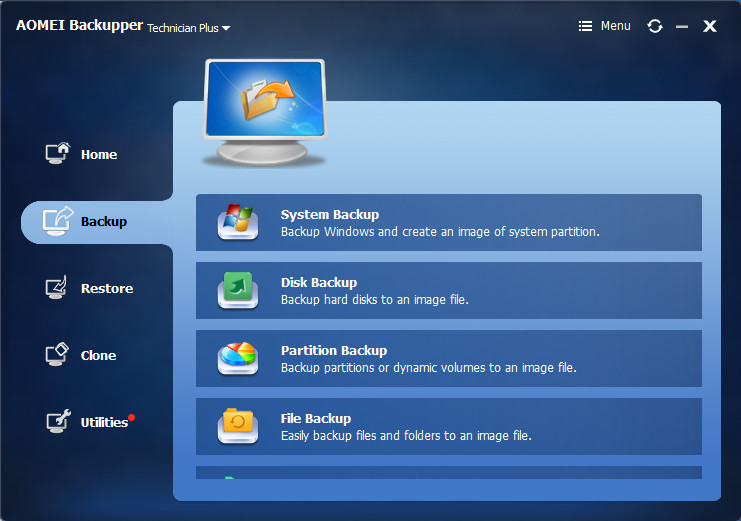
AOMEI Backupper Technician Plus 8.3.0

Description: Complete Windows PC Data Protection and Clone Software. Automatically backup system, disk, files with different methods and schemes. Clone system and disk to another disk of different size without reinstalling. Keep files in two or more locations same via mirror, two-way or real-time sync.

Intelligent Backup
Backup system, disks, partitions, files, folders and all emails
Backup to internal/external storage, CD/DVD, NAS/network share, cloud as you want
Offer full, incremental and differential backup strategies to set customized backup plans
Backup to cloud storage with 3-2-1 backup strategy to save local space

Quick Restore
Restore system, disks, partitions, emails, files and folders to an earlier state
Restore the Windows system image to another computer and ensure it’s bootable
Create a bootable rescue media to restore the system easily when OS is unable to boot
Mount image files as virtual partitions to browse the contents and selectively restore certain contents as per your needs

Flexible Clone
Migrate an active OS from HDD to SSD without re-installation
Clone a hard drive to another disk, supporting conversion between MBR and GPT
Clone from a large disk to a small one, and vice versa

Diverse Sync
Sync files to local folders as well as other external storage devices
Provide different sync modes (“Basic Sync”, “Mirror Sync”, “Real-Time Sync”, “Two-Way Sync”) to personalize sync needs
Perform sync tasks automatically to keep a copy of frequently changed data

Cloud Backup is Ready
A local backup is the minimum requirement for data protection. However, adding online backup enables you to implement the 3-2-1 backup strategy. Cloud backup is an easy, secure, efficient method to add extra layer of protection for your data, reliably storing it off-site against hardware damage, ransomware, natural disaster, and other data loss risks. Meanwhile, economic cloud storage allows you to save expensive local drive costs.
1TB reliable and secure cloud storage
256-bit AES encryption
GDPR Compliance

Release Name: AOMEI Backupper Technician Plus 8.3.0
Size: 212 MB
Links: HOMEPAGE – NFO – Torrent Search

Download: RAPiDGATOR
5 Comments
Mar 22

AOMEI Backupper Technician Plus v8.2.0 WinPE

Description: AOMEI Backupper is a professional-like, easy-to-use backup and recovery software. But is free for home users and commercial use, fully protects your computer from data loss. It lets you securely backup PC and Server, provides one-click backup your system partition or disk and does it in minutes. This software also can explore the created image and restore it to the hard drive if your data gets lost or corrupted. In addition, you can create a bootable rescue disk for recovering your data when the system crashes and the application cannot be accessed from the Windows interface.

Features :


  • Incremental and differential backups. Based on a full backup, the software supports to create incremental or differential backups to taking less time and save storage space.
  • Encryption and Compression. You can set a password for each backups to prevent unauthorized access. When the backup process, specify an industry leading compression algorithm to compress image file in order to take up less disk space.
  • Image file checker and explorer. Check data integrity of image file to ensure the backups can be restored successfully. Mount image files to a virtual partition so that you can browse the contents of the backups in Windows Explorer.
  • Comment Backups and Splitting Backups. Add comments to backups so that the backups can be further identified and clarified. Let you know what a backup is for or what it contains. Splitting Backups can split backup an image file into proper sizes to fit storage media.
  • Create Bootable Rescue Media. You can create a bootable media (e.g. CD or USB media) to restore system drive on the condition that Windows can not boot.
Release Name: AOMEI Backupper Technician Plus v8.2.0 WinPE
Size: 1 GB
Links: HOMEPAGE – NFO – Torrent Search

Download: RAPiDGATOR

10 Comments
Oct 7

AOMEI BACKUPPER TECHNICIAN PLUS V6.6.1 PORTABLE

Description: AOMEI Backupper is a professional-like, easy-to-use backup and recovery software. But is free for home users and commercial use, fully protects your computer from data loss. It lets you securely backup PC and Server, provides one-click backup your system partition or disk and does it in minutes. This software also can explore the created image and restore it to the hard drive if your data gets lost or corrupted. In addition, you can create a bootable rescue disk for recovering your data when the system crashes and the application cannot be accessed from the Windows interface.

Feature :
AOMEI Backupper lets you clone the partition or disk, too. The software already supports the Microsoft Volume Shadow Copy Service (VSS) that enables the data backup process and does not interfere the running applications. This option of AOMEI Backupper is very efficient because backup data can still be made when you’re working.
To prevent data loss, so we need to make data backup, AOMEI Backupper with the following features to ensure the safety of your data.

Release Names: AOMEI BACKUPPER TECHNICIAN PLUS V6.6.1 PORTABLE
Size: 577.69 MB
Links: HOMEPAGE – NFO – Torrent Search

Download: UPLOADGiG – NiTROFLARE – RAPiDGATOR

4 Comments