Please REGISTER or RENEW your account on RAPiDGATOR.net and support us by doing through all RAPiDGATOR working download links on main posts...
June 15

Atlantis Word Processor 5.0.5.2


Description:
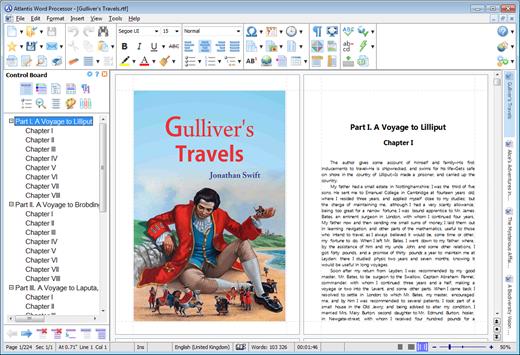
 Atlantis is an innovative, no-nonsense word processor carefully designed with the end-user in mind. Compact, fast-loading, but still powerful and efficient, Atlantis will be the perfect companion for a wide range of your word processing tasks, – from simple to most complex. It does not matter if you are a novice or a power user, Atlantis has the tools you will ever need to compose highly professional documents. Using a most original and practical Control Board, you will create and manage all components of complex documents with unparalleled ease: sections, fields, headers & footers, newspaper columns, bulleted & numbered lists, styles, bookmarks, footnotes & endnotes, etc, all are a breeze with Atlantis.
Both the Safeguard and Backup Files features make sure that you work under extremely safe conditions. Private documents can also be encoded and secured: you can save them to a proprietary COD file format using powerful 256-bit encryption technology.

The Atlantis AutoCorrect and Spellcheck-As-You-Type features combine with a unique typing assist, the Atlantis Power Type, to dramatically simplify your word processing life. The Overused Words feature will help creative writers avoid repetitions and clichйs.

The Atlantis interface is entirely customizable: menus, toolbars, hot keys, colors and sounds can all be adjusted to suit your own requirements. What's more, Atlantis is a fully portable word processor. You can install Atlantis to a memory flash drive, and Atlantis will travel with you wherever you go.

THE WORD PROCESSING FUNCTIONS:
Document creation and formatting is easy, using a customizable and expandable collection of document templates and sample letters.

Comprehensive Style Sheet support is available for advanced users.
A customizable and expandable Clip Library is stocked with text and graphic items ready to be inserted in larger documents whenever suitable. The Atlantis original collections of clips include everyday phrases, letter writing elements, clip art, etc.
Of course, all the traditional font and paragraph formatting commands are present:

choice of typeface, font size, font color. A state of the art typeface preview.
bold, italic, underline, strikeout, double strikeout, superscript, subscript, small caps, all caps, shadow, outline, emboss, engrave.

choice of 17 underline styles; choice of underline color.
character spacing, scaling, kerning, vertical offset.
fully customizable tab stops.
left/right paragraph indent, first line indent and outdent.
spacing before/after paragraph, 6 types of interline spacing.
keep with next paragraph, keep intact, page break before, widow/orphan control.
and plenty more, only a key press or mouse click away...

More than 20 fields are supported. The corresponding items are quickly inserted and automatically updated by Atlantis. Fields make document and template creation very flexible. What's more, we have made sure that fields are not restricted to advanced users: using fields in Atlantis is child's play!

Words can be hyphenated across lines automatically or manually.
You can create newspaper-type columns, divide documents into sections, each section with its own page settings.
You have two graphic-type formatting modes to change font color and highlight text. You will use specific mouse pointers to format text in the same way as you would with a paint brush.

Atlantis introduces a revolutionary approach to document formatting with a Format Palette and Brush. Even the most complex formatting jobs can be done exclusively with a brush-like mouse cursor and a palette loaded with formatting templates. You can use the Atlantis default palette or customize your own format palettes in any way you like.

The Format Palette is only one of the instruments present on the Atlantis Control Board. The Atlantis Control Board brings together all the tools and commands that are required to create both simple and complex documents with the greatest of ease. Each panel of the Atlantis Control Board is dedicated to one specific characteristic of the active document. You have separate overviews of the document Headings, Bookmarks, Sections, Styles, or Lists, with all the related commands directly available from each specific panel of the Control Board. Tools and commands to manage Headings are on hand on the "Headings" panel, tools and commands to manage Bookmarks are on hand on the "Bookmarks" panel. Etc. This gives you unequaled power and flexibility.

The AutoCorrect feature of Atlantis has fully customizable multilingual options, and will dramatically simplify your word processing life. It combines flexibility with power for unparalleled control over the typing and formatting of documents. Some of the Atlantis AutoCorrect functions are still unheard-of in today's top-end word processors. Texts are proofread in the background "As-You-Type", or, optionally, when typing is complete.

A multilingual spellchecker will help you create documents with perfect language. Spelling is checked "As-You-Type", or, again, optionally, when typing is complete. Original Atlantis Spellcheckers are available for 16 languages or dialects. And of course, you can create and augment as many custom dictionaries as you wish.

Power Type is a typing assist adding unique functionality to Atlantis. Working in close cooperation with our proprietary spellchecker engine, Power Type collects statistical information about the texts that you type, creating a smart database of the words that you use most, and also of their usual environment. When you start typing the same words again, Atlantis gives a warning sound, pops a small window up, and displays a list of words beginning with the same characters. But this is not all. The Atlantis Power Type has learning abilities. As time goes by, the Power Type database gets smarter, and you will notice that the typing suggestions are more and more appropriate. Of course, the Atlantis Power Type is invaluable for people with disabilities. But also for slow "one-finger" typists.

The Overused Words feature will help creative writers avoid repetitions and clichйs if they want their texts to be read with any interest or pleasure. The Overused Words feature will show detailed statistics about repetitions and word frequency. This will tell you where words need to be replaced with synonyms, or whole paragraphs reworked.

To improve the reading and understanding of the documents you create in Atlantis, you can add bookmarks, hyperlinks, table of contents to them. Atlantis can build table of contents automatically at the press of a few keys.
All documents created in Atlantis can be "Saved As Web Page", i.e. saved as HTML. This will help owners of personal Web sites, and also e-book creators tremendously. Atlantis also has a command to convert any document to an eBook with just a few mouse clicks.

You will find comprehensive support for all types of lists, bulleted and numbered, whether simple (one level) or outline (multilevel). Where numbered lists are concerned, we have placed the highest emphasis on reliability. You will design foolproof numbering schemes from simplest to most complex with the greatest of ease. And, uniquely, you will be able to fix the wrong numbering of lists created in other not so smart word processors.

Headers and footers are fully supported. And so are footnotes and endnotes. You can insert footnotes and/or endnotes, choosing from a wide range of different reference marks. What's more, and quite uncommonly, you can configure footnotes and endnotes differently from one document section to the other.

DOCUMENT SUPPORT IS COMPREHENSIVE:

Document size is literally unlimited.
Multiple document formats are supported, insuring maximum portability on all systems: RTF, MS Word DOC 6.0/95/97/2000/XP/2003,Vista, Seven DOCX, etc.
Support for document projects.

Multiple graphic formats can be used to complement text: BMP, EMF, WMF, JPG, GIF, PNG, PCX, TGA, TIF, PCD, ICO, etc.
You have an option to save documents in a supercompact lightweight RTF format. Combined with the Atlantis internal Zip compression, this option is ideal for files traveling on the Internet.

Release Name: Atlantis Word Processor 5.0.5.2
Size: 1.9 MB
Links: HOMEPAGE – NFO – Torrent Search

Download: RAPiDGATOR

4 Comments
June 15

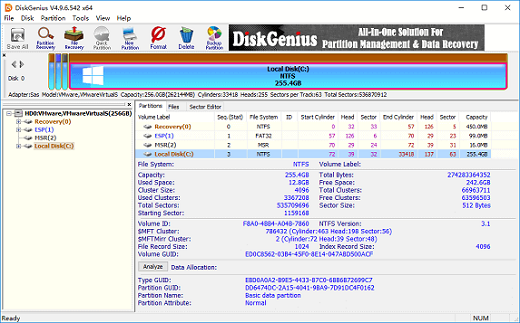
DiskGenius Professional 6.2.0.1829 WinPE

Description: Are you seeking a reliable and all-in-one solution for managing your disk and data needs? Look no further than DiskGenius Professional Edition - your trusted partner in data recovery, disk management, and data backup.

The DiskGenius Professional Edition includes all the features of the Standard Edition and Free Edition, plus additional advanced features and capabilities. Whether you're a home user, a small business owner, or an IT professional looking to optimize disk space, enhance computer performance, recover lost files, back up crucial data, manage a network of computers, and more, DiskGenius Professional Edition stands as the ultimate software suite designed to fulfill your storage and data management needs.

Lost Partition Recovery
Recover deleted or lost partitions and restore them to the partition table. This feature also supports the recovery of lost BitLocker or EXT4/3/2 partitions.

RAW Drive Recovery
Quickly identify and recover all possible data from a partition that has become corrupted or changed to RAW format without scanning the entire drive.

Windows Storage Spaces
Detect and recognize Windows Storage Pools, displaying both Storage Spaces and their member disks, which facilitates the recovery of lost files or partitions.

RAID Data Recovery
Create a virtual RAID 0, RAID 1, RAID 10, RAID 4, RAID 5, RAID 6, JBOD or nested RAID to emulate the real one and recover lost data without affecting original drives.

Read Ext4/3/2 in Windows
You can read from and write to Ext4, Ext3, and Ext2 drives and perform various tasks, such as create, format, resize, recover, or clone Ext4, Ext3, or Ext2 partitions.

Access BitLocker Drives
DiskGenius can unlock BitLocker drives and access data, even if the version of Windows running on your computer does not support BitLocker features.

Access LVM2 in Windows
Open volume groups and logical volumes managed by Linux LVM2 (single or multiple disks), write files to LVM volumes, recover lost data, resize partition on a single physical volume (PV), etc.

Hexadecimal Editor
The built-in hex editor is useful for low-level data editing and recovery, helping you manually recover data from RAW drives, restore deleted or lost partitions, and repair corrupted drives.

Write Data to Virtual Disks
Support to create and open .vhd, .vmdk, .vdi or .hdd virtual disk files, as well as write data to these virtual disks without the need to run a virtual machine.

Write to Hidden Partitions
Easily read or store files and information on hidden partitions that are not readily visible through Windows File Explorer or Disk Management.

Convert Virtual Disk Format
Convert virtual disk formats among .vmdk, .vdi, .vhd, and .hdd without running the virtual machine or causing any data loss during the conversion process.

Set Disk Geometry
Temporarily set disk geometry such as sector size, headers, sectors per track, cylinders, and total sectors, to assist in the analysis of disk partition data structure.

Release Name: DiskGenius Professional 6.2.0.1829 WinPE
Size: 848.1 MB
Links: HOMEPAGE – NFO – Torrent Search

Download: RAPiDGATOR
5 Comments
June 15

ManicTime Pro 2026.1.5

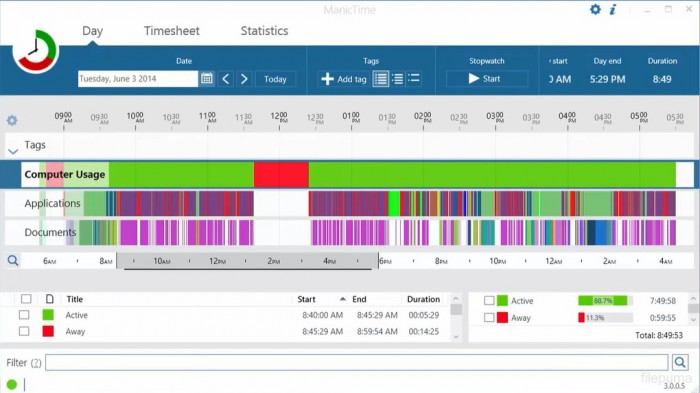
Description: ManicTime automatically records your computer usage. It remembers which apps you've used and for how long. It will also remember which web sites you've visited and which documents you've worked on.

Track project or client work accurately
All the data ManicTime collects will be presented in a easy to understand way. This will help you to quickly figure out when you have switched tasks or went to lunch. You can use this data to accurately assign time to tasks.

Clear and detailed reports
Reports like:
Applications and websites usage
Attendance
Annual leave
Start / end
and others

ManicTime automatically records device usage
Tired of the old, unreliable stopwatch? There is a better way...

Assign time to project or task
Use automatically recorded data to accurately assign time to your projects, clients or tasks.

Great reports
Comprehensive reports are designed to offer you invaluable insights into your business operations.

Attendance and vacation tracking
User-friendly tools for tracking attendance, managing leave quotas, and handling leave approvals

Integrate with other systems
ManicTime integrates with a host of other services as well as your in-house solutions.

Cloud or on premise
Offer a choice between easy to use cloud-based solution or on-premise installation for enhanced data control and security.

Privacy control
Offers highly customizable tracking for enhanced privacy.

Release Name: ManicTime Pro 2026.1.5
Size: 192.5 MB
Links: HOMEPAGE – NFO – Torrent Search

Download: RAPiDGATOR
5 Comments
June 15

MedCalc 23.6.1

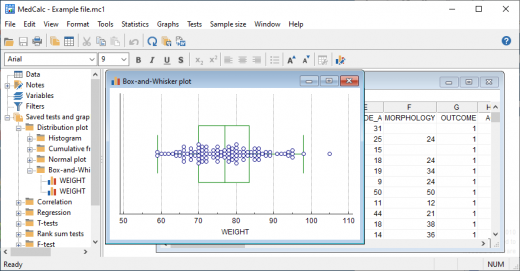
Description: MedCalc is a statistical software package for biomedical research. Includes more than 220 statistical tests, procedures and graphs. ROC curve analysis, method comparison and quality control tools. Minimal learning curve. Developed since 1993.

Easy to learn, fast and reliable
MedCalc includes more than 220 statistical tests, procedures and graphs
save graphs in SVG, PNG, JPG, high resolution TIF, or other file formats, or as PowerPoint slides (*.pptx).
free updates
available with an English, Chinese (simplified and traditional), French, German, Italian, Japanese, Korean, Polish, Portuguese (Brazilian), Russian and Spanish user-interface (help file and documentation in English)
one edition includes all features (do not pay extra for the functions you really need).
compatible with all contemporary Windows desktop editions

Data management
Integrated spreadsheet with 1 048 576 rows and 16 384 columns.
Correct handling of missing data.
Outliers can easily be excluded.
Built-in WYSIWYG text editor.
Imports Excel, Excel 2007, SPSS, DBase and Lotus files, and files in SYLK, DIF or plain text format.
Easy selection of subgroups for statistical analysis.

MedCalc Documentation
Complete HTML manual on MedCalc web site.
Comprehensive context-sensitive help.
Context help in dialog boxes.

ROC curve analysis
MedCalc is the reference software for ROC curve analysis. Our ROC curve analysis module includes:
Area Under the Curve (AUC) with standard error, 95% confidence interval, P-value. Offers choice between methodology of DeLong et al. (1988) and Hanley & McNeil (1982, 1983).
List of sensitivity, specificity, likelihood ratios, and positive and negative predictive values for all possible threshold values.
ROC curve graph with 95% Confidence Bounds.
Threshold values can be selected in an interactive dot diagram with automatic calculation of corresponding sensitivity and specificity.
Plot of sensitivity and specificity, or cost, versus criterion values.
Plot of predictive values versus prevalence.
Interval likelihood ratios.
Comparison of up to 6 ROC curves: difference between the areas under the ROC curves, with standard error, 95% confidence interval and P-value.
Sample size calculation for area under ROC curve and comparison of ROC curves.
Go to the ROC curve analysis section of the MedCalc manual for more information on ROC curve analysis in MedCalc.

Graphs
Lots of graphs, see Graph gallery.
Data point identification in graphs.
Draw text boxes, lines, arrows and connectors.
Name, save and recall graphs and statistics.
Statistical info in graph windows.
Save graphs as SVG, PNG, JPG, GIF, BMP, PCX, or high resolution TIF files, or as PowerPoint slides (*.pptx).

Release Name: MedCalc 23.6.1
Size: 119.1 MB
Links: HOMEPAGE – NFO – Torrent Search

Download: RAPiDGATOR

5 Comments
June 14

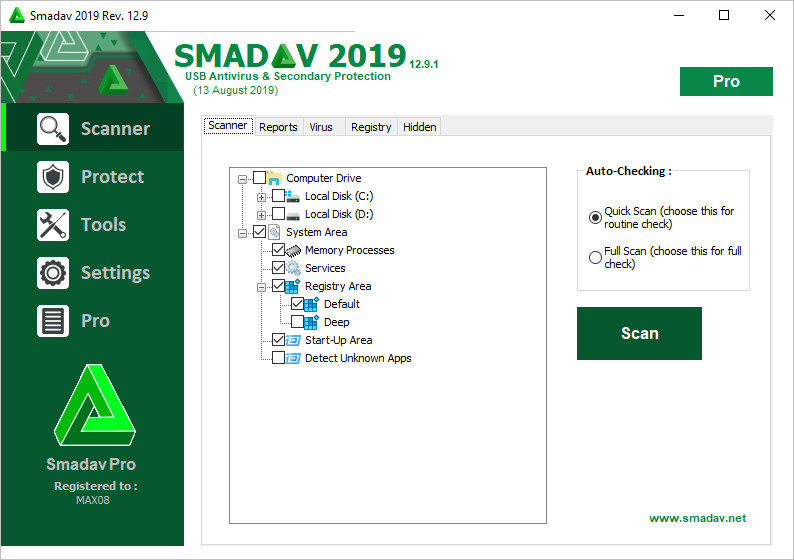
Smadav Pro 2026 15.8

Description: Smadav is an antivirus powerful virus for Windows operating system. Like any program anti-virus any other, this program will provide insurance on your system in order to prevent attacks and security threats. In addition to detecting viruses and malware like worms, Trojans, advertising, spammers, ransomware, etc., this program has good ability to protect and detect all type of virus Autorun.

These viruses are often found in flash memory and storage media, mobile. You attach and copy the files into universities, cafes, school, or any public system does not know about the system your flash. If the system contains virus automatically virus or other malicious, usually, a copy will also be copied to your flash drive when you bring it home and connect to individual system or laptop of you if you do not have insurance and run virus and It is also derived from your system.

This program has a good ability to prevent the attack as such. When you connect the flash with the system, the program will stop enforcing the automatic file and automatic reply and will clean up and report a virus if there is. The program automatically updates and constantly updated database with the latest information about viruses and malicious software. Update anti-virus be automatically downloaded and installed. Of course, you can also update software anti-virus this.

Tool Smadav this use classification system file at the time of scan, meaning the program will only scan the files could be compromised. This increases scanning speed, but not security risks. Any software anti-virus which also can be confused with a diagnosis, so there is a black list in the program where you can send the files that you are confident is safe to block, quarantine, delete or scan. This feature is very necessary for we, the People of Iran used many unlocking software for most files unlocking is categorized as malware because of the nature of invading them. The appearance of the program is also very beautiful and have many different themes to choose from. You can also set a password for the program so no one except you can open the program anti-virus.

Release Name: Smadav Pro 2026 15.8
Size: 6.3 MB
Links: HOMEPAGE – NFO – Torrent Search

Download: RAPiDGATOR
2 Comments
June 14

Adobe InCopy 2026 v21.4 (x64)

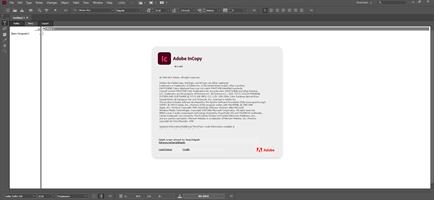
Description: Collaborate with copywriters and editors. InCopy lets copywriters and editors style text, track changes, and make simple layout modifications to a document while designers work on the same document simultaneously in Adobe InDesign - all without overwriting each other’s contributions.

Features:
- Endnote support
- Add paragraph borders
- Find similar fonts
- Advanced font filtering
- Footnotes that span columns
- Open Type enhancements
- Modern user interface
- Work with glyphs easily
- Place images into tables
- Simple application of shading to text; includes controls for offsets and more
- Place Gun for adding borders to tables
- New Find Previous command
- Shortcuts and preferences memory
- Footnote enhancements that respect text wrap
- Color swatch folders for swatch management
- Drag-and-drop table editing
- HiDPI and Retina display support in Windows
- Adobe Typekit integration
- Typekit font syncing
- Quick font searching
- Convenient hyperlink creation
- Different page views when editing
- Enhanced copyfitting
- Save to Cloud command lets you access files on any device
- View recently used fonts
- Middle Eastern language support

Release Name: Adobe InCopy 2026 v21.4 (x64)
Size: 1.2 GB
Links: HOMEPAGE – NFO – Torrent Search

Download: RAPiDGATOR

3 Comments
June 14

Quip 1.7.1

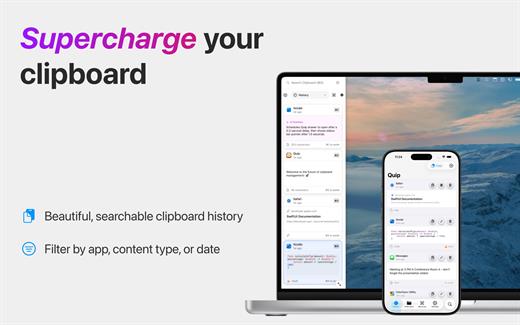
Quip brings desktop-class clipboard management to your iPhone and iPad. With the Quip Keyboard, access your clipboard history from any app, while powerful organization tools keep everything you copy exactly where you need it.

YOUR CLIPBOARD, EVERYWHERE
Never lose important content again. Everything you copy syncs instantly across your Mac, iPhone, and iPad via secure iCloud storage.


  • Unlimited clipboard history across all devices
  • Lightning-fast search finds anything instantly
  • Beautiful visual previews for all content types
  • Secure iCloud sync keeps everything in reach

QUIP KEYBOARD – PASTE FROM ANYWHERE
Access your entire clipboard history from any iOS app with the Quip Keyboard. No more switching apps to find that link or code snippet.


  • System-wide access through custom keyboard
  • Paste any item with a simple tap
  • Auto-save automatically captures your latest copies
  • Works seamlessly with standard iOS clipboard

SMART ORGANIZATION
Collections let you organize content your way. Create project folders, client groups, or let Smart Collections automatically sort items using custom rules.


  • Flexible collections system beats rigid folders
  • Smart Collections auto-organize with custom filters
  • Advanced filtering by app, type, date, and content
  • Pin important items for instant access

SUPER SHORTCUTS FOR QUICK ACCESS
Create shortcuts for frequently used content. Your email, signature, addresses, and more – all available with a single tap in Quip Keyboard.


  • Turn any item into a reusable shortcut
  • Access shortcuts instantly from Quip Keyboard
  • Perfect for emails, addresses, and boilerplate text
  • Sync shortcuts across all your devices

CONTINUITY & HANDOFF
Seamlessly work between your devices. Copy on iPhone, paste on Mac. Use Continuity Camera to scan documents directly into your clipboard.


  • Perfect sync between Mac, iPhone, and iPad
  • Continuity Camera for document scanning
  • Works alongside Universal Clipboard
  • Privacy-first with local data encryption
What’s New

Version 1.7.1:


  • Release notes were unavailable when this listing was updated.
Compatibility

macOS 14.0 or later.


Release Name: Quip 1.7.1
Size: 15.4 MB
Links: HOMEPAGE – NFO – Torrent Search

Download: RAPiDGATOR
4 Comments
June 14

RAR Extractor – Unzip 16.0

Zip,rar,7z,tar files opener. RAR Extractor can extract compressed files in all most formats(over 50 formats).

「Support RAR, ZIP, 7z, pak, pkg, apk, tbz, sti, tar, xar, lha, lzh, hqx, bin, bz2, bzip2, bz, xz, iso, cid, nrg, mdf, taz,l zma, xip, ace, arj, lbr, lqr, cab, rpm, cpt, sea, exe, msi, cpio, lzx, jar, swf, pdf, nsa, dcs, spk… 」
「Compress files to password-protected ZIP & 7Z archives 」
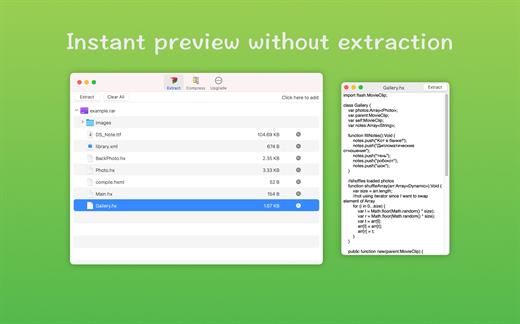
「Quicklook files in archive before extraction」


「Features」


  • Extract extract compressed files in all most formats(over 50 formats).
  • Unzip, unrar encrypted archives.
  • Easy view an archive’s file list.
  • Quicklook files in archive without extracting.
  • Unarchive & unrar the selected individual file or folder in the archive.
  • Double click to display or extract directly after setting this APP as default archiver.
  • Drag archives to the dock icon to extract or display directly.
  • Batch decompress many archives
  • Create password-protected ZIP & 7Z archives.
  • AES256 encryption algorithm to create ZIP & 7Z archives.
What’s New

Version 16.0:


  • Release notes were unavailable when this listing was updated.
Compatibility

macOS 10.13 or later


Release Name: RAR Extractor – Unzip 16.0
Size: 21.5 MB
Links: HOMEPAGE – NFO – Torrent Search

Download: RAPiDGATOR
4 Comments
June 14

PDF Compressor & PDF Toolbox 6.3.6

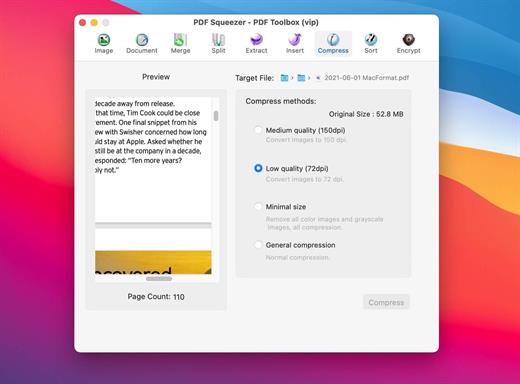
PDF Squeezer – PDF Toolbox is designed for operating PDF files and contains almost all operations you can imagine, such as: compress, merge, split, extract, insert, extract image, convert image, extract text, sequence, encrypt, etc. If you are worried about operating PDF files, download it, it’s so fantastic!

FEATURES:


  1. Merge
    You can easily merge various PDF files that you like into one which is convinent for managing and reading;
  2. Split
    You can arbitrarily split a PDF file at your convenience;
  3. Extract
    You can arbitrarily extract page number from one or more PDF files and merger into a new PDF file;
  4. Insert
    You can insert one PDF file into another;
  5. Extract image
    You can specify the page number of PDF file, and then extract the images or convert the whole page into any other image files in specified format(png,jpeg,bmp,tiff,gif);
  6. Document
    You can extract text in PDF and save as txt or rtfd format;
  7. Compress
    You can compress PDF files making files smaller to save your valuable disk space;
  8. Sort
    You can randomly sequence the page number of PDF file;
  9. Encrypt
    You can encrypt PDF files;

What’s New

Version 6.3.6:


  • Performance improvements.
Compatibility

macOS 10.12 or later


Release Name: PDF Compressor & PDF Toolbox 6.3.6
Size: 10 MB
Links: HOMEPAGE – NFO – Torrent Search

Download: RAPiDGATOR
5 Comments