Please REGISTER or RENEW your account on RAPiDGATOR.net and support us by doing through all RAPiDGATOR working download links on main posts...
June 26

Syncovery Premium 12.2.0.40
Description: The ultimate sync, backup, copy and migration tool. Syncovery will copy your data the way you need it - and fast!
Multiple Platforms
Syncovery will easily fulfill your requirements: on Windows, macOS, Linux, FreeBSD, and NAS systems. Copy between local drives, network shares, mobile devices via MTP, or using FTP, SFTP, or WebDAV and many others.

Cloud Support
Includes support for many different cloud storages, such as Google Drive, Box, Amazon S3, Azure, DropBox, OneDrive, Rackspace, Sharepoint, Backblaze B2, Citrix Sharefile, and many others.

Create multiple Jobs
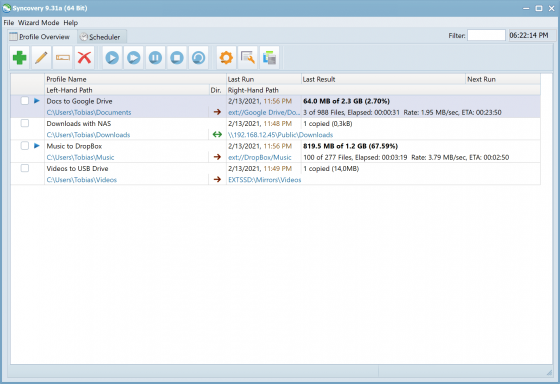
Create as many different jobs as you need. Run them manually (with Sync Preview), or let the scheduler run them automatically.

Handle complex Tasks
Syncovery is rich in features, including real-time sync, compression, encryption, email notifications, and much more. It can be extended via PascalScript.

Wizard Mode makes it easy to create your first profile.
Create your first sync or backup job step by step, with explanations of the main settings you need to make. Each job (or profile) works with two paths – source and destination, or just the left and right path (since profiles can be 2-way copy tasks also).

Extremely Fast Scanning
Syncovery’s multi-threaded folder listing algorithm provides an unparalleled speed, and easily handles millions of files and huge numbers of folders. Even more speed can be gained with our Destination File List Cache and Remote Service features.

Block Level Copying
This will help you save bandwidth as well as backup space. Syncovery can detect changed blocks in large files, and copy only these. The detection works by keeping checksums in a database, or with the help of the Syncovery Remote Service, or by using our revolutionary File System Monitoring Service (the File Sytem Monitoring Service is Windows only).

Real-Time Synchronization
Real-Time Synchronization will make sure that changes are synced quickly. Syncovery listens to file system events and quickly performs the appropriate actions. For cloud servers, it can use polling to detect changes. These features are available on Windows and macOS only.

SmartTracking
The SmartTracking sync mode is frequently used in two-way sync jobs. It can detect moved files, deleted files, and conflicts (files changed on both sides).

Versioning
Syncovery allows you to keep multiple versions of modified files, allowing you to restore your files from an earlier date. The restore date can be chosen for individual files or multiple files, in our Restore Wizard.

File Server Migration
Syncovery’s advanced NTFS copying features, high speed, and scaleability enable you to perform large-scale migrations. Read our new, comprehensive Server Migration Guide.

Release Name: Syncovery Premium 12.2.0.40
Size: 101.4 MB
Links: HOMEPAGE – NFO – Torrent Search

Download: RAPiDGATOR

3 Comments
June 26

Aeon Timeline 3.5.107

Description: Grow big ideas into brilliant narratives. Aeon Timeline helps you manage complex stories, so you can present and write with confidence.

Get your project in order
Document your project in detail. See your complete timeline, clearer than ever.

Compile and record everything
Document all aspects of your project. Group and order events and data, attach files, and add links. Cross-reference anything. Make your timeline as simple or detailed as you need with custom categories and attributes.

Create a clear repository
Manage hundreds of records down to the finest detail. Visualize data by date or category. Find key information and files with ease.

Craft your story
Plan and structure powerful storylines

Outline your project
Plan out your story in a powerful visual workspace. Develop your plot and characters, without ever switching apps.

Plan holistically
Visualize your story chronologically, by narrative, or by character arc. Coordinate subplots, expand on ideas, and track dependencies

Release Name: Aeon Timeline 3.5.107
Size: 192.7 MB
Links: HOMEPAGE – NFO – Torrent Search

Download: RAPiDGATOR
4 Comments
June 26

Lucion FileCenter Suite 12.5.36

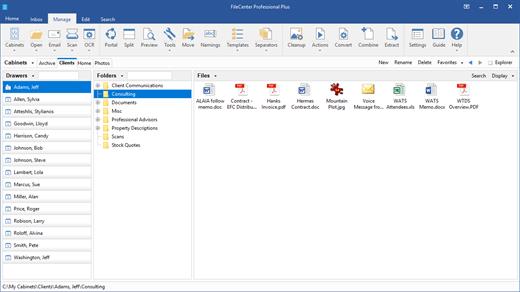
Description: FileCenter turns your Windows desktop into a document editing and management machine. Convert paper documents into searchable PDFs, edit them, and store them in a consistent folder structure for later. Best of all, you can retrieve any document with a simple find & search.

Easy Document Management, Scanning and PDF Software
Now all of your files, digital and paper, come together. Introducing FileCenter – your fastest path to file productivity. Priced for home users and businesses alike. Invoices or receipts, contracts or quality control documents, financial statements or medical records and estate plans … FileCenter fills the void with a fully-featured solution.

Save Time & Money with the
#1 Desktop Productivity Tool
The tasks you struggle with are about to become a pleasure. FileCenter is the productivity solution that's so friendly and approachable, it feels like it drives itself.

An intuitive filing system
Introducing electronic filing cabinets. No complex databases, just regular Window

One-click scanning and OCR
Automatically scan and name documents in just a couple of mouse clicks. Scanning doesn't get any easier.

Easy to install, learn & use
Get set up and running in a few minutes. Or reach our installation experts anytime.

PDF editor
Create PDFs from any file, edit and annotate your PDFs, cut them apart or splice them together.

Seamless integration
No need to abandon the programs you love. FileCenter plays nice.

Optional Cloud access
SharePoint, OneDrive, Google Drive, DropBox, and more.

Smart 'e-filing' system
FileCenter's e-file cabinets "overlay" regular Windows directories, so you can view your existing files without importing them. Organize your files, scan your paper documents, edit your PDFs, and search your archives from one clean, simple interface.

Works with any file
Save files directly into your file cabinets from most of your programs, as part of your usual workflow – no importing necessary. Then open them again from FileCenter in your favorite applications. This integration can be enabled/disabled on a program-by-program basis.

Find documents easily
Type a query, search everything, or limit your search to a specific cabinet, drawer or folder. Find the documents you need fast, no matter how deeply they're buried in your cabinets.

Release Name: Lucion FileCenter Suite 12.5.36
Size: 351.7 MB
Links: HOMEPAGE – NFO – Torrent Search

Download: RAPiDGATOR
3 Comments
June 26

ON1 Resize AI 2026.4 v20.4.1.18862

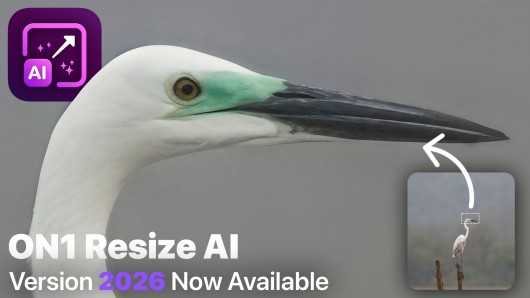
Description: ON1 Resize AI 2026 is the industry-leading image resizer software for creating stunning, high-quality photo enlargements. Powered by advanced super-resolution AI, it allows photographers to enlarge images up to 10x while maintaining—and even enhancing—fine detail, sharpness, and edge clarity. Whether you're preparing prints, enlarging crops, upscaling AI generated images,or restoring old images, Resize AI delivers unmatched results without artifacts or blurring.

AI-powered photo enlargements up to 10x
Advanced face recovery with controllable strength
Photorealistic results, not artificial smoothness
Use as a standalone app or plugin for Lightroom, Photoshop and more
Optimized print presets with soft proofing
Gallery wrap and tiling features for canvas and murals

What's New in Resize AI 2026

New Highest Quality Model
A next-gen AI model using diffusion to rebuild lost detail with stunning realism. Perfect for ultra-sharp enlargements, tight crops, and gallery-quality results from even the smallest images.
Perfect for: Cropped or low-res images, high-end printing and fine art enlargements, reconstructing fine texture and edge detail with realism

New Standard Model
A high-speed AI model designed for clean, reliable results—perfect for low-quality or noisy images. Optimized for large batch jobs and smooth performance, even on older or less powerful GPUs.
Perfect for: Large batch jobs, high-ISO or compressed files, systems with limited graphics power

New Photo Input Options
By choosing the type of photo you're enlarging—standard, or high quality—Resize AI can automatically suggest the ideal AI model to get the best upscaling results.

Tools for Print-Ready Output
Photo enlargement software should deliver the highest quality photo prints. ON1 Resize AI excels at making prints using state-of-the-art technology. You can enlarge your images to any size and not lose sharpness or details in your prints.

Tiling for Murals
Print extra-large images in multiple sections

Gallery Wrap Margins
Easily create canvas-ready photos

Smart Sharpening & Resolution Presets
Auto-optimized for printers

Soft Proofing
See your photo as it will appear in print

Batch Resize & Export with Ease in Resize AI
Set file names, types, destinations
Add gallery wrap margins or watermarks
Use Standard Model for high-volume jobs
Resize layered Photoshop files with masks, text, and more

Resize a single image or batch process hundreds with sharp, high-quality results using powerful export presets—ideal for high-volume workflows. It's all possible with this incredible photo enlargement software.

Release Name: ON1 Resize AI 2026.4 v20.4.1.18862
Size: 209.5 MB
Links: HOMEPAGE – NFO – Torrent Search

Download: RAPiDGATOR
0 Comments
June 26

R-Studio 9.5 Build 191810

Description: Disk Recovery Software and Hard Drive Recovery tool. Empowered by the new unique data recovery technologies, R-STUDIO is the most comprehensive data recovery solution for recovery files from NTFS, NTFS5, ReFS, FAT12/16/32, exFAT, HFS/HFS+ and APFS (Macintosh), XFS, Little and Big Endian variants of UFS1/UFS2 (FreeBSD/OpenBSD/NetBSD/Solaris) and Ext2/Ext3/Ext4 FS (Linux) partitions.

It also uses raw file recovery (scan for known file types) for heavily damaged or unknown file systems. It functions on local and network disks, even if such partitions are formatted, damaged or deleted. Flexible parameter settings give you absolute control over data recovery.

R-Studio utilities recover files:
Deleted without Recycle Bin, or when Recycle Bin has been emptied;
Removed by virus attack or power failure;
After the partition with the files was reformatted, even for different file system;
Recovering data if: VIRUS has invaded; FAT is damaged; MBR is destroyed; FDISK or other disk utilities have been run;
When the partition structure on a hard disk was changed or damaged;
Data recovery on damaged or deleted partitions;
From hard disk with bad sectors;
When necessary R-Studio can also wipe data on hard drives to prevent accidental data leaks when the drives are to be sold, given away, or disposed off in any other way.

Support for:
Basic(MBR), GPT, BSD(UNIX), APM(Apple partition map) partitions layout schemes;
Support for Bitlocker Drive Encryption, both for BitLocker Drive Encryption and BitLocker ToGo volumes;
Dynamic volumes, Windows Storage Spaces (Windows 2000-2022/8.1/10/11);
Apple software RAIDs, CoreStorage, File Vault, and Fusion Drive;
Linux Logical Volume Manager (LVM/LVM2) and mdadm RAIDs;
Intel Software RAIDs;
R-Studio can automatically recognize and assemble the components of these disk managers even if their databases are slightly damaged. Their components with severe corrupted databases can be added manually.
Support for VMDK/VHD/VHDX/VDI file formats. Read-only for all versions, creation for Technician/T80+ versions.
Read-only support for dmg files (Apple Disk Image: all versions ), E01/(EWF) files (Expert Witness File Format: R-Studio Technician/T80+), and AFF files (Advanced Forensic Format: R-Studio Technician/T80+).

Advanced data recovery algorithm:
to increase the quality of file recovery when the file system is not damaged;
to recover files that are not recognized in file system metadata and not found during a disk scanning procedure;
to fast search for lost partitions;
to recover files from devices with unknown file systems, including HD, CD, DVD, floppy disk, Compact-Flash Card, USB drive, ZIP drive, Memory Sticks and other removable media.

Support for specific file system features:
Recognitions of localized names;
NTFS encrypted files, NTFS alternative data streams, NTFS data deduplication, NTFS LogFile, NTFS Symbolic Links & Directory Junctions;
ReFS: symbolic links, directory junctions, deduplication;
HFS+ journal processing, HFS+ extended attributes, HFS+ compressed files;
Advanced APFS recovery: support for encryption;
Ext2/Ext3/Ext4 FS/UFS journal processing and extended attributes;
XFS extended attributes;
Recovery of names and paths for files deleted to Recycle Bin and Trash.

Release Name: R-Studio 9.5 Build 191810
Size: 140.5 MB
Links: HOMEPAGE – NFO – Torrent Search

Download: RAPiDGATOR
3 Comments
June 26

Capture One 16.8.2.3615

Description: Mind-blowing colors and quality. Get true-to-life colors and superb image quality right from the start of your photo process. Fine-tuned by our in-house experts, our RAW converter is customized for nearly 600 camera profiles and over 700 lenses. With true-to-life color processing, you can spend less time editing and reach your final look even faster.

Shoot tethered. Fast.
Connect your camera and shoot tethered into Capture One. Organize shots, make changes on the spot, auto-apply edits to incoming shots, and get the perfect image every time. See what your camera sees with Live View, and don’t miss out on some of our smart features like ReTether and Save to Card, which will make sure you stay flexible and never lose a shot.

Work together with anyone, anywhere
Collaborating with teams and clients – whether in the same room or on different continents – is made easy with Capture One Live. Share, view, comment, rate, tag, and get feedback. All in one place. No uploading, exporting, or downloading a single photo ever again.

Edit intelligently. Easily.
With assisted editing, you can start and finish your projects with just a few clicks.

With a single click, you can instantly match the style or edits of a reference image. Whether from a previous project, a film still, or a mood board, it automatically transfers the look to your current photo(s), giving you a strong starting point for editing and color grading.

Mask skin, hair, eyes, facial features, subjects, and backgrounds with extreme precision. Save time by creating complex masks quickly for multiple images. You can even combine them with other adjustments and save them as a Style.

You can now set your crop reference to a single image and apply it to a batch of photos or incoming shots. Capture One will detect whether to focus on a face or a subject and automatically make consistent crops for all your shots.

Finish most of your edits in seconds with Smart Adjustments by automatically adjusting Exposure and White Balance. Unlike copy and apply, Smart Adjustments makes our photos consistent, even under different lighting conditions.

Experience the speed as Capture One intelligently zooms and pans to the nearest eye in each shot, allowing you to quickly check for sharpness without manually zooming in.

A quick and easy way to take care of annoying dust spots in multiple photos and dramatically speed up your editing.

Release Name: Capture One 16.8.2.3615
Size: 1.5 GB
Links: HOMEPAGE – NFO – Torrent Search

Download: RAPiDGATOR
3 Comments
June 26

XnViewMP 1.11.4

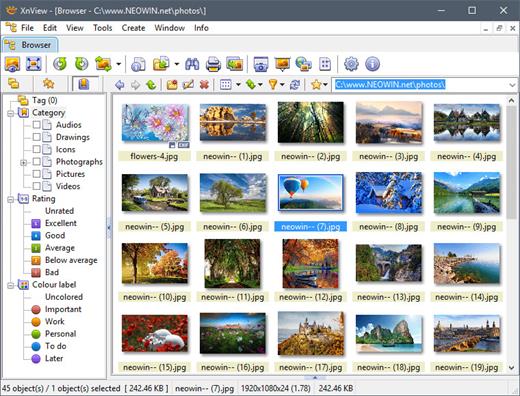
Description: XnView MP is a powerful, versatile and free image viewer, photo management, and image resizer software. XnView is one of the most stable, user-friendly, and comprehensive photo management tools available today, perfect for both beginners and professionals. All common picture and graphics formats are supported (JPEG, TIFF, PNG, GIF, WEBP, PSD, JPEG2000, JPEG-XL, OpenEXR, camera RAW, HEIF, HEIC, AVIF, PDF, DNG, CR2).

Photo Viewer
With XnView you can browse, organize, and view your images in numerous ways:
Thumbnail View
FullScreen View
FilmStrip View
SlideShow with Effects
Image Compare (up to 4 images)

Photo Editor
XnView allows you to process your images with an arsenal of editing tools:
Resize, Rotate, Crop
Lossless Rotate & Crop (jpeg)
Adjust Brightness, Contrast, Gamma, ...
Auto Levels, Auto Contrast
Modify Colors depth & palette
Apply Filters & Effects
And Much More...

Create
SlideShows
Contact Sheets
Video Thumbnails Gallery
File Listings
Strip of Images

Batch tools
XnView allows you to batch process your images:
Powerful Batch Convert (same module also powers XnConvert)
Batch Rename
Change Timestamp
Metadata Editing (IPTC, XMP)

Release Name: XnViewMP 1.11.4
Size: 56.8 MB
Links: HOMEPAGE – NFO – Torrent Search

Download: RAPiDGATOR
5 Comments
June 26

Adobe Premiere Pro 2026 v26.3.0

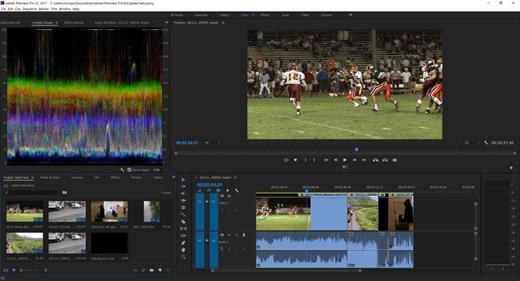
Description: Video editing that’s always a cut above. Premiere Pro is the leading video editing software for film, TV, and the web. Creative tools, integration with other Adobe apps and services, and the power of Adobe Sensei help you craft footage into polished films and videos in one seamless workflow. And Premiere Rush, our new app, is included with your subscription so you can capture footage and start editing on all your devices, anywhere.

Smart tools. Better storytelling.
Premiere Pro is used by Hollywood filmmakers, TV editors, YouTubers, videographers — anyone with a story to tell, including you.

Stay in your creative flow.
Premiere Pro is the industry leader for editing everything from fast-turn TV series to feature films. Integrated, efficient workflows let you polish your work without leaving your timeline. And automated tools powered by Adobe Sensei speed up time-consuming tasks, so you can focus on your story.

Any camera. Any format. Any platform.
Edit footage in any modern format, from 8K to virtual reality. Broad native file support and simple proxy workflows make it easy to work with your media, even on mobile workstations. Delivering content that’s optimized for any screen or platform is faster than ever.

Everything you need. Right where you need it.
Along with tools for color, audio, and graphics, Premiere Pro works seamlessly with other apps and services, including After Effects, Adobe Audition, and Adobe Stock. Open a Motion Graphics template from After Effects or download one from Adobe Stock and customize it — all without leaving the app. And Premiere Pro integrates with hundreds of partner technologies.

Precise and simple color grading
Take the guesswork out of curve adjustments with innovative Lumetri Color tools. Each curve has two axes with paired values, making selective color grading easy and accurate.

Improve audio instantly
New sliders in the Essential Sound panel let you dial down or remove background noise and reverb for incredible results.

Infographics with Motion Graphics templates
Drag and drop spreadsheets into new infographics Motion Graphics templates to quickly generate visualizations of your data. Any updates to your spreadsheets are automatically updated in your infographic.

Release Name: Adobe Premiere Pro 2026 v26.3.0
Size: 4.5 GB
Links: HOMEPAGE – NFO – Torrent Search

Download: RAPiDGATOR
3 Comments
June 26

WYSIWYG Web Builder 21.1

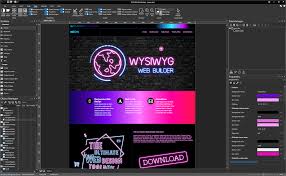
Description: The ultimate toolbox for creating amazing websites! WYSIWYG Web Builder has a huge set of tools for both beginners and professional designers/developers.

Responsive Web Design
Unlike most other web design applications, you can create both flexible and absolute page layouts. With support for layout grid, flexbox, css grid and fixed layouts with breakpoints.

Web Fonts
Easily add Google Fonts and other Web Fonts to your website.

Animations
Add amazing pre made animations and transitions or create your own animations. More than 150 pre-defined animations are included.

Pre-made Blocks
Use pre-made blocks to quickly get started. More than 250 blocks are available!

Forms Tools
Send Emails, Upload Files, Store Data in MySQL or CSV, Auto Responder, Form Validation, Conditons/Calculations

Images & Media
Image filters, shapes, galleries, carousels, lightboxes, rollover animations, YouTube, Vimeo, TikTok, MP4 and audio

Icon Libraries
Support for Font Awesome, Material Icons and many other icon libraries

Navigation
Navigation buttons, drop down menus, fullscreen menu, mega menu, panel menu, breadcrumb, pagination and much more!

Extensions
Hundreds of extensions to add extra functionality to the software. Including slideshows, navigation, audio/video, webshops, data viewers etc.

One Click Publishing
No external FTP program needed. No special hosting required, use with any Hosting Service!
Supports Secure FTP, FTPS and standard FTP

Drag and Drop
Visually design your website (What-You-See-Is-What-You-Get). Just drag & drop the objects to your web pages. The HTML code will be automatically generated for you!

SEO Tools
Google compatible sitemap and robots.txt generator. The built-in SEO Assistant helps you to make your web pages more search engine friendly.

Password Protect Pages
Multi-user login tools. Sign Up, Password Recovery, Online User Administrator, User Roles etc..

CMS
Built-in (PHP based) Content Management System to allow you or your customers to manage content online. There is also more basic 'Editable Content' functionality available.

Ecommerce
Integrated support for third party ecommerce solutions like PayPal, Ecwid, Stripe, Snipcart, Paddle, Gumroad, WebMoney and Vibracart Pro

Release Name: WYSIWYG Web Builder 21.1
Size: 34.1 MB
Links: HOMEPAGE – NFO – Torrent Search

Download: RAPiDGATOR

0 Comments
June 26

Microsoft Office Professional Plus 2021-2024 VL v2606 Build 20131.20090

Description: Microsoft has officially announced the availability of the final version of its Office 2024 release for Windows and Mac users. Following the release of the preview version in the first half of this year, the product has been refined and is now available to users. Office 2024 includes updated versions of apps from the suite, Word, Excel, PowerPoint, Outlook, Access, and Publisher.

Office 2024 includes virtually every change that has been added to the suite of programs in Office 365 over the past 3 years, although some features remain exclusive to subscribers. In addition to the main programs Word, Excel, PowerPoint, and Outlook, which are available for both Windows and macOS, the Access and Publisher versions are only available for Windows and are included, as usual, only in premiums. Visio and Project for Windows are also available, although they are not part of the ongoing release of Office.

Microsoft Office 2021-2024 includes
Microsoft Office 2021-2024 Professional Plus
Microsoft Access 2021-2024
Microsoft Excel 2021-2024
Microsoft Lync 2021-2024
Microsoft OneNote 2021-2024
Microsoft Outlook 2021-2024
Microsoft PowerPoint 2021-2024
Microsoft Publisher 2021-2024
Microsoft Visio Viewer 2021-2024
Microsoft Word 2021-2024
Microsoft Visio pro 2021-2024
Microsoft Project 2021-2024
Skype for business 2021-2024
OneDrive for Business 2021-2024
Office Shared Features
Profing Tools Only 2021-2024
And many more

Release Name: Microsoft Office Professional Plus 2021-2024 VL v2606 Build 20131.20090
Size: 6.9 GB
Links: HOMEPAGE – NFO – Torrent Search

Download: RAPiDGATOR
4 Comments