Please REGISTER or RENEW your account on RAPiDGATOR.net and support us by doing through all RAPiDGATOR working download links on main posts...
June 24

App Builder 2026.15

Description: Professional visual integrated development environment to create modern HTML5 apps, Web Apps, Progressive Web Apps, Web Extensions and Hybrid apps for both mobile and desktop browsers, Android, iOS, Windows and more.

Apache Cordova
DecSoft App Builder is integrated with Apache Cordova and prepares for your app the right config file, platform icons, splash screens, batch files, shell files and JSON files. DecSoft App Builder integrates also the officials Apache Cordova plugins.

User Functions
In addition to the available app methods and the methods provided by the app views, app dialogs, app frames, the Apache Cordova plugins methods, and, all the possible controls that you can use, its also possible to setup your own User Functions in order to be available for your app at runtime.

App languages
Its easy to translate the apps into various languages by using the app languages manager. We can add any number of languages and then translate the app in runtime just by using the app.translateView() method.

Auto scale apps
There are many themes availables for your app, and, you can also set the fixed and scaled styles, even at runtime. The auto scale style made the app properly show in different screen sizes.

Release Name: App Builder 2026.15
Size: 264.6 MB
Links: HOMEPAGE – NFO – Torrent Search

Download: RAPiDGATOR

5 Comments
June 24

Syncovery Premium 12.1.3.38

Description: The ultimate sync, backup, copy and migration tool. Syncovery will copy your data the way you need it - and fast!

Multiple Platforms
Syncovery will easily fulfill your requirements: on Windows, macOS, Linux, FreeBSD, and NAS systems. Copy between local drives, network shares, mobile devices via MTP, or using FTP, SFTP, or WebDAV and many others.

Cloud Support
Includes support for many different cloud storages, such as Google Drive, Box, Amazon S3, Azure, DropBox, OneDrive, Rackspace, Sharepoint, Backblaze B2, Citrix Sharefile, and many others.

Create multiple Jobs
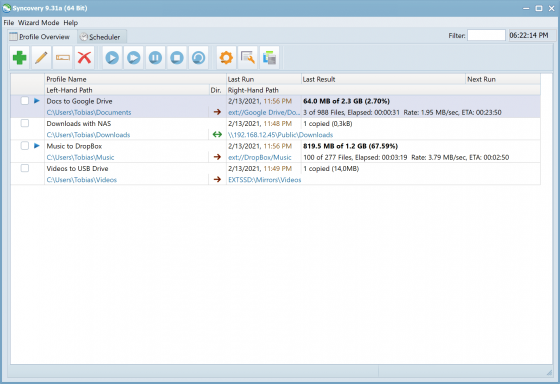
Create as many different jobs as you need. Run them manually (with Sync Preview), or let the scheduler run them automatically.

Handle complex Tasks
Syncovery is rich in features, including real-time sync, compression, encryption, email notifications, and much more. It can be extended via PascalScript.

Wizard Mode makes it easy to create your first profile.
Create your first sync or backup job step by step, with explanations of the main settings you need to make. Each job (or profile) works with two paths – source and destination, or just the left and right path (since profiles can be 2-way copy tasks also).

Extremely Fast Scanning
Syncovery’s multi-threaded folder listing algorithm provides an unparalleled speed, and easily handles millions of files and huge numbers of folders. Even more speed can be gained with our Destination File List Cache and Remote Service features.

Block Level Copying
This will help you save bandwidth as well as backup space. Syncovery can detect changed blocks in large files, and copy only these. The detection works by keeping checksums in a database, or with the help of the Syncovery Remote Service, or by using our revolutionary File System Monitoring Service (the File Sytem Monitoring Service is Windows only).

Real-Time Synchronization
Real-Time Synchronization will make sure that changes are synced quickly. Syncovery listens to file system events and quickly performs the appropriate actions. For cloud servers, it can use polling to detect changes. These features are available on Windows and macOS only.

SmartTracking
The SmartTracking sync mode is frequently used in two-way sync jobs. It can detect moved files, deleted files, and conflicts (files changed on both sides).

Versioning
Syncovery allows you to keep multiple versions of modified files, allowing you to restore your files from an earlier date. The restore date can be chosen for individual files or multiple files, in our Restore Wizard.

File Server Migration
Syncovery’s advanced NTFS copying features, high speed, and scaleability enable you to perform large-scale migrations. Read our new, comprehensive Server Migration Guide.

Release Name: Syncovery Premium 12.1.3.38
Size: 101.4 MB
Links: HOMEPAGE – NFO – Torrent Search

Download: RAPiDGATOR

4 Comments
June 24

Coolmuster Android Assistant 6.1.52

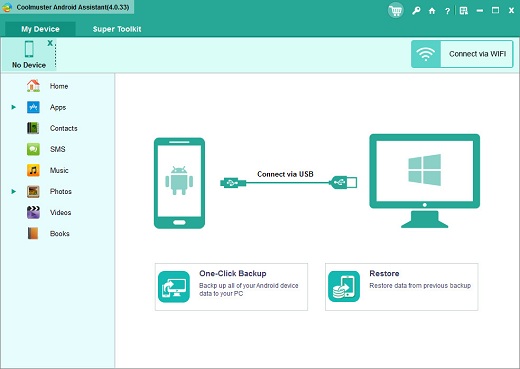
Description: Back up and restore everything on Android device with 1 click. Selectively export and import contacts, SMS, call logs, music, videos, photos, books and etc. Add, transfer, delete and edit contacts on the computer. Send, resend, forward, delete and copy text messages directly on your computer. Manage music and video files on Android. Install and uninstall apps.

Why Should You Choose Coolmuster Android Assistant?

Want A Perfect Contacts & SMS & Call Logs Assistant? Here It Is.
Just end your life of group text messaging or adding contacts one by one manually on your Android phone with Coolmuster Android Assistant. Experience a new texting way here and better manage your contacts, SMS and call logs.
This Android managing tool enables you to send SMS on computer, perform group texting at once, back up SMS, import SMS from computer and delete messages from phone.
Import and export contacts from computer, add new contacts, delete contacts, back up and edit exsiting contacts on computer.
Back up Android call logs to computer, import call logs from computer to phone and delete unwanted call logs on computer smoothly.

Are You An App & Media Fancier? You Can Not Miss It.
If you are an app enthusiast and media fancier, Android Assistant will be your must-have tool because it features with all powerful functions that make you fully enjoy entertainment on the go.
Import installed apps from computer to your Android device with a click. Back up apps from Android to computer and uninstall useless apps on Android quickly from computer.
Android Assistant helps you transfer your wanted music, photos and videos from Android device to computer, add media files from computer and delete unwanted media files without any hassle. You can even manage albums, and move photos from one album to another.
Android Assistant allows you to take screenshot of your phone anytime as you like.

How to Back Up and Restore Android? 1 Click is Enough.
Hate to transfer data from your Android device to computer, or restore from your computer to the Android device one by one? The new features from Android Assistant allow you to back up and restore your Android phone/tablet with just 1 mouse click. Of course, you can also selectively back up and restore the data you want.
1-click to back up contacts, SMS, call logs, photos, videos, music, apps, etc. from Android phone or tablet to computer instantly.
1-click to restore Android data from the backup files to your Android phone without any data loss.
You can connect your Android device to the program via USB cable or WiFi. If you want to connect via WiFi, you need to install Android Assistant (Android version) on your Android device first.

Read-only and Compatible with All Android Brands. 100% Green.
After many times of testing, Android Assistant can be proved 100% secure and works well on almost all popular Android phones and tablets.
A wide range of Android brands are supported by this Android managing tool, including Samsung, Xiaomi, OPPO, Oneplus, TECNO, Infinix, Itel, vivo, Motorola, Honor and many more.
100% Safe application. Performs READ-ONLY operations to avoid causing any damage to the Android data and your computer.
Android Assistant is able to manage more than one Android device simultaneously at the same time.

Release Name: Coolmuster Android Assistant 6.1.52
Size: 24.4 MB
Links: HOMEPAGE – NFO – Torrent Search

Download: RAPiDGATOR

5 Comments
June 24

Softros LAN Messenger 12.6.3

Description: Softros LAN Messenger is an easy-to-use LAN messaging application for safe, secure and effective intra-office communication. It does not require a server to run and is very easy to install. Softros LAN IM comes with a variety of handy features such as PC-to-PC messaging, group LAN chat rooms, broadcast messaging to quickly notify selected individuals or groups about an event, and also drag-and-drop file transfer to exchange files and folders between staff members.
All messages and files exchanged by the users are securely encrypted and never go outside your local company network, which guarantees that no unauthorized person will ever read your private correspondence or access your sensitive data.

Security, Safety and Privacy
The Softros LAN chat software encrypts all data with AES-256 and works strictly within your company network as self-hosted chat. This allows your employees to safely exchange messages and files, while discouraging them from chatting with people outside the organization. It also saves your Internet bandwidth and minimizes the number of opened firewall ports that could result in outside hacker attacks and IM worms.

Ease of Installation and Use
The instant messenger from Softros has a very intuitive interface and requires no additional training. All you need to do is install and run it on each network computer. Users themselves can easily configure the program without requesting assistance from the IT staff.

Serverless Messenger
You do not need to set up and maintain a dedicated office messaging server – our IM tool is a stand-alone peer-to-peer based application.

Individual and Group Conversations
Exchange messages with just one or multiple users at the same time.

Group Messaging
Notify individual users or whole user groups about an event by sending out a broadcast message.

Offline Messaging
Send messages to users even when they are offline. Offline messages are received when the users come back online. No server or dedicated storage is required for this.

File Transfer
Easily exchange documents with your colleagues. Just drag and drop a file or folder on the recipient's icon in the user list or on the conversation you are having with them.

Broadcast File Transfer
You can easily send files and folders to multiple users at the same time right within a group conversation or a broadcast message.

Send Messages and Files via Command Line
Use the built-in command line tool to send messages and files to users, groups, IP addresses, and computer names.

User Groups
Arrange your co-workers in groups by department or job title. You also can add users to multiple groups at the same time.

Message History
Keep track of your messages by saving them locally or to a network share. View, search through and print out your correspondence with other employees using the built-in History Viewer.

Remote Desktop Sharing
Request remote assistance using LAN Messenger, and the colleague on the other end will securely connect to your desktop to help you configure Windows, install an application, or resolve a technical issue. Desktop sharing functionality is based on Microsoft's Remote Assistance technology.

Multi-User Video Conferencing
Ensure the highest level of security for video meetings (Video Calls), strictly within your company's network, or across its branches. No need for a server, third-party internet service, or even an internet connection. No call limits and no leaks of confidential information.

Terminal Services Support
Full support of Microsoft and Citrix Terminal Services environments (including the RemoteApp and XenApp application virtualization technologies).

Active Directory, Entra ID, and Domain Support
Softros Intranet Messenger seamlessly works in a correctly set up domain controller environment with Active Directory or Entra ID (formerly Azure AD). Users' full names retrieved from Active Directory or Entra ID are displayed in the user list, while their SIDs are used for identification purposes within the program.

LAN, WAN, VPN and VLAN Support
Enhanced functionality of the Softros local chat application allows you to link your company locations or subnets into a office chat environment. Just connect your subnets physically, virtually or with a VPN and then configure the program by referring to our detailed help system.

Network Wide Group Policy Deployment
In a domain controller environment, deploying the Softros messaging software, its license and settings across the network can be easily done through Group Policy.

Importing, Exporting and Pre-configuring User Settings
In case your company does not have a domain controller with Active Directory, Softros LAN Messenger allows you to automate distribution of its settings (network settings, user groups, license file, administrative restrictions) using certain built-in features.

Restricting User Access
Administrators can selectively restrict access to most features of the Softros work chat communication software.

SDK Tool Kit
If you run on-premises CRM/billing/invoicing software and want to automate the process of sending messages, notifications and files, Softros LAN Messenger comes with an SDK API tool kit allowing you to integrate it into your system. The toolkit comes complete with C++, C#, and Delphi examples to help you get started.

Release Name: Softros LAN Messenger 12.6.3
Size: 43.3 MB
Links: HOMEPAGE – NFO – Torrent Search

Download: RAPiDGATOR

4 Comments
June 24

ON1 Photo RAW / ON1 Photo RAW MAX 2026.4 v20.4.1.18862

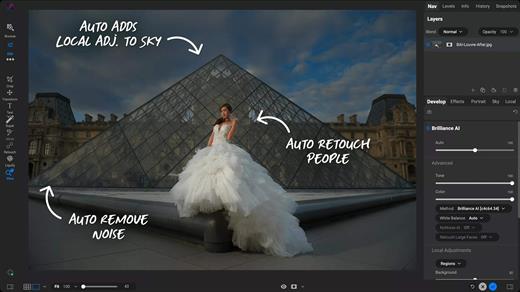
Description: ON1 Photo RAW MAX 2026 is coming this October, and you can lock in your copy today. This major release introduces powerful updates to masking, the Effects module, and photo enlargements, making it one of the most capable Lightroom alternatives available. With all-new Super Resolution AI models, a fully redesigned masking experience, and next-level creative filters, you'll have the perfect mix of quality, speed, and control—whether you're making precise selections, exploring fresh creative looks to bring your vision to life, creating stunning photo enlargements.

New ON1 Photo RAW MAX 2026
Photo RAW is getting a HUGE upgrade this month! Version 2026 brings groundbreaking new masking tools, new creative filters, new AI for super-resolution enlargements, and a whole lot more.

See ON1 Photo RAW 2026 in Action
Discover the next breakthrough in photo editing with ON1 Photo RAW 2026. From groundbreaking masking tools to new creative filters and built-in Resize AI, this release is packed with smarter, faster, and more powerful features designed to bring your photos to life.

New Features Include:

How to Add Cinematic Depth Lighting in Seconds
Depth Lighting filter with AI depth masks arrives in Photo RAW 2026!

One-Click Subject & Background Masking
Automatic subject & background masks in ON1 Photo RAW 2026. Fast, accurate, effortless.

Start Every Edit with the Look You Love
Starting Points in ON1 Effects make editing simple—just click to turn on your favorite filters.

Make Your Background Larger Without Losing the Foreground
Bring your landscape backgrounds closer with the Split Field Filter, new in Photo RAW 2026.

Turn Tiny, Noisy Images into Huge Photo Enlargements
Resize AI 2026 is built into Photo RAW—bigger, sharper, cleaner photos made easy.

Get Cleaner Edges with Less Manual Touch-Up
Mask the tough stuff easily with ON1 2026—better edges, fewer halos, no refinements needed.

Fix Crooked Buildings Without Losing Image Edge
Fix perspective easily in ON1 Photo RAW 2026—new tools, no black corners, perfect lines.

Stop Fighting Complex Masks — Stack & Combine Them Instead
Stack, mix, and refine masks like never before—combine tools and layers for unlimited control.

Customize Your Workspace to Edit Faster
Customize your workspace in ON1 Photo RAW 2026—float or dock panes for more editing space.

Find Your Favorite Filters & Effects
New Add Filter dialog in Photo RAW 2026 puts your favorite filters and Effects front and center.

Turn Ordinary Shots into Art with Double Exposure
Create stunning double exposures in seconds—no camera tricks or complex layers needed.

Add Realistic Motion Blur Right at Your Desk
Add panning, zoom, or twist motion to still photos—no missed shots, just dynamic effects.

Digitizing Film? How to Perfectly Invert & Color-Correct Negatives
Easily invert and color-correct film negatives—no scanners or backwards sliders required.

Release Name: ON1 Photo RAW / ON1 Photo RAW MAX 2026.4 v20.4.1.18862
Size: 1.7 GB
Links: HOMEPAGE – NFO – Torrent Search

Download: RAPiDGATOR
3 Comments
June 24

GiliSoft Private Disk 11.8

Description: GiliSoft Private Disk is a data security software for Windows to protect your important files, documents, folders, hard drives, USB drives, CD, DVD. It protects information with the strongest encryption algorithm known today – AES 256-bit. Besides offering state-of-the-art, trustworthy and reliable AES 256-bit NIST certified encryption, GiliSoft Private Disk provides additional protection for your confidential information by employing its innovative Disk Image Hide method.

The Disk Image Hide protects your data by application, ensuring that no viruses, trojans, spyware or any other malware will harm or steal your valuable information. It also protects data on USB flash drives – you can work with the encrypted files on any computer without installing the software locally.

Encrypt files with AES 256-bit
Using a strong 256-bit encryption algorithm, Private Disk securely protects your most sensitive files. Once the files are encrypted, you don't have to worry about someone reading your sensitive information, because encrypted files are useless without a password. It cannot be read at all, and no back door.

Password Protect Your Dropbox
Dropbox doesn't provide for client-side encryption. If you have any really sensitive files in your cloud storage, the most straightforward way to do this is to use Private Disk to create an Locker inside of your Dropbox (or other cloud storage).

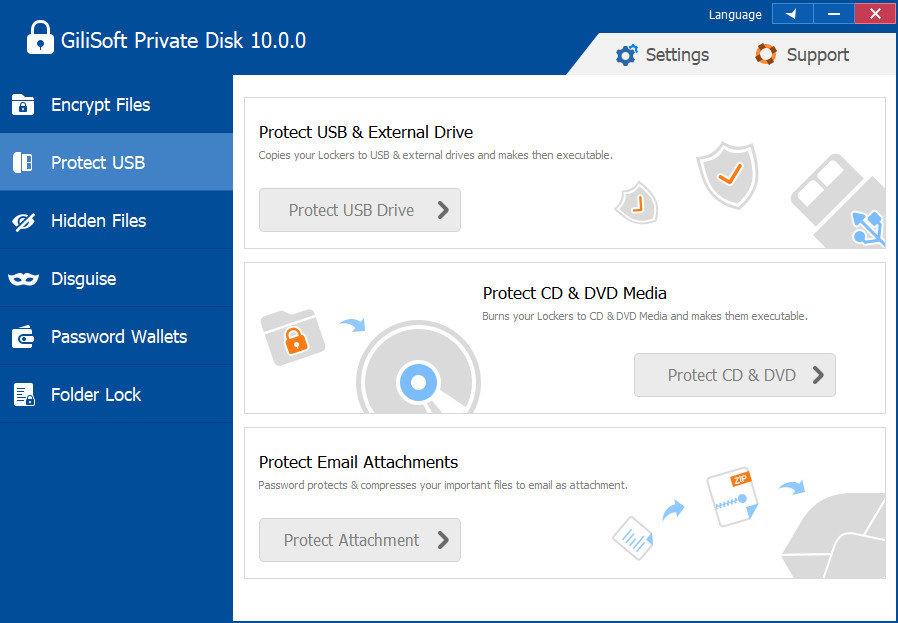
Protect USB Storage
Protect USB storage device includes flash memory with an integrated USB interface: USB Flash Drive, Flash Memory Stick, Portable Fold,Thumb Drives, USB Jump Drive .

Protect CD DVD Media
Any type of data can be burnt on discs, such as software for commercial use or e-learning materials for students. It offers a reliable solution of optical disc protection to protect CD DVD.

Protect Email Attachments
To further protect email attachments, Private Disk encrypt files to *.gpd file of any size, so you can securly send file in USB Drives, CDs/DVDs, Emails with *.gpd format.

Hide files folders
Create an encrypted private disk first, then drag and drop your files and folders to the encrypted disk. To hide files, you need to close the private disk.

Disguise Folder with password
Disquise Folder as Recyce, Disquise Folder as Printer,Disguise Folder as Network Dialing, Disguise Folder as Network Neighborhood, Disguise Folder as Control Panel, Disguise Folder as Management Tool.

Password Managers
Help you manage the passwords of Bank Account, Business Card, Business Info, Credit Card, General Purpose, Health And Hygiene, ID Card, License, Passport.

Protect files in Lockers
Lockers are virtual disk image files of Private Disk. Mount multiple disks simultaneously and manage your files in a better way, keeping different types of files on different disks.

Transparent Encryption
Transparent Encryption of Private Disk provides continuous file-level encryption that protects against unauthorized access by users and processes in physical, virtual, and cloud environments.

Password Uninstall
If you forgot the Master Password, you can’t access Private Disk or open those locked files or folders by it. You can’t even uninstall the Private Disk without the Master Password.

Copy Protection
Unauthorized copying of data can lead to data leak, exposure, or even a breach. No one can’t access Private Disk without password.

Release Name: GiliSoft Private Disk 11.8
Size: 15.3 MB
Links: HOMEPAGE – NFO – Torrent Search

Download: RAPiDGATOR
5 Comments
June 24

Rons WebLynx Pro 2026.6.23.820

Description: Rons WebLynx is a Windows desktop application, for organizing and managing bookmarks. Bookmarks are stored in WebLynx documents on the local computer, so are not 'shared' in the cloud and do not rely on third party storage.

Ideal for research, marketing, or just organizing a lot (1000's) of links. Nowadays, almost everyone can do with a good bookmark manager as the internet has become part of our daily lives - you typically don’t realize you need a bookmark manager until you start using one.

WebLynx combines power, elegance and ease of use, and is full of features like automatic link checking to make it a great tool for anyone who uses the Internet.

Clear and Easy to Manage
Links are organized using well known folder and tag concepts, and have additional Views to quickly check new, broken and duplicate links (and more). Searches can be done in folders, or across tabs, or both, and folders and tags can be collected into Groups to create custom views. The built-in browsing/reading panels add convenience when checking links, and all of this is clearly presented in a logical way.

Loads of Ways to get Links IN
Getting links into WebLynx could not be simpler:
Import your browser bookmarks.
Drag and drop anything - selected text from you browser or a file or directory from your computer.
Use the import to find links from pretty much anywhere including Outlook, Word documents, 'Outertech Linkman' or even entire websites.
Paste, or finally, just enter by hand.

Loads of Ways to get Links OUT
Export links with their tags and folders, or export the link Content (reading view).
Export to File or Clipboard, in the following formats HTML, XML, Linker Exchange or Content.

Power and Automation
WebLynx is about automation power.
Aside from the automatic checks that are done on all links periodically, any number of selected links can be re-checked, cleaned and organized. Folders and tags have options like 'Merge' or 'Remove Empty'.
Groups show collections of folders and tags, and Automatic filing performs movement or removal of links based on configurable rules.

RSS Reader Included
RSS feeds are automatically extracted from linked web pages, and listed in the Link Information panel. To make things even easier the 'Page with Feed' View shows all pages that contain feeds.
Feeds can be added to any folder as an Active Folder, then merged into one or more feed 'In-boxes' using Groups.

Browser Integration
Use the Web Browser integration available for Google Chrome, Edge, Brave and Firefox to send links directly into WebLynx so your browsing is not disturbed by switching to another application.
Links come into WebLynx in a place called the 'Landing Zone', which is a side panel shared between all open WebLynx windows, so that links can be filed appropriately.

Release Name: Rons WebLynx Pro 2026.6.23.820
Size: 15.9 MB
Links: HOMEPAGE – NFO – Torrent Search

Download: RAPiDGATOR

5 Comments
June 24

reaConverter Pro 8.0.229

Description: Easily process full batches of files and folders. reaConverter combines powerful automation with intuitive tools to streamline image conversion and eliminate repetitive editing.

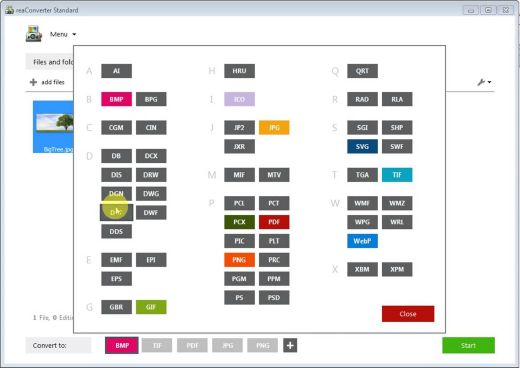
700+ File Formats
reaConverter delivers high-efficiency batch conversion for an extensive range of file formats.

Efficient Conversion
A powerful file conversion toolkit with advanced processing features — giving you precise, granular control over every output.

Image Editing
reaConverter simplifies batch image editing — apply touch-ups, transformations, and effects to unlimited images simultaneously.

Automation
Professional-grade automation features for high-volume file conversion and batch processing.

Development
Integrate reaConverter's functionality into scripts, applications, or websites using its command-line tool or DLL.

Release Name: reaConverter Pro 8.0.229
Size: 419.8 MB
Links: HOMEPAGE – NFO – Torrent Search

Download: RAPiDGATOR
4 Comments
June 24

Cresset Flare 12.0.0

Description: Through high-resolution 3D visualization and in-depth analysis of target structures and potential ligands, Flare enables users to optimize and prioritize new molecules efficiently and effectively.

Accelerating small molecule discovery
Flare customers, typically computational and medicinal chemists across pharmaceuticals, biotechnology, academia, and other industries, value the platform as their ‘computational toolbox’. The software enables them to closely inspect the detail of their ligand-protein complexes, using a variety of methods to gain useful insights into their protein targets and ligand series. As our most feature-packed software package, both ligand-based and structure-based drug designers are supported to progress their lead optimization, with confidence.

By closely examining a wide portfolio of ideas and applying a large variety of methods, a large number of molecules can be reduced to a small collection, allowing only the very best molecules to be handed over for lab experiments. The outcome is not only a great reduction in time, energy, and lab resources, but also the greatest chances of success in later-stage drug development.

Ligand-based drug design software components
Ligand-based drug designers utilize Flare to closely examine, compare, and prioritize their molecules, based on their shape, electrostatics, and binding activity. Through robust QSAR models that predict the activity and ADMET properties of new compounds, users can build confidence and understanding across a full portfolio of leads.

Structure-based drug design software components
With a variety of methods including docking and scoring, Electrostatic Complementarity™, molecular dynamics, pocket analysis, and water analysis (GIST and 3D-RISM), structure-based drug designers can gain new insights into protein-ligand binding. Based on established, proprietary methods around ligand and protein electrostatics, combined with the best of our own internal and open-source research, users are able to fully understand the features and interactions of their target structures.

Support medicinal chemists in reaching results more efficiently
Progress lead optimization with confidence
Prioritize the best molecules to make
Visualize target structures and potential ligands with high-resolution 3D graphics
Develop a comprehensive understanding of molecular interactions and binding
Accurately predict the activity of congeneric ligands using cutting-edge Free Energy Perturbation (FEP) calculations
Build predictive QSAR models for activity and ADME properties
Gain an in-depth understanding of the SAR for your ligands
Enable communication with colleagues across the DMTA cycle, thanks to Flare's seamless integration with Torx

Release Name: Cresset Flare 12.0.0
Size: 1.4 GB
Links: HOMEPAGE – NFO – Torrent Search

Download: RAPiDGATOR
2 Comments
June 24

Sketch 2026.2.0

Sketch is a complete design toolkit. With a native Mac app for design and prototyping, and web-based tools to share, get feedback and handoff.

A native macOS app for design and prototyping


  • Powerful tools built for designers, by designers
  • Nestable frames and flexible stack layouts
  • Fast, immersive prototyping to bring your ideas to life
  • Shared Libraries, styles and components to scale your work
  • Full control over color profiles, including P3 support
  • Variable and OpenType font support
  • Offline and local file support
  • Ready for real-time collaboration, or working solo

A flexible web app for feedback, sharing and handoff


  • Store, sync and share documents
  • Document and project permissions
  • Easy Workspace admin
  • Annotate documents with feedback
  • File version history
  • Share Libraries, components and templates
  • Developer handoff tools
  • Test prototypes in any browser
  • View, comment and handoff for free
What’s New

Version 2026.2.0:


  • Release notes were unavailable when this listing was updated.
Compatibility

macOS 14.0 or later


Release Name: Sketch 2026.2.0
Size: 104.7 MB
Links: HOMEPAGE – NFO – Torrent Search

Download: RAPiDGATOR

4 Comments