Please REGISTER or RENEW your account on RAPiDGATOR.net and support us by doing through all RAPiDGATOR working download links on main posts...
June 24

Juicy 1.5.1

Juicy is a native macOS utility designed to give you total control over your MacBook’s battery life and health through highly customizable alerts and sleek monitoring tools.
Key Features


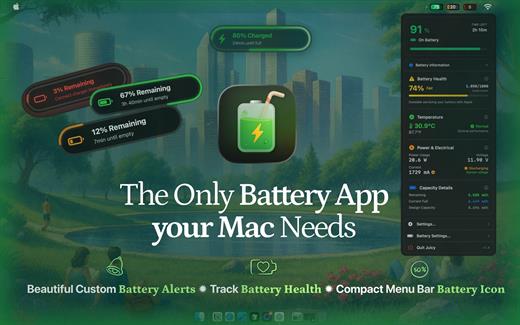
  • Custom Battery Alerts: Break free from the standard 10% notification. Set beautiful, native-style alerts at any percentage (e.g., 20%, 80%, or even 3%).
  • Health & Lifecycle Tracking: Monitor real-time health percentage, cycle counts, and temperature. Get notified when your battery hits 80% to help prolong its total lifespan.
  • All-in-One Dashboard: View battery levels for all connected devices—including AirPods, iPhones, iPads, and Magic Mice—in one organized list.
  • Sleek Menu Bar Icons: Replace the default battery icon with a compact, iPhone-style display that shows the percentage inside the icon to save space.
  • Smart Automation: Automatically dismisses annoying system battery pop-ups and provides “screen glow” effects to ensure you never miss a critical low-battery warning.
What’s New

Version 1.5.1:


  • Release notes were unavailable when this listing was updated.
Compatibility

macOS 15.6 or later.


Release Name: Juicy 1.5.1
Size: 19.5 MB
Links: HOMEPAGE – NFO – Torrent Search

Download: RAPiDGATOR

4 Comments
June 24

Screens 5.8.8

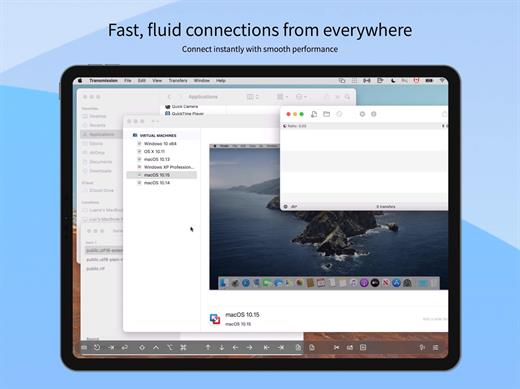
Streamlined and powerful VNC utility designed to provide you with all the tools you need to remotely connect to your devices from your Mac

Accessing your devices from anywhere in the world is surely great, especially if you need to perform some last minute modifications to a project or copy a certain file. This can be done from any computer that can access your device’s network using the VNC desktop sharing system.

Features

  • iCloud – Synchronize all your stored screens on all your iOS devices, including your Mac.
  • Use Screens in fullscreen mode to make it feel your remote computer is right there in front of you.
  • Easy to Use: Screens is an easy, user-friendly VNC client for Mac.
  • Secure: Screens can connect to your computer through an SSH tunnel so your session is encrypted and safe.
  • Multi-Touch: Screens supports many of the multi-touch features – such as pinch and navigation – you’re already used to on your trackpad.
  • Screens Connect: Make your computer available from anywhere with this optional helper app. Easy as flicking a switch. No messy router setup.
  • Works Anywhere: Through Wi-Fi or a 3G network.
What’s New

Version 5.8.8:


  • Release notes were unavailable when this listing was updated.
Compatibility

macOS 14.0 or later.


Release Name: Screens 5.8.8
Size: 39.9 MB
Links: HOMEPAGE – NFO – Torrent Search

Download: RAPiDGATOR
4 Comments
June 24

Wipr 2.32

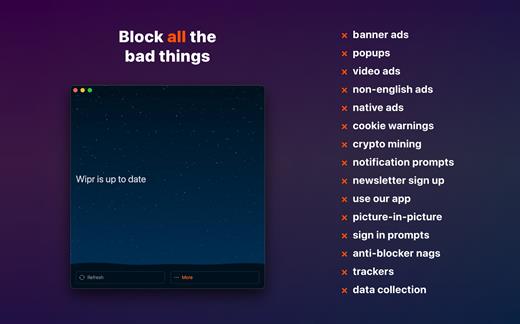
Wipr blocks ads, popups, trackers, cookie warnings, and other nasty things that make the web slow and ugly.

Websites in Safari will look clean, load fast, and stop invisibly tracking you. You’ll notice significant improvements to your battery life and data usage. Setup is a snap.

Wipr’s blocklist is updated twice a week automatically, and has enhanced versions for the following languages: Chinese, Czech, Danish, Dutch, Estonian, Finnish, French, German, Greek, Hebrew, Hindi, Hungarian, Icelandic, Italian, Japanese, Korean, Norwegian, Polish, Romanian, Russian, Slovak, Spanish, Thai, and Vietnamese.

Wipr 2 is a universal app: install it on all your devices (iPhone, iPad, Mac, Vision Pro) with a single purchase. It’s fully accessible with VoiceOver, Voice Control, and more. Dark and Tinted icon variants are included. Family Sharing is supported.

What’s New

Version 2.32:


  • Wipr Extra improvements on many websites
Compatibility

macOS 14.0 or later.


Release Name: Wipr 2.32
Size: 6.5 MB
Links: HOMEPAGE – NFO – Torrent Search

Download: RAPiDGATOR

4 Comments
June 24

RadarScope 5.5.5

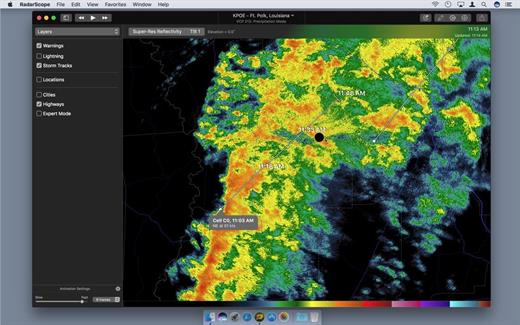
RadarScope is a specialized display utility for weather enthusiasts and meteorologists that allows you to view NEXRAD Level 3 radar data and severe weather warnings. It can display the latest reflectivity, velocity, and other radar products from any NEXRAD radar site in the United States, Guam, or Puerto Rico. These aren’t smoothed PNG or GIF images, this is real Level 3 radar data rendered in its original radial format for a high level of detail. Whether you are scanning reflectivity for a mesocyclone’s tell-tale hook echo, trying to pinpoint the landfall of a hurricane’s eye wall, or looking for small features like velocity couplets in the storm-relative radial-velocity product, RadarScope gives you the power to view true radial NEXRAD weather radar on your Mac.

What’s New

Version 5.5.5:


  • Release notes were unavailable when this listing was updated.
Compatibility

macOS 10.14 or later


Release Name: RadarScope 5.5.5
Size: 53.7 MB
Links: HOMEPAGE – NFO – Torrent Search

Download: RAPiDGATOR
4 Comments
June 24

Dynamic Wallpaper Studio 25.4

Dynamic Wallpaper Engine allows you to use live wallpapers on your desktop/screensaver. It provides thousands of live wallpapers in the Workshop while taking as little system resources as possible. It’s the Wallpaper Engine for Mac.

Features
• 2000+ hand-picked videos which are updated every day.
• Multiple types of 4K Ultra HD videos, anime, scenery, cute, game, creative, Beauty, Ancient, Movie, etc.
• Supports “keyword searching” in videos.
• Supports “Dynamic-ScreenSaver”, personalize your lock screen.
• Easy to import local video.
• Supports The playlist, list loop, shuffle loop.
• Supports multiple screen aspect ratios and video native resolutions.
• Supports global hotkeys to control wallpaper, hide desktop icons and show screensaver.
• Set different wallpapers on different displays.
• Manual control, video pause, resume and mute.
• Break reminders, with flexible customization if you want it.
• Auto mode, pause the video when other apps are active, not disturbed at work.
• Auto mode, pause the video when Power Disconnected.
• Support for hiding desktop icons.
• Dynamic Wallpaper Engine is designed to provide an interesting experience while consuming as little system resources as possible.

What’s New

Version 25.4:


  • Release notes were unavailable when this listing was updated.
Compatibility

macOS 10.12 or later
Apple Silicon or Intel Core processor

Release Name: Dynamic Wallpaper Studio 25.4
Size: 36.7 MB
Links: HOMEPAGE – NFO – Torrent Search

Download: RAPiDGATOR
4 Comments
June 24

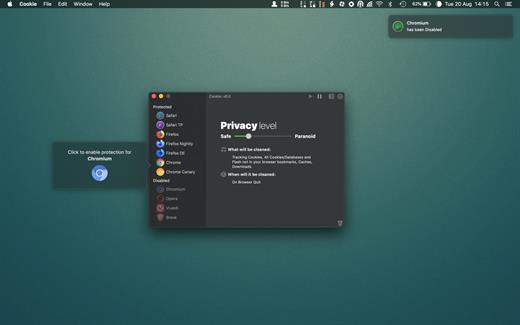
Cookie 8.5.1

Cookie prevents third parties from hijacking your browsing experience. The sites you visit store “cookies” in your browser without your knowledge or consent. Some are helpful, but others are frustrating and invasive. Cookie can help.

Features:


  • Consolidate all your browser privacy settings
  • Simplified View that takes care of all the technical details for you
  • Advanced View which puts you in total control of all your privacy settings
  • Combined cookie view displaying all cookie/flash/localStorage data in one easy to manage view
  • Cookie’s can be favorited on a per domain, or per cookie basis. You decide
  • Individual Browser settings. It is possible to configure different automatic removal options for each browser. In the case of Chrome/Chromium/Canary/Brave you can even configure settings per user!
  • A number of removal schedules are possible: When quitting Cookie, when a Browser is Quit, on computer login, On computer waking from sleep, on a customizable time schedule, or entirely manually
  • Hotkey support, so you can remove all unwanted data quickly and easily
  • Customizable tracking cookie definitions
  • Whitelist individual tracking cookies
  • Clean, modern and Intuitive User Interface
  • Helpful setup window
  • Browser extension protection
  • Full Screen support
  • iCloud support
  • Dark/Regular theme
What’s New

Version 8.5.1:


  • Release notes were unavailable when this listing was updated.
Compatibility

macOS 10.14 or later, 64-bit processor


Release Name: Cookie 8.5.1
Size: 9.8 MB
Links: HOMEPAGE – NFO – Torrent Search

Download: RAPiDGATOR
4 Comments
June 24

Overlay 4.40

A frame that allows you to have an image or even PDF displayed semi-transparently in front of everything. It enables you to copy, trace, or compare designs, images, and documents with ease since you can lock the frame and make it undisturbed by mouse gestures.

It’s a transparent overlay of an image or document on your screen that you can click through – like a transparent sticker on your screen.

Overlay is especially useful for artists, designers, and students as it allows you to make your art or design from or reference photos and screenshots.

What’s New

Version 4.40:


  • Release notes were unavailable when this listing was updated.
Compatibility

macOS 10.15 or later
Apple Silicon or Intel Core processor


Release Name: Overlay 4.40
Size: 6.6 MB
Links: HOMEPAGE – NFO – Torrent Search

Download: RAPiDGATOR

4 Comments
June 24

Folder Preview Pro 2.11.1

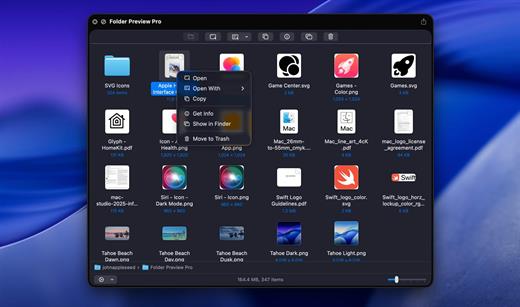
Folder Preview is a macOS Quick Look extension that enables users to preview the contents of folders directly in Finder without opening them. By selecting a folder and invoking Quick Look (e.g., pressing the spacebar), it displays a visual representation of the files and subfolders inside, leveraging the native Quick Look framework for seamless integration.

What’s New

Version 2.11.1:


  • Release notes were unavailable when this listing was updated.
Compatibility

macOS 13 or later


Release Name: Folder Preview Pro 2.11.1
Size: 8.9 MB
Links: HOMEPAGE – NFO – Torrent Search

Download: RAPiDGATOR

4 Comments
June 24

Easy New File 6.1

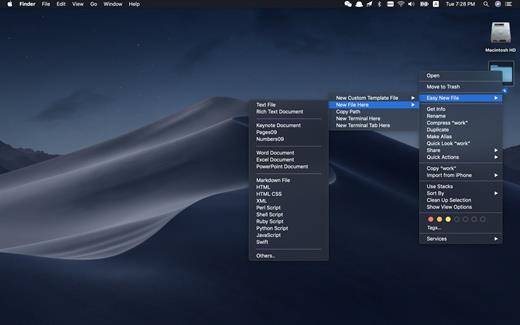
Easy New File is a Finder extension which adds some functions to the right-click menu in the Finder.

Features


  • Quick new file
  • Copy file path
  • Support all common file extension, such as text file, Word document, Excel, Keynote, Rich Text document, shell, Python script, Swift…
  • New Terminal here
What’s New

Version 6.1:


  • Release notes were unavailable when this listing was updated.
Compatibility

macOS 10.10 or later.


Release Name: Easy New File 6.1
Size: 7 MB
Links: HOMEPAGE – NFO – Torrent Search

Download: RAPiDGATOR

4 Comments
June 24

Mole 1.8.0

Mole is a powerful, native macOS utility designed to streamline your digital workspace. Instead of cluttering your system with multiple single-purpose applications, Mole consolidates disk cleanup, app management, maintenance, disk analysis, and live system monitoring into one single, lightweight binary.

Built with a conservative, privacy-first mindset, Mole ensures your Mac runs smoothly without ever compromising your data.

Key Features

  • Clean: Safely scans and removes caches, Xcode builds, device leftovers, large active logs, and browser temporary files. You review every file before it gets deleted.
  • Software Manager: Effortlessly handles app updates (supporting Sparkle, Electron, Homebrew, and the Mac App Store) and ensures clean uninstalls by scrubbing leftover preferences and support files.
  • Optimize: Runs essential maintenance tasks with a single tap—rebuilding Quick Look, repairing caches, and auditing login items behind a secure prompt.
  • Analyze: Visualizes your entire disk using an intuitive treemap, allowing you to instantly spot and drill down into the largest space-hogging files.
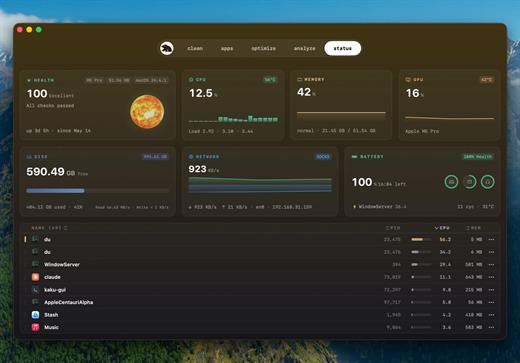
  • Status Dashboard: Features a live HUD tracking CPU, memory, GPU, network, battery, and thermals with 60-second sparklines, alongside native fan speed controls for supported Macs.
What’s New

Version 1.8.0:


  • Release notes were unavailable when this listing was updated.
Compatibility

macOS 14.0 or later


Release Name: Mole 1.8.0
Size: 19.8 MB
Links: HOMEPAGE – NFO – Torrent Search

Download: RAPiDGATOR
5 Comments