Please REGISTER or RENEW your account on RAPiDGATOR.net and support us by doing through all RAPiDGATOR working download links on main posts...
July 9

Wondershare UniConverter v17.4.4.617 (x64) + Fix

Description: UniConverter - Best Video Converter Ultimate. Convert, Download, Compress, Edit, Burn Videos in 1000 formats and do more.
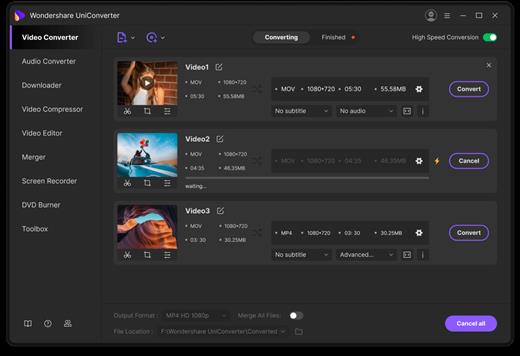
Full Quality, High Speed
Video Conversion To Any Format
Wondershare UniConverter (originally Wondershare Video Converter Ultimate) accomplishes your conversion tasks with handy features.

Easy-to-Use Video Editor, Makes Your Video Stand Out
You can customize home movies through advanced editing features and get professional-looking works in minutes.

Save Videos From Over 10,000 Sites With One Click
Download or record your favorite 4K/HD videos from popular video sharing sites for enjoyment without Internet connection; Or convert them to compatible formats for playback on TV, smartphone, or other devices.

A Flawless DVD & Blu-ray Experience Anywhere
Powerful DVD toolkit of UniConverter (originally Wondershare Video Converter Ultimate) helps you to create and edit DVD files in an easy way.

Burn Videos to DVD and Blu-ray discs
Convert Any Format to DVD
Provide Free DVD Templates
Edit DVD Files with Built-in Editor

Download Videos from Hot Online UGC Sites.
Download Online Video to MP3 in One Click.
Download online video playlist in batch
Download Entire Online Video Playlist at One Go.
Record Videos from Streaming Sites.
Note: You're only entilted to download the videos with authorized copyrights.

Transfer Videos to Devices & External Hard Drives
Transfer media files to Apple devices, Android devices, USB flash drives or external hard drivers easily. More importantly, all unsupported formats will be intelligently converted to compatible ones during the transfer.

All-Purpose Video Toolbox
Wondershare UniConverter (originally Wondershare Video Converter Ultimate) also offers a full set of optimized video tools which will come in handy sometime.

Compress Video to Smaller Size
Video Compressor
Compress video without quality loss.

Fix Video Metadata
Fix metadata info for videos.
VR Converter (Only for Windows)
Convert any video to VR format.
GIF Maker
Convert a video or photos to a GIF picture.
Screen Recorder
Record all desktop activities with voice.

Release Name: Wondershare UniConverter v17.4.4.617 (x64) + Fix
Size: 350 MB
Links: HOMEPAGE – NFO – Torrent Search

Download: RAPiDGATOR

4 Comments
July 9

CyberLink PowerDirector Ultimate 2026 v24.6.1907

Description: Award-winning video editing software for professional creators. Create. Edit. Share. Video editing, made for everyone. No experience necessary. Do more, faster with customizable templates. Discover and create attention-grabbing video intros alongside our community of creatives.

Kickstart Your Projects
- No experience necessary.
- Do more, faster with customizable templates.

Save Time With Thousands of Shareable Video Intros
Discover and create attention-grabbing video intros alongside our community of creatives.

Mask Designer
Remove unwanted objects, or composite clips together.
- Custom Masks
- Image Masks
- Text Masks

Title Designer
Choose from drag-and-drop presets or get creative with an array of gradient, border, and shadow tools.
- Motion Graphics
- Sound Effects
- Blending Modes
- Special Effects

PiP Designer
Use animated stickers, shapes, and callouts to grab your viewers’ attention.
- In/Out Animations
- Animated Stickers and Graphics
- Custom Shapes and Callouts

AI Motion Tracking
Add text or graphics that automatically follow the motion of any object.

AI Sky Replacement
From blissful blue skies to dramatic sunsets, don’t let bad weather ruin your perfect shot.

AI Object Detection
Instantaneously create masks with automatic object selection for cars, people, pets, and more.

System Requirements
- Microsoft Windows 11, 10, 8/8.1, 7 (64 bit OS only).
* Microsoft Windows 11 or 10 required for AI features and NVIDIA Audio/Video Denoise and Room Echo Removal.
- Intel Core™ i-series and above.
- Haswell (4th generation) processor: Core i7-4770 (only Core and Xeon branded), and above required for AI features.
- AMD Phenom® II and above.
- AMD A8-7670K and above, AMD Ryzen™ 3 1200 and above required for AI features.
- Standard Video: 128 MB VGA VRAM or higher.
- 360-video: DirectX 11 compatible.
- AI Plugin: 2 GB VGA VRAM or higher.
- NVIDIA Audio/Video Denoise and Room Echo Removal: NVIDIA GeForce RTX 2060, NVIDIA Quadro RTX 3000, NVIDIA TITAN RTX, or higher.
- 4GB memory required (6GB or above recommended).
- 8GB memory or higher required for NVIDIA Audio/Video Denoise and Room Echo Removal.
- 7GB space required.
- Burning drive is required for disc burning purpose.
- Windows compatible sound card is required.
- 1024 x 768, 16-bit color or above.

Supported Languages
- English
- French
- German
- Italian
- Spanish (European)
- Chinese Simplified
- Chinese Traditional
- Japanese
- Korean
- Dutch

Release Name: CyberLink PowerDirector Ultimate 2026 v24.6.1907
Size: 723.3 MB
Links: HOMEPAGE – NFO – Torrent Search

Download: RAPiDGATOR

7 Comments
July 9

Total Network Inventory 6.8.1.7487

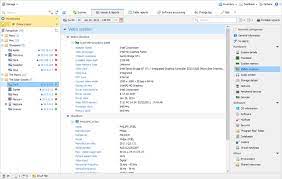
Description: Software for managing network inventory. Introducing the latest version of Total Network Inventory 6, which is a PC inventory system for audits and inventory management.

Network scanning
Effortlessly scan computers and servers across Windows, macOS, Linux, FreeBSD, and ESX/ESXi-based systems. All you need is the administrator’s password and you are good to go. You can target individual nodes, specific network ranges, or the entire Active Directory structure.

Inventory management
In the centralized TNI database, each computer occupies just a few dozen kilobytes. Organize assets into groups, annotate them, and append detailed information. With Total Network Inventory, your network is displayed in full detail, thanks to its robust hardware inventory system.

Reports
Generate versatile reports across various data types with our exceptional inventory software. Utilize the tool to create detailed table reports with numerous data fields. These reports can be duplicated, exported, or printed, and the instant search function provides immediate results as you type.

Change log
Monitor and track all changes in hardware and software. Be alerted when any software is installed, updated or removed as well as when hardware is connected or removed. You can also observe the trends in disk space and other important metrics.

Task scheduler
Set up automatic tasks for data gathering and exporting. Schedule single or recurring tasks for scanning and reporting. Whether it is daily, every Friday, or the first Monday of each month, you can always tailor the schedule to fit your individual needs and keep your inventory up-to-date.

Additional features
Create a detailed network map, compile a database of network users, and maintain various passwords for different assets and protocols. These features, along with many others from our inventory application, will significantly streamline and improve your network auditing process.

Release Name: Total Network Inventory 6.8.1.7487
Size: 66.2 MB
Links: HOMEPAGE – NFO – Torrent Search

Download: RAPiDGATOR

4 Comments
July 9

Light Image Resizer 7.6.4.173

Description: Easily convert images, photos and pictures with ObviousIdea’s Light Image Resizer and image converter software. Simple and easy, resize and convert images, one by one or in batch mode. Bulk Images convert with a prebuilt collection of presets.

Create your own profiles without programming. Include a free pic collage maker app. Capture screenshot with automatic OCR. Extract text from jpg.

Light Image Resizer – ObviousIdea’s all-time best seller, Millions of images have been resized with our software!
– previously called ‘VSO Image Resizer’

The program is available for all Windows computers. Just right click to resize images as copies or continue to work on the originals. Then simply share your resized images and collages online with friends.

Features
Resize images, resize pictures and resize photos – compress, convert, and easily create copies
All common image formats are supported, details see below (“Supported Formats“)
Create beautiful collage layouts for social media with just a few clicks
Resize and convert multiple images at a time
Create e-mail friendly images or use them for internet publishing (optionally with optimized compression)
Sort, rename or add a watermark to protect your pictures from being stolen
Choose from a wide range of pre-defined profiles (like 1K, 2K, Email) or create your own
Easily convert between image formats (for example JPEG to PNG, or vice versa)
Shell integration to add your favorite profiles directly to Windows context menu
Create JPG to PDF or PDF documents from your images, or vice versa
Create beautiful collage layouts for social media with just a few clicks (see video…)
Take screenshots or perform common editing tasks like adding text, highlight, blur, and more with the new included Light Image Editor

Resize and convert
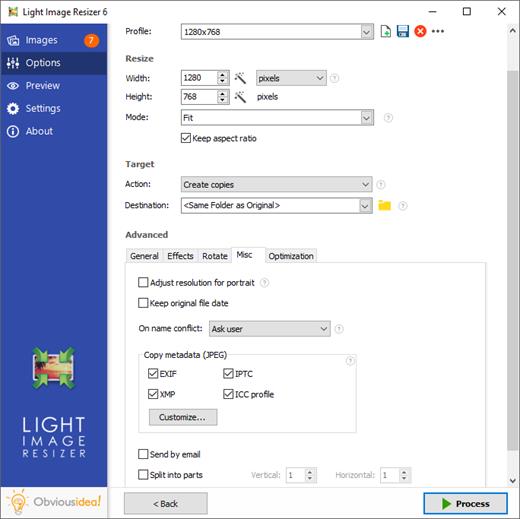
Use the Light Image Resizer to resize photos. The batch image converter can easily convert your pictures into different formats. Select your output resolution, resize the original or create a copy, move and/or rename files or compress, choose a specific destination for your processed images. You can work on individual photos or edit large numbers of images by simply doing a batch resize in just one click.

Extra settings
Add your own watermark to protect your work or add a copyright to photos with html-like text formatting and transparency support. Customize pictures by converting them to sepia or add a border. Use the live preview to see what the final result will look like before actually processing the image. The ObviousIdea Photo Resizer/Picture Resizer works on files, subfolders and folders, and supports RAW formats. With multi-core support integrated, you can convert images even faster. Launch the application easily from Windows shell explorer with a right click on the image or folder.

Output and export
Photos can be added directly as attachments, individually or in a ZIP file, to email by using the publish function, without exceeding the maximum size permitted by email servers. Create PDF files from your images (convert JPG to PDF for example); do this for individual or multiple images. Edit, create, export, backup new profiles with your favorite settings. The most popular profiles are already pre-defined, such as 1K, 2K, Watermark, Web optimized, etc. Access to profiles in one click with the shell integration.

Collage layouts
Arrange beautiful collage layouts with several pictures, only with a few clicks. Just choose your images, select a layout template, check the order, and save your collage. Perfect for sharing on social media or your blog post. Free pic collage maker included.

What’s new in version 7
Context menu integration for Windows 11 is here!! Right-click your images from the file explorer
Now includes Light Image Editor with features like adding text, highlight, blur, shapes, and much more…
In this new app coming with LIR7, you can make screenshots easily with OCR applied
Profiles have been reset with new names, easier to use like 1k, 2k, 4k, or with a file size target (256Kb, 1Mb, 2Mb or your own file size requirement) (old profiles are renamed LIR6_xx)
Profiles are now stored as individual files in a sub-folder under user’s documents. It is synchronized with OneDrive cloud account so you can use your profiles between your desktop and laptop.
Incremental search in profile list by typing initial letters
Option to split long images to several pages for Create PDF action (see PDF tab)
PDF, JPEG or any photo can be a source for a OCR task (side file or in metadata). This makes your JPEG searchable by keywords in your local Windows search.
Output/convert images to HEIC format (a popular format supported by Apple for iPhone and MacOS)
Lossless compression option for WebP output
Watermark text tags for original file size, extension, and dimensions (use your files metadata for contact sheet, captioning, documentation)
Watermark panel has been improved, the setup package is coming with free sample of watermark with transparency.
“Append” option for text fields in metadata properties

Release Name: Light Image Resizer 7.6.4.173
Size: 52.2 MB
Links: HOMEPAGE – NFO – Torrent Search

Download: RAPiDGATOR
5 Comments
July 9

WinSnap 6.2.4

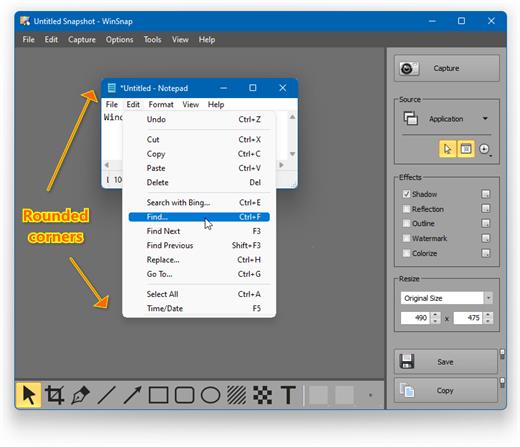
Description: WinSnap is a fast and user-friendly utility for taking and editing screenshots. It easily captures windows with rounded corners and transparent backgrounds from Aero Glass on Windows 7 to Mica Material on Windows 11. Right after capture, WinSnap instantly enhances screenshots with professional-looking shadows, reflections, outlines, highlights, watermarks, arrows, shapes and text annotations.

WinSnap 6 contains a number of innovative features that enable far superior screenshots and even easier working methods. Redesigned and updated user interface comes in Windows 11 style with Auto Dark mode and significantly improves the overall usability.

Effortless Screen Capture
WinSnap 1.0 was originally designed to capture windows with rounded corners on Windows XP, then Windows Vista came out with Aero Glass window styles and WinSnap 2.0 was updated to preserve titlebar transparency and native window shadows as well.

Nowadays, even the built-in Snipping Tool can’t compete with WinSnap in capturing window effects on Windows 11. On the screenshot below, the Calculator window is captured with Snipping Tool, then the Snipping Tool window itself is captured with WinSnap.

Release Name: WinSnap 6.2.4
Size: 9.1 MB
Links: HOMEPAGE – NFO – Torrent Search

Download: RAPiDGATOR

4 Comments
July 9

Wondershare Recoverit 14.0.31.4

Description: Recover Files in Minutes, No Tech Skills Needed. 2000+ storage devices supported. Recover 1000+ file types. Success recovery rate of 99.5%. 3 simple steps to recover unlimited data.

2000+ Storage Devices Supported
The high-tech data recovery tool can easily recover lost data from almost any devices or storage media.

Laptops, PCs & NAS
Recyle bin, internal drives, partitions; NAS (Network Attached Storage)

Memory Cards
SD/CF card, microSD, miniSD, Sandisk, memory card/stick, TF memory card…

Internal Hard Drive
Hard Drive (Basic & Dynamic), SSD (Solid State Drive)

External Hard Drive
We Support Nearly All External Hard Drive That You Use

Flash Drives
USB Drives, Jump Drives, Pen Drives, Thumb Drives…

Other Storage Media
Camera (Canon, Sony, Nikon, Fuji), Music/Video Player, Camera Drones (GoPro, DJI)

Recoverit Support 1000+ File Types and Formats
We support recovery of all types of files and file systems, e.g. NTFS, FAT, HFS+, APF.

Document
DOC, DOCX, RTF, XLS, XLSX, XLSB, PPT, PPTX, PPS, PDF, DOT, DOTX, XLSB, XLT, XLTX, POT, PPSX, etc.

Photo
CRW, JPEG, JPG, PNG, PSD, RAW, RGB, 3DM, 3DMF, 3FR, ABM, AFX, ANI, ART, ARW, BIZ, BLD, etc.

Video
AVI, FLA, FLV, M4V, MOV, MP4, WMV, 3G2, 3GP, 3GP2, 3GPP, AMV, ANM, ASF, ASX, etc.

Audio
AAC, AIFF, ALAC, FLAC, MP3, OGG, PCM, WAV, WMA, A52, AA, AA3, AAC, AC3, ACC,AFC, AIF, etc.

Archive
7Z, WAR, ZIP, exe, 7zip, etc.

Other Files
MSG, PST, OST, EML, EMLX, MBOX, EPUB, JIS, KEY, LOG, MPS, 3DA, 3DS, 3TF, 3WS, ABD, etc.

Release Name: Wondershare Recoverit 14.0.31.4
Size: 256.8 MB
Links: HOMEPAGE – NFO – Torrent Search

Download: RAPiDGATOR
5 Comments
July 9

Gilisoft SnapID 8.9.0

Description: Gilisoft SnapID offers a wide range of features to help you enhance and transform your images. With Gilisoft SnapID, you can easily crop, resize, and rotate images to get the perfect composition. The software also allows you to adjust colors, brightness, contrast, and saturation to bring out the best in your photos.

One of the standout features of Gilisoft SnapID is its ability to add filters and effects. You can choose from a variety of presets or customize your own to create unique and artistic looks. Whether you want to give your image a vintage feel, add a dramatic glow, or create a surreal effect, this software has you covered.

In addition to basic editing functions, Gilisoft SnapID also provides advanced tools for more complex tasks. You can remove unwanted objects from images, retouch portraits, and even create collages. The intuitive interface makes it easy for both beginners and experienced users to navigate and use the software effectively.

Whether you are a professional photographer or just someone who loves to edit images for fun, Gilisoft SnapID is a great choice. It offers a comprehensive set of tools and features to help you unleash your creativity and transform your images into masterpieces.

Exclusive Features of Gilisoft SnapID

Advanced cropping tool
Allows you to precisely cut out specific areas of an image, enabling you to focus on the most important elements and remove unwanted parts. You can choose from various preset aspect ratios or customize the crop dimensions to suit your specific needs.

Resizing with precision
Easily adjust the size of your images without sacrificing quality. Whether you need to make an image smaller for web use or enlarge it for printing, this feature provides smooth and accurate resizing options.

Rotation and flipping
Rotate images to the desired angle or flip them horizontally or vertically for creative effects or to correct orientation issues. This gives you full control over the positioning of your images.

Color correction and enhancement
Fine-tune the colors in your images with a comprehensive set of tools. Adjust hue, saturation, and brightness to bring out the true beauty of your photos. Correct color casts and enhance contrast for more vivid and impactful images.

Brightness and contrast adjustment
Converting images to PDF format can integrate multiple images into one file, which is convenient for saving, sharing, and printing. This makes it easier to manage and view images, while also retaining the original quality of the images.

Saturation control
Boost or reduce the saturation of colors to create different moods and atmospheres. High saturation can make colors pop and appear more vibrant, while low saturation can give a more subdued and elegant look.

Filters and effects galore
Choose from a wide range of filters and effects to add a creative touch to your images. From vintage looks to modern artistic styles, there are options for every taste. Experiment with different combinations to achieve unique results.

Object removal made easy
Remove unwanted objects from your images with a seamless object removal tool. Whether it's a stray object in the background or a blemish on a subject, this feature allows you to clean up your images effortlessly.

Portrait retouching for perfection
Enhance portraits with tools specifically designed for retouching. Smooth skin, whiten teeth, and brighten eyes to create flawless portraits. Adjust facial features and remove imperfections for professional-looking results.

Collage creation wizard
Combine multiple images into a single collage with ease. Select from various layouts and templates, and customize the arrangement and size of each image. Add borders, shadows, and other effects to make your collages truly unique.

Batch processing for efficiency
Process multiple images at once with batch processing capabilities. Apply the same edits to a group of images, saving you time and effort. This is especially useful for photographers and designers who need to edit large numbers of images quickly.

Text addition and customization
Add text to your images for captions, labels, or artistic purposes. Choose from a variety of fonts, sizes, and colors, and customize the text's opacity, shadow, and outline. Position the text anywhere on the image for maximum impact.

Layers and blending modes
Work with layers to create complex compositions. Use blending modes to combine layers in different ways, adding depth and creativity to your images. Adjust the opacity of layers for seamless integration.

Histogram display for accurate analysis
View the histogram of an image to analyze its tonal distribution. This helps you identify areas that may need adjustment and make informed decisions about color and brightness corrections.

Zoom and pan for detailed work
Zoom in on specific areas of an image for detailed editing. Pan around the image to easily access different parts. This allows you to work with precision and ensure every detail is perfect.

Undo and redo functionality
Don't worry about making mistakes. The software offers unlimited undo and redo options, so you can easily go back and forth in your editing process until you achieve the desired result.

Save in multiple formats
Save your edited images in a variety of formats, including JPEG, PNG, TIFF, and more. Choose the format that best suits your needs, whether it's for web use, printing, or sharing on social media.

User-friendly interface
The intuitive and user-friendly interface makes it easy for both beginners and experienced users to navigate and use the software. With clear menus and tooltips, you can quickly find the features you need and start editing your images right away.

Release Name: Gilisoft SnapID 8.9.0
Size: 592.9 MB
Links: HOMEPAGE – NFO – Torrent Search

Download: RAPiDGATOR

4 Comments
July 9

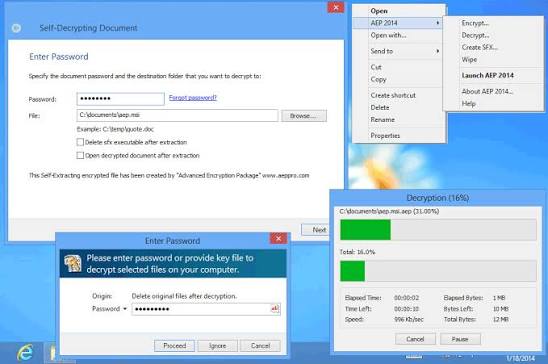
InterCrypto Advanced Encryption Package 6.13

Description: File Encryption Software Features. Strong and proven encryption algorithms to protect your confidential documents. To secure sensitive data AEP file encryption software uses 20 proven and strong encryption algorithms including AES, Blowfish, Twofish, GOST, Serpent and others.

Easy to use for novices. Integration with Windows context menu.
Encryption technology is a difficult thing, especially if you are not technically savvy. How is an older family member supposed to figure out how to create a self-decrypting file, securely delete a file, or use Public Key Infrastructure to receive mails securely? This file encryption software is made easy for novices. It integrates nicely with Windows Explorer, allowing you to use Explorer's context menus for file encryption/decryption/secure deletion directly from well known Windows Explorer.
AEP file encryption software can encrypt a single file, multiple files at once or even whole Windows folder(s).

Using USB sticks to store encryption / decryption keys
It is possible to store all your encryption passwords on a USB Flash Drive. You just need to remember a single Master Password for the password vault on the USB memory stick. There is no need to keep 20 passwords in mind when you can store these encryption keys on flash memory in an encrypted form and remember just one password.
It might sound simplistic, but strong passwords are a must for good security. A good password is a combination of several words that aren't themselves a word interspersed with special characters (e.g., !4scOrE&sDayNYeaRs_ag0).
What is the real difference between a weak password and strong randomly generated password?
AEP file encryption software can generate a really strong encryption key (a real example is "(+3!';0.;4{M>tMpRnK7&*u'F7)SYu2Q"). The ability to remember such strong passwords (with the help of a USB memory stick of course) is the key to using modern encryption algorithms 100% effectively.

Securely delete source files after encryption. Never delete confidential files using Windows Explorer!
It is a common misconception of PC users that once they have dropped a file into the recycle bin and emptied it that, there is nothing left to do and that the file is gone for good.
All that happens when you erase a file by either deleting it or putting it into the trash is that Windows has been told to not recognize the file so that you do not see it when you open a folder or your desktop. In fact, it is not erased at all, the data is still there on your hard drive and it will remain there until the information is overwritten by some other file or data.
We know all about this, as we have developed special software to recover accidentally deleted files and we also know all about the file systems used in Windows 10, 8, 7.
AEP file encryption software can wipe the contents of the original pre-encrypted file beyond recovery to make sure that not even a trace remains after shredding. AEP PRO matching and exceeding the specifications of the U.S. Department of Defense to stop software and hardware recovery tools.
AEP supports about 20 ways to securely delete file: Peter Gutmann algorithm, U.S. DoD 5200.28, VSITR, German Standard, Bruce Schneier algorithm, NATO Data Destruction Standard, GOST P50739-95 Russian Standard, The National Computer Security Center Standard, Canadian Standard, NAVSO P-5239-26, US Navy Standard, AFSSI-5020, US Air-Force Standard, AR380-19, US Army Standard and simple Quick Wipe algorithm.

Release Name: InterCrypto Advanced Encryption Package 6.13
Size: 13.3 MB
Links: HOMEPAGE – NFO – Torrent Search

Download: RAPiDGATOR
5 Comments
July 9

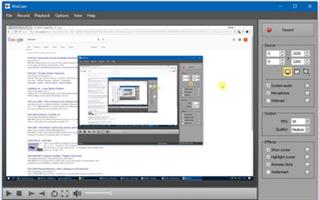
WinCam 4.0

Description: WinCam is a powerful and extremely easy-to-use screen recorder for Windows. It can deal with a given application, a region or the entire screen – and record everything that goes on in there. With the ability to capture up to 60 frames per second, WinCam makes sure your recording doesn’t miss a tiny thing, while hardware acceleration renders and encodes video in real time and truly effortless.

Designed as simple as possible, WinCam is packed with functions that allow for almost any use: recording video tutorials, saving Skype calls, capturing various media in real time and creating visual content in a hit of a button.

Choose the desired video source and effects, click the Record button and proceed as usual: work in any application, watch video or play games. When you’re done, click WinCam icon or press a hotkey, and the video of your activity is ready for sharing.

Live Preview
WinCam incorporates the same design philosophy as WinSnap (our screenshot creator). On the right pane, you can adjust the video source, the frame rate and post-processing effects, and preview these changes immediately without starting recording.

Cursor Zoom, Highlight and Click Animation
Creating a tutorial, you can make your cursor pop by adjusting its size, adding the highlight effect and mouse click animations. Alternatively, when recording a live-stream video, you might want to hide the distacting cursor entirely.

It’s your preference! In WinCam, it’s a quick option you can adjust in a few clicks.

System Audio and Microphone
With WinCam, you can record system audio, microphone or both simultaneously. The selected audio signals are automatically resampled to achieve the best possible quality, mixed together and encoded in real time alongside the video.

Release Name: WinCam 4.0
Size: 9.3 MB
Links: HOMEPAGE – NFO – Torrent Search

Download: RAPiDGATOR

4 Comments
July 9

Steelray Project Viewer 6.29.1

Description: Viewers for Microsoft and Primavera Schedules. For team members who only need to view Microsoft Project or P6 schedules. Steelray invented the viewer for Microsoft Project in 2000 and has continuously added innovations and improvements since then. There is no need to import or upload anything – simply open the file as you would with Microsoft Project or Primavera, and you’ll see the same core views and data in the schedule.

Enterprise Ready
Steelray Viewer is used by customers in the industries with the largest project schedules (e.g. Aerospace/Defense, Construction).

Enhanced Printing
Preview all pages, one page or actual size before printing. Scale and see the effects on the output, control page size and orientation and header data. Easier than printing in Project!

Schedule Search
Find what you need rapidly with the first search engine integrated into a project viewer. Search through task information, resource names and dates.

Platform Ready
Opens Microsoft Project files from Microsoft Project 98 through Project 2019. Opens Primavera P6 .XER files.

1-Click Navigation
Click on a task and see the detailed information. Select a resource name and you’ll see the assignments for that resource. Click on a date and see what is starting, finishing and in-progress.

Easy to Use
An improvement on the original, not a clone of Microsoft Project or Primavera. Simplify project data for all who need it.

Release Name: Steelray Project Viewer 6.29.1
Size: 86.9 MB
Links: HOMEPAGE – NFO – Torrent Search

Download: RAPiDGATOR
5 Comments