Please REGISTER or RENEW your account on RAPiDGATOR.net and support us by doing through all RAPiDGATOR working download links on main posts...
July 9

COAA PlanePlotter 6.7.6.9

Description: PlanePlotter receives and decodes live digital position reports from aircraft and plots them on a chart. Using PlanePlotter, you can see a radar-like display of all those aircraft around you that are transmitting the appropriate digital messages including ACARS, ADS-B and HFDL.

PlanePlotter - Features
The animated screen grab from PlanePlotter (left) was kindly provided by John Locker.

Message display
PlanePlotter shows a table display of messages received and decoded from live aircraft transmissions.

Data saving
PlanePlotter archives all the digital data that it receives and decodes to a log file.

Chart display
PlanePlotter plots aircraft positions, altitudes and times decoded from the message traffic that it receives. These include embedded position reports, AMDAR reports and ADS reports contained in ACARS messages, ADS-B position reports received by the Kinetic SBS1(tm) or AirNav System RadarBox(tm) Mode-S receivers, and position reports on HF using Charles Brain's PC-HFDL software. The plot can be superimposed on a suitable aeronatical chart that you have prepared, or PlanePlotter can download satellite imagery and plot the aircraft symbols on that. Where altitude information is available (eg Mode-S messages), you can select the data by altitude band to distinguish low level and high level traffic.

Google Earth server
If you are receiving Mode-S ADS-B position reports, PlanePlotter can interface to Google Earth to display aircraft positions over the Google Earth base map. It can even give you a dynamic real-time view from the flight deck of an aircraft that you designate.

Direction finding
PlanePlotter can determine and display the direction of any transmission using a simple passive antenna switch. This allows aircraft to be located even if they are not equipped with ACARS or Mode-S/ADS-B.

Input signals
PlanePlotter can decode ACARS messages, display the message content and plot any positions on a chart.
PlanePlotter can process and display Mode-S/ADS-B position reports captured by the Kinetic SBS1(tm), the AirNav Systems RadarBox(tm), the RxControl Mode-S receiver, the PlaneGadget Radar, the miniADSB, the microADBS and the FPGA Beast.
PlanePlotter can also work in conjunction with Charles Brain's PC-HFDL software (http://www.chbrain.dircon.co.uk/pchfdl.html) by automatically extracting position reports from the log file and plotting them in real time on the same chart display. PlanePlotter adds value by calculating course and heading from successive reports from the same aircraft and plotting the predicted position between reports (right).
PlanePlotter can drive a passive antenna switch and display the direction (QDM) of any aircraft voice transmission.

GPX overlays
PlanePlotter can display waypoints, tracks or routes over the current chart using data from a user-defined GPX format file.

Alerts
PlanePlotter can generate visible and audible alerts on detection of a specified registration, flight number or ADS identifier, on detection of any new aircraft, or on detection of an aircraft whose position is inside a user-defined Alert zone polygon.

Memory-Map Navigator support
PlanePlotter can direct the Memory-Map Navigator program (www.memory-map.com) to display dynamic aircraft position symbols over its proprietary maps using data from either ACARS or Mode-S ADS-B (in conjunction with the SBS1 receiver).

OLE/COM interface
You can access the position and other data for each aircraft known to PlanePlotter using a simple VB script or other OLE/COM capable program. You can use the same interface to update data held by PlanePlotter and to control the user interface.

Release Name: COAA PlanePlotter 6.7.6.9
Size: 7.7 MB
Links: HOMEPAGE – NFO – Torrent Search

Download: RAPiDGATOR

4 Comments
July 9

HTML Compiler 2026.8

Description: With DecSoft HTML Compiler you can easily compile your modern HTML apps (Single Page Apps, for example, created with our DecSoft App Builder) and games (for example, created with Construct 3) into standalone executables for both Microsoft Windows® 32 and 64 bits. Your app files are never extracted into the user computer and run in a modern browser environment based in Chromium.

It's secure
Your HTML apps are compiled in both Microsoft Windows 32 and 64 bits executables. Your app's files are never extracted in the final user computer except if you want to extract some particular files.

Without limits!
Put your imagination here. You can convert into executable programs for Windows almost any modern HTML app like ebooks, surveys, quizzes, magazines, presentations, photo albums and galleries, games (Construct 3, for example), etc.

Super easy
You can use the user graphic interface or the command line tool in order to compile your HTML apps, just by indicating the path for your application "index.html" file.

Take a look!
The next video shown how DecSoft HTML Compiler works! In just a minute you can see how DecSoft HTML Compiler take the "Database" app sample of DecSoft App Builder and convert it into a standalone Microsoft Windows executables.

CLI support
DecSoft HTML Compiler include a command line compiler in addition with the visual environment. In this way you can compile your apps from the command line, simply and fast.

32 & 64 bits
You can compile your apps for both Windows 32 bits and Windows 64 bits from your Windows 32 bits or Windows 64 bits. So from any Windows you can get your app compiled for both Windows 32 bits and Windows 64 bits.

Very simple
DecSoft HTML Compiler don't shown to the user any interface element. But this is fine, because then your application looks exactly as you wanted, without any undesired interferences!

Release Name: HTML Compiler 2026.8
Size: 28.3 MB
Links: HOMEPAGE – NFO – Torrent Search

Download: RAPiDGATOR
6 Comments
July 9

IDimager Photo Supreme 2026.3.1.9343

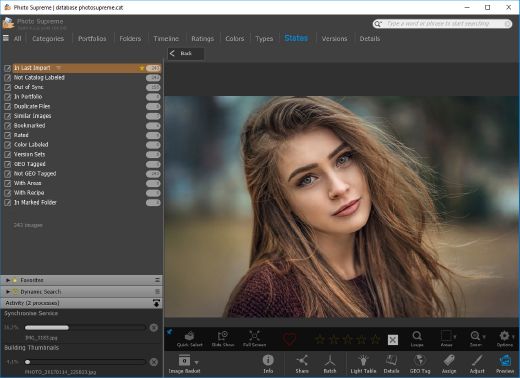
Description: Photo Supreme v2026 is a thoughtful and forward-looking release. This update has focused on smarter discovery, faster performance, and modern workflow expectations, especially around large catalogs, mobile integration, searches, and team environments.

Import and Select
One of the standout additions in Photo Supreme v2026 is the new multi-pass Import and Select workflow. This allows users to review and refine image selections in multiple stages instead of making all decisions in one pass. It’s especially useful for large shoots, letting photographers cull images more deliberately and with less pressure. In addition, the Import and Select feature now loads images faster than ever. Mac users will also appreciate direct iOS device importing, which makes it possible to bring photos straight from an iPhone or iPad into the catalog without relying on intermediary software. This significantly streamlines mobile-first workflows.

Powerful Searches
Photo Supreme now supports natural language searching, allowing users to find images using plain, conversational phrases rather than rigid metadata queries. This feature is powered by AI services such as OpenAI, Google Gemini, or local models with Ollama. This gives users flexibility in how advanced features are enabled. In addition, a new classification system enhances search accuracy by grouping images into meaningful categories upon import, making it easier to surface relevant results in large or complex catalogs.

Video & Media Handling
For users working with video, Photo Supreme v2026 introduces hover-based video previews. Simply hovering over a video thumbnail now reveals a short animated preview, making it much faster to identify clips without opening them individually. Support for modern formats has also been expanded, ensuring the software keeps pace with current media standards.

Sharing with ZIP
Exporting images is more flexible in v2026 thanks to ZIP output support in transfer profiles. This makes it easy to bundle images into a single archive for delivery, backup, or client sharing, all directly from within Photo Supreme. These enhancements simplify distribution workflows and reduce the need for external tools.

GEO Maps
GEOgraphic-Mapping features can now generate maps using not only Google Maps, but also OpenFreeMap with OpenStreetMaps. This removes the need for API keys while still delivering rich, interactive map displays. This update makes location-based browsing easier to configure and more accessible for all users.

Performance and Refinements
Photo Supreme v2026 delivers notable performance enhancements, resulting in faster browsing and a more responsive overall experience. Response times are improved by up to 10%, with especially noticeable gains for large libraries containing many catalog labels.
Catalogs with numerous stacks also see significant performance improvements, particularly when displayed in stacked views.
v2026 includes a wide range of refinements, such as: "Visually similar" stack detection, numerous stability fixes and workflow enhancements, polished UI behavior in collections, searches, and metadata handling

Wait, there's more, a lot more…
New "RAW Files" and "Video Files" catalog states
Added support for Google Gemini as an AI service
Added support for OpenAI GPT-5.2 as an AI Service
Added support for Ministral3 model with Ollama
Added file management support for ACR sidecar files
Update HTTP Server with Photo Supreme Online (Server Edition)
Faster face recognition
Added "AI-Estimated GEO Location" to the AI Panel
Faster result display in the Collection Viewer
"Cascade Metadata" from image to Stack or Version Set is now a background process
A highlighted stroke has been added to the active tabs, improving navigation
Now you can display metadata charts and graphs across multiple tabs
Added support for Ctrl/Cmd+Z functionality in text and memo fields
Defined the new Affinity v3 .AF and .AVIF file format as a supported "other file format"
Switching the collection viewer's view style is faster (eg from Basic to Grid to Clean to Custom Thumb Info)
Advanced Search now has an option to search by "File Size" and "File Size MB"
Finetuned the check for "need to compact" on PostgreSQL (Server Edition)
Bookmark keyboard shortcuts are now a "toggle", similar to ratings and color labels
Expanding nodes in the Catalog Tree is ~25% faster
When using the "Dump Full to Catalog File" feature, there's now the option to create either a "catalog dump" file, or a "catalog with thumbs" dump files
Added a XMP Storage Location for "original file AND non-standard sidecar file"
In "Stacked View", you can now select a specific item from the stack to show
Support for PostgreSQL 18.
And more…

Highlights for v2026
Multi-Pass "Import and Select": Seamlessly transition through passes with a fast-culling system that optimizes your workflow.
Direct iOS Image Import on macOS: Import images directly from your iOS devices with ease.
Video Thumbnail Preview: Hover over a video thumbnail or open the Quick View to view a live video preview.
Natural Language Search Powered by AI: Search your content using plain language, with smart integration through OpenAI, Google Gemini, or Ollama models.
Transfer Profiles can now create ZIP output files: Copy or send sets of images as a single ZIP file for easier sharing.
Maps with OpenFreeMap: Display images on interactive maps using OpenFreeMap/OpenStreetMaps with no API key needed.
Server Edition Thumbnail Caching: Enjoy faster performance with local thumbnail caching, automatic cleanup, and customizable settings for retention and cache size.
Classifications: Enhance search accuracy with an automatic image classification mechanism on import.

Release Name: IDimager Photo Supreme 2026.3.1.9343
Size: 162.6 MB
Links: HOMEPAGE – NFO – Torrent Search

Download: RAPiDGATOR

5 Comments
July 9

Reclaim Time FocusMe 7.7.8.2

Description: Take Back Control of Your Time. Conquer digital distractions with the world’s most powerful focus software. FocusMe blocks distractions, reveals your online habits and helps you build the routines that make deep work possible.

How FocusMe Works
In a world of highly addictive websites and apps, FocusMe studies your digital patterns and reveals your online behavior. Where your attention drifts, when you work best and what needs stronger boundaries. Your AI Coach is an optional feature which then turns those insights into practical recommendations for blocking plans and focus routines, which you can immediately apply using the tools built directly into FocusMe.

The app runs in the background limiting exposure to distractions, setting screen time limits and scheduling focused work sessions. These are fully customizable to your daily schedule. If you want extra accountability, you can lock your set-up using Force Mode. With built-in Pomodoro timers, break reminders and real-time progress tracking, FocusMe becomes your digital productivity coach.

Release Name: Reclaim Time FocusMe 7.7.8.2
Size: 51.7 MB
Links: HOMEPAGE – NFO – Torrent Search

Download: RAPiDGATOR
5 Comments
July 9

App Builder 2026.17

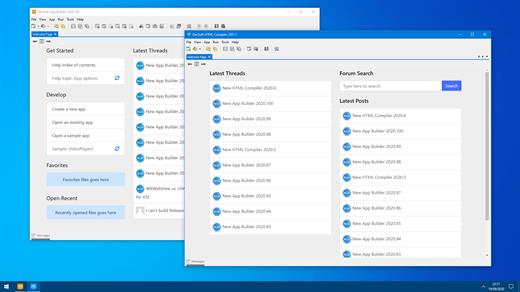
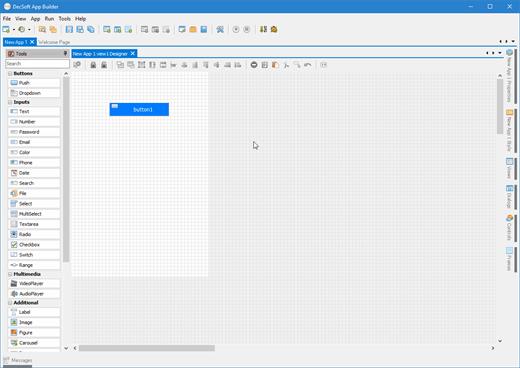
Description: Professional visual integrated development environment to create modern HTML5 apps, Web Apps, Progressive Web Apps, Web Extensions and Hybrid apps for both mobile and desktop browsers, Android, iOS, Windows and more.

Apache Cordova
DecSoft App Builder is integrated with Apache Cordova and prepares for your app the right config file, platform icons, splash screens, batch files, shell files and JSON files. DecSoft App Builder integrates also the officials Apache Cordova plugins.

User Functions
In addition to the available app methods and the methods provided by the app views, app dialogs, app frames, the Apache Cordova plugins methods, and, all the possible controls that you can use, its also possible to setup your own User Functions in order to be available for your app at runtime.

App languages
Its easy to translate the apps into various languages by using the app languages manager. We can add any number of languages and then translate the app in runtime just by using the app.translateView() method.

Auto scale apps
There are many themes availables for your app, and, you can also set the fixed and scaled styles, even at runtime. The auto scale style made the app properly show in different screen sizes.

Release Name: App Builder 2026.17
Size: 71.2 MB
Links: HOMEPAGE – NFO – Torrent Search

Download: RAPiDGATOR

7 Comments
July 9

Pepakura Designer 6.2.4

Description: Pepakura Designer is a Windows application which makes unfolded patterns from 3D data. Pepakura Designer features to automatically unfold 3D polygon-mesh models, and allow you to edit them. Pepakura Designer allows you to create real paper craft models from digital data!

You can try Pepakura Designer with no charge. (The data exporting feature is activated with purchase of the license keycode.) Note that Pepakura Designer does not have 3D data design features. You require 3D data before starting to use Pepakura Designer. Pepakura Designer supports common 3DCG file formats. Recommended 3DCG software is Metasequoia. You can use it for 3D model design at no charge. Pepakura Designer reads Metasequoia files with high compatibility.

One Button Unfolding
An unfolded 3D model pattern will be generated once you press the button.

Useful Toolset for Layout Editing
Pepakura Designer provides a simple and useful toolset for layout editing.
The Move, Rotate, and Join/Disjoin Parts editing tools, and the Adding Flaps support to arrange the layout.

Assemble Assistance
Pepakura Designer assists in the assembly process.
For example, ID numbers are assigned to edges, so you can understand the pairs of edges to be glued together. The positions of the pairs to be glued together are indicated by an arrow.

Exporting
Pepakura Designer supports the export in several file formats, including BMP, PNG, GIF, JPG, EPS, DXF, and PDF.

Texture Setting
By switching the textures on and off, you can assemble the color model or the white model, whichever you prefer.
You can also change the texture images on Pepakura Designer.

Operating System: Windows 8/10/11 (64bit)

Release Name: Pepakura Designer 6.2.4
Size: 18.4 MB
Links: HOMEPAGE – NFO – Torrent Search

Download: RAPiDGATOR

4 Comments
July 9

Teorex FolderIco 9.3.3

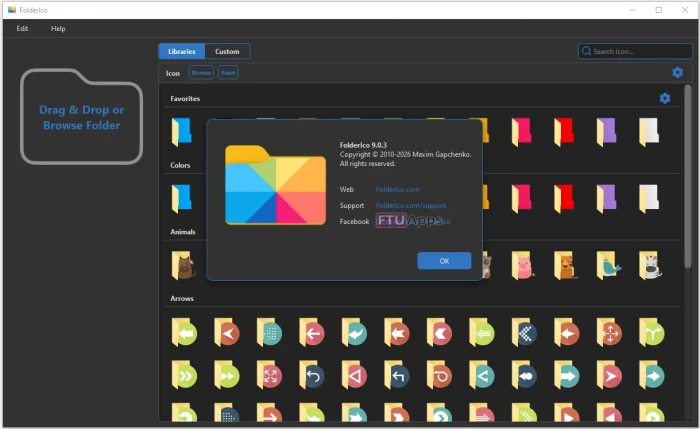
Description: FolderIco allows to change the color of Windows folder in one click!

Organize your Folders more Easily
Don't you know how to change a standard folder to a colorful and bright one? With FolderIco, give some color to Windows & Mac folders. With just a one click, colorize your folders, and discover a new intuitive way to classify your files. A quick look is now enough to identify the folder you are looking for!

Classify your Folders by Priority
You can now classify your folders by priority. Red is an important folder, orange is urgent, green is no action needed... Choose the attributes that you like, so you'll never delete an important folder in error.

A Fast and Light Tool
FolderIco is a very light software that doesn't stay in memory. It uses a native functionality of Windows & Mac to be more efficient. Discover its simplicity: with a single right-click on a folder you change its icon!

Integration with Windows Explorer
FolderIco is integrated into your Windows Explorer! One right-click on any folder and FolderIco is ready to change your folder's icon.

Release Name: Teorex FolderIco 9.3.3
Size: 32 MB
Links: HOMEPAGE – NFO – Torrent Search

Download: RAPiDGATOR

7 Comments
July 9

DBF Recovery 4.75

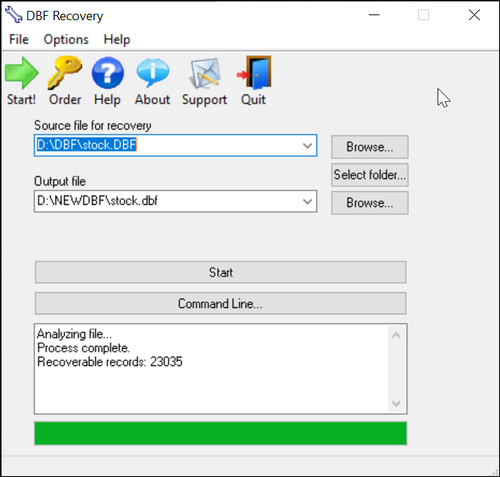
Description: DBF Recovery empowers its users with the ability to recover a damaged database back to its pristine condition without needing the expertise to accomplish such a task or requiring the additional expense of hired recovery services. When the program runs, you see a simple interface with two main fields. Select the file for recovery in the first field and the folder for the output in the second.

As an added option, you can choose to recover deleted records in the database. Once everything is set, you click on the Start button. DBF Repair Tool does the rest. It repairs the headers and data structures in an automatic process that involves no interaction with the user. After all you may not want to sit around and watch the process. With DBF Recovery, you'll truly have a lean, mean DBF repairing machine without functional fluff.

Bring your DBF files back from the dead
Have you ever tried to open the database only to discover that it won't let do so? Remember how you felt when several months of mind-numbingly tedious data entry turned into undecipherable mess of characters? So, wouldn't it be nice if you could bring your database back from the dead without the assistance of hired experts? Well, if you are in the interest of the state-of-the-art, affordable recovery technology, you're ready for DBF Recovery. Just run the DBF Repair, load the corrupt file and ta-da! The database is back to its original healthy condition!

Save your budget and even business from disaster
Too often a database is something that the company's action and the well-being of its employees depend on. A crush of a database is one of the worst nightmares not only for the system administrator but for the company in general. One study reports that a company that experiences a computer outage lasting for more than 10 days will never fully recover financially and 50 percent of such companies will be out of business in 5 years.

Repair most any DBF database
Unlike some other tools, DBF Recovery works with all popular DBF databases, including those made in Clipper, Foxbase, FoxPro, Visual Foxpro, dBASE III/IV, etc. Its Artificial Intelligence will determine the DBF format and choose the best recovery method on its own.

Run DBF Recovery in your native language
Another nice feature in DBF Repair sofware is multilingual support, letting you use the program even if English is not your native language. Currently, DBF Recovery is localized into English, German, Italian, Spanish and French with support for more languages on the way!

START USING DBF REPAIR TOOL TODAY!
Why wait? Add DBF Recovery to your software toolkit today. Because it's not "IF" the database will fail, it's "WHEN" this dreadful occurrence will take place. Sooner or later, it will get damaged due to a power failure or application error and heaven help you if you don't have a reliable DBF recovery tool. It's a hard lesson to learn. But with DBF Recovery, you get a fail-safe solution to repair databases without having to beat the brains to death for days trying to re-enter lost data or spending large amounts of dollars hiring a recovery service.

Release Name: DBF Recovery 4.75
Size: 1.7 MB
Links: HOMEPAGE – NFO – Torrent Search

Download: RAPiDGATOR
3 Comments
July 9

Total Software Deployment 3.5.1.1131

Description: Total Software Deployment: managed software deployment for your corporate network.

Remote and Automated Software Deployment
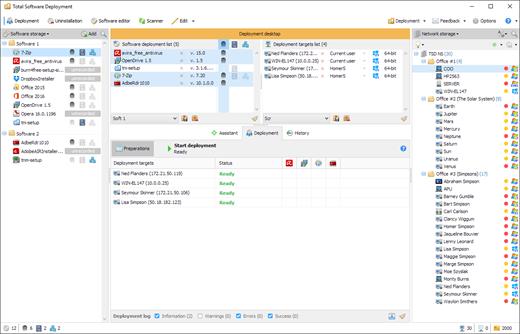
Total Software Deployment makes deploying software on any number of computers a blast. Software inventory management, automatic network scanning, and concurrent deployment of multiple types of installation packages make TSD a clear winner among remote deployment tools.

One-Click Concurrent Deployment
Unlike the competition, this tool supports advanced concurrent deployment, allowing you to install multiple packages on multiple computers at the same time. You can specify how many computers and how many packages per computer can be installed at any moment. Once you have made up your mind, you can start deploying in just one click.

Remote Software Uninstallation
You can also remotely uninstall software from one or multiple computers. The remote uninstall tool supports packages deployed using Total Software Deployment or installed in any other way, allowing network administrators to control which software is required on the network and which must be uninstalled.

Integrated Software Inventory Management
Total Software Deployment enables organization-wide visibility across network computers, maintaining a comprehensive list of software installed on all computers in your corporate network.

Automatic Inventory Scans
TSD automatically scans your network computers to build inventory lists. Computers and servers on your corporate network can be scanned without permanently installed agents; all you need is the administrator’s password. Scanned data will be categorized and organized automatically to build a comprehensive inventory of software installed on your local area network.

Flexible MSI & EXE Application Deployment
Ever wish for a system more flexible than Microsoft® deployment tools? Being restricted to deploying MSI packages is no fun. Total Software Deployment supports all types of installers including MSI and all popular third-party installers, enabling fully automated, silent deployment of just about any package.

Three Types of Deployment Methods
Not all installation packages are created equal. Some have pre-configured options for silent setup, while others may come with no support for automated deployment at all. TSD offers the choice of as many as three different methods of creating an automated deployment package for your network, allowing you to remotely deploy software products that were never meant to be.

Release Name: Total Software Deployment 3.5.1.1131
Size: 46.7 MB
Links: HOMEPAGE – NFO – Torrent Search

Download: RAPiDGATOR

4 Comments
July 8

Dropzone Pro 5.0.9

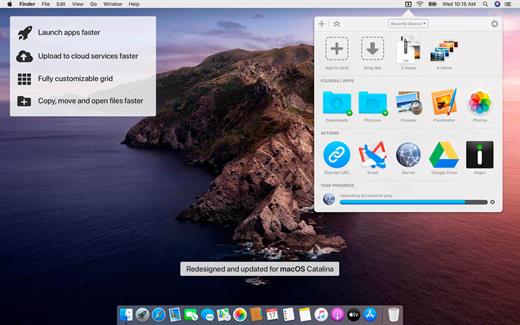
Dropzone makes it faster and easier to copy and move files, open applications and share files with many different services. Dropzone is a unique and amazing app that’s like nothing you’ve ever used before. We’ve paid fanatical attention to every detail and built an app that looks and feels like an integral part of macOS.

Dropzone ships with a powerful scripting API and with a little programming knowledge you can modify any of your actions or even create entirely new ones. This gives Dropzone unlimited extendability and utility. We’re always thinking up new actions so Dropzone will become even more useful over time.

Dropzone also includes Drop Bar – Drop Bar makes it easy to stash files you know you’ll need later. Just drop files on the Drop Bar icon in the grid and they will stick there until you’re ready to use them.

Features

  • Open applications, move and copy files faster than ever before.
  • Shorten URLs quickly using Tinyurl shortener. Just select a URL to shorten and press Ctrl+Option+Cmd+S and the shortened URL is automatically copied to the clipboard.
  • AirDrop integration lets you drop files or folders from any app and share them with your other Macs over the network.
  • Imgur integration lets you share images fast and get a link for pasting.
  • Upload files to Amazon S3 (Dropzone Pro feature).
  • Upload files to your FTP server (Dropzone Pro feature).
  • Upload files to your Google Drive (Dropzone Pro feature).
  • Download and install add-on actions that let you upload to services like Google Drive, YouTube and many others (Dropzone Pro feature).
  • Powerful multi-tasking engine allows you to run multiple tasks at once and track the progress of each one through the in-grid task status area.
  • See how tasks are progressing at a glance in the animated menu item.
  • Launch Dropzone actions with the newly added keyboard shortcuts feature (Dropzone Pro feature).
  • Add applications, folders or actions to your grid easily by dragging and dropping them on the Add to Grid area.
  • Develop your own actions using the updated and massively improved Ruby or Python API (Dropzone Pro feature).
What’s New

Version 5.0.9:


  • Release notes were unavailable when this listing was updated.
Compatibility

macOS 10.15.0 or later
Apple Silicon or Intel Core processor


Release Name: Dropzone Pro 5.0.9
Size: 69.4 MB
Links: HOMEPAGE – NFO – Torrent Search

Download: RAPiDGATOR

9 Comments