Please REGISTER or RENEW your account on RAPiDGATOR.net and support us by doing through all RAPiDGATOR working download links on main posts...
July 5

Qbserve 1.9.1

Qbserve is an automatic private time tracker that helps improve your productivity. It gives you instant answers about the way you spend your time by intelligently observing active apps. All the tracked information is stored privately on your machine.

Qbserve knows productivity rates for thousands of sites and apps and has a unique ability to differentiate between chats in Skype, Slack, and Telegram, YouTube videos, and subreddits. You can also set alerts to notify you when you are reaching your goals or spending too much time on distractions.

Feature Highlights

  • automatic recognition of apps and popular websites opened in Chrome, Safari, and Opera browsers
  • separate productivity of Slack teams, chats in Skype, Telegram; YouTube videos, Reddit.com subreddits; different windows inside one application
  • show application windows as standalone activities
  • view all logged windows for each application record
  • ignore any application, website, window, etc.
  • enable dynamic dock icon and/or menu bar item status
  • search activities with filters by name, productivity, category, application or time period
  • edit uncategorized activities that weren’t recognized by Qbserve
  • set idle time limit and turn it off for some categories like “Videos”
  • view detailed chart with productivity meters for any period within a year
  • get feedback on how productivity changes compared to previous days, weeks, months
  • pause and resume tracking
  • track only selected weekdays or time periods
  • shift the day starting time in case you are a night owl
What’s New

Version 1.9.1:


  • Release notes were unavailable when this listing was updated.
Compatibility

OS X 10.10 or later, 64-bit processor


Release Name: Qbserve 1.9.1
Size: 6.1 MB
Links: HOMEPAGE – NFO – Torrent Search

Download: RAPiDGATOR

4 Comments
July 4

Textual 7.2.7

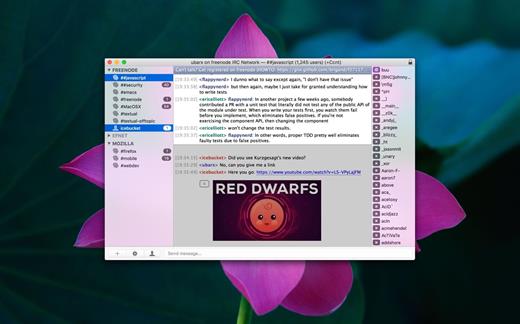
Textual is the world’s most popular application for interacting with Internet Relay Chat (IRC) chatrooms on OS X.

First appearing in 2010, Textual has since evolved and matured into the top IRC client for OS X; relied on and trusted by thousands of people.

Beautiful Interface

Textual includes two elegantly designed dark and light variants of the user interface which have been refined all the way down to the very last pixel.

Powerful, yet lightweight

Textual supports very powerful modern technologies such as native IPv6, the latest IRCv3 specifications, client-side certificate authentication, and much, much more in an easy to navigate, clutter free environment.

Privacy is valued

Textual protects your privacy by leveraging widely accepted, proven technologies such as Off-the-Record Messaging (OTR) to ensure that the only people reading your conversations are those that you intend to.

Customizable

Textual takes customization to the next level with styles created using well documented, open web standards in addition to addons built using a multitude of programming languages such as AppleScript, Objective-C, PHP, Python, Perl, Ruby, Shell, and Swift.

Textual also includes…

  • Multi-channel selection
  • Quick navigation using fuzzy searching
  • Inline nickname colorization
  • Rich array of keyboard shortcuts
  • iCloud support for syncing connections and preferences
  • Address Book for tracking when friends are online & offline
  • Powerful, customizable, rule-based ignore matching
  • Inline media embedding (Show images inline with chat)
  • Auto-Completion for nicknames, commands, and channels
  • Growl and native Notification Center support
  • Bold, color, italic, and underline text formatting
  • Built in support for converting text emoticons to emojis
  • Powerful ZNC integration for power users
  • Simple Authentication and Security Layer (SASL)
  • SOCKS4, SOCKS5, and HTTP proxy support (with or without SSL)
  • Support for sending self-signed certificates for authentication
  • Support for validating and specifying trust for untrusted certificates
What’s New

Version 7.2.7:


  • Release notes were unavailable when this listing was updated.
Compatibility

macOS 11.0 or later


Release Name: Textual 7.2.7
Size: 10.2 MB
Links: HOMEPAGE – NFO – Torrent Search

Download: RAPiDGATOR
5 Comments
July 4

Oka Unarchiver Pro 2.1.13

Oka Unarchiver is upgraded to version 2.0. New interface, optimized operation experience.

Compression formats supported:


  • ZIP
Extraction formats supported:

  • 7Z, ZIP, RAR, TAR, GZIP, BZIP2, XZ, LZIP, ACE, ISO, CAB, PAX, JAR, AR, CPIO, and more

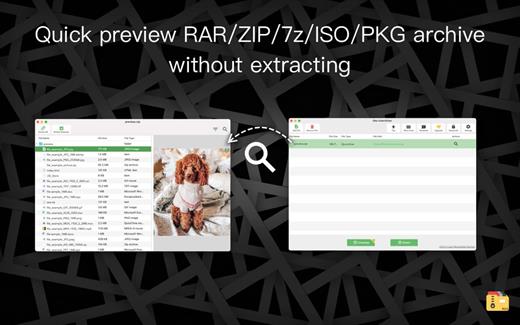
The Oka Unarchiver is a small and easy-to-use program that can archive or unarchive many different kinds of archive files.
With Oka Unarchiver you can compress as many files as you want. Also, you can protect them with a password.

Also, Oka Unarchiver can extract lots of compressed files, from ZIP to 7Z archives, even parted ones. Just drop files in the icon, or into the main window, and they will be extracted using Oka Unarchiver

You can add any file into the list to archive or extract. If you click the archive button, Oka Unarchiver can archive all the files in the list at one time. If you click the extract button, Oka Unarchiver will automatically detect which files can be extracted.

The latest support for Finder extension, right-click on the file directly in the Finder, you can compress/uncompress or preview the file through the menu, greatly simplifying the operation steps.

So easy to use:

  • Support Finder extension, right-click the file in Finder to compress or extract files directly, even preview files inside the archive
  • Support Quick look preview zip files
  • Batch decompression of archives
  • Supports password-protected archives
  • Click one button to extract & archive;
  • Drag archives and drop to extract;
  • Open in finder to extract;
  • Support archive into multi-part zip files.
  • Supports new Mac computers with Apple M1 chip.
What’s New

Version 2.1.13:


  • Fixed issue
Compatibility

macOS 10.13 or later.


Release Name: Oka Unarchiver Pro 2.1.13
Size: 27.7 MB
Links: HOMEPAGE – NFO – Torrent Search

Download: RAPiDGATOR

5 Comments
July 4

NotchNook 1.6.2

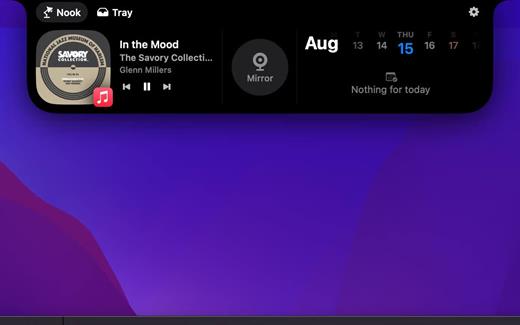
NotchNook is a Mac app that turns the notch on your MacBook into a dynamic, interactive element that pulses with notifications.

Access media controls, calendar events, shortcuts, and more — all from the top of your screen. With the ability to store files temporarily and preview your webcam instantly, NotchNook brings a new level of functionality to your Mac, making everyday tasks smoother and more efficient.

Control media effortlessly

Manage your music with just a glance at your Mac’s notch. Enjoy album artwork and waveforms displayed dynamically, making your media experience both functional and visually appealing.

View your calendar instantly

Keep track of your schedule without opening a calendar app. NotchNook displays your calendar events right in the notch, so you’re always in the know.

Store and transfer files

Use NotchNook as a temporary space to hold files. Drag and drop files onto the notch to store them in the Tray or quickly send them via AirDrop to another device.

Preview your webcam

Activate and preview your webcam with just one click using the Mirror widget. Whether you need a quick check before a video call or just want to see what’s in frame, NotchNook makes it simple.

What’s New

Version 1.6.2:


  • Release notes were unavailable when this listing was updated.
Compatibility

macOS 14 and later


Release Name: NotchNook 1.6.2
Size: 40.4 MB
Links: HOMEPAGE – NFO – Torrent Search

Download: RAPiDGATOR
5 Comments
July 4

Moom 4.5.1

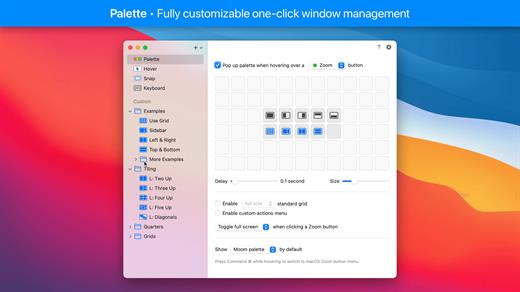
Moom allows you to move and zoom windows – using either the mouse or the keyboard – to predefined locations and sizes, or to full screen mode.

When used via the mouse, all you need to do is hover over a green resize button, and Moom’s interface appears. When used via the keyboard, press your defined shortcut, and the Moom keyboard bezel appears; you can then move windows using the arrow keys and modifier keys.

Moom can be run as a traditional application, a menu bar application, or a completely faceless background application.

What’s New

Version 4.5.1:


  • Adjusted the settings window and its various controls to macOS 26's new look. This required a lot of small changes that all apply conditionally, depending on which macOS version Moom is running on. (At the risk of editorializing a little: Regardless of how much anyone likes said new look, we think there's value in native apps at least making an honest attempt at being consistent with the system and its bundled apps.)
  • Improved window highlighting on macOS 26. The highlight now matches the highlighted window's radius (which can vary depending on factors such as whether the window has a toolbar), at least for apps that interpret macOS 26's fondness of concentric circles correctly.
  • Fixed a rare issue where tiny windows made Moom crash. (Hat tip to Andreas S.)
  • Improved the settings window's accessibility support.
  • Moom's app icon now supports macOS 26's light, dark, and clear/tinted app icon looks.
  • Adapted to a change in Google Chrome, which affected window matching for layouts.
  • Worked around Cluely's invisible overlay window.(Hat tip to pkubigjoe on Discord.
  • Worked around an issue where weird things happened on macOS 26 when launching Moom by opening a *.moom file.
Compatibility

macOS 10.13 or later
Apple Silicon or Intel Core processor


Release Name: Moom 4.5.1
Size: 12.5 MB
Links: HOMEPAGE – NFO – Torrent Search

Download: RAPiDGATOR

5 Comments
July 4

Mole 1.9.0

Mole is a powerful, native macOS utility designed to streamline your digital workspace. Instead of cluttering your system with multiple single-purpose applications, Mole consolidates disk cleanup, app management, maintenance, disk analysis, and live system monitoring into one single, lightweight binary.

Built with a conservative, privacy-first mindset, Mole ensures your Mac runs smoothly without ever compromising your data.

Key Features

  • Clean: Safely scans and removes caches, Xcode builds, device leftovers, large active logs, and browser temporary files. You review every file before it gets deleted.
  • Software Manager: Effortlessly handles app updates (supporting Sparkle, Electron, Homebrew, and the Mac App Store) and ensures clean uninstalls by scrubbing leftover preferences and support files.
  • Optimize: Runs essential maintenance tasks with a single tap—rebuilding Quick Look, repairing caches, and auditing login items behind a secure prompt.
  • Analyze: Visualizes your entire disk using an intuitive treemap, allowing you to instantly spot and drill down into the largest space-hogging files.
  • Status Dashboard: Features a live HUD tracking CPU, memory, GPU, network, battery, and thermals with 60-second sparklines, alongside native fan speed controls for supported Macs.
What’s New

Version 1.9.0:


  • Release notes were unavailable when this listing was updated.
Compatibility

macOS 14.0 or later


Release Name: Mole 1.9.0
Size: 20.5 MB
Links: HOMEPAGE – NFO – Torrent Search

Download: RAPiDGATOR
4 Comments
July 4

Serial Box Q3-2026

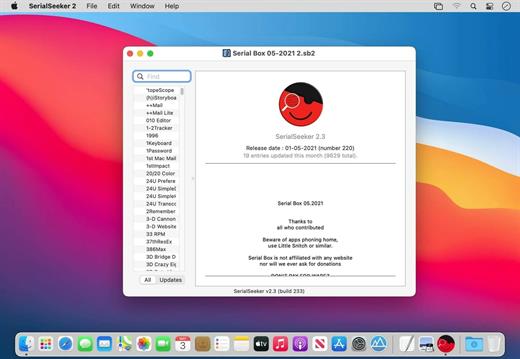
The base of serial numbers project iSerial as of 2022. It contains information on how to activate (serial numbers, information about other methods of activation) for the PowerPC platform programs so and Intel.

Just open the dmg file, drag and drop the app where you like. However, there is no way to view what serials, cracks and patches are new in this issue as compared to the previous. Thanks to all contributors and supporters!

Include

  • Serial Box Q2-2026
  • SerialSeeker 2.3
  • SerialSeeker 1.3.19

SerialBox will now only be published quarterly.

What’s New

Version Q3-2026:


  • Release notes were unavailable when this listing was updated.
Compatibility

OS X 10.7 or later


Release Name: Serial Box Q3-2026
Size: 9.8 MB
Links: HOMEPAGE – NFO – Torrent Search

Download: RAPiDGATOR
4 Comments
July 4

Alcove 1.7.7

Alcove brings the elegant Dynamic Island experience to your Mac, transforming how you interact with notifications, live activities, and system events. Designed to feel native, it’s a polished way to stay informed without being interrupted.

Key Features


  • Fluid Transitions — Smooth animations and transitions that make alerts and interactions feel natural and integrated.
  • Instant Notifications — Alerts appear quickly and gracefully so you never miss important updates.
  • Live Activities Support — Keep track of ongoing tasks directly from the Dynamic Island interface.
  • Swipe Gestures — Use intuitive gestures to clear, interact with, or dismiss alerts.
  • Customizable HUDs — Tailor the look and feel of the heads-up displays to fit your style or workflow.
  • Lock Screen Presence — Alcove can show notifications or status even when your Mac is locked, ensuring you stay informed at a glance.
  • Lightweight, Native App — Built to run smoothly, Alcove is fast and performs well without draining resources.

xattr -cr /Applications/Alcove.app

What’s New

Version 1.7.7:


  • Release notes were unavailable when this listing was updated.
Compatibility

macOS 12.0 or later


Release Name: Alcove 1.7.7
Size: 15.1 MB
Links: HOMEPAGE – NFO – Torrent Search

Download: RAPiDGATOR
4 Comments
July 4

Proxyman 6.12.0

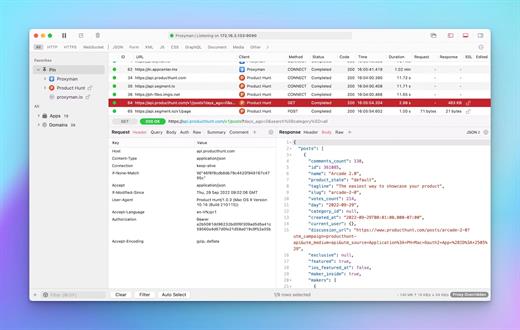
Proxyman is a high-performance macOS app, which enables developers to view HTTP/HTTPS requests from apps and domains.

Features


  • ? Native macOS app. Written by Swift, Objective-C. Powered by Apple SwiftNIO for the high-performance network application.
  • ? Fully support Apple Chip (e.g M1, M2, M1 Pro/Max).
  • ? Built for macOS Monterey & Ventura.
  • ✅ Hassle-free Intercept HTTP/HTTPS requests/response and WebSocket from Web Browsers, iOS, and Android devices.
  • ✅ Modern and intuitive UI
  • ? Multiple filters
  • Comprehensive Guideline to set up with iOS simulator and iOS and Android devices.
  • Basic debugging tools: Compose, Repeat, Wildcard/Regex Filter, Multiple Filters, Customize Columns, Toolbar…
  • Advanced Tools: Breakpoint, Map Local, Map Remote, Backlist, External Proxying, No Caching, Protobuf, Clear Cache, Custom Certificates, Scripting, Network Conditions, Reverse Proxy, Diff, Access Control etc
  • Automatic Setup for Backend Development: Auto capture HTTP(s) traffic from NodeJS, Ruby and Python.
  • macOS 10.15+
What’s New

Version 6.12.0:


  • Release notes were unavailable when this listing was updated.
Compatibility

macOS 10.15 or later


Release Name: Proxyman 6.12.0
Size: 36.8 MB
Links: HOMEPAGE – NFO – Torrent Search

Download: RAPiDGATOR

4 Comments
July 4

DMGKit 2.1.1

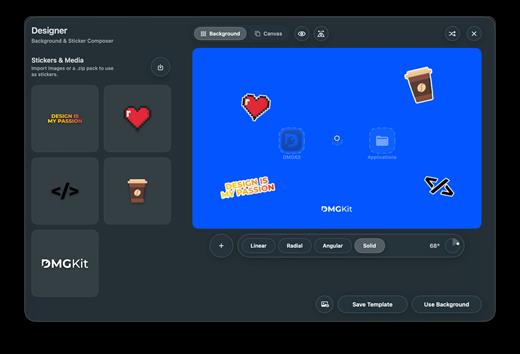
DMGKit is a native publishing workflow tool for Mac developers that integrates DMG installer design, code signing, notarization, binding, legal documentation, template reuse, release checks, and direct distribution all within a single SwiftUI application. It is compatible with macOS 15 and above, serving native Swift applications as well as supporting desktop applications from the Python, Electron, Tauri tech stacks, and more. Developers can create brand-style installation windows using the visual canvas, precisely placing backgrounds, icons, Applications shortcuts, arrows, and overlays, and check package structure and release details before exporting.

DMGKit also has built-in privacy policies, terms of use, EULA, and installation protocol management capabilities, supports automatic translation, and facilitates more complete release packages for users in different regions. For teams that need to bypass the Mac App Store for official distribution, it makes every release more controllable, consistent, and more compliant with Apple’s security requirements.

What’s New

Version 2.1.1:


  • Release notes were unavailable when this listing was updated.
Compatibility

macOS 15 or later


Release Name: DMGKit 2.1.1
Size: 10.2 MB
Links: HOMEPAGE – NFO – Torrent Search

Download: RAPiDGATOR

4 Comments