Please REGISTER or RENEW your account on RAPiDGATOR.net and support us by doing through all RAPiDGATOR working download links on main posts...
July 5

DxO PhotoLab 9.8.0 Build 46

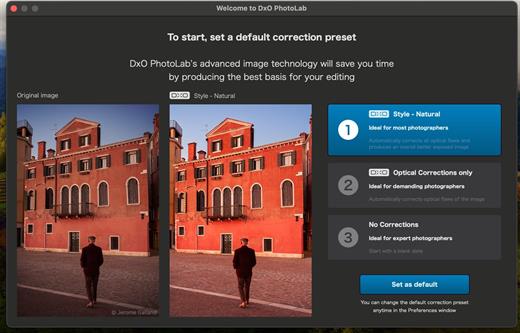
DxO PhotoLab provides a complete set of smart assisted corrections that you can manually fine-tune at any time. Take control on every aspect of your photos: effectively remove noise, get rid of light constraints, recover color details, apply sophisticated optical corrections, and enhance details.

Reducing digital noise in RAW images is an ongoing challenge for most photo-editing software. But with DxO DeepPRIME we are breaking new ground. The first artificial intelligence-based (AI) technology of its kind, DeepPRIME enables you to demosaic and denoise images simultaneously. Try it out – the results speak for themselves.

What’s New

Version 9.8.0:


  • Release notes were unavailable when this listing was updated.
Compatibility

macOS 13.6 or later


Release Name: DxO PhotoLab 9.8.0 Build 46
Size: 2.3 GB
Links: HOMEPAGE – NFO – Torrent Search

Download: RAPiDGATOR

2 Comments
July 5

DaisyDisk 4.34.1

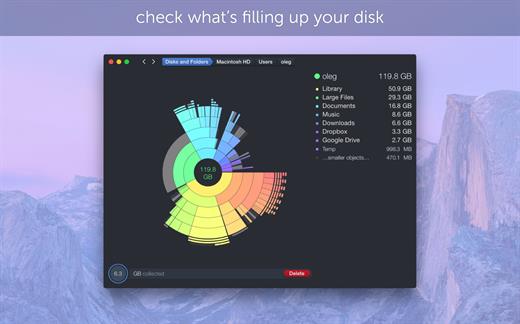
DaisyDisk allows you to visualize your disk usage and free up disk space by quickly finding and deleting big unused files.

The program scans your disk and displays its content as a sector diagram where the biggest files and folders at once become obvious. To drill down to a folder, just click on a segment. To bubble up, click in the center. Move the mouse over the diagram and see the name and path of each file, and enclosed files (if any). Hit Space to quickly preview file content, without launching another application. In this way, walk around your disk and drag-and-drop all unneeded files into the “collector”. Expand the collector to check its contents. When done, clean it up with a single click.

What’s New

Version 4.34.1:


  • Updated the application icon to match the newest macOS style.
Compatibility

macOS 10.13 or later
Apple Silicon or Intel Core processor


Release Name: DaisyDisk 4.34.1
Size: 8.9 MB
Links: HOMEPAGE – NFO – Torrent Search

Download: RAPiDGATOR

4 Comments
July 5

WhyFi 1.4.3

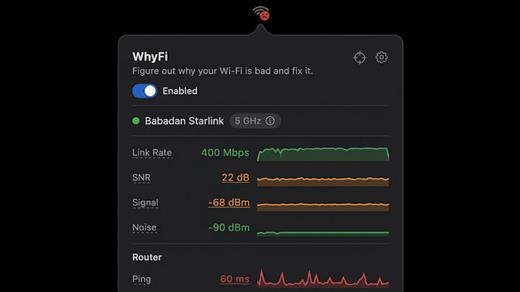
WhyFi is a lightweight macOS utility designed to diagnose and explain Wi-Fi performance issues in real time. Instead of guessing why your connection is slow, WhyFi continuously monitors your network and breaks down problems into clear categories such as Wi-Fi signal, router performance, ISP issues, and DNS delays.

By analyzing each layer of your connection, WhyFi helps you identify the exact cause of slow speeds, high latency, or unstable connections — and provides actionable insights to resolve them quickly.

Built as a menu bar app, it runs quietly in the background and gives you instant visibility into your network health without interrupting your workflow.

What’s New

Version 1.4.3:


  • Release notes were unavailable when this listing was updated.
Compatibility

macOS 13.0 or later


Release Name: WhyFi 1.4.3
Size: 5.7 MB
Links: HOMEPAGE – NFO – Torrent Search

Download: RAPiDGATOR

4 Comments
July 5

Colori 1.9.0

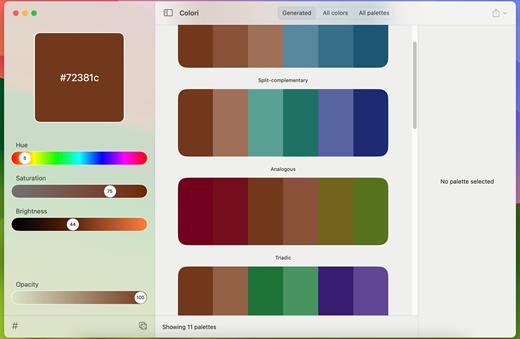
Generate a color palette from one color, organize your palettes, preview, and export

Beautiful color schemesright at your fingertips.

Features

  • Easy to use: Simple, practical and ultra-easy to use: Pick a color as a starting point and start experimenting: it had never been that easy!
  • Colors everywhere!: Lots and lots of colors + 100’s generated or ready-made palettes to choose from and make your next design project stand out!
  • Lots of options: Work elegantly and lightning-fast from your Mac. Do you want to export your palettes for use e.g. with web design and CSS/LESS/SASS? Done!
What’s New

Version 1.9.0:


  • Release notes were unavailable when this listing was updated.
Compatibility

macOS 12.0 or later


Release Name: Colori 1.9.0
Size: 5.5 MB
Links: HOMEPAGE – NFO – Torrent Search

Download: RAPiDGATOR

4 Comments
July 5

AppKiller 4.3.0

AppKiller lets you close all your open apps, with the fuss of going through them one-by-one. Do you want to be able to do with a single click? Or – even better – with a single… keyboard shortcut? Look no further!

Features


  • Easy-to-use: App Killer sleeps unobtrusively in your status bar and waiting for… orders
  • Ultra-fast: Killing all your open application will take no more than… milliseconds
  • Cmd+Shift+K: And that’s all it takes to instantaneously kill all your open apps–really!
What’s New

Version 4.3.0:


  • Release notes were unavailable when this listing was updated.
Compatibility

macOS 10.7 or later, 64-bit processor


Release Name: AppKiller 4.3.0
Size: 6.5 MB
Links: HOMEPAGE – NFO – Torrent Search

Download: RAPiDGATOR

4 Comments
July 5

AltTab Pro 11.4.2

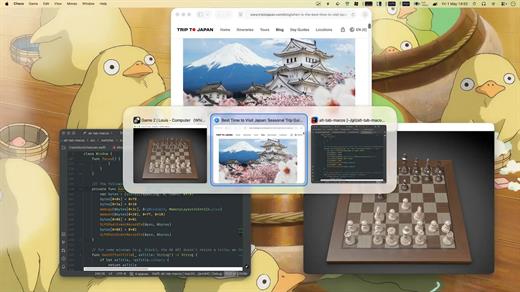
AltTab Pro brings the powerful, intuitive window-switching functionality of Windows to the Mac ecosystem, complete with an elegant look and highly customizable upgrades.

While the core app remains a free and open-source tool providing lightning-fast window switching with high-quality thumbnails, the Pro version elevates the experience for power users with four major upgrades:


  • App Icons & Window Titles Styles: Switch seamlessly between three appearance modes—live window thumbnails, a clean dock-like icon view, or a compact text-only list.
  • Instant Search: Find any window immediately just by typing its title or application name.
  • Auto-Sizing Switcher: Thumbnails automatically scale based on your workspace clutter—expanding when you have fewer windows and shrinking to fit when you have many.
  • Multiple Shortcuts: Configure up to 9 independent keyboard shortcuts, each with custom keys and specific window filters.
What’s New

Version 11.4.2:


  • Release notes were unavailable when this listing was updated.
Compatibility

macOS 13.0 or later


Release Name: AltTab Pro 11.4.2
Size: 9.5 MB
Links: HOMEPAGE – NFO – Torrent Search

Download: RAPiDGATOR

4 Comments
July 5

Ulysses 40.1

Ulysses lets you focus when you need to concentrate. It keeps all your texts neatly stuffed in its intuitive library. With a few clicks, Ulysses can create beautiful documents from your manuscripts: PDFs, web pages, even iBooks-ready ePubs. With its simple, clutter-free interface, it will turn work hours into fun time. And mere thoughts into powerful stories. If you love to write, and write a lot, Ulysses is made for you.

What’s New

Version 40.1:


  • Release notes were unavailable when this listing was updated.
Compatibility

macOS 14.0 or later.


Release Name: Ulysses 40.1
Size: 73.8 MB
Links: HOMEPAGE – NFO – Torrent Search

Download: RAPiDGATOR

4 Comments
July 5

Mimestream 1.10.4

Mimestream combines your favorite Gmail features with the power of a native macOS app so you can move through your email effortlessly

Made for Mac, optimized for Gmail

As a native app written in Swift, Mimestream leverages the full power of macOS to deliver a lightning-fast and instantly familiar experience. Instead of using the IMAP protocol, Mimestream utilizes the Gmail API to enable an enhanced set of features that let you work with ease.

Work smarter, email faster

  • Rise above the noise and focus on the work that matters most. Mimestream makes it easy to keep your inbox organized with confidence.

  • Categorized Inbox – with support for Gmail’s categories, focus on what matters most and triage the rest at your leisure.
  • Multiple Accounts
  • Label Management
Committed to Privacy

Your data and credentials are stored only on your device, and the app only makes direct connections to Gmail. There are no intermediary servers, and Mimestream does not collect or sell your email.

Key Features

  • Lightweight and Fast – Mimestream is built for speed, and only uses a minimal amount of disk space to cache recent messages
  • Offline Access – Fully functional when offline and on the slowest connections-perfect for business travelers and whenever you’re on the go
  • System Notifications – Receive macOS system notifications when you receive new messages, so you never fall behind on important threads
  • Aliases – Your email aliases are automatically synced from Gmail without any setup and are used for replies when appropriate
  • Signatures – Signatures set up in Gmail are automatically synced with Mimestream
  • Robust Search – Enter any Gmail search query into Mimestream and get consistent results. Search while offline, too
  • Swipe Gestures – Use familiar macOS swipe gestures to quickly triage and archive your email
  • Tracking Prevention – Read your email privately – Mimestream blocks tracking pixels from 50+ of the most common tracking services
  • Keyboard Shortcuts – Triage your email quickly using keyboard shortcuts, including the option to use familiar Gmail or Apple Mail shortcut sets
What’s New

✨ Improved


  • Improved throughput of Gmail API queries
? Fixed

  • Inbox unread counts sometimes get stuck and stop updating
  • Sharing videos to Mimestream sometimes fails
  • Order of attachments in quicklook preview panel doesn't match message
  • Some names aren't parsed correctly for the message list recipient list
  • When sending to an Apple Contacts Group, preferred address isn't respected
? Cleanup

  • Automatic recovery from certain licensing error situations
  • Reduce memory high water mark when sharing large files
  • Avoid unnecessary post-selection syncs when it's known that nothing can be synced
Compatibility

macOS 10.15.0 or later


Release Name: Mimestream 1.10.4
Size: 11.7 MB
Links: HOMEPAGE – NFO – Torrent Search

Download: RAPiDGATOR

4 Comments
July 5

PullTube 1.8.6.33

Sharing videos via online hosting services, such as YouTube or Vimeo is a common practice, yet streaming the content might not work as expected if you have a slow internet connection.
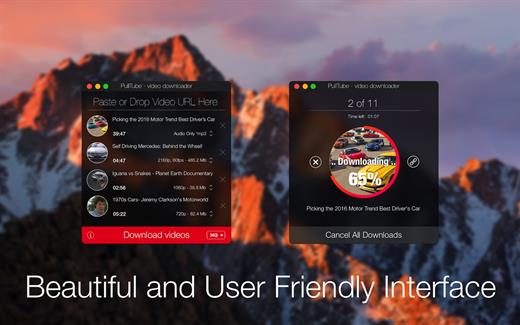
PullTube offers you the possibility to download videos from both sources (YouTube and Vimeo), while other platforms might be added at a later time. The app can handle playlists, allows you to select the output quality, and can even extract only the audio.

Video downloader that can import links with drag and drop and can detect playlists

The PullTube user interface is represented by a small window where you get to quickly paste the video URL. Note that you can also add a video by dropping the link on top of the PullTube window.

Worth mentioning is that, if PullTube detects that the video is part of a playlist, will offer to download the entire collection: will fetch the data for each entry and handle the downloads consecutively.

Download videos hosted on YouTube or Vimeo to different output sizes and formats

PullTube will start fetching the video data right away so you can see the video name, duration, and a small thumbnail. When configuring a download, you get to select the output quality (highest, 4K, HD or regular with different resolutions) or choose to export only the audio to an M4A or MP3 file.

Via the PullTube Settings panel, you can change the default download location and the default MP3 bitrate (320Kbps, 256Kbps, 128Kbps, 64Kbps). You can also add the quality info to the video’s name and choose to quit the app when all downloads are completed.

Get offline access to videos hosted online in just a few steps

PullTube proposes a streamlined workflow for quickly downloading videos from YouTube or Vimeo, provides control over the output quality, and enables you to extract the audio to MP3 or M4A files.

However, during our tests, we have noticed that PullTube has trouble completing the download when handling videos that are longer that 2 minutes. The process stops without any explanation, and you can eventually complete the task, but you need to add the link to download tool multiple times.

What’s New

Version 1.8.6.33:


  • Release notes were unavailable when this listing was updated.
Compatibility

macOS 10.12 or later


Release Name: PullTube 1.8.6.33
Size: 251.1 MB
Links: HOMEPAGE – NFO – Torrent Search

Download: RAPiDGATOR

5 Comments
July 5

Acorn 8.6.1

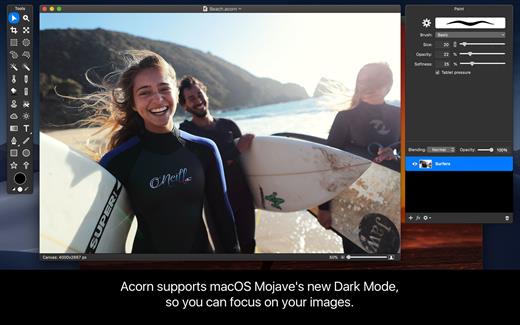
Acorn is a new image editor built with one goal in mind – simplicity. Fast, easy, and fluid, Acorn provides the options you’ll need without any overhead. Acorn feels right, and won’t drain your bank account.


  • Take screenshots using Acorn and edit them right away.
  • Chain together image filters to create stunning effects.
  • Layer based image editing, an industry standard.
  • Make new images and layers using your built-in iSight.
  • Easy image and canvas resizing, just by changing the size of your window.
  • Take advantage of every pixel of your monitor with full screen image editing.
  • Tablet sensitive for pressure strokes and using the tablet’s eraser.
  • Vector shape and text layers.
  • Freeform, elliptical, rectangular, and magic wand selections.
  • Gradients.
  • Create and apply custom text styles.
  • Control opacity and blending modes for each layer.
  • Write plugins using the Python scripting language, as well as in Objective-C.
  • GPU powered. The same graphics card that makes your gaming experience smooth, helps Acorn fly through the toughest of graphics operations.
What’s New

Version 8.6.1:


  • Release notes were unavailable when this listing was updated.
Compatibility

macOS 10.14.0 or later
Apple Silicon or Intel Core processor


Release Name: Acorn 8.6.1
Size: 29.4 MB
Links: HOMEPAGE – NFO – Torrent Search

Download: RAPiDGATOR

4 Comments