Please REGISTER or RENEW your account on RAPiDGATOR.net and support us by doing through all RAPiDGATOR working download links on main posts...
July 1

Boris FX VEGAS Pro 2026.0.0.143

Description: VEGAS Pro is built different, so you can edit videos bolder. With powerful tools and a lightning-fast timeline, it’s the ultimate creative cheatcode.

Effortless editing
Get started quickly and stay efficient with intuitive, easy-to-use tools.

All-in-one power
Go beyond the basics with built-in tools that deliver the speed, control, and power you need.

Advanced expandability
Push your creativity further with full support for third-party plugins and hardware.

Explore what’s new in VEGAS Pro

VEGAS Core Engine
Fast, powerful, and built for precision. The VEGAS Core Engine supercharges your editing process and delivers reliable color accuracy with smooth playback, even under pressure.

Perfect colors in record time
Work fast, trust your colors, and feel confident that the final look will match exactly what you had in mind.

Fluent preview playback
Accurately review your work with high preview framerates even under the heavy load of high-res media packed with video effects.

A super sleek interface keeps you in the zone
Fully-integrated color grading
Grade directly on the timeline without switching modes or breaking your flow. VEGAS Pro keeps color correction fully integrated, so you stay efficient and creative.

Designed for you
VEGAS Pro gives you a clean, focused workspace with smart UI design that helps you stay in the zone.

Unified Explorer
Quickly access all your media in one familiar, streamlined view.

Export made easy
Access powerful export options in a easy-to-use render interface, built for both pros and beginners.

Release Name: Boris FX VEGAS Pro 2026.0.0.143
Size: 550 MB
Links: HOMEPAGE – NFO – Torrent Search

Download: RAPiDGATOR

6 Comments
July 1

Cardhop 2.4.8

Cardhop lets you search, add, edit, and interact with your contacts in a fun and interactive way. Just type what you want and Cardhop will figure it out.

Features


  • Search: Instantly find what you’re looking for by typing the name or details and let Cardhop handle the rest.
  • Add or edit: Add new contacts or edit existing contacts with unparalleled ease and simplicity. Just enter the name of the contact along with their details and then observe the smile on your face.
  • Act: The old way of interacting with your contacts takes multiple steps to accomplish the actions you want. This all changes with Cardhop. After you try Cardhop, you’ll wonder how you ever did it the old way.
What’s New

Version 2.4.8:


  • Release notes were unavailable when this listing was updated.
Compatibility

macOS 10.13 or later
Apple Silicon or Intel Core processor


Release Name: Cardhop 2.4.8
Size: 31.9 MB
Links: HOMEPAGE – NFO – Torrent Search

Download: RAPiDGATOR

4 Comments
July 1

Wondershare PDFelement Pro 12.1.20 (OCR)

Wondershare PDFelement is a self-explanatory OS X application that makes it easier for your to preview, edit, join, split and convert PDF documents using a Mac.

The Wondershare PDFelement also features a simple, clean and intuitive interface that provide instantaneous access to all the tools and features you might need to complete your daily tasks.

Powerful and user-friendly PDF editor for everyday use

Moreover, with Wondershare PDFelement’s help, you can effortlessly edit PDF documents created using text files, web pages or scanned documents.

Consequently, you can add, remove or edit text, move and rearrange pages, insert or remove images and more.

Wondershare PDFelement’s top toolbar helps you hide, show and customize the sidebar in order to display the items and information you are interested in. In addition, you can browse through the loaded document, zoom in or out, print it or email it with just a couple of mouse clicks.

Advanced OCR capabilities make text editing a breeze

Furthermore, you can choose between the “Hand”, “Select” and “Edit” tool, use the advanced OCR feature and convert your source file into plain text or RTF document, ePUB, HTML, as well as file formats compatible with Microsoft Word, Excel, and PowerPoint.

The context menu also helps you switch between the “Move”, “Select” and “Touchup” tool, change the display mode and open the Inspector window to view detailed information about the loaded document.

As an added bonus, by accessing the Document menu, you have the option to add, update or remove an watermark, extract, insert and delete pages, split, merge or convert your document and crop or rotate a page with ease.

Full-featured tool designed to help you stamp, watermark, encrypt and decrypt PDF documents on a Mac

The complete list of all available editing tools, bookmark features, annotation tools and stamp options can be found under the Tools menu.

From here you can easily insert text boxes, add sticky notes, highlight, strike-through and underline text, insert various shapes and use the handy pencil or erase.

On the whole, Wondershare PDFelement comes with the right set of features to help you edit and annotate PDF documents using a Mac, as well as effortlessly add password protect and convert them other formats for easier sharing with your friends and colleagues.

What’s New

Version 12.1.20:


  • Release notes were unavailable when this listing was updated.
Compatibility

macOS 11.0 or later
Apple Silicon or Intel Core processor


Release Name: Wondershare PDFelement Pro 12.1.20 (OCR)
Size: 918.7 MB
Links: HOMEPAGE – NFO – Torrent Search

Download: RAPiDGATOR

4 Comments
July 1

Noir – Dark Mode for Safari 2026.1.7

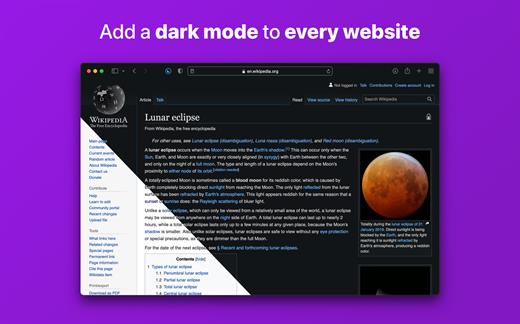
Noir is a Safari extension that automatically adds a dark mode to every website you visit.

It makes browsing the web at night so much better. With Noir, you won’t be blinded by bright websites ever again.

And the results look great too. Noir generates a custom dark style for each website you visit, based on the colors that are used on a page. You won’t even notice this happening in the background – that’s how fast it is – but you’ll certainly appreciate the end result: a beautiful dark mode tailored for each website, where contrast is preserved and highlights still pop.

Noir works with any website you visit in Safari, automatically. By default, Noir is linked to your device’s Dark Mode, so websites will only go dark when you want them to. But you can easily customize this to your liking, even per website. Only want to use Noir on just a few specific websites? Sure thing! Disable Noir on some websites? No problem!

The app feels right at home on your device. It is a Safari extension, which means there’s no need to manually activate it every time you load a new page. The app also tightly integrates with system features such as Shortcuts to fully integrate Noir in all your workflows. And your settings are automatically synced to all your devices using iCloud.

And just as importantly, Noir takes your privacy seriously: it doesn’t collect any of your browsing data. Period.

Noir is made by a solo developer. It does not include any subscriptions or ads. Buy Noir once, use it forever.

What’s New

Version 2026.1.7:


  • Release notes were unavailable when this listing was updated.
Compatibility

macOS 12.0 or later.


Release Name: Noir – Dark Mode for Safari 2026.1.7
Size: 12.5 MB
Links: HOMEPAGE – NFO – Torrent Search

Download: RAPiDGATOR

4 Comments
July 1

iA Writer 8.0.2

iA Writer (was iA Writer Pro) is a professional writing suite that gives you full control over your notes, drafts and edits.


  • Workflow: Note – Write – Edit – Read. Each stage has a task-specific typeface and color.
  • Syntax Control scans the syntax of English, French, German, Italian, and Spanish text and highlights your adjectives, nouns, verbs, adverbs, prepositions or conjunctions.
  • Precision Writing Tools:

    • Auto Markdown formats text on-screen — your hands stay on the keyboard
    • Syntax Control introduces syntactic markup for natural language text. It covers English, French, German, Italian, and Spanish. Patent pending.
    • Convert Markdown to Microsoft Word 2007 .docx, and back again
Features

  • Workflow states
  • Custom typefaces, carefully set for optimal readability
  • In-app preview
  • Reading time, plus sentence, word, and character count
  • Real-time iCloud sync
  • Ready for Retina displays
  • Full-screen
What’s New

Version 8.0.2:


  • Release notes were unavailable when this listing was updated.
Compatibility

macOS 10.15 or later


Release Name: iA Writer 8.0.2
Size: 26.3 MB
Links: HOMEPAGE – NFO – Torrent Search

Download: RAPiDGATOR

4 Comments
July 1

Soulver 3.16.3

Soulver 3 is a smart notepad with a built-in calculator. It gives instant answers to any calculations it finds in your text. It’s a better way to work stuff out than with a traditional calculator, and a more lightweight tool for quick calculations than a spreadsheet.

Math Features


  • Instant calculations, no equals required
  • Use words alongside numbers, so calculations make sense
  • Quick totals of all your lines, and subtotals
  • Calendar calculations (June 9 + 3 weeks, 3:35 pm + 6 hours 27 minutes)
  • Easy percentages (“$300 – 10%”, “30 as a % of 200”)
  • Unit conversions (“10 kg in pounds, “25 meters in feet”)
  • 168 live real-world and cryptocurrency rates.
  • Line references to build little calculating documents
  • Variables & variable autocompleting
  • Global variables & custom units
App Features

  • Dark mode
  • Sidebar for organising your sheets and the ability to make folders
  • Headings (#), comments (//) & labels (:)
  • Customize your syntax coloring & font
  • Automatic number formatting, with spaces around operators and thousand separators
  • Number scrubbing (hold shift and hover over a number)
  • Deep macOS system integration: Touch Bar support, Quicklook, Calculate anywhere services
  • Automation tools: a command-line interface, Alfred workflow, Automator action
What’s New

Version 3.16.3:


  • Release notes were unavailable when this listing was updated.
Compatibility

macOS 10.14.4 or later, 64-bit processor


Release Name: Soulver 3.16.3
Size: 23.7 MB
Links: HOMEPAGE – NFO – Torrent Search

Download: RAPiDGATOR
4 Comments
July 1

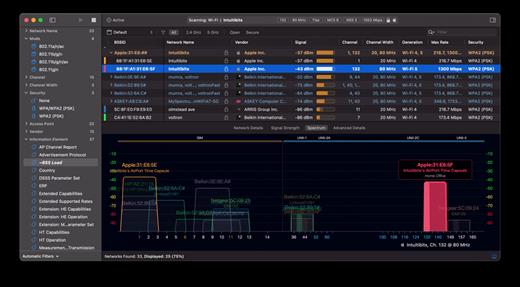
WiFi Explorer Pro 3.10

WiFi Explorer Pro takes the code base of WiFi Explorer, and adds a set of features that makes it the right tool for WLAN and IT professionals. You can use WiFi Explorer Pro for preliminary assessments, to help design and validate wireless networks installations, as well as to identify channel conflicts, overlapping, poor signal quality and other issues that may be affecting the connectivity or performance of your home, office or enterprise wireless network.

Features:


  • Passive and directed scan modes
  • Spectrum analysis integration
  • Custom filters
  • Support for remote sensors
  • Support for networks with hidden SSIDs
  • Additional columns with advanced information
  • Additional organization options for scan results
  • Dark and light themes
What’s New

Version 3.10:


  • Release notes were unavailable when this listing was updated.
Compatibility

macOS 10.13.0 or later


Release Name: WiFi Explorer Pro 3.10
Size: 17.4 MB
Links: HOMEPAGE – NFO – Torrent Search

Download: RAPiDGATOR

5 Comments
July 1

Airtool 2.7.6

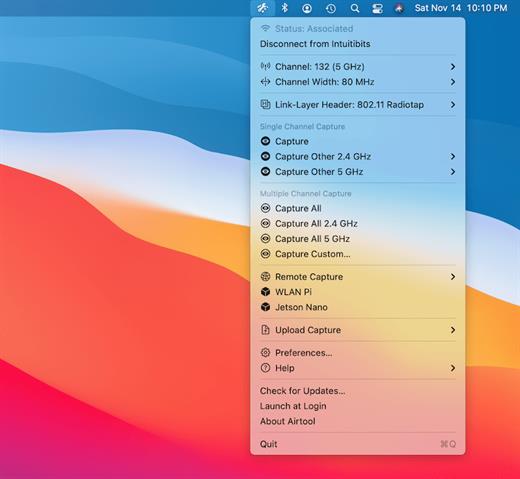
Airtool is a system menu-bar application that provides basic functions to check the state and channel configuration of the built-in Wi-Fi adapter, as well as to perform frame captures on single and multiple channels. It can be used together with Wireshark to let you change channel settings while performing live frame captures. In addition, captures can be automatically uploaded to CloudShark.

Features:


  • See Wi-Fi adapter state (associated, not associated) and channel information
  • Disconnect from network
  • List supported channels and channel widths
  • Perform frame captures on single or multiple channels
  • Change channel settings while performing live frame captures from external tools such as Wireshark or tcpdump
  • Automatically or manually upload captures to CloudShark
What’s New

Version 2.7.6:


  • Release notes were unavailable when this listing was updated.
Compatibility

macOS 13.5 or later


Release Name: Airtool 2.7.6
Size: 18.9 MB
Links: HOMEPAGE – NFO – Torrent Search

Download: RAPiDGATOR
4 Comments
July 1

Principle 6.43

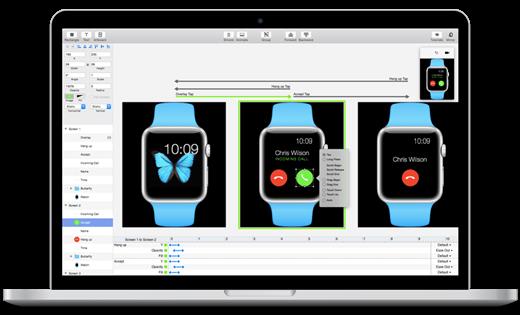
Principle makes it easy to create animated and interactive user interface designs. Whether you’re designing the flow of a multi-screen app, or new interactions and animations, Principle lets you create designs that look and feel amazing.

Built for the Biggest Imaginations
There are a lot of things you might want to design: a short animation, a slick interaction, or an extensive multiple screen app. No matter what you’re doing, you can do it with Principle.

Animation
Principle’s timeline makes it quick work to illustrate the perfect bounce, ease, and pop.

Interaction
Want to design a totally new interaction? Principle gives you the freedom to experiment without limiting you to pre-defined transitions.

Multiple Screens
It’s a breeze to design the flow of a multi-screen app; and when you’re done you’ll have a bird’s-eye view of all your screens.

Totally New, Yet Immediately Familiar
With artboards, magic animations and a timeline, using Principle will give you Déjà vu.

Touch Your Designs
Principle Mirror lets you interact with your design instantly on device or view designs that others have sent you.

Lights. Camera. Interaction.
Showing your designs has never been simpler with the record feature: Export a video or an animated gif that can be shared on Dribbble, Twitter, and wherever else you’d like!

Built for OS X
Principle is powered by Core Animation, the hardware-accelerated animation engine that iOS and OS X are built on. It also includes the Mac features you love: Full-screen mode, a Retina interface, and Auto Save — so you’ll feel right at home.

Design For Any Size
Choose a device preset or enter a custom Artboard size. Whether it’s web, desktop, mobile, or watch — you’re set!

What’s New

Version 6.43:


  • Release notes were unavailable when this listing was updated.
Compatibility

macOS 10.13 or later, 64-bit processor


Release Name: Principle 6.43
Size: 7.1 MB
Links: HOMEPAGE – NFO – Torrent Search

Download: RAPiDGATOR

4 Comments
July 1

MacDroid Pro 2.10

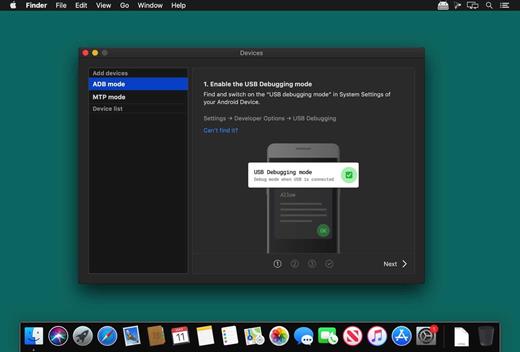
MacDroid app is a very helpful solution for those who use Mac or MacBook, at the same time preferring an Android device to an iPhone. Android and macOS cannot natively work together, hence there is a vital need for an interface that would not only connect the two systems but also allow safe and smooth file transfer between them.

With MacDroid you get the convenience of connecting Mac and an Android phone or tablet and accessing the portable device’s content in the Finder. You will be able to transfer photos, music, videos as well as entire folders. You’ll only need a USB cable to connect your phone to computer, MacDroid will take care of everything else.

Transfer your photos

You can access your Android photos in the Finder app and easily drag them with your mouse cursor to any folder on your Mac.

Transfer music to your phone

You can add your favorite tracks to Android from your Mac or vice versa and enjoy the music on the go.

Watch videos when offline

Got some great new episodes that you want to watch, but not planning to take your computer with you? Not a problem! You can transfer them to your Android and watch on a plane, on a train, or while having an Uber ride.

Edit Android files directly from Mac

When you don’t really feel like moving files around, you can edit your Android files with your favorite Mac app without actually saving them to your computer.

What’s New

Version 2.10:


  • Added: displaying transfer speed in Activity Log.
  • Improved: canceling file uploads.
Compatibility

macOS 10.10 or later


Release Name: MacDroid Pro 2.10
Size: 36 MB
Links: HOMEPAGE – NFO – Torrent Search

Download: RAPiDGATOR

4 Comments