Please REGISTER or RENEW your account on RAPiDGATOR.net and support us by doing through all RAPiDGATOR working download links on main posts...
June 26

EazyDraw 12.6.0

EazyDraw is a vector drawing application. For the full journey from Jaguar to El Capitan, EazyDraw has been the trail-blazing app for the new vector-drawing paradigm on the Mac.
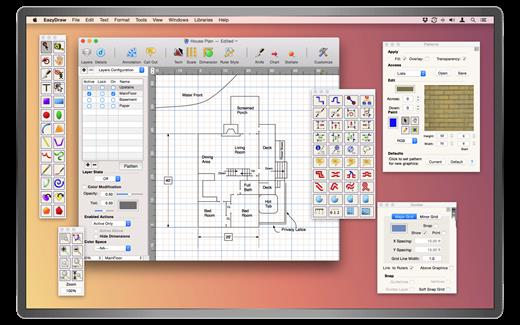
EazyDraw provides a balanced feature set that includes tools needed for technical drawing, Web and app graphic design, print publishing, logos, page — text layout and more. Easy enough for everyone, but with the depth your project will need.

Includes comprehensive support for bitmap and vector graphic formats. Import and ungroup for editing PDF and EPS. Import and export SVG and now DXF. Preview and publish to EPS and TIFF with RGB or CMYK process colors. Exchange scaled CAD drawings with DXF. Publish Web graphics. Create Mac, iPhone, and iPad app-development graphics and icons.

What’s New

Version 12.6.0:


  • Release notes were unavailable when this listing was updated.
Compatibility

macOS 10.13 or later
Apple Silicon or Intel Core processor


Release Name: EazyDraw 12.6.0
Size: 160.4 MB
Links: HOMEPAGE – NFO – Torrent Search

Download: RAPiDGATOR

4 Comments
June 26

AltTab Pro 11.3.1

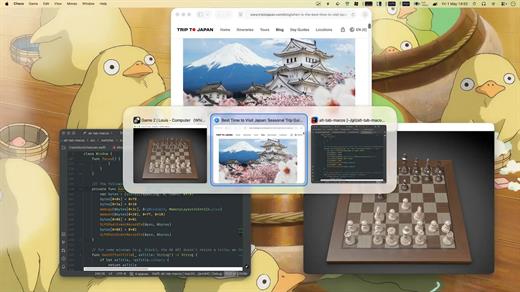
AltTab Pro brings the powerful, intuitive window-switching functionality of Windows to the Mac ecosystem, complete with an elegant look and highly customizable upgrades.

While the core app remains a free and open-source tool providing lightning-fast window switching with high-quality thumbnails, the Pro version elevates the experience for power users with four major upgrades:


  • App Icons & Window Titles Styles: Switch seamlessly between three appearance modes—live window thumbnails, a clean dock-like icon view, or a compact text-only list.
  • Instant Search: Find any window immediately just by typing its title or application name.
  • Auto-Sizing Switcher: Thumbnails automatically scale based on your workspace clutter—expanding when you have fewer windows and shrinking to fit when you have many.
  • Multiple Shortcuts: Configure up to 9 independent keyboard shortcuts, each with custom keys and specific window filters.
What’s New

Version 11.3.1:


  • Release notes were unavailable when this listing was updated.
Compatibility

macOS 13.0 or later


Release Name: AltTab Pro 11.3.1
Size: 9.5 MB
Links: HOMEPAGE – NFO – Torrent Search

Download: RAPiDGATOR
4 Comments
June 26

Performance Test 4.4.2

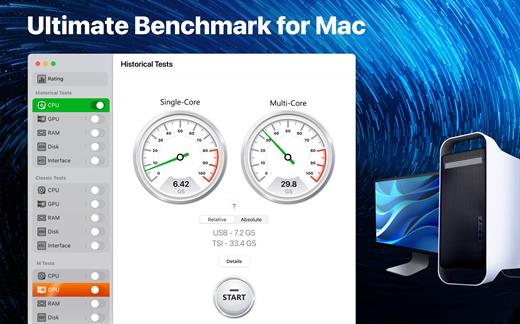
Performance Test app is designed to compare your Mac with other macOS devices and evaluate performance and efficiency of different configurations.

Since we are talking about a 64-bit system, we took the very first 64-bit computer designed by Apple as a conventional unit – the legendary Power Mac G5 first introduced by Steve Jobs in July 2003.

Powered by the PowerPC processors, the Power Mac G5 was so effective and energy efficient that in autumn 2003 a group of enthusiastic students introduced the System X supercomputer, combined with 1100 of such desktops. This supercomputer became a real technological breakthrough, taking third place in the TOP-500 rating.

Nowadays, such a result would be impossible. If we would have combined a similar configuration of 1100 top 64-bit desktops, the resulting supercomputer wouldn’t even be included in the TOP-100 of the world ranking.

With the help of our application you can find out how much of the legendary Power Mac G5 your Mac contains.

What’s New

Version 4.4.2:


  • Release notes were unavailable when this listing was updated.
Compatibility

macOS 10.15 or later


Release Name: Performance Test 4.4.2
Size: 676 MB
Links: HOMEPAGE – NFO – Torrent Search

Download: RAPiDGATOR
6 Comments
June 26

Picmal 1.7.0

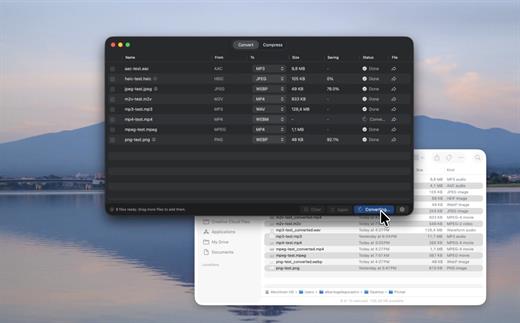
Picmal is an all-in-one offline macOS media converter and compressor for images, video, and audio, built around fast batch processing and a native Mac workflow. It supports 100+ formats, Finder integration, presets, detailed codec and bitrate controls, resizing, color space options, folder monitoring, Shortcuts automation, and privacy-friendly local processing.

What Picmal actually does
Convert, compress, and resize media files. Everything runs on your Mac, nothing touches a server.

Convert between multiple formats
Turn a PSD into a PNG, an AI file into SVG, a MOV into MP4. Pick the output format and go.

Batch processing
Drop hundreds of files at once. Drag them in, use File > Open, or right-click in Finder. No need to feed them one by one.

Presets for the usual stuff. Full control for the rest.
Built-in presets for web, social media, archival. If you want to get specific, tweak color space, resize, codecs, bitrates.

Shrink file sizes without visible quality loss
Same format, smaller file. Shrink photos before uploading or get a video under the email attachment limit

Designed for Mac
Lightweight, plays nice with Finder, Quick Actions, and Shortcuts.

Works offline
Works on a plane, at a café with terrible Wi-Fi, or when your connection just dies.

Privacy first
Your files stay on your Mac. Nothing gets uploaded anywhere.

What’s New

Version 1.7.0:


  • Release notes were unavailable when this listing was updated.
Compatibility

macOS 14 or later.


Release Name: Picmal 1.7.0
Size: 91.5 MB
Links: HOMEPAGE – NFO – Torrent Search

Download: RAPiDGATOR
4 Comments
June 26

Davinci Resolve Studio 21.0.1

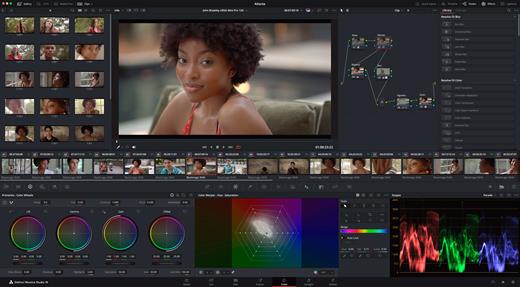
DaVinci Resolve Studio is the world’s only solution that combines professional 8K editing, color correction, visual effects and audio post production all in one software tool! You can instantly move between editing, color, effects, and audio with a single click. DaVinci Resolve Studio is also the only solution designed for multi user collaboration so editors, assistants, colorists, VFX artists and sound designers can all work live on the same project at the same time! Whether you’re an individual artist, or part of a large collaborative team, it’s easy to see why DaVinci Resolve is the standard for high end post production and finishing on more Hollywood feature films, television shows and commercials than any other software.

DaVinci Resolve 20 features powerful new DaVinci Neural Engine AI tools and over 100 feature upgrades! New AI tools include text based timeline editing, music remixing, dialogue separation and UltraNR noise reduction. IntelliTrack AI lets you use video to track the Fairlight audio panner. ColorSlice vector grading and film look creator offer richer grading vibrance and color density. Plus there are new features for live TV production and broadcast. DaVinci Resolve now supports realtime selection of live camera recordings for instant replay to air with slow motion and stingers. Multi Source is the fastest way to see your cameras and edit to the timeline while the cameras are still recording!

What’s New

Version 21.0.1:


  • Release notes were unavailable when this listing was updated.
Compatibility

macOS 13.0 or later


Release Name: Davinci Resolve Studio 21.0.1
Size: 7.5 GB
Links: HOMEPAGE – NFO – Torrent Search

Download: RAPiDGATOR

2 Comments
June 26

Alcove 1.7.5

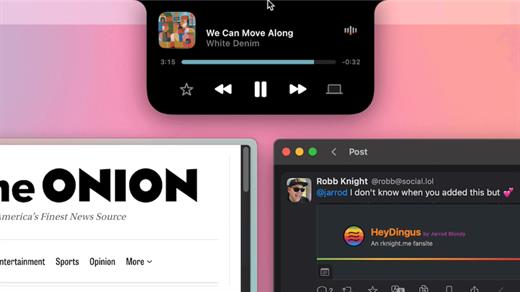
Alcove brings the elegant Dynamic Island experience to your Mac, transforming how you interact with notifications, live activities, and system events. Designed to feel native, it’s a polished way to stay informed without being interrupted.

Key Features


  • Fluid Transitions — Smooth animations and transitions that make alerts and interactions feel natural and integrated.
  • Instant Notifications — Alerts appear quickly and gracefully so you never miss important updates.
  • Live Activities Support — Keep track of ongoing tasks directly from the Dynamic Island interface.
  • Swipe Gestures — Use intuitive gestures to clear, interact with, or dismiss alerts.
  • Customizable HUDs — Tailor the look and feel of the heads-up displays to fit your style or workflow.
  • Lock Screen Presence — Alcove can show notifications or status even when your Mac is locked, ensuring you stay informed at a glance.
  • Lightweight, Native App — Built to run smoothly, Alcove is fast and performs well without draining resources.

xattr -cr /Applications/Alcove.app

What’s New

Version 1.7.5:


  • Release notes were unavailable when this listing was updated.
Compatibility

macOS 12.0 or later


Release Name: Alcove 1.7.5
Size: 15 MB
Links: HOMEPAGE – NFO – Torrent Search

Download: RAPiDGATOR
4 Comments
June 26

ExactScan Pro 26.6.20

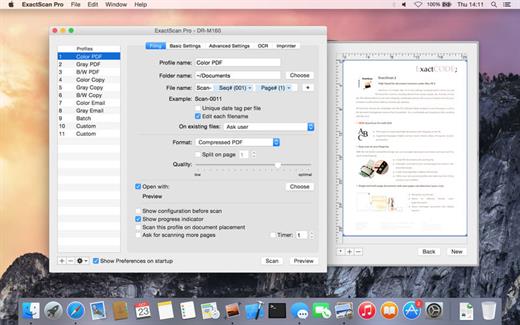
ExactScan Pro is the professional scan solution for a paperless office on the Mac. ExactScan comes with over 400 drivers for professional document scanners from Avision, Canon DR-series, Fujitsu fi-series, Kodak, Oki, Panasonic, Visioneer and Xerox, which otherwise do not come with a Mac driver.

Scan all your documents for fast retrieval, and get rid of dusty paper archives. Find searchable PDF everywhere with Spotlight in a snap.


  • Over 400 native built-in drivers for professional document scanners from Avision, Canon, Fujitsu, HP, Kodak, Oki, Panasonic, Visioneer and Xerox
  • Support for a variety of third party scanners via ImageCapture and TWAIN drivers
  • Save to PDF, TIFF, JPEG, JPEG 2000, PNG, BMP, PNM
  • Advanced and intelligent image processing algorithms
  • Auto-crop & de-skew
  • Blank page removal
  • Direct scan to print
  • Profiles to configure scan workflow
  • AppleScript support for professionals

ExactScan Pro additionally includes


  • OCR to directly create searchable PDF files
  • Content based page de-skew
  • Automatic rotation, color- and source detection
  • Imprinter to print flexible text into the scanned image
  • Barcode recognition to file stacks by barcodes
  • Batch processing of existing image files

The following languages are supported by the OCR

Bulgarian, Croatian, Czech, Danish, Dutch, English, Estonian, French, German, Hungarian, Italian, Latvian, Lithuanian, Polish, Portuguese, Rumanian, Russian, Serbian, Slovenian, Spanish, Swedish, Turkish, Ukrainian, and

What’s New

Version 26.6.20:


  • Release notes were unavailable when this listing was updated.
Compatibility

macOS 10.13 or later


Release Name: ExactScan Pro 26.6.20
Size: 21.5 MB
Links: HOMEPAGE – NFO – Torrent Search

Download: RAPiDGATOR
4 Comments
June 26

UltraEdit 25.0.0.11

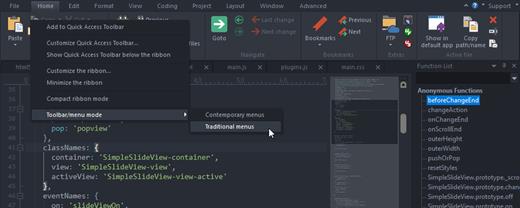
UltraEdit is the world’s best text editor, now available for Mac. UltraEdit for Mac is a native Mac application based on the popular Windows text editor, UltraEdit! UE Mac offers a myriad of tools that make it ideal for anything from basic text editing, to a full-fledged development in languages such as C, Objective C, Javascript, XML, PHP, Perl, Python, and others. UltraEdit for Mac includes your favorite UltraEdit features such as Find in Files, Replace in Files, native FTP/FTPS, macros, scripting, column/block mode, and a lot more.

What’s New

Version 25.0.0.11:


  • Release notes were unavailable when this listing was updated.
Compatibility

macOS 10.12 or later


Release Name: UltraEdit 25.0.0.11
Size: 144.1 MB
Links: HOMEPAGE – NFO – Torrent Search

Download: RAPiDGATOR
4 Comments
June 26

ON1 Effects 2026.4 v20.4.1.18862

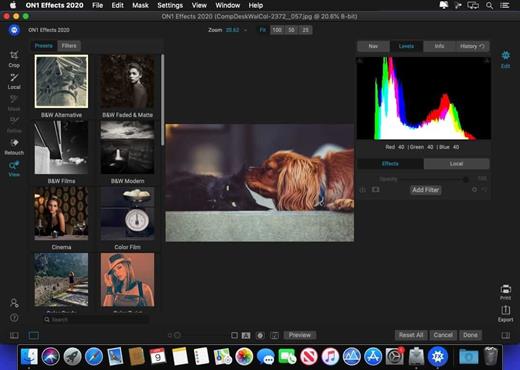
ON1 Effects includes hundreds of stackable filters, presets, borders, and textures to help create your style. Whether you’re looking to add an HDR look, convert to B&W, bring out more detail, reduce noise, or enhance a portrait, don’t use five different plug-ins when ON1 Effects 2018 is your one-stop solution

Includes 23 stackable filters and hundreds of presets, borders, and textures. Everything you need to add any effect to your photos. With live adjustments, stack effects to create your own look, and save your own custom presets

Features:

  • Custom presets – Create and save your own custom presets. With the wide variety of filters to add different looks to your photos, it’s perfect for fine tuning and creating any look you want. Have a preset you use over and over? Customize it and save it as your own.
  • Effects works as a plug-in to Adobe® Photoshop®, Adobe Lightroom®, Adobe Photoshop Elements, Apple® Aperture®, or as a standalone app. ON1 Effects works where you do.
  • Live adjustments and previews – Responsive sliders and tools. We’ve made sure that your tools and slider adjustments won’t stick, giving you a fast and smooth editing experience. Filters respond fast and presets are easy to find and apply.
What’s New

Version 20.4.1:


  • Release notes were unavailable when this listing was updated.
Compatibility

macOS 10.15.0 or later

Apple Silicon or Intel Core processor


Release Name: ON1 Effects 2026.4 v20.4.1.18862
Size: 728.9 MB
Links: HOMEPAGE – NFO – Torrent Search

Download: RAPiDGATOR

6 Comments
June 26

A Better Finder Rename 12.31

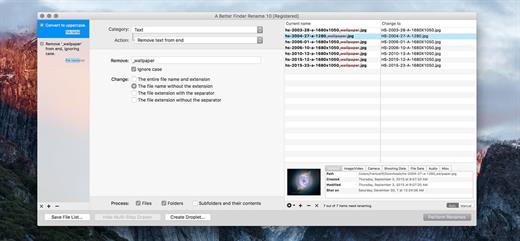
A Better Finder Rename is the most complete renaming solution available on the market today. That’s why, since 1996, tens of thousands of hobbyists, professionals and businesses depend on A Better Finder Rename to organize and maintain files.

The Instant Preview feature eliminates guesswork and costly errors and helps you find the right settings quickly and accurately by providing as-you-type feedback.

A Better Finder Rename offers a complete set of renaming options that are organized into 15 categories covering all the text, character, position, conversion and truncation features that you would expect from a file renamer, but it does not stop there. The multi-step renaming feature allows multiple renaming steps to be combined to deal with complex renaming jobs in a single operation. Unlike other tools, A Better Finder Rename allows any number of renaming actions to be combined, re-ordered, copied and deleted.

What’s New

Version 12.31:


  • Release notes were unavailable when this listing was updated.
Compatibility

macOS 10.13 or later
Apple Silicon or Intel Core processor


Release Name: A Better Finder Rename 12.31
Size: 16.6 MB
Links: HOMEPAGE – NFO – Torrent Search

Download: RAPiDGATOR
4 Comments