Please REGISTER or RENEW your account on RAPiDGATOR.net and support us by doing through all RAPiDGATOR working download links on main posts...
June 26

PhotoSweeper X 5.5.4

PhotoSweeper is a fast, precise & super efficient tool to eliminate similar or duplicate photos even in huge photo collections. It works with photos from iPhoto, Aperture and Adobe Lightroom libraries as well as photos from your hard drives and external storages.
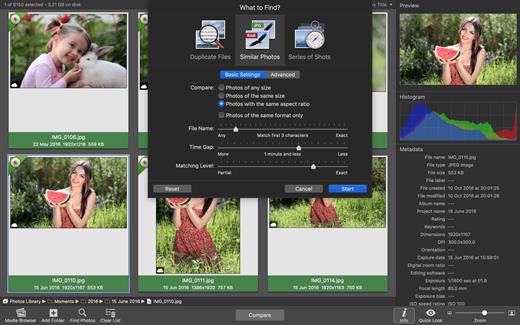
PhotoSweeper will help you if:


  • You take a series of shots of the same scene trying to get the perfect one.
  • You edit photos with software like Photoshop, Pixelmator etc., and make backups just in case.
  • You have photos scattered on external hard drives and local disks, in iPhoto, Aperture or Lightroom libraries.
  • You have a mess in your photo collection or just want to free disk space by removing junk photos.
Features:

  • Easy search of photos – Just drag and drop folders from your Mac to allow PhotoSweeper to find all photos inside. Add more photos from your iPhoto, Aperture or Lightroom library via the Media Browser window.
  • Flexible comparison settings – Powerful multi-settings to easily find duplicates, similar photos, series of shots. The app finds duplicate photos, even those edited in external programs such Photoshop, regardless of image size or format.
  • High speed and quality – PhotoSweeper was developed as a tool for extremely fast comparison of a huge number of photos. Cutting-edge technologies and unique algorithms make searching duplicates incredibly fast and gives excellent comparison results.
  • Efficiency – You can regroup the results without re-comparing photos by changing matching level with a slider. Using caches makes the next comparison much faster.
  • Marking duplicates automatically – Mark photos you want to get rid of manually, or use the “Auto Mark” feature to mark duplicates automatically based on the list of rules you can adjust to your needs in the Preferences.
  • Comfortable viewing results – PhotoSweeper provides 3 modes for reviewing results: “One by One”, “Face-to-Face” – one or two large photos with an opportunity to mark a photo with just a click, “All in One” – all groups of duplicates in one list.
  • Great photo browsing – PhotoSweeper also serves as an up-to-date photo browser with a built-in search of photos by metadata, Quick Look preview, the “Info” panel with a detailed photo description, including histogram and image metadata (EXIF, IPTC etc.)
What’s New

Version 5.5.4:


  • Release notes were unavailable when this listing was updated.
Compatibility

macOS 10.12.2 or later.


Release Name: PhotoSweeper X 5.5.4
Size: 56 MB
Links: HOMEPAGE – NFO – Torrent Search

Download: RAPiDGATOR

5 Comments
June 26

Mountain Duck 5.3.0

Mountain Duck, based on the solid open-source foundation of Cyberduck, allows you to mount remote volumes in Finder on OS X and File Explorer on Windows. Access remote files as if they were on a local disk, and edit them with your preferred applications. A minimalist user interface in the menu bar allows you to quickly mount remote volumes. Bookmarks are shared with Cyberduck if installed.

All major protocols are supported to connect to just about any server or cloud storage, including WebDAV, Amazon S3, Microsoft Azure, OpenStack Swift, FTP, and SFTP.

Notes:
– If license is not applied after installation, just click on the license file inside .dmg and click through the ‘Continue’ button
– Firewall “mountainduck.io”
– Do not codesign, or you will have issues

What’s New

Version 5.3.0:


  • Release notes were unavailable when this listing was updated.
Compatibility

macOS 10.13 or later.


Release Name: Mountain Duck 5.3.0
Size: 186.8 MB
Links: HOMEPAGE – NFO – Torrent Search

Download: RAPiDGATOR

4 Comments
June 26

Parallels Desktop 26.4.0-57513

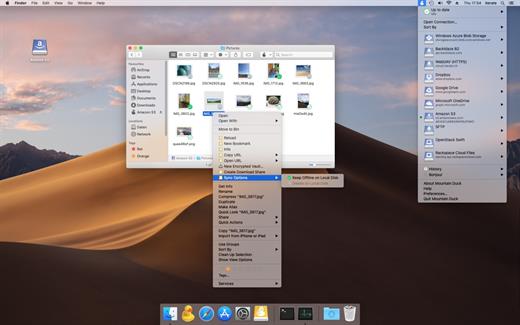
Parallels Desktop allows you to run Windows and Mac applications side by side. Choose your view to make Windows invisible while still using its applications, or keep the familiar Windows background and controls on your Mac.

Works with Boot Camp®


  • Reuse your existing Boot Camp installation. Converting a virtual machine from Boot Camp is now much easier and more intuitive than ever.
Not just for Windows

  • Run a wide array of operating systems including OS X, Windows 10, 8.1 & 7, Linux, and Google ChromeTM. You can run just about anything on your Mac!
One-click tuning

  • Select productivity, games, design, or development, and Parallels Desktop 11 for Mac will optimize your virtual machine settings and performance for you.
Robust Performance

  • Parallels Desktop Pro Edition gives your virtual machines more processing power. Up to 64 GB vRAM and 16 vCPUs per virtual machine lets you run even the most demanding applications with ease.
Business Class Software

  • Keep IT in control of end user licenses and Windows virtual machines with a Unified Volume License Key, centralized license management, and advanced security features available in Parallels Desktop Business Edition.

If the version you are using does not have bugs. No reinstallation is required.

What’s New

Version 26.4.0-57513:


  • Release notes were unavailable when this listing was updated.
Compatibility

macOS 12 or later


Release Name: Parallels Desktop 26.4.0-57513
Size: 209.5 MB
Links: HOMEPAGE – NFO – Torrent Search

Download: RAPiDGATOR
5 Comments
June 26

ExactScan Enterprise 26.6.20

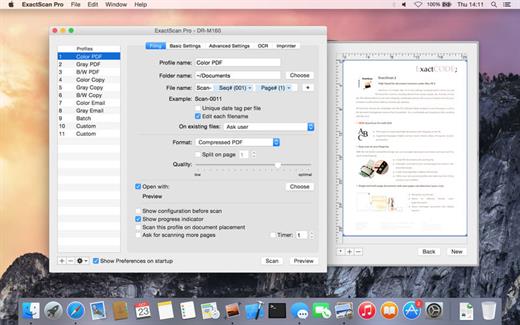
ExactScan Pro offers high-speed document scanning. It is a popular, easy-to-use OS X scanning app that utilizes built-in drivers for over 200 document scanners, including devices from Avision, Kodak, Oki, Visioneer, and Xerox.

With built-in OCR, ExactScan Pro recognizes the text in images and transform scans to editable and searchable documents, faster and more accurate than before. Together with the OS X Spotlight indexing system ExactScan Pro allows you to quickly find and retrieve archived documents.

What’s New

Version 26.6.20:


  • Release notes were unavailable when this listing was updated.
Compatibility

macOS 10.9 or later


Release Name: ExactScan Enterprise 26.6.20
Size: 22 MB
Links: HOMEPAGE – NFO – Torrent Search

Download: RAPiDGATOR

4 Comments
June 26

Dato 5.8.2

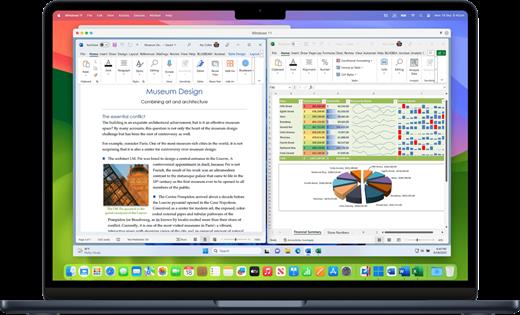
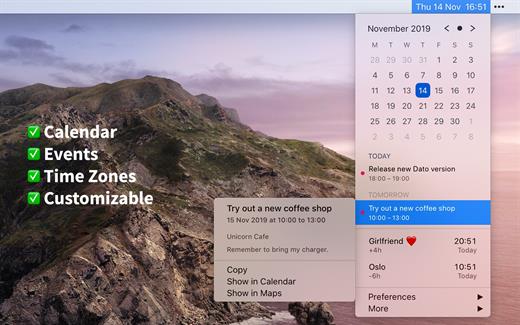
Dato is a replacement for the system menu bar clock.

By default, it looks exactly the same, but when you click it, you get a small calendar, calendar events for the next week, the current time in various time zones (even with custom names), week number, and more. You can customize what to show in the menu and the menu bar.

Dato supports all the locales and languages that macOS supports for dates, times, and the calendar, but the menus are English-only.

Features

  • Calendar, optionally with week numbers. Your upcoming events for the next week at a glance (customizable).Time zones, optionally with custom names.Search time zones by city (15K cities included).Customizable.Double-click a day in the calendar to open that day in the default calendar app.
  • (Supports: Calendar, Fantastical 2, BusyCal).Fully offline with no network entitlements, for your privacy benefit.Supports calendar events with HTML formatted notes.Lots of keyboard shortcuts for power users.”Join Zoom Meeting” button on Zoom meeting calendar invites.
What’s New

Version 5.8.2:


  • Release notes were unavailable when this listing was updated.
Compatibility

macOS 10.14.4 or later, 64-bit processor


Release Name: Dato 5.8.2
Size: 19.8 MB
Links: HOMEPAGE – NFO – Torrent Search

Download: RAPiDGATOR
4 Comments
June 26

Dockitty 1.2.6

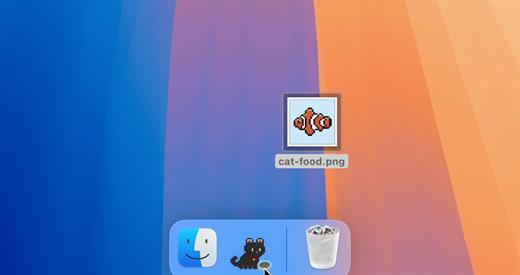
Dockitty is a charming, minimalist macOS application designed to bring a touch of joy and nostalgia to your desktop. Instead of being another demanding productivity tool, Dockitty serves a single, simple purpose: giving you a tiny digital pet that lives right in your Mac Dock. Inspired by classic 90s desktop companions like Neko and Tamagotchi, this lightweight app provides the perfect mental break during a long workday or a boring meeting.

? Key Features


  • Mostly Vibes: Dockitty quietly hangs out in your dock, occasionally doing something cute without interrupting your workflow.
  • Pick Your Perfect Companion: Choose from a variety of adorable pixelated cats—because there is no wrong choice when it comes to kittens.
  • Roam the Screen: Let your new feline friend wander freely across your monitor like they own the place.
  • Interactive Controls: Right-click the app icon to trigger custom animations, including making your cat jump, sleep, attack, or even perform a dramatic death.
  • 100% Authentic Art: Hand-drawn pixel art with absolutely zero AI generation involved.
What’s New

Version 1.2.6:


  • Release notes were unavailable when this listing was updated.
Compatibility

macOS 14.6 or later


Release Name: Dockitty 1.2.6
Size: 12.7 MB
Links: HOMEPAGE – NFO – Torrent Search

Download: RAPiDGATOR

4 Comments
June 26

WhatCable Pro 1.1.2

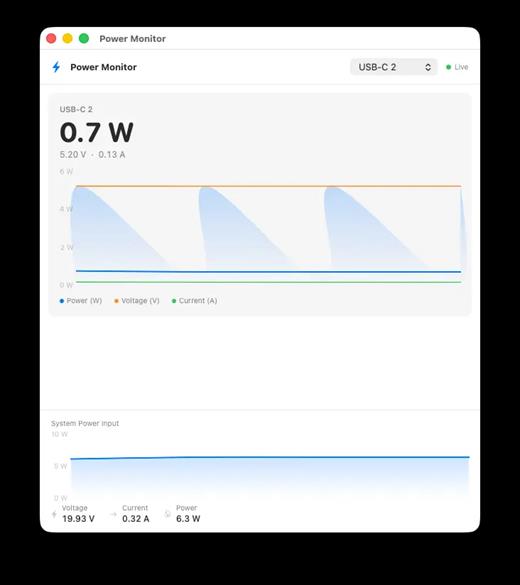
WhatCable Pro is a deep USB-C diagnostics tool designed specifically for Apple Silicon Macs running macOS 14+. While the free version identifies basic cable capabilities, the Pro tier offers advanced, real-time troubleshooting directly from IOKit data—requiring no extra software or root access.

Key Features


  • Negotiation Diagnostics: Easily spot bottlenecks by comparing what your Mac port, cable, and connected device support side-by-side.
  • Live Power Metering: Displays real-time wattage, voltage, and amperage per port, updating every 2 seconds.
  • Hardware & Port Health: Tracks lifetime port errors, resets, and monitors liquid detection (LDCM) sensors.
  • Advanced Insights: Offers Power Delivery (PD) contract inspection, cable resistance estimation, and DisplayPort Alt Mode lane mapping.
  • Developer Friendly: Includes a CLI monitor mode (whatcable –monitor) and desktop widgets for quick tracking.
What’s New

Version 1.1.2:


  • Release notes were unavailable when this listing was updated.
Compatibility

macOS 14.0 or later


Release Name: WhatCable Pro 1.1.2
Size: 12.7 MB
Links: HOMEPAGE – NFO – Torrent Search

Download: RAPiDGATOR
4 Comments
June 26

NetWorker Pro 11.0.12

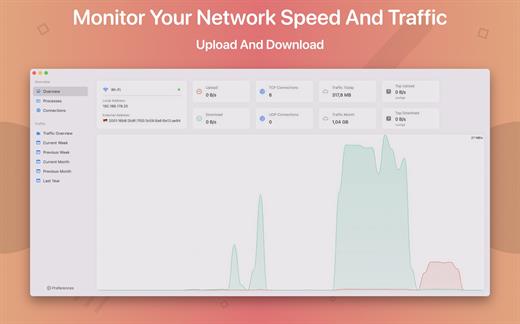
NetWorker is a lightweight and easy-to-use tool that shows either the current download and upload speed or the session traffic of your network adapter. The information is shown in a small view in your menu bar.

Features


  • You can switch between three modes: speed, traffic, or speed/traffic
  • You can choose the network adapter to observe, so both wired and wireless adapters are supported
  • Adjustable refresh interval
  • Support for auto-start
What’s New

Version 11.0.12:


  • Release notes were unavailable when this listing was updated.
Compatibility

macOS 11.0 or later


Release Name: NetWorker Pro 11.0.12
Size: 7.7 MB
Links: HOMEPAGE – NFO – Torrent Search

Download: RAPiDGATOR

4 Comments
June 26

iToolab WatsGo 9.0

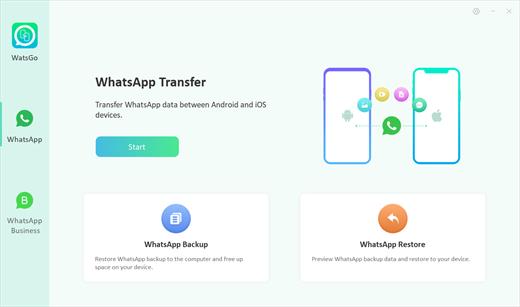
Description: WhatsApp/WhatsApp Business Transfer Cross Multiple Devices. Whenever you want to upgrade to or switch to a new device, you can enjoy iToolab WatsGo to transfer WhatsApp between Android and iOS like never before. It assures a secure and effective way to move data. So, you will never say Goodbye to your old stuff!

Features:
One-click to Transfer WhatsApp/WA Business between Android and iOS.
Transfer GBWhatsApp to WhatsApp or GBWhatsApp in a simple way.
A wide range of data type including WhatsApp messages, images, videos, contacts, etc.
Restore WhatsApp Backup from Google Drive to iPhone & Android.
Backup WhatsApp on Android & iOS to computer without Google Drive, iTunes or iCloud.
Preview and Restore WhatsApp backup or iTunes backup anytime.
Fully compatible with Android 15 and iOS 18.

Android to iPhone
If you switch to a new iPhone from an old Android phone, then this helps you to quickly transfer WhatsApp from Android to iPhone with all data kept.

iPhone to Android
No matter what Android brands you are holding, you can always trust WatsGo to transfer WhatsApp from iPhone to Android without limitation.

Android to Android
Couldn't restore your Google Drive backup to new Android phone? You can transfer your WhatsApp backup from Android to Android instead of Google Drive.

iPhone to iPhone
How to transfer WhatsApp from iPhone to iPhone without iCloud? WatsGo perfectly solves the issue and increases the chance or transferring.

Transfer All Data with a Secure Way, Nothing Will be Left Behind
Some Move to iOS users complain about data loss during transfer. However, iToolab WatsGo doesn't allow such a thing to happen. Let's check out what will be transferred in its entirety.

Release Name: iToolab WatsGo 9.0
Size: 296.8 MB
Links: HOMEPAGE – NFO – Torrent Search

Download: RAPiDGATOR
6 Comments
June 26

Password Depot 19.2

Description: Store, generate and auto‑fill credentials – with AES‑256 encryption, Passkeys (FIDO2/WebAuthn), add‑ons for Chrome, Firefox, Edge, Opera and flexible storage locations (local, USB, server/NAS via HTTP(S), FTP/SFTP, WebDAV or cloud services such as Google Drive, OneDrive, Dropbox, HiDrive).

Best‑possible encryption
In Password Depot, your information is not just encrypted once, but actually twice – using the AES‑256 algorithm. In the United States, this algorithm is approved for government documents classified as top secret.

Two‑factor authentication
Double your protection with our two‑factor authenticator. Start by choosing a master password that is required to open the file, and further increase security by using a key file for additional data protection.

Protection against brute‑force attacks
Brute‑force attacks are rendered practically impossible by an automatic three‑second delay after each incorrect master‑password attempt.

Backups
Password Depot automatically creates database backups that can be stored locally, on FTP servers (including SFTP) or on external drives. Adjust backup intervals according to your preferences.

Secure password usage
Protection against keylogging
Strong passwords are useless if they can be spied on. That is why all password fields in the application include built‑in protection against various types of keystroke interception (keylogging). This prevents your sensitive login data from being captured while you type.

Clean system memory
Our password manager leaves no traces in RAM when handling your passwords. Even an attacker with direct access to your PC who scans memory dumps will not be able to recover any passwords.

Release Name: Password Depot 19.2
Size: 83 MB
Links: HOMEPAGE – NFO – Torrent Search

Download: RAPiDGATOR

5 Comments